
Solr 4.4.0利用dataimporthandler导入本地pdf、word等文档
1. 创建本地目录
$ mkdir /usr/local/contentplatform/solr/solr/core1/file1

$ ls -lh

total 88M

-rw-r--r--  tnuser appuser  14M May  : apache_hbase_reference_guide.pdf

-rw-r--r--  tnuser appuser 7.4M Apr  : Architecting_HBase_Applications.pdf

-rw-r--r--  tnuser appuser  14M Jan    Cloudera_Hadoop_Test_Cases.docx

-rw-r--r--  tnuser appuser 6.6M Apr  : HBase_Administration_Cookbook.pdf

-rw-r--r--  tnuser appuser 2.1M Apr  : HBase_Essentials.pdf

-rw-r--r--  tnuser appuser  25M Apr   : Hbase-HBase实战.pdf

-rw-r--r--  tnuser appuser 7.9M Nov    HBase.in.Action.pdf

-rw-r--r--  tnuser appuser  13M Apr  : HBase:The_Definitive_Guide.pdf
2. 在core的conf目录修改配置文件solrconfig.xml配置dataimport请求处理器
<requestHandler name="/dataimport" class="org.apache.solr.handler.dataimport.DataImportHandler">

    <lst name="defaults">

      <str name="config">data-config.xml</str>

    </lst>

  </requestHandler>
3. 在conf目录新建data-config.xml文件并添加数据源的引用
<dataConfig>

    <dataSource name="fileDataSource" type="fileDataSource" />

    <dataSource name="binFileDataSource" type="BinFileDataSource" />

     <document>

      <entity

        name="file1"

        datasource="fileDataSource"

        processor="FileListEntityProcessor"

        baseDir="/usr/local/contentplatform/solr/solr/core1/file1"

        fileName=".*\.(pdf)|(doc)|(docx)|(ppt)|(pptx)|(xls)|(xlsx)|(odf)|(txt)|(rtf)|(html)|(htm)|(jpg)|(csv)"

        onError="skip"

        recursive="true"

        rootEntity="false">

       <field column="file" name="id" />

       <field column="fileSize" name="size" />

       <field column="fileAbsolutePath" name="filepath" />

       <field column="fileLastModified" name="lastModified" />

     <entity

        name="documentImport1"

        processor="TikaEntityProcessor"

        url="${file1.fileAbsolutePath}"

        format="text"

        datasource="binFileDataSource"

        onError="skip"

        recursive="true">

       <field column="Author" name="author" meta="true"/>

       <field column="title" name="title" meta="true"/>

       <field column="text" name="text"/>

     </entity>

     </entity>

    </document>

</dataConfig>
4.修改conf目录下的schema.xml文件,添加以下内容
   <field name="fileLastModified" type="date" indexed="true" stored="true"/>

   <field name="fileAbsolutePath" type="string" indexed="true" stored="true"/>
5. 重新加载配置文件

6. 通过DIH导入本地的文件
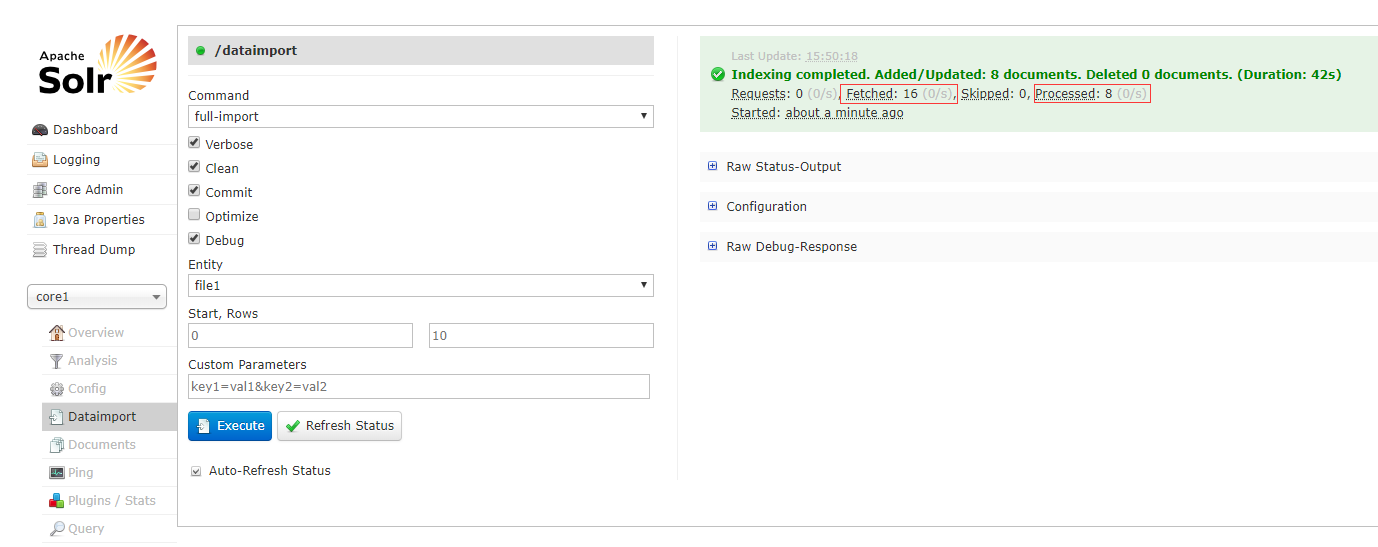
6. 查看导入的文档

{

  "responseHeader": {

    "status": ,

    "QTime": ,

    "params": {

      "indent": "true",

      "q": "*:*",

      "_": "",

      "wt": "json"

    }

  },

  "response": {

    "numFound": ,

    "start": ,

    "docs": [

      {

        "id": "Hbase-HBase实战.pdf",

        "title": [

          "HBASE 实战=HBASE IN ACTION"

        ],

        "author": "(美)NICK DIMIDUK著;谢磊译",

        "author_s": "(美)NICK DIMIDUK著;谢磊译",

        "_version_":

      },

      {

        "id": "apache_hbase_reference_guide.pdf",

        "title": [

          "Apache HBase ™ Reference Guide"

        ],

        "author": "Apache HBase Team",

        "author_s": "Apache HBase Team",

        "_version_":

      },

      {

        "id": "Architecting_HBase_Applications.pdf",

        "title": [

          "Architecting HBase Applications"

        ],

        "author": "Jean-Marc Spaggiari & Kevin O'Dell",

        "author_s": "Jean-Marc Spaggiari & Kevin O'Dell",

        "_version_":

      },

      {

        "id": "HBase_Administration_Cookbook.pdf",

        "_version_":

      },

      {

        "id": "HBase_Essentials.pdf",

        "title": [

          ""

        ],

        "author": "",

        "author_s": "",

        "_version_":

      },

      {

        "id": "HBase.in.Action.pdf",

        "title": [

          "HBase in Action"

        ],

        "author": "Nick Dimiduk, Amandeep Khurana",

        "author_s": "Nick Dimiduk, Amandeep Khurana",

        "_version_":

      },

      {

        "id": "HBase:The_Definitive_Guide.pdf",

        "title": [

          "HBase: The Definitive Guide"

        ],

        "author": "Lars George",

        "author_s": "Lars George",

        "_version_":

      },

      {

        "id": "Cloudera_Hadoop_Test_Cases.docx",

        "author": "FeiLong, Li [DBA]",

        "author_s": "FeiLong, Li [DBA]",

        "_version_":

      }

    ]

  }

}
Solr 4.4.0利用dataimporthandler导入本地pdf、word等文档的更多相关文章
- Solr 4.4.0利用dataimporthandler导入postgresql数据库表
将数据库edbstore的edbtore schema下的customers表导入到solr 1. 首先查看customers表字段信息 edbstore=> \d customers Tabl ...
- 【工具篇】利用DBExportDoc V1.0 For MySQL自动生成数据库表结构文档
对于DBA或开发来说,如何规范化你的数据库表结构文档是灰常之重要的一件事情.但是当你的库,你的表排山倒海滴多的时候,你就会很头疼了. 推荐一款工具DBExportDoc V1.0 For MySQL( ...
- 利用DBExportDoc V1.0 For MySQL自动生成数据库表结构文档
对于DBA或开发来说,如何规范化你的数据库表结构文档是灰常之重要的一件事情.但是当你的库,你的表排山倒海滴多的时候,你就会很头疼了. 推荐一款工具DBExportDoc V1.0 For MySQL( ...
- idea导入项目报错:文档中根元素前面的标记必须格式正确
今天从git上面导入项目之后,由于是上周刚刚提交过的,本地也没有什么修改,于是就从gitlab上面直接下载下来了.可是项目启动时候,报错了... 文档中根元素前面的标记必须格式正确 想想 原来是上次提 ...
- 利用sphinx为python项目生成API文档
sphinx可以根据python的注释生成可以查找的api文档,简单记录了下步骤 1:安装 pip install -U Sphinx 2:在需要生成文档的.py文件目录下执行sphinx-apido ...
- 利用Swagger2自动生成对外接口的文档
一直以来做对外的接口文档都比较原始,基本上都是手写的文档传来传去,最近发现了一个新玩具,可以在接口上省去不少麻烦. swagger是一款方便展示的API文档框架.它可以将接口的类型最全面的展示给对方开 ...
- 利用node 剥取其他网站的文档数据结构 ---
1.如何利用nodejs获取其他网站的文档结构呢 以下是代码演示------! //首先需要引入一些核心模块 var http = require('http'); var fs = require( ...
- Asp.Net Core2.0 WebAPI 使用Swagger生成漂亮的接口文档
1.引用NuGet: Swashbuckle.AspNetCore.Swagger Swashbuckle.AspNetCore.SwaggerGen 或 <PackageReference I ...
- Confluence-6.10.0+Jira-7.13+Crowd-3.2.1最全破解文档,附下载包
=========================================2019.4.19更改================================================ ...
随机推荐
- JPA的常用Annotation
http://www.blogjava.net/zJun/archive/2007/01/24/95747.html @transient 忽略该方法 一. @Entity:通过@Entity注解将一 ...
- vue实现v-model父子组件间的双向通信
首先讲清楚有个缺点:父页面若同时使用多个子组件,永远只会只能实现第一个双向驱动,我是新手,还在研究.如果有高手请指教,感谢! 子组件 <script> export default { m ...
- UVA 10900 So do you want to be a 2^n-aire?
#include<bits/stdc++.h> #include<stdio.h> #include<iostream> #include<cmath> ...
- EasyPrtSc sec[1.2] 发布!
//HOMETAG #include<bits/stdc++.h> namespace EasilyPrtSc{ //this namespace is for you to be mor ...
- 缓存区溢出之slmail fuzzing
这是我们的实验环境 kali 172.18.5.118smtp windows2003 172.18.5.117 pop3 110 smtp 25 本机 172.18.5.114 已经知道slma ...
- day3_Python基础三
参考:http://www.cnblogs.com/jin-xin/articles/7562422.html 一.数据类型 1.1.int:用于计算,不可变,可哈希 数字主要是用于计算用的: #bi ...
- deepClone deepCompare
一.深度复制 // 深度复制 function deepClone(datas) { if (typeof datas !== 'object' || datas === null) return d ...
- Mini-batch 和batch的区别
原文地址:https://blog.csdn.net/weixin_39502247/article/details/80032487 深度学习的优化算法,说白了就是梯度下降.每次的参数更新有两种方式 ...
- Link标签
Link标签的属性:rel定义当前文档与目标文档之间的关系. rev定义目标文档与当前文档之间的关系. Link和@import的区别: 1.隶属上的差别 link是一个html的一个标 ...
- Linux 的路由功能
目录 文章目录 目录 前文列表 路由器 Router 路由 Routing 静态路由与动态路由 通过路由实现的全网通信示例 Linux 作为路由器 route 指令 路由表项的类型 ip route ...