
Cocos2d-x之Map<K, V>
| 版权声明:本文为博主原创文章,未经博主允许不得转载。
Map<K, V>是Cocos2d-x 3.0x中推出的字典容器,它也能容纳Ref类型。Map<K,V>是模仿C++标准库的std::unorder_map<K, V>模板设计的。
创建Map<K,V>对象函数:
 /** Default constructor Map()默认构造函数*/

     Map<K, V>()

     : _data()

     {

         static_assert(std::is_convertible<V, Ref*>::value, "Invalid Type for cocos2d::Map<K, V>!");

         CCLOGINFO("In the default constructor of Map!");

     }

 /** Constructor with capacity. 创建Map,并设置容量*/

     explicit Map<K, V>(ssize_t capacity)

     : _data()

     {

         static_assert(std::is_convertible<V, Ref*>::value, "Invalid Type for cocos2d::Map<K, V>!");

         CCLOGINFO("In the constructor with capacity of Map!");

         _data.reserve(capacity);

     }

 /** Copy constructor. 用一个已经存在的Map创建另一个Map*/

     Map<K, V>(const Map<K, V>& other)

     {

         static_assert(std::is_convertible<V, Ref*>::value, "Invalid Type for cocos2d::Map<K, V>!");

         CCLOGINFO("In the copy constructor of Map!");

         _data = other._data;

         addRefForAllObjects();

     }

 /** Move constructor. 用一个已经存在的Map创建另一个Map*/

     Map<K, V>(Map<K, V>&& other)

     {

         static_assert(std::is_convertible<V, Ref*>::value, "Invalid Type for cocos2d::Map<K, V>!");

         CCLOGINFO("In the move constructor of Map!");

         _data = std::move(other._data);

     }
添加元素函数:
 /** Inserts new elements in the map. @note If the container has already contained the key, this function will erase the old pair(key, object)  and insert the new pair.param key The key to be inserted.param object The object to be inserted.在Map中添加一个新元素,V必须是Ref以及子类指针类型*/

     void insert(const K& key, V object)

     {

         CCASSERT(object != nullptr, "Object is nullptr!");

         object->retain();

         erase(key);

         _data.insert(std::make_pair(key, object));

     }
移除元素的函数:
 /** Removes an element with an iterator from the Map<K, V> container.param position Iterator pointing to a single element to be removed from the Map<K, V>.Member type const_iterator is a forward iterator type.指定位置移除对象,参数是迭代器,返回值是下一个迭代器*/

     iterator erase(const_iterator position)

     {

         CCASSERT(position != _data.cend(), "Invalid iterator!");

         position->second->release();

         return _data.erase(position);

     }

 /** Removes an element with an iterator from the Map<K, V> container.param k Key of the element to be erased.Member type 'K' is the type of the keys for the elements in the container,defined in Map<K, V> as an alias of its first template parameter (Key).通过给定键移除一个指定位置的元素*/

     size_t erase(const K& k)

     {

         auto iter = _data.find(k);

         if (iter != _data.end())

         {

             iter->second->release();

             _data.erase(iter);

             return ;

         }

         return ;

     }

 /** Removes some elements with a vector which contains keys in the map.param keys Keys of elements to be erased.通过给定建集合移除多个元素*/

     void erase(const std::vector<K>& keys)

     {

         for(const auto &key : keys) {

             this->erase(key);

         }

     }

 /**  All the elements in the Map<K,V> container are dropped:their reference count will be decreased, and they are removed from the container,leaving it with a size of 0.移除所有的元素*/

     void clear()

     {

         for (auto iter = _data.cbegin(); iter != _data.cend(); ++iter)

         {

             iter->second->release();

         }

         _data.clear();

     }
查找元素的函数:
 /** Returns a reference to the mapped value of the element with key k in the map.note If key does not match the key of any element in the container, the function return nullptr.param key Key value of the element whose mapped value is accessed.Member type K is the keys for the elements in the container. defined in Map<K, V> as an alias of its first template parameter (Key).*/

     const V at(const K& key) const            //通过键返回值

     {

         auto iter = _data.find(key);

         if (iter != _data.end())

             return iter->second;

         return nullptr;

     }

     V at(const K& key)                        //返回指定整型键的值

     {

         auto iter = _data.find(key);

         if (iter != _data.end())

             return iter->second;

         return nullptr;

     }

 /** Searches the container for an element with 'key' as key and returns an iterator to it if found,otherwise it returns an iterator to Map<K, V>::end (the element past the end of the container).param key Key to be searched for.Member type 'K' is the type of the keys for the elements in the container,defined in Map<K, V> as an alias of its first template parameter (Key).*/

     const_iterator find(const K& key) const             //查找Map容器中的对象,返回值迭代器

     {

         return _data.find(key);

     }

     iterator find(const K& key)              //查找Map容器中的对象,返回值迭代器

     {

         return _data.find(key);

     }
其他操作函数:
 ()、  std::vector<K> keys();            //返回所有的键

 ()、  std::vector<K> keys(V object);       //返回与对象匹配的所有的键值

 ()、  ssize_t size();               //返回元素的个数
实例:
.h files

#ifndef _MAPTEST_SCENE_H_

#define _MAPTEST_SCENE_H_

#include "cocos2d.h"

class mapTest : public cocos2d::Layer

{

private:

public:

        static cocos2d::Scene* createScene();

        virtual bool init();

        void testMap();

        CREATE_FUNC(mapTest);

};

#endif // _MAPTEST_SCENE_H_

.cpp files

#include "MapTest.h"

USING_NS_CC;

Scene* mapTest::createScene()

{

        // 'scene' is an autorelease object

        auto scene = Scene::create();

        // 'layer' is an autorelease object

        auto layer = mapTest::create();

        // add layer as a child to scene

        scene->addChild(layer);

        // return the scene

        return scene;

}

// on "init" you need to initialize your instance

bool mapTest::init()

{

        {

               return false;

        }

        testMap();

        return true;

}

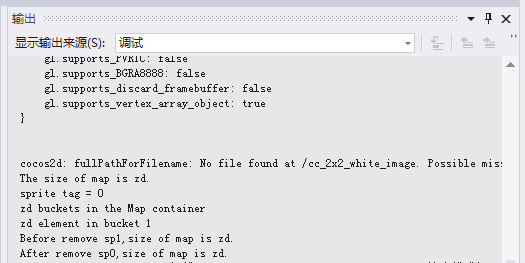
void mapTest::testMap()

{

        //1. 插入值

        auto sp1 = Sprite::create();

        sp1->setTag(0);

        Map<std::string, Sprite*> map1;

        std::string mapKey1 = "MAP_KEY_1";

        map1.insert(mapKey1, sp1);

        log("The size of map is %zd.", map1.size());

        //2. 使用map1创建

        Map<std::string, Sprite*>map2(map1);

        std::string mapKey2 = "MAP_KEY_2";

        //3. 判断是否为空

        if (!map2.empty())

        {

               //根据key获得值

               auto spTemp = (Sprite*)map2.at(mapKey1);

               //获得sprite的tag

               log("sprite tag = %d", spTemp->getTag());

               //创建sprite

               auto sp2 = Sprite::create();

               //设置Tag

               sp2->setTag(2);

               //插入

               map2.insert(mapKey2, sp2);

               //key集合

               std::vector<std::string>mapKeyVec;

               //遍历key

               for (auto key : mapKeyVec)

               {

                       //根据key获得value

                       auto spTag = map2.at(key)->getTag();

                       log("The sprite tag = %d, Map key = %s", spTag, key.c_str());

                       log("Element with key %s is located in bucket %zd", key.c_str(), map2.bucket(key));

               }

               log("%zd buckets in the Map container", map2.bucketSize(2));

               log("%zd element in bucket 1", map2.getRandomObject()->getTag());

               //大小

               log("Before remove sp1,size of map is %zd.", map1.size());

               //查找并删除

               map1.erase(map1.find(mapKey1));

               log("After remove sp0,size of map is %zd.", map1.size());

        }

        //5. 重新设置Map的大小

        Map<std::string, Sprite*>map3(5);

        map3.reserve(10);

}
Cocos2d-x之Map<K, V>的更多相关文章
- cocos基础教程(5)数据结构介绍之cocos2d::Map<K,V>
1.概述 cocos2d::Map<K,V> 是一个内部使用了 std::unordered_map的关联容器模版. std::unordered_map 是一个存储了由key-value ...
- 关于jsp利用EL和struts2标签来遍历ValueStack的东东 ------> List<Map<K,V>> 以及 Map<K,<List<xxx>>> 的结构遍历
//第一种结构Map<K,<List<xxx>>> <body> <% //显示map<String,List<Object>& ...
- JDK源码(1.7) -- java.util.Map<K,V>
java.util.Map<K,V> 源码分析 --------------------------------------------------------------------- ...
- Map<k,v>接口
https://docs.oracle.com/javase/8/docs/api/java/util/Map.html public interface Map<K,V> K—key,V ...
- 随笔1 interface Map<K,V>
第一次写笔记就从map开始吧,如上图所示,绿色的是interface,黄色的是abstract class,蓝色的是class,可以看出所有和图相关的接口,抽象类和类的起源都是interface ma ...
- Mybatis返回List<Map<K,V>>
最终映射的字段名 会被作为 hashMap 的 key , <!-- TODO 测试返回 HashMap--> <resultMap id="testResultMap&q ...
- Map<K, V> 中k,v如果为null就转换
Set<String> set = map.keySet(); if(set != null && !set.isEmpty()) { for(String key : s ...
- Java------遍历Map<k,v>的方法
1. public class MapAction extends ActionSupport{ private Map<String, User> map = new HashMap&l ...
- Cocos2d-x3.0模版容器具体解释之二:cocos2d::Map<K,V>
1.概述: 版本号: v3.0 beta 语言: C++ 定义在 "COCOS2DX_ROOT/cocos/base" 路径下的 "CCMap.h" 的头文件里 ...
随机推荐
- CentOS7安装MySQL5.7.20
参考1:https://www.cnblogs.com/technology-huangyan/p/10484838.html 参考1:https://blog.csdn.net/aiyowei110 ...
- C#设计模式:单例模式(Singleton)
一,单例模式:它的主要特点不是根据客户程序调用生成一个新的实例,而是控制某个类型的实例数量-唯一一个,就是保证在整个应用程序的生命周期中,在任何时刻,被指定的类只有一个实例,并为客户程序提供一个获取该 ...
- 使用WakeLock将Android应用程序保持后台唤醒
前言: 一些手机app(如微信.QQ等)有新消息来到达,手机屏幕即使在锁屏状态下也会亮起,并提示用户有新消息.但是,一般情况下手机锁屏后,Android系统为了省电以及减少CPU消耗,在一段时间后会使 ...
- AR/VR增强现实 虚拟现实,嵌入式解决方案探讨
AR/VR增强现实 虚拟现实,嵌入式解决方案探讨 北京太速科技有限公司 视频增强现实产品与视频矩阵拼接等产品开发,增强现实技术包含了多媒体.三维建模.实时视频显示及控制.多传感器融合.实时跟踪及注册. ...
- Algorithms4th 1.1.25 欧几里得算法——数学归纳法证明
欧几里得算法的自然语言描述 计算两个非负整数p和q的最大公约数: 若q是0,则最大公约数为p.否则将p除以q得到余数r,p和q的最大公约数即为q和r的最大公约数. 数学归纳法证明 基础步骤: 若q = ...
- 第五节:从一条记录说起——InnoDB记录结构
<MySQL 是怎样运行的:从根儿上理解 MySQL>第五节:从一条记录说起——InnoDB记录结构 准备工作 现在只知道客户端发送请求并等待服务器返回结果. MySQL什么方式来访 ...
- 【Leetcode周赛】从contest-111开始。(一般是10个contest写一篇文章)
Contest 111 (题号941-944)(2019年1月19日,补充题解,主要是943题) 链接:https://leetcode.com/contest/weekly-contest-111 ...
- Vue路由监听
一.问题描述 描述:页面1showowner.vue跳转到页面2showuser.vue 需求:页面1的多个结点对应于一个页面2文件[页面2未展示] 问题:并不是页面一的一个结点对应一个页面二文件 处 ...
- 【串线篇】数据库设计之加谈n-n
// n-n即(1-n)+(n-1): // 1-n:n-1:n-n:外键应该放在哪个表? //结论: //一对n:外键一定放在n的一端:别让一个人去记14亿,而让大家只记一个习大大 //n-n:”中 ...
- word里输入英文字母间距变宽,字体改变,怎么回事?
word里输入英文字母间距变宽,字体改变,怎么回事? 你有没有遇到下面这种情况,在word里输入英文,变的很奇怪,就像下面图中那样: 是不是很蛋疼?看起来很别扭. 那是因为输入法是全角状态 我们只要把 ...