
Angular.js 使用获取验证码按钮实现-倒计时
获取验证码界面效果如图:

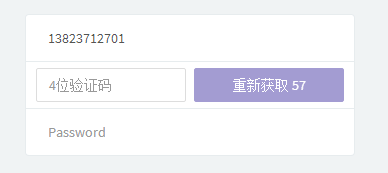
需要实现以下逻辑
按钮不可选
--输入电话号码,按钮可选
--点击获取,进入倒计时,按钮不可选
--倒计时结束,回到初识状态
核心代码:
var cd = 60;

var toDo = function() {

    cd--;

    $scope.countDown = "重新获取 " + cd;

};

$interval(toDo, 1000, 60);
完整代码:
html:
 <form name="form" class="form-validation">

          <div class="list-group list-group-sm">

            <div class="list-group-item">

              <input  type="text" placeholder="phone" class="form-control no-border" ng-model="seller.phone" required>

            </div>

            <div class="list-group-item">

                  <input style="width: 150px;float: left;border: 1px solid #DDD;"

                      type="phone" placeholder="4位验证码" class="form-control no-border" ng-model="seller.verification" required>

                <button style="width: 150px;float: right;" type="button" class="btn  btn-primary btn-block" ng-click="sendVerification()" ng-disabled='!seller.phone||send' >

                    {{countDown}}

                </button>

                <div class="clearfix"></div>

            </div>

            <div class="list-group-item">

               <input type="password" placeholder="Password" class="form-control no-border" ng-model="seller.password" required>

            </div>

          </div>

</form>
js:
app.controller('SignupFormController', [ '$interval', '$scope', '$http', '$state', function( $interval, $scope, $http, $state) {

    $scope.countDown = "获取验证码";

    $scope.loginmsg="";

    $scope.send = false;

    $scope.sendVerification = function() {

        $http.post('http://localhost:8083/boronManager/seller/verification/' + $scope.seller.phone, {verificationType: 1}).then(function(response) {

            var req = response.data;

            if(!req.success)

                $scope.authError = req.error;

        }, function(x) {

            $scope.authError = response.data.error;

        });

        var cd = 60;

        var toDo = function() {

            $scope.send = true;

            cd--;

            if(cd < 0) {

                cd = "";

                $scope.send = false;

            }

            $scope.countDown = "重新获取 " + cd;

        };

        $interval(toDo, 1000, 60);

    };

}]);
Angular.js 使用获取验证码按钮实现-倒计时的更多相关文章
- iOS “获取验证码”按钮的倒计时功能
iOS 的倒计时有多种实现细节,Cocoa Touch 为我们提供了 NSTimer 类和 GCD 的dispatch_source_set_timer方法去更加方便的使用计时器.我们也可以很容易的的 ...
- [RN] React Native 获取验证码 按钮
React Native 获取验证码 按钮 效果如图: 实现方法: 一.获取验证码 按钮组件 封装 CountDownButton.js "use strict"; import ...
- button获取验证码60秒倒计时 直接用
__block ; __block UIButton *verifybutton = _GetverificationBtn; verifybutton.enabled = NO; dispatch_ ...
- angular js 模拟获取后台的数据
在这里我们把后台的数据用一个.json文件进行代替. 项目的目录结构如下: puDongLibraryLearning----ui-router-learning ---- data-------pe ...
- JS 获取验证码按钮改变案例
HTML代码 <div class="box"> <label for="">手机号</label> <input t ...
- 前端学习——ionic/AngularJs——获取验证码倒计时按钮
按钮功能为:点击"获取验证码"--按钮不可用-设置倒计时-60秒后重新获取. 代码借鉴于:http://plnkr.co/edit/Swj82MpJSix3a47jZRHP?p= ...
- JS获取验证码后倒计时不受刷新及关闭影响
HTML部分 <input type="button" id="code_btn" value="获取验证码"> JS部分 // ...
- Android 获取验证码倒计时实现
Android 获取验证码倒计时实现 2017年10月24日 09:55:41 FBY展菲 阅读数:2002 版权声明:本文为博主原创文章,未经博主允许不得转载. https://blog.cs ...
- iOS点击获取短信验证码按钮
概述 iOS点击获取短信验证码按钮, 由于 Demo整体测试运行效果 , 整个修改密码界面都已展现, 并附送正则表达式及修改密码逻辑. 详细 代码下载:http://www.demodashi.com ...
随机推荐
- 面试题常考&必考之--js中的对象的浅拷贝和深拷贝(克隆,复制)(下)
这里主要是讲深拷贝: 深拷贝:个人理解就是拷贝所有的层级 1.像对象里再放数组和对象这些叫引用值.开始我们先判断大对象中是否有引用值(数组和小对象), 然后在判断引用值是数组还是对象 2.开始啦: 1 ...
- 基于点云的3ds Max快速精细三维建模方法及系统的制作方法 插件开发
基于点云的3ds Max快速精细三维建模方法及系统的制作方法[技术领域][0001]本发明涉及数字城市三维建模领域,尤其涉及一种基于点云的3d ...
- Java 有关类字段的初始化
实例代码 package text; public class MethodOverload { /** * @param args */ public static void main(String ...
- Web开发者易犯的五大严重错误
无论你是编程高手,还是技术爱好者,在进行Web开发过程中,总避免不了犯各种各样的错误. 犯了错误,可以改正.但如果犯了某些错误,则会带来重大损失.遗憾.令人惊讶的是,这些错误往往是最普通,最容易避免. ...
- vue 通过绑定事件获取当前行的id
<div @click="router(items.productId)" style="float: left;" :key='items.produc ...
- 高通平台msm8916修改开机logo【原创】
经过两天的奋战终于把开机logo给搞定了啊. 首先修改开机logo要从哪里入手呢?先分析一下源码看看. ---> void display_image_on_screen() { struct ...
- 十三、python列表方法汇总
'''1.append():更新列表'''l=[]l.append('111')l.append('[123,456]')print l-------------------------------- ...
- SVN 客户端不显示图标解决方案
下图为没有设置之前,文件夹不显示svn图标 SVN客户端不显示图标解决方案:右键svn->设置->图标覆盖->状态缓存选择"Windows外壳"->确定,刷 ...
- 阶段1 语言基础+高级_1-3-Java语言高级_04-集合_06 Set集合_1_HashSet集合介绍
特点:不允许有重复的记录,无序的集合 set不允许重复.接口中没有索引.所以方法和Collection中的方法是一样的,没有带索引的方法 因为Set的方法和Collection都是一样的.所以这里不再 ...
- UI自动化之异常与截图处理
对操作不成功时,希望能够继续执行其他操作,或者是,希望操作不成功时,能够写日志记录 目录 1.常见异常 2.截图处理 1.常见异常 1.NoSuchElementException:没有找到元素 2. ...