
三台mysql5.7服务器互作主从配置案例
一、架构
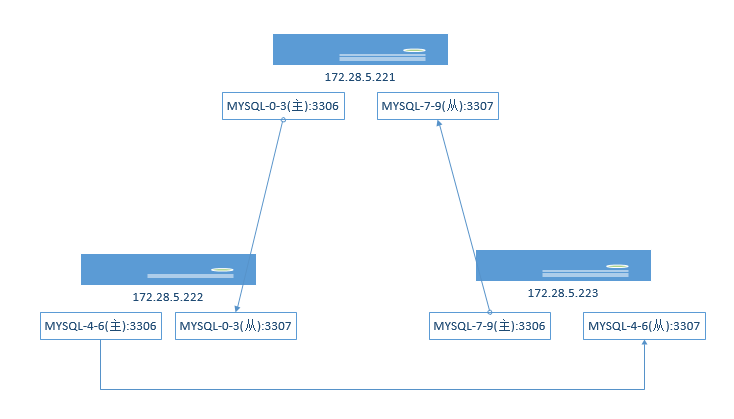
三台msyql服务器221,222,223,每台服务器开两个实例,3306作为主库,3307作为另外一台服务器的从库
二、每台服务器安装双实例
参照:https://www.cnblogs.com/sky-cheng/p/10919447.html
进行双实例安装
三、每台服务器的3306实例创建一个复制账号
在172.28.5.221上
[root@push-- ~]# mysql -uroot -p -S /var/lib/mysql//mysql.sock

Enter password:

Welcome to the MySQL monitor.  Commands end with ; or \g.

Your MySQL connection id is

Server version: 5.7. MySQL Community Server (GPL)

Copyright (c) , , Oracle and/or its affiliates. All rights reserved.

Oracle is a registered trademark of Oracle Corporation and/or its

affiliates. Other names may be trademarks of their respective

owners.

Type 'help;' or '\h' for help. Type '\c' to clear the current input statement.

mysql> grant replication slave,replication client on *.* to 'repl'@'%' identified by 'XXXXXXX';

Query OK,  rows affected,  warning (0.00 sec)

mysql>
在172.28.5.222上
[root@push-- ~]# mysql -uroot -p -S /var/lib/mysql//mysql.sock

Enter password:

Welcome to the MySQL monitor.  Commands end with ; or \g.

Your MySQL connection id is

Server version: 5.7. MySQL Community Server (GPL)

Copyright (c) , , Oracle and/or its affiliates. All rights reserved.

Oracle is a registered trademark of Oracle Corporation and/or its

affiliates. Other names may be trademarks of their respective

owners.

Type 'help;' or '\h' for help. Type '\c' to clear the current input statement.

mysql> grant replication slave,replication client on *.* to 'repl'@'%' identified by 'XXXXXXXX';

Query OK,  rows affected,  warning (0.01 sec)

mysql> flush privileges;

Query OK,  rows affected (0.00 sec)

mysql>
在172.28.5.223上
[root@push-- ~]# mysql -uroot -p -S /var/lib/mysql//mysql.sock

Enter password:

Welcome to the MySQL monitor.  Commands end with ; or \g.

Your MySQL connection id is

Server version: 5.7. MySQL Community Server (GPL)

Copyright (c) , , Oracle and/or its affiliates. All rights reserved.

Oracle is a registered trademark of Oracle Corporation and/or its

affiliates. Other names may be trademarks of their respective

owners.

Type 'help;' or '\h' for help. Type '\c' to clear the current input statement.

mysql> grant replication slave,replication client on *.* to 'repl'@'%' identified by 'xxxxxxxx';

Query OK,  rows affected,  warning (0.00 sec)

mysql> flush privileges;

Query OK,  rows affected (0.00 sec)

mysql>
三、主从配置
1、首先设置好每个3306mysql实例的server_id参数为本机IP地址最后一位,3307实例server_id参数为本机IP地址最后一位再加端口号
在172.28.5.221服务器的3306配置文件中打开日志文件设置
[root@push-- ~]# vim /etc/mysql/my-.cnf

# For advice on how to change settings please see

# http://dev.mysql.com/doc/refman/5.7/en/server-configuration-defaults.html

[mysqld]

# innodb_buffer_pool_size = 128M

# join_buffer_size = 128M

# sort_buffer_size = 2M

# read_rnd_buffer_size = 2M

user=mysql

port=

datadir=/home/mysql-5.7./data/

socket=/var/lib/mysql//mysql.sock

server_id=

log-bin=master-

binlog_format=row

#skip-grant-tables

symbolic-links=

pid-file=/var/run/mysqld//mysqld.pid

log-error=/home/mysql-5.7./log//mysqld.log

[mysqld_safe]

log-error=/home/mysql-5.7./log//mysqld.log
server_id=221 设置server_id
log-bin=master-221 设置log_bin日志文件名
binlog_format=row 指定日志格式为row
2、重启3306实例,使配置生效
[root@push-- ~]# mysqladmin -uroot -p -S /var/lib/mysql//mysql.sock shutdown

[root@push-- ~]# mysqld_safe --defaults-file=/etc/mysql/my-.cnf &

[]

[root@push-- ~]# --27T02::.758733Z mysqld_safe Logging to '/home/mysql-5.7.26/log/3306/mysqld.log'.

--27T02::.813602Z mysqld_safe Starting mysqld daemon with databases from /home/mysql-5.7./data/
3、客户端连接
^C

[root@push-- ~]# mysql -uroot -p -S /var/lib/mysql//mysql.sock

Enter password:

Welcome to the MySQL monitor.  Commands end with ; or \g.

Your MySQL connection id is

Server version: 5.7.-log MySQL Community Server (GPL)

Copyright (c) , , Oracle and/or its affiliates. All rights reserved.

Oracle is a registered trademark of Oracle Corporation and/or its

affiliates. Other names may be trademarks of their respective

owners.

Type 'help;' or '\h' for help. Type '\c' to clear the current input statement.
4、显示server_id参数
mysql> show variables like '%server_id%';

+----------------+---------+

| Variable_name  | Value   |

+----------------+---------+

| server_id      |  |

| server_id_bits |       |

+----------------+---------+

 rows in set (0.00 sec)
5、显示主库状态
mysql> show master status\G;

*************************** . row ***************************

             File: master-221.000002

         Position:

     Binlog_Do_DB:

 Binlog_Ignore_DB:

Executed_Gtid_Set:

 row in set (0.00 sec)

ERROR:

No query specified
此时,需要记住上面的参数: File: master-221.000001 Position: 154 ,日志文件名和偏移量,需要在从库上做主从设置时要用到这两个参数
6、从库设置
在172.28.5.222服务器上的3307配置文件
[mysqld]

# innodb_buffer_pool_size = 128M

# join_buffer_size = 128M

# sort_buffer_size = 2M

# read_rnd_buffer_size = 2M

user=mysql

port=

datadir=/home/mysql-5.7./data/

socket=/var/lib/mysql//mysql.sock

server_id=

symbolic-links=

pid-file=/var/run/mysqld//mysqld.pid

log-error=/home/mysql-5.7./log//mysqld.log

[mysqld_safe]

log-error=/home/mysql-5.7./log//mysqld.log
7、重启3307实例,使配置生效
[root@push-- ~]# mysqladmin -uroot -p -S /var/lib/mysql//mysql.sock shutdown

[root@push-- ~]# mysqld_safe --defaults-file=/etc/mysql/my-.cnf &

[]

[root@push-- ~]# --27T03::.550199Z mysqld_safe Logging to '/home/mysql-5.7.26/log/3307/mysqld.log'.

--27T03::.610157Z mysqld_safe Starting mysqld daemon with databases from /home/mysql-5.7./data/
8、查看相应参数
[root@push-- ~]# mysql -uroot -p -S /var/lib/mysql//mysql.sock

mysql> show variables like '%server_id%';

+----------------+---------+

| Variable_name  | Value   |

+----------------+---------+

| server_id      |  |

| server_id_bits |       |

+----------------+---------+

 rows in set (0.00 sec)
9、执行从库命令
mysql> change master to

    -> master_host='172.28.5.221',

    -> master_port=,

    -> master_user='repl',

    -> master_password='xxxxxxxx',

    -> master_log_file='master-221.000002',

    -> master_log_pos=;

Query OK,  rows affected,  warnings (0.31 sec)
10、启动从库
mysql> start slave;

Query OK,  rows affected (0.05 sec)
11、显示从库状态
mysql> start slave;

Query OK,  rows affected (0.05 sec)

mysql> show slave status\G;

*************************** . row ***************************

               Slave_IO_State: Waiting for master to send event

                  Master_Host: 172.28.5.221

                  Master_User: repl

                  Master_Port:

                Connect_Retry:

              Master_Log_File: master-221.000002

          Read_Master_Log_Pos:

               Relay_Log_File: push---relay-bin.

                Relay_Log_Pos:

        Relay_Master_Log_File: master-221.000002

             Slave_IO_Running: Yes

            Slave_SQL_Running: Yes

              Replicate_Do_DB:

          Replicate_Ignore_DB:

           Replicate_Do_Table:

       Replicate_Ignore_Table:

      Replicate_Wild_Do_Table:

  Replicate_Wild_Ignore_Table:

                   Last_Errno:

                   Last_Error:

                 Skip_Counter:

          Exec_Master_Log_Pos:

              Relay_Log_Space:

              Until_Condition: None

               Until_Log_File:

                Until_Log_Pos:

           Master_SSL_Allowed: No

           Master_SSL_CA_File:

           Master_SSL_CA_Path:

              Master_SSL_Cert:

            Master_SSL_Cipher:

               Master_SSL_Key:

        Seconds_Behind_Master:

Master_SSL_Verify_Server_Cert: No

                Last_IO_Errno:

                Last_IO_Error:

               Last_SQL_Errno:

               Last_SQL_Error:

  Replicate_Ignore_Server_Ids:

             Master_Server_Id:

                  Master_UUID: 3e61e5be-7dff-11e9--6c2b5992e632

             Master_Info_File: /home/mysql-5.7./data//master.info

                    SQL_Delay:

          SQL_Remaining_Delay: NULL

      Slave_SQL_Running_State: Slave has read all relay log; waiting for more updates
Slave_IO_Running: Yes
Slave_SQL_Running: Yes
同步线程都已经启动成功、
Exec_Master_Log_Pos: 154  同步主库日志文件偏移量跟主库的日志文件偏移量相同,说明已经完全同步

12、测试同步
在172.28.5.221上创建test库和test表,并插入一条记录
mysql> create database test;

Query OK,  row affected (0.12 sec)

mysql> show databases;

+--------------------+

| Database           |

+--------------------+

| information_schema |

| mysql              |

| performance_schema |

| sys                |

| test               |

+--------------------+

mysql> use test;

Database changed

mysql> create table test( uid int, name varchar());

Query OK,  rows affected (0.43 sec)

mysql> insert into test(uid,name)values(,'aaaa');

Query OK,  row affected (0.14 sec)

mysql> select * from test;

+------+------+

| uid  | name |

+------+------+

|     | aaaa |

+------+------+

 row in set (0.00 sec)
此时,在172.28.5.222上连接从库3307
[root@push-- ~]# mysql -uroot -p -S /var/lib/mysql//mysql.sock

Enter password:

Welcome to the MySQL monitor.  Commands end with ; or \g.

Your MySQL connection id is

Server version: 5.7. MySQL Community Server (GPL)

Copyright (c) , , Oracle and/or its affiliates. All rights reserved.

Oracle is a registered trademark of Oracle Corporation and/or its

affiliates. Other names may be trademarks of their respective

owners.

Type 'help;' or '\h' for help. Type '\c' to clear the current input statement.

mysql> show databases;

+--------------------+

| Database           |

+--------------------+

| information_schema |

| mysql              |

| performance_schema |

| sys                |

| test               |

+--------------------+

 rows in set (0.00 sec)

mysql> use test;

Reading table information for completion of table and column names

You can turn off this feature to get a quicker startup with -A

Database changed

mysql> show tables;

+----------------+

| Tables_in_test |

+----------------+

| test           |

+----------------+

 row in set (0.00 sec)

mysql> select * from test;

+------+------+

| uid  | name |

+------+------+

|     | aaaa |

+------+------+

 row in set (0.00 sec)
已经跟主库数据同步成功了。
同样在172.28.5.222上将3306配置文件打开
[mysqld]

#innodb_buffer_pool_size = 128M

# join_buffer_size = 128M

# sort_buffer_size = 2M

# read_rnd_buffer_size = 2M

user=mysql

port=

datadir=/home/mysql-5.7./data/

socket=/var/lib/mysql//mysql.sock

server_id=

log-bin=master-

binlog_format=row

#skip-grant-tables

symbolic-links=

pid-file=/var/run/mysqld//mysqld.pid

log-error=/home/mysql-5.7./log//mysqld.log

[mysqld_safe]

log-error=/home/mysql-5.7./log//mysqld.log
重启3306实例
[root@push-- ~]# mysqladmin -uroot -p -S /var/lib/mysql//mysql.sock shutdown

Enter password:

[root@push-- ~]# mysqld_safe --defaults-file=/etc/mysql/my-.cnf &

[]

[root@push-- ~]# --27T03::.804192Z mysqld_safe Logging to '/home/mysql-5.7.26/log/3306/mysqld.log'.

--27T03::.864191Z mysqld_safe Starting mysqld daemon with databases from /home/mysql-5.7./data/

[root@push-- ~]# mysql -uroot -p -S /var/lib/mysql//mysql.sock

Enter password:

Welcome to the MySQL monitor.  Commands end with ; or \g.

Your MySQL connection id is

Server version: 5.7.-log MySQL Community Server (GPL)

Copyright (c) , , Oracle and/or its affiliates. All rights reserved.

Oracle is a registered trademark of Oracle Corporation and/or its

affiliates. Other names may be trademarks of their respective

owners.

Type 'help;' or '\h' for help. Type '\c' to clear the current input statement.

mysql> show variables like '%server_id%';

+----------------+---------+

| Variable_name  | Value   |

+----------------+---------+

| server_id      |  |

| server_id_bits |       |

+----------------+---------+

 rows in set (0.01 sec)

mysql> show msater status\G;

ERROR  (): You have an error in your SQL syntax; check the manual that corresponds to your MySQL server version for the right syntax to use near 'msater status' at line

ERROR:

No query specified

mysql> show master status\G;

*************************** . row ***************************

             File: master-222.000001

         Position:

     Binlog_Do_DB:

 Binlog_Ignore_DB:

Executed_Gtid_Set:

 row in set (0.00 sec)

ERROR:

No query specified
显示主库状态
在172.28.5.223服务器上打开3307配置文件,将其设置为172.28.5.222的3306的从库
[root@push-- ~]# vim /etc/mysql/my-.cnf

[mysqld]

# innodb_buffer_pool_size = 128M

# join_buffer_size = 128M

# sort_buffer_size = 2M

# read_rnd_buffer_size = 2M

user=mysql

port=

datadir=/home/mysql-5.7./data/

socket=/var/lib/mysql//mysql.sock

server_id=

#log-bin=master-

#binlog_format=row

#skip-grant-tables

symbolic-links=

pid-file=/var/run/mysqld//mysqld.pid

log-error=/home/mysql-5.7./log//mysqld.log

[mysqld_safe]

log-error=/home/mysql-5.7./log//mysqld.log
客户端连接,设置从库命令
[root@push-- ~]# mysql -uroot -p -S /var/lib/mysql//mysql.sock

Enter password:

Welcome to the MySQL monitor.  Commands end with ; or \g.

Your MySQL connection id is

Server version: 5.7. MySQL Community Server (GPL)

Copyright (c) , , Oracle and/or its affiliates. All rights reserved.

Oracle is a registered trademark of Oracle Corporation and/or its

affiliates. Other names may be trademarks of their respective

owners.

Type 'help;' or '\h' for help. Type '\c' to clear the current input statement.

mysql> show variables like '%server_id%';

+----------------+---------+

| Variable_name  | Value   |

+----------------+---------+

| server_id      |  |

| server_id_bits |       |

+----------------+---------+

 rows in set (0.00 sec)

mysql> change master to

    -> master_host='172.28.5.222',

    -> master_port=,

    -> master_user='repl',

    -> master_password='xxxxxx',

    -> master_log_file='master-222.000001',

    -> master_log_pos=;

Query OK,  rows affected,  warnings (0.36 sec)
启动从库
mysql> start slave;

Query OK,  rows affected (0.05 sec)

mysql> show slave status\G;

*************************** . row ***************************

               Slave_IO_State: Waiting for master to send event

                  Master_Host: 172.28.5.222

                  Master_User: repl

                  Master_Port:

                Connect_Retry:

              Master_Log_File: master-222.000001

          Read_Master_Log_Pos:

               Relay_Log_File: push---relay-bin.

                Relay_Log_Pos:

        Relay_Master_Log_File: master-222.000001

             Slave_IO_Running: Yes

            Slave_SQL_Running: Yes

              Replicate_Do_DB:

          Replicate_Ignore_DB:

           Replicate_Do_Table:

       Replicate_Ignore_Table:

      Replicate_Wild_Do_Table:

  Replicate_Wild_Ignore_Table:

                   Last_Errno:

                   Last_Error:

                 Skip_Counter:

          Exec_Master_Log_Pos:

              Relay_Log_Space:

              Until_Condition: None

               Until_Log_File:

                Until_Log_Pos:

           Master_SSL_Allowed: No

           Master_SSL_CA_File:

           Master_SSL_CA_Path:

              Master_SSL_Cert:

            Master_SSL_Cipher:

               Master_SSL_Key:

        Seconds_Behind_Master:

Master_SSL_Verify_Server_Cert: No

                Last_IO_Errno:

                Last_IO_Error:

               Last_SQL_Errno:

               Last_SQL_Error:

  Replicate_Ignore_Server_Ids:

             Master_Server_Id:

                  Master_UUID: de99b6b7--11e9-9a45-6c2b5992e6d2

             Master_Info_File: /home/mysql-5.7./data//master.info

                    SQL_Delay:

          SQL_Remaining_Delay: NULL

      Slave_SQL_Running_State: Slave has read all relay log; waiting for more updates

           Master_Retry_Count:

                  Master_Bind:

      Last_IO_Error_Timestamp:

     Last_SQL_Error_Timestamp:

               Master_SSL_Crl:

           Master_SSL_Crlpath:

           Retrieved_Gtid_Set:

            Executed_Gtid_Set:

                Auto_Position:

         Replicate_Rewrite_DB:

                 Channel_Name:

           Master_TLS_Version:
此时,从库已经启动,并且同步线程启动成功,同步完毕
测试数据
在172.28.5.222的3306上创建test库个test表,并插入一条数据
mysql> create database test;

Query OK,  row affected (0.11 sec)

mysql> use test;

Database changed

mysql> create table test (uid int,name varchar());

Query OK,  rows affected (0.26 sec)

mysql> insert into test values(,'bbbb');

Query OK,  row affected (0.15 sec)

mysql> select * from test;

+------+------+

| uid  | name |

+------+------+

|     | bbbb |

+------+------+

 row in set (0.00 sec)
此时,在172.28.5.223上连接3307从库
[root@push-- ~]# mysql -uroot -p -S /var/lib/mysql//mysql.sock

Enter password:

Welcome to the MySQL monitor.  Commands end with ; or \g.

Your MySQL connection id is

Server version: 5.7. MySQL Community Server (GPL)

Copyright (c) , , Oracle and/or its affiliates. All rights reserved.

Oracle is a registered trademark of Oracle Corporation and/or its

affiliates. Other names may be trademarks of their respective

owners.

Type 'help;' or '\h' for help. Type '\c' to clear the current input statement.

mysql> use test;

Reading table information for completion of table and column names

You can turn off this feature to get a quicker startup with -A

Database changed

mysql> select * from test;

+------+------+

| uid  | name |

+------+------+

|     | bbbb |

+------+------+

 row in set (0.00 sec)
数据同步成功。
同样在172.28.5.223的3306和172.28.5.221的3307做主从配置
编辑172.28.5.223的3306配置文件
[root@push-- ~]# vim /etc/mysql/my-.cnf

[mysqld]

# innodb_buffer_pool_size = 128M

# join_buffer_size = 128M

# sort_buffer_size = 2M

# read_rnd_buffer_size = 2M

user=mysql

port=

datadir=/home/mysql-5.7./data/

socket=/var/lib/mysql//mysql.sock

server_id=

log-bin=master-

binlog_format=row

#skip-grant-tables

symbolic-links=

pid-file=/var/run/mysqld//mysqld.pid

log-error=/home/mysql-5.7./log//mysqld.log

[mysqld_safe]

log-error=/home/mysql-5.7./log//mysqld.log
重启3306实例
[root@push-- ~]# mysqladmin -uroot -p -S /var/lib/mysql//mysql.sock shutdown

Enter password:

[root@push-- ~]# mysqld_safe --defaults-file=/etc/mysql/my-.cnf &

[]

[root@push-- ~]# --27T03::.899652Z mysqld_safe Logging to '/home/mysql-5.7.26/log/3306/mysqld.log'.

--27T03::.965604Z mysqld_safe Starting mysqld daemon with databases from /home/mysql-5.7./data/

^C

[root@push-- ~]# mysql -uroot -p -S /var/lib/mysql//mysql.sock

Enter password:

Welcome to the MySQL monitor.  Commands end with ; or \g.

Your MySQL connection id is

Server version: 5.7.-log MySQL Community Server (GPL)

Copyright (c) , , Oracle and/or its affiliates. All rights reserved.

Oracle is a registered trademark of Oracle Corporation and/or its

affiliates. Other names may be trademarks of their respective

owners.

Type 'help;' or '\h' for help. Type '\c' to clear the current input statement.

mysql> show variables like'%server_id%';

+----------------+---------+

| Variable_name  | Value   |

+----------------+---------+

| server_id      |  |

| server_id_bits |       |

+----------------+---------+

 rows in set (0.01 sec)

mysql> show master status \G

*************************** . row ***************************

             File: master-223.000001

         Position:

     Binlog_Do_DB:

 Binlog_Ignore_DB:

Executed_Gtid_Set:

 row in set (0.00 sec)
主库启动成功
在172.28.5.221的3307配置文件
[root@push-- ~]# vim /etc/mysql/my-.cnf

# For advice on how to change settings please see

# http://dev.mysql.com/doc/refman/5.7/en/server-configuration-defaults.html

[mysqld]

# innodb_buffer_pool_size = 128M

# join_buffer_size = 128M

# sort_buffer_size = 2M

# read_rnd_buffer_size = 2M

user=mysql

port=

datadir=/home/mysql-5.7./data/

socket=/var/lib/mysql//mysql.sock

server_id=

# Disabling symbolic-links is recommended to prevent assorted security risks

symbolic-links=

log-error=/home/mysql-5.7./log//mysqld.log

pid-file=/var/run/mysqld//mysqld.pid

[myqld_safe]

log-error=/home/mysql-5.7./log//mysqld.log
重启3307实例
[root@push-- ~]# mysqladmin -uroot -p -S /var/lib/mysql//mysql.sock shutdown

[root@push-- ~]# mysqld_safe --defaults-file=/etc/mysql/my-.cnf &

[]

[root@push-- ~]# --27T03::.427996Z mysqld_safe Logging to '/home/mysql-5.7.26/log/3307/mysqld.log'.

--27T03::.482868Z mysqld_safe Starting mysqld daemon with databases from /home/mysql-5.7./data/

^C

[root@push-- ~]# mysql -uroot -p -S /var/lib/mysql//mysql.sock

Enter password:

Welcome to the MySQL monitor.  Commands end with ; or \g.

Your MySQL connection id is

Server version: 5.7. MySQL Community Server (GPL)

Copyright (c) , , Oracle and/or its affiliates. All rights reserved.

Oracle is a registered trademark of Oracle Corporation and/or its

affiliates. Other names may be trademarks of their respective

owners.

Type 'help;' or '\h' for help. Type '\c' to clear the current input statement.

mysql> show variables like '%server_id%';

+----------------+---------+

| Variable_name  | Value   |

+----------------+---------+

| server_id      |  |

| server_id_bits |       |

+----------------+---------+

 rows in set (0.01 sec)
执行从库命令
mysql> change master to

    -> master_host='172.28.5.223',

    -> master_port=,

    -> master_user='repl',

    -> master_password='Zaq1xsw@',

    -> master_log_file='master-223.000001',

    -> master_log_pos=;

Query OK,  rows affected,  warnings (0.42 sec)

mysql> start slave;

Query OK,  rows affected (0.06 sec)

mysql>
测试数据
在172.28.5.223的3306创建test库和test表,并插入一条记录
mysql> create database test;

Query OK,  row affected (0.06 sec)

mysql> use test;

Database changed

mysql> create table test(id int,name varchar());

Query OK,  rows affected (0.34 sec)

mysql> insert into test values(,'ccc');

Query OK,  row affected (0.14 sec)

mysql> select * from test;

+------+------+

| id   | name |

+------+------+

|     | ccc  |

+------+------+

 row in set (0.00 sec)
在172.28.5.221的3307上查看
sion for the right syntax to use near 'database' at line

mysql> show databases;

+--------------------+

| Database           |

+--------------------+

| information_schema |

| mysql              |

| performance_schema |

| sys                |

| test               |

+--------------------+

 rows in set (0.00 sec)

mysql> use test;

Reading table information for completion of table and column names

You can turn off this feature to get a quicker startup with -A

Database changed

mysql> select * from test;

+------+------+

| id   | name |

+------+------+

|     | ccc  |

+------+------+

 row in set (0.00 sec)
数据同步成功
至此3台MYSQL服务器互为主从设置完毕。
四、多实例的启动和停止
停止3306实例: mysqladmin -uroot -p -S /var/lib/mysql/3307/mysql.sock shutdown
启动3306实例: mysqld_safe --defaults-file=/etc/mysql/my-3306.cnf &
连接3306实例:mysql -uroot -p -S /var/lib/mysql/3306/mysql.sock
三台mysql5.7服务器互作主从配置案例的更多相关文章
- Windows下安装配置免安装MySQL5.7服务器
Windows下安装配置免安装MySQL5.7服务器 1.下载.解压安装包 从MySQL官方网站上下载mysql-5.7.19-winx64.zip 下载完成后,把安装包解压到D:\DevSoft ...
- CentOS 6.3下Samba服务器的安装与配置方法(图文详解)
这篇文章主要介绍了CentOS 6.3下Samba服务器的安装与配置方法(图文详解),需要的朋友可以参考下 一.简介 Samba是一个能让Linux系统应用Microsoft网络通讯协议的软件, ...
- 阿里云服务器Linux CentOS安装配置(零)目录
阿里云服务器Linux CentOS安装配置(零)目录 阿里云服务器Linux CentOS安装配置(一)购买阿里云服务器 阿里云服务器Linux CentOS安装配置(二)yum安装svn 阿里云服 ...
- 阿里云服务器Linux CentOS安装配置(九)shell编译、打包、部署
阿里云服务器Linux CentOS安装配置(九)shell编译.打包.部署 1.查询当前目录以及子目录下所有的java文件,并显示查询结果 find . -name *.java -type f - ...
- 阿里云服务器Linux CentOS安装配置(八)nginx安装、配置、域名绑定
阿里云服务器Linux CentOS安装配置(八)nginx安装.配置.域名绑定 1.安装nginx yum -y install nginx 2.启动nginx service nginx star ...
- 阿里云服务器Linux CentOS安装配置(七)域名解析
阿里云服务器Linux CentOS安装配置(七)域名解析 1.购买域名 登录阿里云,左侧菜单点击[域名],然后[域名注册],完成域名购买.(一般首年45元) 2.添加域名解析 在域名列表里点击你的域 ...
- 阿里云服务器Linux CentOS安装配置(六)resin多端口配置、安装、部署
阿里云服务器Linux CentOS安装配置(六)resin多端口配置.安装.部署 1.下载resin包 http://125.39.66.162/files/2183000003E08525/cau ...
- 阿里云服务器Linux CentOS安装配置(五)jetty配置、部署
阿里云服务器Linux CentOS安装配置(五)jetty配置.部署 1.官网下载jetty:wget http://repo1.maven.org/maven2/org/eclipse/jetty ...
- 阿里云服务器Linux CentOS安装配置(四)yum安装tomcat
阿里云服务器Linux CentOS安装配置(四)yum安装tomcat 1.yum -y install tomcat 执行命令后,会帮你把jdk也安装好 2.tomcat安装目录:/var/li ...
随机推荐
- C++ Map实践
实践如下: #include <iostream> #include <map> #include <string> #include <typeinfo&g ...
- leetcode 160相交链表
暴力解法当然可以遍历两个链表,不过time O(mn) space O(1)暂且不说, 方法一:双指针, time O(m+n),space O(1) 可以对比判断环形链表的快慢指针法. 这种方法构思 ...
- 内网每一台电脑的外网ip是一样吗
内网每一台电脑上网的IP地址是一样的,因为公网地址的稀缺性,所以内部上网是通过映射或者说叫端口复用将内部私有地址转换为公有地址进行上网的. 公有地址就是网关设备出口的地址,也可以说是路由器的出口地址, ...
- Selenium 2自动化测试实战16(多窗口切换)
一.多窗口切换 在页面操作过程中有时候点击某个链接会弹出新的窗口,这时就需要主机切换到新打开的窗口上进行操作.WebDriver提供了switch_to.window()方法.可以实现在不同的窗口之间 ...
- resultMap的使用总结
Mybatis:resultMap的使用总结 resultMap是Mybatis最强大的元素,它可以将查询到的复杂数据(比如查询到几个表中数据)映射到一个结果集当中. resultMap包含的元素 ...
- VirtualBox-5.2.8-121009-Win.exe虚拟机桥接
- 关于struts2防止表单重复提交
struts2防表单重复提交有两种方式. 其一是action的重定向,跳转时设置type为从一个action跳转到另一个action或者另一个页面, 使用户提交后,所停留的位置,不是当前处理数据的Ac ...
- 盒模型 box-sizing 属性
css3增添了盒模型box-sizing属性,box-sizing属性值可以有下面三个值: content-box:默认值,让元素维持W3C的标准盒模型.元素的宽度/高度(width/height)( ...
- Metinfo4.0 /member/save.php 任意用户密码修改
- web.xml文件的的param-name
第一个阶段 配置阶段 web.xml配置,如下图 第二个阶段 初始化阶段 init(ServletConfig config) 1.加载配置文件 获取web.xml文件的的param-name ...