
org.springframework.web.servlet.view.ContentNegotiatingViewResolver
restful服务中一个重要的特性就是一种资源可以有多种表现形式,在springmvc中可以使用ContentNegotiatingViewResolver这个视图解析器来实现这种方式。
描述资源的三种形式
一、使用扩展名
http://localhost:8080/test/user.xml 以xml格式呈现
http://localhost:8080/test/user.json 以json格式呈现
http://localhost:8080/test/user 以默认视图呈现,如jsp
二、使用http request header的Accept
GET /user HTTP/1.1
Accept:application/xml 请求时设置返回形式是xml,如使用ajax请求,则需要设置contentType:application/xml
GET /user HTTP/1.1
Accept:application/json 请求时设置返回形式是json,如使用ajax请求,则需要设置contentType:application/json
三、使用参数
http://localhost:8080/test/user?format=json
http://localhost:8080/test/user?format=xml
上面了解了同一种资源的三种呈现方式,即json、xml、jsp,那么我们要如何使用ContentNegotiatingViewResolver类配置,使客户端请求的方式不同,返回同一种资源的三种方式呢?
ContentNegotiatingViewResolver配置
ContentNegotiatingViewResolver是视图解析器,我们在使用jsp这个视图的时候也配置了一个视图解析器InternalResourceViewResolver,他们都是视图解析器,后者着重在配置一个默认的视图解析即jsp;ContentNegotiatingViewResolver本身不会解析,他会分配其他的viewResolver去解析,并选择一个看起来像是客户端请求需要返回的一种 View 返回。
下面是ContentNegotiatingViewResolver的具体配置

<!--springmvc中根据后缀不同返回不同格式的配置

        如,XXX.json  返回json格式

           XXX.xml   返回xml格式

           xxx       返回jsp

        -->

    <bean class="org.springframework.web.servlet.view.ContentNegotiatingViewResolver">

        <!--这里是解析器的执行顺序,如果有多个的话,配置的数值越小,则越早执行-->

        <property name="order" value="1" />

        <!--

        这里是是否启用扩展名支持,默认就是true

                    例如  /user/{userid}.json

             -->

        <property name="favorPathExtension" value="true"></property>

        <!--这里是是否启用参数支持,默认就是true

        例如  /user/{userid}?format=json

             -->

        <property name="favorParameter" value="false"></property>

        <!--这里是否忽略掉accept header,默认就是false

                   例如     GET /user HTTP/1.1

        Accept:application/json

        -->

        <property name="ignoreAcceptHeader" value="true"></property>

        <!--

        这里是扩展名到mimeType的映射,

        例如 /user/{userid}.json  中的   .json  就会映射到   application/json

        -->

        <property name="mediaTypes">

            <map>

                <entry key="json" value="application/json" />

                <entry key="xml" value="application/xml" />

            </map>

        </property>

 <!--视图-->

        <property name="defaultViews">

            <list>

            <!--json视图-->

                <bean class="org.springframework.web.servlet.view.json.MappingJackson2JsonView"></bean>

            <!--xml视图-->

                <bean class="org.springframework.web.servlet.view.xml.MarshallingView"

                    <constructor-arg>

                        <bean class="org.springframework.oxm.jaxb.Jaxb2Marshaller">

                            <property name="classesToBeBound">

                                <list>

                                    <value>com.cn.my.entity.Course</value>

                                    <value>com.cn.my.entity.CourseList</value>

                                </list>

                            </property>

                        </bean>

                    </constructor-arg>

                </bean>

            </list>

        </property>

    </bean>
order:如果存在多个viewResolver则order值小的被使用,如果没有合适的viewResolver则会使用另外的;
favorPathExtension:是否支持扩展名,默认为true(支持),扩展名指的xxx.json、xxx.xml等形式
favorParameter:是否启用参数支持,默认为true(支持),即xxx?format=json、xxx?format=xml等形式,这里的参数名默认为format,可以通过配置改变。
ignoreAcceptHeader:是否忽略accept header,默认是false(不忽略),即请求时指定的contentType:application/json等,由于我这里要使用扩展名的形式返回,所以把另外两项都关闭了,可视不同情况,使用不同设置;
mediaTypes:配置扩展名到mimeType的映射,这里配置了json和xml的映射;
defaultViews:配置视图,这里配置了json和xml的视图,json使用的jackson;
最后,我还配置一个另外一个视图解析器,InternalResourceViewResolver,
<bean class="org.springframework.web.servlet.view.InternalResourceViewResolver">

        <property name="order" value="2" />

        <property name="prefix" value="/WEB-INF/jsp/"></property>

        <property name="suffix" value=".jsp"></property>

        <property name="viewClass" value="org.springframework.web.servlet.view.JstlView" />

    </bean>
这是jsp的视图解析器,order属性配置为了2,在无法匹配到json、xml的情况下,会返回jsp的视图。
下面是controller的方法
package com.cn.my.controllor;

import java.util.ArrayList;

import java.util.List;

import org.springframework.stereotype.Controller;

import org.springframework.ui.ModelMap;

import org.springframework.web.bind.annotation.PathVariable;

import org.springframework.web.bind.annotation.RequestMapping;

import com.cn.my.entity.Course;

import com.cn.my.entity.CourseList;

@Controller

@RequestMapping("/mul")

public class MultiView {

    @RequestMapping("/simple/{coursId}")

    public String method1(@PathVariable("coursId") String coursId,ModelMap model){

        Course c=new Course();

        c.setId(coursId);

        c.setContent("这是测试内容");

        c.setName("李四");

        model.put("course", c);

        return "course";

    }

}
这里使用的restful服务中的uri的格式,用到了@PathVariable注解,这里方法返回的String,且没有@ResponseBody注解,在前边的返回json一文中有返回json的配置,需要@ResponseBody注解,详细的可以参看前边,同时在方法参数中有ModelMap,为什么这里要返回一个字符串呢,目的是为了统一,我们知道如果要返回到jsp视图,那么这里要返回的一个代表逻辑视图名的字符串,为了使三种方式统一,这里返回的是字符串,如果不返回到jsp也可以返回一个实际的对象。
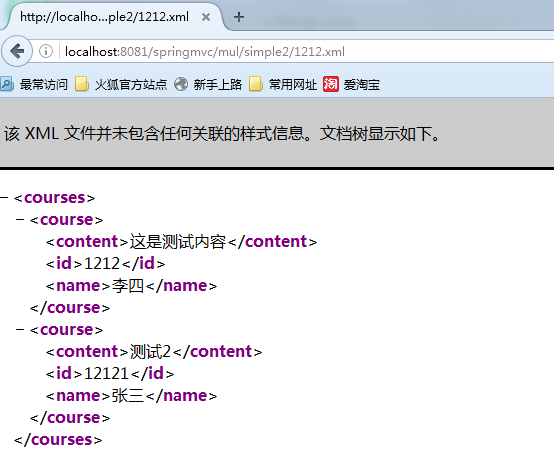
下面看测试结果,
请求:http://localhost:8081/springmvc/mul/simple2/1212.json

请求:http://localhost:8081/springmvc/mul/simple2/1212.xml
请求:http://localhost:8081/springmvc/mul/simple2/1212
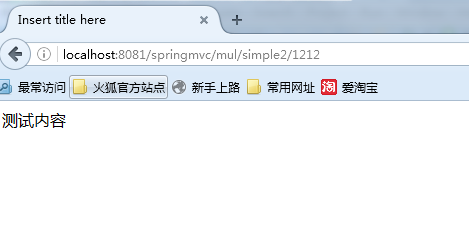
最后一个jsp的视图,本来是要在jsp页面中输出内容的,我这里没做,只是输出了一段话。请谅解!
从上边的测试结果来看,我们分别使用了三种不同的请求方式去请求同一个资源,返回了各自的形式,这种方式很适合用在不同的系统调用同一个系统时,可能别的系统处理数据的方式不一样,我们使用上边的配置可以实现一套代码,返回不同的形式。
最后
在配置默认的jsp解析器的时候也可以照下面的配置方式,
<!--springmvc中根据后缀不同返回不同格式的配置

        如,XXX.json  返回json格式

           XXX.xml   返回xml格式

           xxx       返回jsp

        -->

    <bean class="org.springframework.web.servlet.view.ContentNegotiatingViewResolver">

        <!--这里是解析器的执行顺序,如果有多个的话,配置的数值越小,则越早执行-->

        <property name="order" value="1" />

        <!--

        这里是是否启用扩展名支持,默认就是true

                    例如  /user/{userid}.json

             -->

        <property name="favorPathExtension" value="true"></property>

        <!--这里是是否启用参数支持,默认就是true

        例如  /user/{userid}?format=json

             -->

        <property name="favorParameter" value="false"></property>

        <!--这里是否忽略掉accept header,默认就是false

                   例如     GET /user HTTP/1.1

        Accept:application/json

        -->

        <property name="ignoreAcceptHeader" value="true"></property>

        <!--

        这里是扩展名到mimeType的映射,

        例如 /user/{userid}.json  中的   .json  就会映射到   application/json

        -->

        <property name="mediaTypes">

            <map>

                <entry key="json" value="application/json" />

                <entry key="xml" value="application/xml" />

            </map>

        </property>

        <!--视图解析器-->

        <property name="viewResolvers">

            <list>

                <bean class="org.springframework.web.servlet.view.InternalResourceViewResolver">

                    <property name="prefix" value="/WEB-INF/jsp/"></property>

                    <property name="suffix" value=".jsp"></property>

                    <property name="viewClass" value="org.springframework.web.servlet.view.JstlView" />

                </bean>

            </list>

        </property>

 <!--视图-->

        <property name="defaultViews">

            <list>

            <!--json视图-->

                <bean class="org.springframework.web.servlet.view.json.MappingJackson2JsonView"></bean>

            <!--xml视图-->

                <bean class="org.springframework.web.servlet.view.xml.MarshallingView"

                    <constructor-arg>

                        <bean class="org.springframework.oxm.jaxb.Jaxb2Marshaller">

                            <property name="classesToBeBound">

                                <list>

                                    <value>com.cn.my.entity.Course</value>

                                    <value>com.cn.my.entity.CourseList</value>

                                </list>

                            </property>

                        </bean>

                    </constructor-arg>

                </bean>

            </list>

        </property>

    </bean>
org.springframework.web.servlet.view.ContentNegotiatingViewResolver的更多相关文章
- NoSuchBeanDefinitionException: No qualifying bean of type 'org.springframework.web.servlet.view.InternalResourceViewResolver' available
问题描述: 项目中需要配置多个视图解析器,所以使用ContentNegotiatingViewResolver来处理,在其内部设置了FreeMarkerViewResolver .InternalRe ...
- org.springframework.web.servlet.view.InternalResourceViewResolver
http://blog.csdn.net/superdog007/article/details/28857495 我们在controller里面经常这样return一个ModelAndView: r ...
- Cannot find class [org.springframework.web.servlet.view.freemarker.FreeMarkerConfigurer]
解决方案:添加spring-webmvc好多人都不知道org.springframework.web.servlet.view.freemarker.FreeMarkerConfigurer这个类到底 ...
- org.springframework.web.servlet.view
view包下面的类和接口 description:提供view和viewResolver的标准实现,也提供一些抽象基类.Spring MVC已经提供了 JSPs, Velocity, XSLT等视图的 ...
- org.springframework.web.servlet.PageNotFound
2017-07-11 16:36:13.489 WARN [http-nio-8032-exec-16]org.springframework.web.servlet.PageNotFound -Re ...
- org.springframework.web.servlet.DispatcherServlet noHandlerFound
1 请求URL: http://localhost:8080/mvc/rojas 2 control RequestMapping : @RequestMapping(value="xx ...
- 静态资源[org.springframework.web.servlet.PageNotFound]
springmvc 无法访问js.css.jpg等资源文件,tomcat启动报警告如下 [org.springframework.web.servlet.PageNotFound] - No mapp ...
- org.springframework.web.servlet.PageNotFound No mapping found for HTTP request with URI [/AssetRepair/assetRepairController/test.do] in DispatcherServlet with name 'assetrepair'
web.xml文件配置: xxx-servlet.xml 我们可以发现DispatcherServlet会处理"jsp"后缀的请求;而模型视图后缀也是jsp的 如果这样配置会报以下 ...
- springmvc报错 org.springframework.web.servlet.DispatcherServlet
在写springMVC时,导入所有需要的包后,运行程序,控制台报以下错误: 严重: Servlet [springDispatcherServlet] in web application [/Spr ...
随机推荐
- 将JSON字符串反序列化为指定的.NET对象类型
目录导航: 前言: 方法一.在项目中定义对应的对象参数模型,用于映射反序列化出来的参数(复杂JSON字符串数据推荐使用): 方法二.直接将JSON字符串格式数据反序列化转化为字典数据(简单JSON字符 ...
- Cocos2d-X多线程(4) 在子线程中进行网络请求
新版本的android系统已经不允许在UI线程中进行网络请求了,必须新建一个线程. 代码实操: 头文件: #ifndef __TestThreadHttp_SCENE_H__ #define __Te ...
- P3611 【[USACO17JAN]Cow Dance Show奶牛舞蹈】
想了一下还是不发以前做过的水题了,意义也不是很大,现在的话大概只有洛谷黄题以上才会收录了哦~~~ 喵了个咪的题面~~ 洛谷题解dalao不是P党就是优先队列,看的我作为一个新手蒟蒻好慌啊... 这题用 ...
- c/c++ 链表实现
//链表的基本用法代码实现/************************************************************************/ /* Created: ...
- JS 截取字符的方法
substr() 方法 substr() 方法可在字符串中抽取从 start 下标开始的指定数目的字符. stringObject.substr(start,length) start:必需.要抽取的 ...
- 第九周课程总结&实验报告
实验任务详情: 完成火车站售票程序的模拟. 要求: (1)总票数1000张: (2)10个窗口同时开始卖票: (3)卖票过程延时1秒钟: (4)不能出现一票多卖或卖出负数号票的情况. public c ...
- 第一个vue程序(极客时间Vue视频笔记)
第一个vue程序 <body> <div class="app"> {{message}}--{{message+','+message}} <div ...
- Spring(二)--Spring入门案例
Spring入门案例 1.需要的实体类 2.需要的接口和实现类 3.需要的service和实现类 /** * service层的作用 * 在不改变dao层代码的前提下,增加业务逻辑操作 */ publ ...
- Java第二周总结报告
第二周的学习,开始正式实践进行Java的学习. 本周做了什么? 了解的Java的一些基本知识,如Java变量,数据类型和运算符等.Java变量对不同的数据类型最好采用不同的命名规则,合理的命名有利于提 ...
- 洛谷P1029 最大公约数和最小公倍数问题 (简单数学题)
一直懒的写博客,直到感觉不写不总结没有半点进步,最后快乐(逼着)自己来记录蒟蒻被学弟学妹打压这一年吧... 题目描述 输入22个正整数x_0,y_0(2 \le x_0<100000,2 \le ...