
【串线篇】Mybatis之SSM整合
SSM;Spring+SpringMVC+MyBatis
建立Java web项目
一、导包
1)、Spring:
【aop核心】
com.springsource.net.sf.cglib-2.2.0.jar
com.springsource.org.aopalliance-1.0.0.jar
com.springsource.org.aspectj.weaver-1.6.8.RELEASE.jar
spring-aspects-4.0.0.RELEASE.jar
【ioc核心】
commons-logging-1.1.3.jar
spring-aop-4.0.0.RELEASE.jar
spring-beans-4.0.0.RELEASE.jar
spring-context-4.0.0.RELEASE.jar
spring-core-4.0.0.RELEASE.jar
spring-expression-4.0.0.RELEASE.jar
【jdbc核心】
spring-jdbc-4.0.0.RELEASE.jar
spring-orm-4.0.0.RELEASE.jar
spring-tx-4.0.0.RELEASE.jar
【测试】
spring-test-4.0.0.RELEASE.jar
2)、SpringMVC:
【ajax】
jackson-annotations-2.1.5.jar
jackson-core-2.1.5.jar
jackson-databind-2.1.5.jar
【数据校验】
hibernate-validator-5.0.0.CR2.jar
hibernate-validator-annotation-processor-5.0.0.CR2.jar
classmate-0.8.0.jar
jboss-logging-3.1.1.GA.jar
validation-api-1.1.0.CR1.jar
【上传下载】
commons-fileupload-1.2.1.jar
commons-io-2.0.jar
【jstl-jsp标准标签库】
jstl.jar
standard.jar
【验证码】
kaptcha-2.3.2.jar
【springmvc核心】
spring-web-4.0.0.RELEASE.jar
spring-webmvc-4.0.0.RELEASE.jar
3)、MyBatis
【mybatis核心】
mybatis-3.4.1.jar
【和Spring整合包】
mybatis-spring-1.3.0.jar
【日志】
log4j-1.2.17.jar
【ehcache整合】
ehcache-core-2.6.8.jar
mybatis-ehcache-1.0.3.jar
slf4j-api-1.7.21.jar
slf4j-log4j12-1.7.21.jar
4)、其他的
mysql-connector-java-5.1.37-bin.jar
c3p0-0.9.1.2.jar
二、写配置
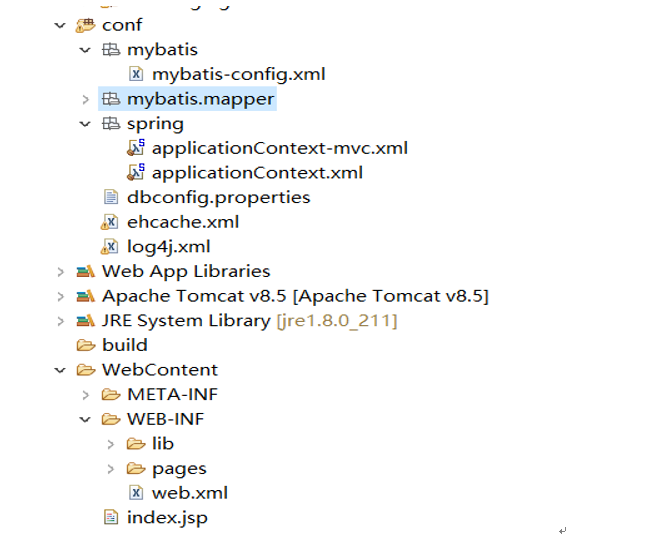
0、web.xml配置:
<?xml version="1.0" encoding="UTF-8"?>

<web-app xmlns:xsi="http://www.w3.org/2001/XMLSchema-instance" xmlns="http://java.sun.com/xml/ns/javaee" xsi:schemaLocation="http://java.sun.com/xml/ns/javaee http://java.sun.com/xml/ns/javaee/web-app_3_0.xsd" id="WebApp_ID" version="3.0">

  <display-name>7.SSM</display-name>

  <welcome-file-list>

    <welcome-file>index.jsp</welcome-file>

  </welcome-file-list>

  <!-- 配置Spring容器启动: -->

  <!-- needed for ContextLoaderListener -->

    <context-param>

        <param-name>contextConfigLocation</param-name>

        <!--指定spring配置文件位置  -->

        <param-value>classpath:spring/applicationContext.xml</param-value>

    </context-param>

    <!-- Bootstraps the root web application context before servlet initialization -->

    <listener>

        <listener-class>org.springframework.web.context.ContextLoaderListener</listener-class>

    </listener>

    <!-- 配置springmvc的前端控制器 -->

    <!-- The front controller of this Spring Web application, responsible for handling all application requests -->

    <servlet>

        <servlet-name>springDispatcherServlet</servlet-name>

        <servlet-class>org.springframework.web.servlet.DispatcherServlet</servlet-class>

        <init-param>

            <param-name>contextConfigLocation</param-name>

            <param-value>classpath:spring/applicationContext-mvc.xml</param-value>

        </init-param>

        <load-on-startup>1</load-on-startup>

    </servlet>

    <!-- Map all requests to the DispatcherServlet for handling -->

    <servlet-mapping>

        <servlet-name>springDispatcherServlet</servlet-name>

        <url-pattern>/</url-pattern>

    </servlet-mapping>

    <!--  两个标准配置-->

    <!-- 字符编码 -->

    <filter>

        <filter-name>CharacterEncodingFilter</filter-name>

        <filter-class>org.springframework.web.filter.CharacterEncodingFilter</filter-class>

        <init-param>

            <param-name>encoding</param-name>

            <param-value>utf-8</param-value>

        </init-param>

        <init-param>

            <param-name>forceEncoding</param-name>

            <param-value>true</param-value>

        </init-param>

    </filter>

    <filter-mapping>

        <filter-name>CharacterEncodingFilter</filter-name>

        <url-pattern>/*</url-pattern>

    </filter-mapping>

    <!-- 支持Rest风格的过滤器 -->

    <filter>

        <filter-name>HiddenHttpMethodFilter</filter-name>

        <filter-class>org.springframework.web.filter.HiddenHttpMethodFilter</filter-class>

    </filter>

    <filter-mapping>

        <filter-name>HiddenHttpMethodFilter</filter-name>

        <url-pattern>/*</url-pattern>

    </filter-mapping>

</web-app>
1、spring配置:
2、springmvc的配置:
<?xml version="1.0" encoding="UTF-8"?>

<beans xmlns="http://www.springframework.org/schema/beans"

    xmlns:xsi="http://www.w3.org/2001/XMLSchema-instance"

    xmlns:context="http://www.springframework.org/schema/context"

    xmlns:mvc="http://www.springframework.org/schema/mvc"

    xsi:schemaLocation="http://www.springframework.org/schema/mvc http://www.springframework.org/schema/mvc/spring-mvc-4.0.xsd

        http://www.springframework.org/schema/beans http://www.springframework.org/schema/beans/spring-beans.xsd

        http://www.springframework.org/schema/context http://www.springframework.org/schema/context/spring-context-4.0.xsd">

    <!-- SpringMVC只扫描控制器;禁用默认的规则 -->

    <context:component-scan base-package="com.atguigu" use-default-filters="false">

        <context:include-filter type="annotation" expression="org.springframework.stereotype.Controller"/>

    </context:component-scan>

    <bean class="org.springframework.web.servlet.view.InternalResourceViewResolver">

        <property name="prefix" value="/WEB-INF/pages/"></property>

        <property name="suffix" value=".jsp"></property>

    </bean>

    <!--配置文件上传解析器  -->

    <bean id="multipartResolver" class="org.springframework.web.multipart.commons.CommonsMultipartResolver">

        <property name="defaultEncoding" value="utf-8"></property>

        <property name="maxUploadSize" value="#{1024*1024*20}"></property>

    </bean>

    <!-- 扫静态资源 -->

    <mvc:default-servlet-handler/>

    <!-- 扫动态  -->

    <mvc:annotation-driven></mvc:annotation-driven>

</beans>
3、mybatis的配置:
整合步骤:导入整合包;(能将dao的实现加入到容器中)
整合的关键配置其实实在spring.xml中的
<!--2、配置JdbcTemplate操作数据库。pass  -->

    <!--3、配置使用mybatis操作数据库  -->

    <!-- 可以根据配置文件得到sqlSessionFactory -->

    <bean id="sqlSessionFactoryBean" class="org.mybatis.spring.SqlSessionFactoryBean">

        <!-- 指定配置文件位置 -->

        <property name="configLocation" value="classpath:mybatis/mybatis-config.xml"></property>

        <property name="dataSource" ref="ds"></property>

        <!-- 指定xml映射文件的位置 -->

        <property name="mapperLocations" value="classpath:mybatis/mapper/*.xml"></property>

    </bean>

    <!-- 我们要把每一个dao接口的实现加入到ioc容器; -->

    <bean class="org.mybatis.spring.mapper.MapperScannerConfigurer">

        <!-- 指定dao接口所在的包 -->

        <property name="basePackage" value="com.atguigu.dao"></property>

    </bean>
4、其他小家伙的配置:
【串线篇】Mybatis之SSM整合的更多相关文章
- 【串线篇】spring boot整合SpringData JPA
一.SpringData简介 其中SpringData JPA底层基于hibernate 二.整合SpringData JPA JPA: Java Persistence API的简称,中文名Java ...
- Spring框架学习笔记(4)——SSM整合以及创建Maven自定义模版
Spring+Spring MVC+MyBatis+Maven SSM整合的核心还是Spring+MyBatis的整合,回顾一下MyBatis操作数据库流程,我们是使用一个SQLSessionFact ...
- [置顶]
Java Web学习总结(24)——SSM(Spring+SpringMVC+MyBatis)框架快速整合入门教程
1.基本概念 1.1.Spring Spring是一个开源框架,Spring是于2003 年兴起的一个轻量级的Java 开发框架,由Rod Johnson 在其著作Expert One-On-One ...
- ssm整合说明与模板-Spring Spring MVC Mybatis整合开发
ssm整合说明 spring+spring mvc+mybatis 说明 源码下载 由于之前存在ssh框架,spring+struts+hibernate,其中spring负责aop与ioc,所以一般 ...
- 吴裕雄--天生自然JAVA SPRING框架开发学习笔记:SSM(Spring+Spring MVC+MyBatis)框架整合搭建详细步骤
因为 Spring MVC 是 Spring 框架中的一个子模块,所以 Spring 与 SpringMVC 之间不存在整合的问题.实际上,SSM 框架的整合只涉及 Spring 与 MyBatis ...
- Mybatis第五篇【Mybatis与Spring整合】
Mybatis与Spring整合 既然我们已经学了Mybatis的基本开发了,接下来就是Mybatis与Spring的整合了! 以下使用的是Oracle数据库来进行测试 导入jar包 aopallia ...
- SSM整合配置
SSM三大框架整合详细教程(Spring+SpringMVC+MyBatis) 使用SSM(Spring.SpringMVC和Mybatis)已经有三个多月了,项目在技术上已经没有什么难点了,基于现有 ...
- SpringMVC之简单的增删改查示例(SSM整合)
本篇文章主要介绍了SpringMVC之简单的增删改查示例(SSM整合),这个例子是基于SpringMVC+Spring+Mybatis实现的.有兴趣的可以了解一下. 虽然已经在做关于SpringMVC ...
- 【MyBatis学习14】MyBatis和Spring整合
前面十几篇博文总结了mybatis在开发中的相关技术,但在实际中都是和spring整合开发的,所以这里总结一下mybatis和spring的整合方法,并在整合后进行测试. 1. 整合的环境 这都是老掉 ...
随机推荐
- CMD批处理查看当前路径
1.直接在CMD窗口查看 echo %cd% 2.建立批处理文件 @echo offecho 当前盘符:%~d0echo 当前盘符和路径:%~dp0echo 当前批处理全路径:%~f0echo 当前盘 ...
- 基于mpvue搭建小程序项目框架
简介: mpvue框架对于从没有接触过小程序又要尝试小程序开发的人员来说,无疑是目前最好的选择.mpvue从底层支持 Vue.js 语法和构建工具体系,同时再结合相关UI组件库,便可以高效的实现小程序 ...
- Flutter中的浮动按钮 FloatingActionButton
FloatingActionButton 简称 FAB ,可以实现浮动按钮,也可以实现类似闲鱼 app 的底部凸起导航 . 常用属性 FloatingActionButton的常用属性,同flutte ...
- C# Label换行解决方法
一.label太短,无法完成显示所要显示信息长度,要换行,解决方法如下: (1) string aa =(长串) ; string cc= aa.Substring(0,10);//取前10个字符 s ...
- 学习日记7、mvc +easyui datagrid excel上传
1.首先获取datagrid所有行的数据 var rows = $("#List").datagrid("getRows"); 2.进行数据转换转化成JSON格 ...
- Uva 12563 Jin Ge Jin Qu hao(01背包)
题意: 假定你在唱KTV,还剩下t秒时间.你决定接下来唱你最喜爱的n首歌(不包含劲歌金曲)中的一些歌曲.在时间结束之前再唱一个劲歌金曲.使得唱的歌的总曲目尽量多以及时间总长度. 输入保证所有n+1曲子 ...
- HDU 5634 Rikka with Phi
题目链接:http://acm.hdu.edu.cn/showproblem.php?pid=5634 ------------------------------------------------ ...
- 制作自己的win7系统
每次安装完纯净版的系统,然后是漫长的打补丁,装驱动,装软件.不妨制作一个自己的系统光盘(也就是GHOST系统),再要重装系统时,直接用这个系统光盘,一键安装,方便省时. 制作GHOST系统,就是将本地 ...
- linux常用命令之文档
不常用,经常就会遗忘,mygod,不用则退化... 目录管理命令 ls:列出指定目录下的内容格式:ls [OPTION]... [FILE]... -a:显示所有文件包括隐藏文件 -A:显示除.和. ...
- MyEclipse上有main函数类运行报错:Editor does not contain a
MyEclipse下有main函数类运行报错:Editor does not contain a main type?出现这种问题的原因是,该java文件 MyEclipse下有main函数类运行 ...