
【串线篇】Mybatis之SSM整合
SSM;Spring+SpringMVC+MyBatis
建立Java web项目
一、导包
1)、Spring:
【aop核心】
com.springsource.net.sf.cglib-2.2.0.jar
com.springsource.org.aopalliance-1.0.0.jar
com.springsource.org.aspectj.weaver-1.6.8.RELEASE.jar
spring-aspects-4.0.0.RELEASE.jar
【ioc核心】
commons-logging-1.1.3.jar
spring-aop-4.0.0.RELEASE.jar
spring-beans-4.0.0.RELEASE.jar
spring-context-4.0.0.RELEASE.jar
spring-core-4.0.0.RELEASE.jar
spring-expression-4.0.0.RELEASE.jar
【jdbc核心】
spring-jdbc-4.0.0.RELEASE.jar
spring-orm-4.0.0.RELEASE.jar
spring-tx-4.0.0.RELEASE.jar
【测试】
spring-test-4.0.0.RELEASE.jar
2)、SpringMVC:
【ajax】
jackson-annotations-2.1.5.jar
jackson-core-2.1.5.jar
jackson-databind-2.1.5.jar
【数据校验】
hibernate-validator-5.0.0.CR2.jar
hibernate-validator-annotation-processor-5.0.0.CR2.jar
classmate-0.8.0.jar
jboss-logging-3.1.1.GA.jar
validation-api-1.1.0.CR1.jar
【上传下载】
commons-fileupload-1.2.1.jar
commons-io-2.0.jar
【jstl-jsp标准标签库】
jstl.jar
standard.jar
【验证码】
kaptcha-2.3.2.jar
【springmvc核心】
spring-web-4.0.0.RELEASE.jar
spring-webmvc-4.0.0.RELEASE.jar
3)、MyBatis
【mybatis核心】
mybatis-3.4.1.jar
【和Spring整合包】
mybatis-spring-1.3.0.jar
【日志】
log4j-1.2.17.jar
【ehcache整合】
ehcache-core-2.6.8.jar
mybatis-ehcache-1.0.3.jar
slf4j-api-1.7.21.jar
slf4j-log4j12-1.7.21.jar
4)、其他的
mysql-connector-java-5.1.37-bin.jar
c3p0-0.9.1.2.jar
二、写配置
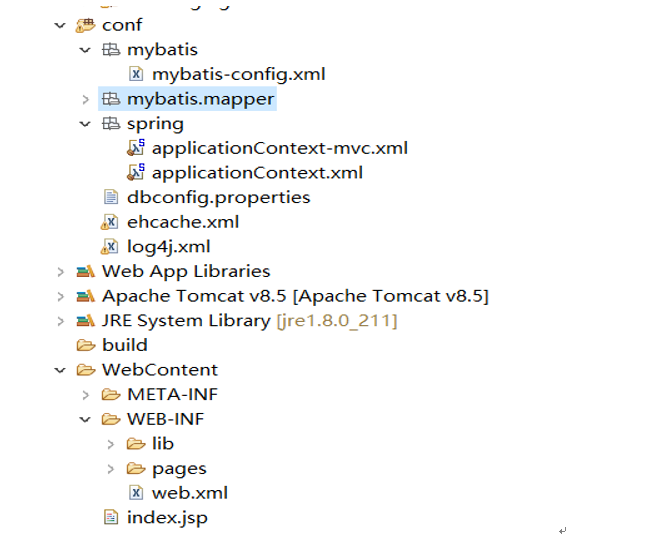
0、web.xml配置:
<?xml version="1.0" encoding="UTF-8"?>

<web-app xmlns:xsi="http://www.w3.org/2001/XMLSchema-instance" xmlns="http://java.sun.com/xml/ns/javaee" xsi:schemaLocation="http://java.sun.com/xml/ns/javaee http://java.sun.com/xml/ns/javaee/web-app_3_0.xsd" id="WebApp_ID" version="3.0">

  <display-name>7.SSM</display-name>

  <welcome-file-list>

    <welcome-file>index.jsp</welcome-file>

  </welcome-file-list>

  <!-- 配置Spring容器启动: -->

  <!-- needed for ContextLoaderListener -->

    <context-param>

        <param-name>contextConfigLocation</param-name>

        <!--指定spring配置文件位置  -->

        <param-value>classpath:spring/applicationContext.xml</param-value>

    </context-param>

    <!-- Bootstraps the root web application context before servlet initialization -->

    <listener>

        <listener-class>org.springframework.web.context.ContextLoaderListener</listener-class>

    </listener>

    <!-- 配置springmvc的前端控制器 -->

    <!-- The front controller of this Spring Web application, responsible for handling all application requests -->

    <servlet>

        <servlet-name>springDispatcherServlet</servlet-name>

        <servlet-class>org.springframework.web.servlet.DispatcherServlet</servlet-class>

        <init-param>

            <param-name>contextConfigLocation</param-name>

            <param-value>classpath:spring/applicationContext-mvc.xml</param-value>

        </init-param>

        <load-on-startup>1</load-on-startup>

    </servlet>

    <!-- Map all requests to the DispatcherServlet for handling -->

    <servlet-mapping>

        <servlet-name>springDispatcherServlet</servlet-name>

        <url-pattern>/</url-pattern>

    </servlet-mapping>

    <!--  两个标准配置-->

    <!-- 字符编码 -->

    <filter>

        <filter-name>CharacterEncodingFilter</filter-name>

        <filter-class>org.springframework.web.filter.CharacterEncodingFilter</filter-class>

        <init-param>

            <param-name>encoding</param-name>

            <param-value>utf-8</param-value>

        </init-param>

        <init-param>

            <param-name>forceEncoding</param-name>

            <param-value>true</param-value>

        </init-param>

    </filter>

    <filter-mapping>

        <filter-name>CharacterEncodingFilter</filter-name>

        <url-pattern>/*</url-pattern>

    </filter-mapping>

    <!-- 支持Rest风格的过滤器 -->

    <filter>

        <filter-name>HiddenHttpMethodFilter</filter-name>

        <filter-class>org.springframework.web.filter.HiddenHttpMethodFilter</filter-class>

    </filter>

    <filter-mapping>

        <filter-name>HiddenHttpMethodFilter</filter-name>

        <url-pattern>/*</url-pattern>

    </filter-mapping>

</web-app>
1、spring配置:
2、springmvc的配置:
<?xml version="1.0" encoding="UTF-8"?>

<beans xmlns="http://www.springframework.org/schema/beans"

    xmlns:xsi="http://www.w3.org/2001/XMLSchema-instance"

    xmlns:context="http://www.springframework.org/schema/context"

    xmlns:mvc="http://www.springframework.org/schema/mvc"

    xsi:schemaLocation="http://www.springframework.org/schema/mvc http://www.springframework.org/schema/mvc/spring-mvc-4.0.xsd

        http://www.springframework.org/schema/beans http://www.springframework.org/schema/beans/spring-beans.xsd

        http://www.springframework.org/schema/context http://www.springframework.org/schema/context/spring-context-4.0.xsd">

    <!-- SpringMVC只扫描控制器;禁用默认的规则 -->

    <context:component-scan base-package="com.atguigu" use-default-filters="false">

        <context:include-filter type="annotation" expression="org.springframework.stereotype.Controller"/>

    </context:component-scan>

    <bean class="org.springframework.web.servlet.view.InternalResourceViewResolver">

        <property name="prefix" value="/WEB-INF/pages/"></property>

        <property name="suffix" value=".jsp"></property>

    </bean>

    <!--配置文件上传解析器  -->

    <bean id="multipartResolver" class="org.springframework.web.multipart.commons.CommonsMultipartResolver">

        <property name="defaultEncoding" value="utf-8"></property>

        <property name="maxUploadSize" value="#{1024*1024*20}"></property>

    </bean>

    <!-- 扫静态资源 -->

    <mvc:default-servlet-handler/>

    <!-- 扫动态  -->

    <mvc:annotation-driven></mvc:annotation-driven>

</beans>
3、mybatis的配置:
整合步骤:导入整合包;(能将dao的实现加入到容器中)
整合的关键配置其实实在spring.xml中的
<!--2、配置JdbcTemplate操作数据库。pass  -->

    <!--3、配置使用mybatis操作数据库  -->

    <!-- 可以根据配置文件得到sqlSessionFactory -->

    <bean id="sqlSessionFactoryBean" class="org.mybatis.spring.SqlSessionFactoryBean">

        <!-- 指定配置文件位置 -->

        <property name="configLocation" value="classpath:mybatis/mybatis-config.xml"></property>

        <property name="dataSource" ref="ds"></property>

        <!-- 指定xml映射文件的位置 -->

        <property name="mapperLocations" value="classpath:mybatis/mapper/*.xml"></property>

    </bean>

    <!-- 我们要把每一个dao接口的实现加入到ioc容器; -->

    <bean class="org.mybatis.spring.mapper.MapperScannerConfigurer">

        <!-- 指定dao接口所在的包 -->

        <property name="basePackage" value="com.atguigu.dao"></property>

    </bean>
4、其他小家伙的配置:
【串线篇】Mybatis之SSM整合的更多相关文章
- 【串线篇】spring boot整合SpringData JPA
一.SpringData简介 其中SpringData JPA底层基于hibernate 二.整合SpringData JPA JPA: Java Persistence API的简称,中文名Java ...
- Spring框架学习笔记(4)——SSM整合以及创建Maven自定义模版
Spring+Spring MVC+MyBatis+Maven SSM整合的核心还是Spring+MyBatis的整合,回顾一下MyBatis操作数据库流程,我们是使用一个SQLSessionFact ...
- [置顶]
Java Web学习总结(24)——SSM(Spring+SpringMVC+MyBatis)框架快速整合入门教程
1.基本概念 1.1.Spring Spring是一个开源框架,Spring是于2003 年兴起的一个轻量级的Java 开发框架,由Rod Johnson 在其著作Expert One-On-One ...
- ssm整合说明与模板-Spring Spring MVC Mybatis整合开发
ssm整合说明 spring+spring mvc+mybatis 说明 源码下载 由于之前存在ssh框架,spring+struts+hibernate,其中spring负责aop与ioc,所以一般 ...
- 吴裕雄--天生自然JAVA SPRING框架开发学习笔记:SSM(Spring+Spring MVC+MyBatis)框架整合搭建详细步骤
因为 Spring MVC 是 Spring 框架中的一个子模块,所以 Spring 与 SpringMVC 之间不存在整合的问题.实际上,SSM 框架的整合只涉及 Spring 与 MyBatis ...
- Mybatis第五篇【Mybatis与Spring整合】
Mybatis与Spring整合 既然我们已经学了Mybatis的基本开发了,接下来就是Mybatis与Spring的整合了! 以下使用的是Oracle数据库来进行测试 导入jar包 aopallia ...
- SSM整合配置
SSM三大框架整合详细教程(Spring+SpringMVC+MyBatis) 使用SSM(Spring.SpringMVC和Mybatis)已经有三个多月了,项目在技术上已经没有什么难点了,基于现有 ...
- SpringMVC之简单的增删改查示例(SSM整合)
本篇文章主要介绍了SpringMVC之简单的增删改查示例(SSM整合),这个例子是基于SpringMVC+Spring+Mybatis实现的.有兴趣的可以了解一下. 虽然已经在做关于SpringMVC ...
- 【MyBatis学习14】MyBatis和Spring整合
前面十几篇博文总结了mybatis在开发中的相关技术,但在实际中都是和spring整合开发的,所以这里总结一下mybatis和spring的整合方法,并在整合后进行测试. 1. 整合的环境 这都是老掉 ...
随机推荐
- 【HDOJ6625】three arrays(Trie树,贪心)
题意:给定两个长均为n的序列a和b,要求两两配对,a[i]和b[j]配对的值为a[i]^b[j],求字典序最小的配对后的值序列 n<=1e5,a[i],b[i]<2^30 思路: 做法一: ...
- ps磨皮的方法
磨皮顾名思义就是将皮肤模糊掉,它可以去除皮肤上的一些斑点以及细纹,从而使皮肤看起来更加光滑.下面就是两张磨皮前后的对比图,很明显右边的人物的皮肤看起来要更好一些:给人的视觉效果也更年轻一点. 磨皮前后 ...
- XML大作业
XML大作业 共两题,均于实验上机完成 第一题:在xml文档中使用DTD 第二题:掌握使用xsl显示xml文件的基本方法 第一题: 一.实验目的 (1)通过本实验,使学生能够了解并掌握XML DTD的 ...
- Linux shell - scp命令用法
例子: 远程复制一个文件从服务器A (172.0.0.0) /home/test/file1.txt 到 服务器B (172.0.0.1) /home/test 服务器A和服务器B的用户是 test ...
- ubuntu python3相关
安装pip3 sudo apt install python3-pipsudo apt-get install python3-virtualenv sudo pip3 install virtual ...
- 三层for循环求解组成三角形边的组合
假设a.b.c是三角形的三条边,当三条边符合勾股定理时,即,a2+b2=c2 ,为直角三角形.若a.b.c均为小于等于50的整数,求能够组成直角三角形的所有组合.请显示边的各种可能组合情况,显示总的组 ...
- R 保存包含中文的 eps 图片--showtext
来自统计之都,感谢 Ihavenothing(http://cos.name/cn/profile/81532) 详情参考:http://cos.name/cn/topic/151358?replie ...
- LinkedList 源码解读
LinkedList 源码解读 基于jdk1.7.0_80 public class LinkedList<E> extends AbstractSequentialList<E&g ...
- Vue自定义事件:触发自定义事件
一 项目结构 二 子组件(Mongo.vue) <template> <button @click="eat">按钮</button> < ...
- 【ABAP系列】SAP ABAP基础-abap数据类型的解析整理
公众号:SAP Technical 本文作者:matinal 原文出处:http://www.cnblogs.com/SAPmatinal/ 原文链接:[ABAP系列]SAP ABAP基础-abap数 ...