
tomcat redis session共享
编译redis所需要的序列化包
安装 gradle
Linux & MacOS users
Configure your PATH environment variable to include the bin directory of the unzipped distribution, e.g.:
$ export PATH=$PATH:/opt/gradle/gradle-5.3/bin
$ mkdir /opt/gradle
$ unzip -d /opt/gradle gradle-5.3-bin.zip
$ ls /opt/gradle/gradle-5.3
拉源码包
git clone https://github.com/jcoleman/tomcat-redis-session-manager.git
编译
[root@oldboy tomcat-redis-session-manager]# cat build.gradle
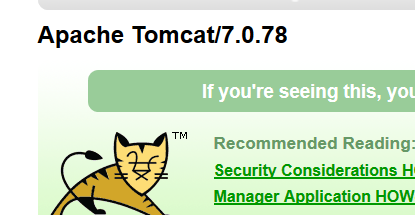
tomcat 版本 7.0.78
jdk版本 1.8
[root@oldboy ~]# java -version
java version "1.8.0_151"
Java(TM) SE Runtime Environment (build 1.8.0_151-b12)
 [root@oldboy tomcat-redis-session-manager]# cat build.gradle

 apply plugin: 'java'

 apply plugin: 'maven'

 apply plugin: 'signing'

 group = 'com.orangefunction'

 version = '2.0.0'

 repositories {

   mavenCentral()

 }

 compileJava {

   sourceCompatibility = 1.8

   targetCompatibility = 1.8

 }

 dependencies {

   compile group: 'org.apache.tomcat', name: 'tomcat-catalina', version: '7.0.78'

   compile group: 'redis.clients', name: 'jedis', version: '2.5.2'

   compile group: 'org.apache.commons', name: 'commons-pool2', version: '2.6.0'

   //compile group: 'commons-codec', name: 'commons-codec', version: '1.9'

   testCompile group: 'junit', name: 'junit', version: '4.+'

   testCompile 'org.hamcrest:hamcrest-core:1.3'

   testCompile 'org.hamcrest:hamcrest-library:1.3'

   testCompile 'org.mockito:mockito-all:1.9.5'

   testCompile group: 'org.apache.tomcat', name: 'tomcat-coyote', version: '7.0.78'

 }

 task javadocJar(type: Jar, dependsOn: javadoc) {

   classifier = 'javadoc'

   from 'build/docs/javadoc'

 }

 task sourcesJar(type: Jar) {

   from sourceSets.main.allSource

   classifier = 'sources'

 }

 artifacts {

   archives jar

   archives javadocJar

   archives sourcesJar

 }

 //signing {

  // sign configurations.archives

 //}

 task copyJars(type: Copy) {

   from configurations.runtime

   into 'dist'

 }

 uploadArchives {

   repositories {

     mavenDeployer {

       beforeDeployment { MavenDeployment deployment -> signing.signPom(deployment) }

      //repository(url: "https://oss.sonatype.org/service/local/staging/deploy/maven2/") {

      //authentication(userName: sonatypeUsername, password: sonatypePassword)

      //}

      //repository(url: "https://oss.sonatype.org/content/repositories/snapshots") {

      //authentication(userName: sonatypeUsername, password: sonatypePassword)

      //}

       pom.project {

         name 'tomcat-redis-session-manager'

         packaging 'jar'

         description 'Tomcat Redis Session Manager is a Tomcat extension to store sessions in Redis'

         url 'https://github.com/jcoleman/tomcat-redis-session-manager'

         issueManagement {

           url 'https://github.com:jcoleman/tomcat-redis-session-manager/issues'

           system 'GitHub Issues'

         }

         scm {

           url 'https://github.com:jcoleman/tomcat-redis-session-manager'

           connection 'scm:git:git://github.com/jcoleman/tomcat-redis-session-manager.git'

           developerConnection 'scm:git:git@github.com:jcoleman/tomcat-redis-session-manager.git'

         }

         licenses {

           license {

             name 'MIT'

             url 'http://opensource.org/licenses/MIT'

             distribution 'repo'

           }

         }

         developers {

           developer {

             id 'jcoleman'

             name 'James Coleman'

             email 'jtc331@gmail.com'

             url 'https://github.com/jcoleman'

           }

         }

       }

     }

   }

 }
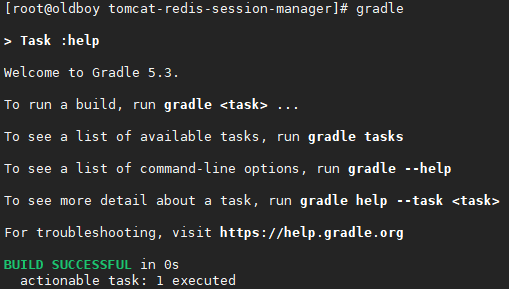
[root@oldboy tomcat-redis-session-manager]# gradle build -x test copyJars

在tomcat-redis-session-manager/build/libs/目录下生成以下几个包

在tomcat-redis-session-manager/dist/下生成以下几个包
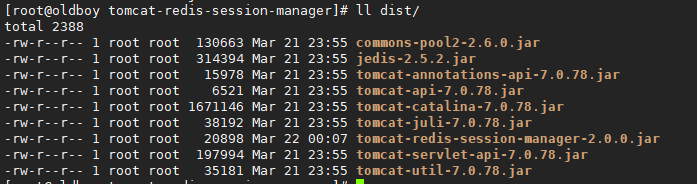
复制3个文件到tomcat/lib目录下
[root@oldboy dist]# cp jedis-2.5.2.jar tomcat-redis-session-manager-2.0.0.jar commons-pool2-2.6.0.jar /usr/local/tomcat/lib/
编写tomcat context.xml文件添加redis信息
[root@oldboy ~]# vim /usr/local/tomcat/conf/context.xml
<?xml version='1.0' encoding='utf-8'?>
<!--
Licensed to the Apache Software Foundation (ASF) under one or more
contributor license agreements. See the NOTICE file distributed with
this work for additional information regarding copyright ownership.
The ASF licenses this file to You under the Apache License, Version 2.0
(the "License"); you may not use this file except in compliance with
the License. You may obtain a copy of the License at
http://www.apache.org/licenses/LICENSE-2.0
Unless required by applicable law or agreed to in writing, software
distributed under the License is distributed on an "AS IS" BASIS,
WITHOUT WARRANTIES OR CONDITIONS OF ANY KIND, either express or implied.
See the License for the specific language governing permissions and
limitations under the License.
-->
<!-- The contents of this file will be loaded for each web application -->
<Context>
<!-- Default set of monitored resources -->
<WatchedResource>WEB-INF/web.xml</WatchedResource>
<!-- Uncomment this to disable session persistence across Tomcat restarts -->
<!--
<Manager pathname="" />
-->
<!-- Uncomment this to enable Comet connection tacking (provides events
on session expiration as well as webapp lifecycle) -->
<!--
<Valve className="org.apache.catalina.valves.CometConnectionManagerValve" />
-->
<Valve className="com.orangefunction.tomcat.redissessions.RedisSessionHandlerValve" />
<Manager className="com.orangefunction.tomcat.redissessions.RedisSessionManager"
host="10.0.0.51"
port="6379"
password='123'
database="0"
maxInactiveInterval="60" />
</Context>
测试结果.随便刷新 seisson不变
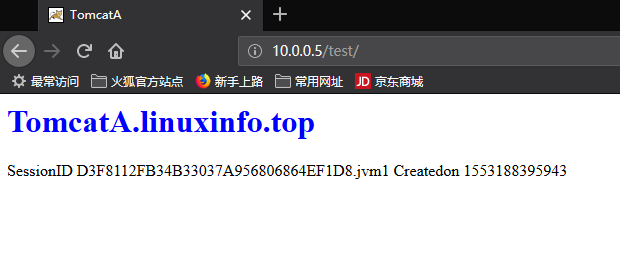
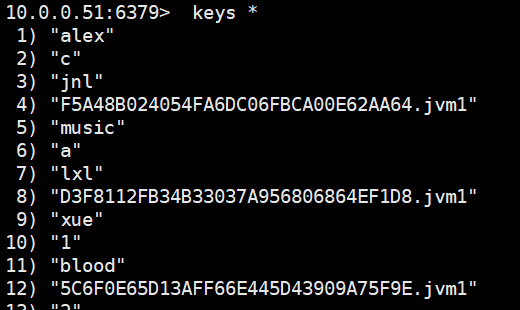
存到redis的session数据
- jdk安装
rpm -ivh jdk-8u151-linux-x64.rpm
如图:
2、tomcat下载、解压
tomcat 下载地址:http://tomcat.apache.org/
tar xf apache-tomcat-7.0.78.tar.gz -C /usr/local/
ln -s apache-tomcat-7.0.78 tomcat
3、配置path环境变量
vi /etc/profile.d/tomcat.sh
export CATALINA_BASE=/usr/local/tomcat
export PATH=$CATALINA_BASE/bin:$PATH
chmod +x /etc/profile.d/tomcat.sh # 赋予可执行权限
source /etc/profile.d/tomcat.sh
4、创建测试网页的发布目录
mkdir /usr/local/tomcat/webapps/test/
[root@oldboy dist]# cat /usr/local/tomcat/webapps/test/index.jsp
<%@ page language="java" %>
<html>
<head><title>TomcatA</title></head>
<body>
<h1><font color="red">TomcatA.linuxinfo.top</font></h1>
<tablealign="centre" border="1">
<tr>
<td>SessionID</td>
<% session.setAttribute("linuxinfo.top","linuxinfo.top");%>
<td><%=session.getId() %></td>
</tr>
<tr>
<td>Createdon</td>
<td><%=session.getCreationTime() %></td>
</tr>
</table>
</body>
</html>
6、分别启动tomcat
catalina.sh start #可也用全路径/usr/local/tomcat/bin/startup.sh
7、访问192.168.2.197,测试如下,查看session ID
1下载五个jar包,将jar包放在/usr/local/tomcat/lib:
mgetjavolution-5.4.3.1.jar
memcached-session-manager-1.8.0jar
memcached-session-manager-tc7-1.8.0.jar
msm-javolution-serializer-1.8.0.jar
spymemcached-1.8.0.jar
- 在contest.xml段定义一个用于测试的context容器,并在其中创建一个会话管理器。
添加如下信息
vim /usr/local/tomcat/conf/context.xml" - <?xml version='1.0' encoding='utf-8'?>
- <!--
- Licensed to the Apache Software Foundation (ASF) under one or more
- contributor license agreements. See the NOTICE file distributed with
- this work for additional information regarding copyright ownership.
- The ASF licenses this file to You under the Apache License, Version 2.0
- (the "License"); you may not use this file except in compliance with
- the License. You may obtain a copy of the License at
- http://www.apache.org/licenses/LICENSE-2.0
- Unless required by applicable law or agreed to in writing, software
- distributed under the License is distributed on an "AS IS" BASIS,
- WITHOUT WARRANTIES OR CONDITIONS OF ANY KIND, either express or implied.
- See the License for the specific language governing permissions and
- limitations under the License.
- -->
- <!-- The contents of this file will be loaded for each web application -->
- <Context>
- <!-- Default set of monitored resources -->
- <WatchedResource>WEB-INF/web.xml</WatchedResource>
- <!-- Uncomment this to disable session persistence across Tomcat restarts -->
- <!--
- <Manager pathname="" />
- -->
- <!-- Uncomment this to enable Comet connection tacking (provides events
- on session expiration as well as webapp lifecycle) -->
- <!--
- <Valve className="org.apache.catalina.valves.CometConnectionManagerValve" />
- -->
- <Manager className="de.javakaffee.web.msm.MemcachedBackupSessionManager"
- memcachedNodes="m1:192.168.2.37:11211,m2:192.168.2.27:11211"
- failoverNodes="m2"
- requestUriIgnorePattern=".*\.(ico|png|gif|jpg|css|js)$"
- transcoderFactoryClass="de.javakaffee.web.msm.serializer.javolution.JavolutionTranscoderFactory"/>
- </Context>
- 重启服务:
catalina.sh stop
catalina.sh start
3、下载memcached,启动服务
yum install memcached -y
systemctl start memcached
tomcat redis session共享的更多相关文章
- nginx tomcat负载均衡 使用redis session共享
环境准备 1.准备一台nginx服务器 ip192.168.1.133 端口81 安装过程: #首先安装依赖: yum -y install gcc-c++ yum -y install pcre p ...
- 配置tomcat的session共享
可通过下面方法限制一个用户访问一个服务器之后就只在该服务器上操作. 请求负载过程中会话信息不能丢失.那么在多个tomcat中session需要共享. 配置tomcat的session共享可以有三种解决 ...
- 高级运维(五):构建memcached服务、LNMP+memcached、使用Tomcat设置Session、Tomcat实现session共享
一.构建memcached服务 目标: 本案例要求先快速搭建好一台memcached服务器,并对memcached进行简单的添.删.改.查操作: 1> 安装memcached软件,并启动服务d ...
- Tomcat 集群 + Redis Session 共享出现 Session 瞬间失效问题
写在前面的话 写这篇博客出于公司最近要迁移到新的云上面且对之前的资源,架构做一个升级. 本来是一个不大的项目,旧环境旧一个 TOMCAT 跑起来,不过出于高可用考虑,新环境决定使用 TOMCAT 集群 ...
- Nginx反向代理,负载均衡,redis session共享,keepalived高可用
相关知识自行搜索,直接上干货... 使用的资源: nginx主服务器一台,nginx备服务器一台,使用keepalived进行宕机切换. tomcat服务器两台,由nginx进行反向代理和负载均衡,此 ...
- (转)tomcat架构&session共享
(二期)16.tomcat的整体架构与session共享方案 [课程16]tomcat...共享.xmind47.6KB [课程16]tomcat...流程.xmind0.6MB [课程16]tomc ...
- Tomcat中session共享问题的简单解决办法
tomcat-redis-session-manager 使用redis配置tomcat共享session 结构图: 分析: 分布式web server集群部署后需要实现session共享,针对 to ...
- Memcached做Tomcat的session共享
基于cache DB缓存的session共享 基于memcache/redis缓存的session共享.即使用cacheDB存取session信息,应用服务器接受新请求将session信息保存在cac ...
- Apache代理Tomcat实现session共享构建网上商城系统
一.环境介绍 二.安装配置后端服务器 三.安装配置前端服务器 四.配置Tomcat服务器实现session共享 五.构建网上商城系统 一.环境介绍 系统版本:CentOS 6.4_x86_64 Mys ...
随机推荐
- Qt开发经验小技巧41-50
如果使用sqlite数据库不想产生数据库文件,可以创建内存数据库. QSqlDatabase db = QSqlDatabase::addDatabase("QSQLITE"); ...
- spring boot 打包引入第三方jar
本文作者:@Ryan Miao 本文链接:https://www.cnblogs.com/woshimrf/p/springboot-package-3rdparty-lib.html 版权声明: 本 ...
- 为什么地址空间分配粒度为64K?Why is address space allocation granularity 64K?
您可能想知道为什么VirtualAlloc在64K边界分配内存,即使页面粒度为4K. 你有Alpha AXP处理器,感谢你. 在Alpha AXP上,没有“加载32位整数”指令.要加载32位整数,实际 ...
- CentOS7 ping: unknown host www.baidu.com
原文链接:https://blog.csdn.net/zz657114506/article/details/53871470
- Android逆向破解:Android Killer使用
目录 目录 软件介绍 Android Killer是一款可以对APK进行反编译的工具,它能够对反编译后的Smali文件进行修改,并将修改后的文件进行打包. 软件下载 这里用的是@昨夜星辰2012 ...
- Dockerfile常用指令说明
具体解释:https://blog.csdn.net/achenyuan/article/details/80231922 将dockerfile文件和生成好的jar 使用ftp工具上传到linux服 ...
- 深入玩转K8S之利用Label控制Pod位置
首先介绍下什么是Label? Label是Kubernetes系列中一个核心概念.是一组绑定到K8s资源对象上的key/value对.同一个对象的labels属性的key必须唯一.label可以附加到 ...
- Overview to “Toon/Cel shading”
转自:https://blog.felixkate.net/2017/01/19/toon-shading/ For the last couple of weeks I often had disc ...
- 实现简单的string类
摘要 实现了一个string类,包括基本的构造.赋值.判断.大小写等. String API Constructors string(); string(const char& ch); st ...
- 在ensp中的acl控制
原理 实验模拟 实验拓扑 相关参数 我们在每一台路由器上设置ospf服务,使其互相能通 下面我们配置基本ACL控制访问 配置完成后,尝试在R1上建立telent连接 但是这样设置是不安全的,只要是直连 ...