
Qt 组合框QComboBox的定制
转载:https://www.cnblogs.com/csuftzzk/p/qss_combobox.html
转载:https://www.bbsmax.com/A/E35pLgRK5v/
转载:https://www.cnblogs.com/peterliang/p/3618820.html(QSplitter 拆分窗口)
转载:http://blog.sina.com.cn/s/blog_a6fb6cc90101i8it.html
Demo参考网上的例子,暂时记录下来,随后再整理
1.自定义combobox中的item控件
#include <QWidget>

#include <QLabel>

class ComboboxItem : public QWidget

{

    Q_OBJECT

public:

    ComboboxItem(QWidget *parent);

    ~ComboboxItem();

    void setLabelContent(const QString & str);

signals:

    void chooseAccount(const QString&);

private:

    QLabel* m_img;

    QLabel* m_label;

};
#include "ComboboxItem.h"

#include <QHBoxLayout>

ComboboxItem::ComboboxItem(QWidget *parent)

    : QWidget(parent)

{

    m_img = new QLabel(this);

    m_label = new QLabel(this);

    m_img->setStyleSheet("QLabel{background: rgb(255, 0, 0)}");

    m_img->setFixedSize(, );

    QHBoxLayout* layout = new QHBoxLayout(this);

    layout->addWidget(m_img);

    layout->addWidget(m_label);

    layout->setContentsMargins(, , , );

    setLayout(layout);

}

ComboboxItem::~ComboboxItem()

{

}

void ComboboxItem::setLabelContent(const QString & str)

{

    m_label->setText(str);

}
2.自定义代理
#include <QStyledItemDelegate>

class NoFocusFrameDelegate :public QStyledItemDelegate

{

    Q_OBJECT

public:

    NoFocusFrameDelegate(QObject* parent = );

    ~NoFocusFrameDelegate();

    virtual void paint(QPainter *painter, const QStyleOptionViewItem &option, const QModelIndex &index) const;

};
#include "NoFocusFrameDelegate.h"

NoFocusFrameDelegate::NoFocusFrameDelegate(QObject* parent /*= 0*/)

{

}

NoFocusFrameDelegate::~NoFocusFrameDelegate()

{

}

void NoFocusFrameDelegate::paint(QPainter *painter, const QStyleOptionViewItem &option, const QModelIndex &index) const

{

    QStyleOptionViewItem  view_option(option);

    if (view_option.state & QStyle::State_HasFocus) {

        view_option.state = view_option.state ^ QStyle::State_HasFocus;

    }

    QStyledItemDelegate::paint(painter, view_option, index);

}
3.主窗口中使用
#include <QtWidgets/QMainWindow>

#include "ui_QMyCombobox.h"

class QListWidget;

class QMyCombobox : public QMainWindow

{

    Q_OBJECT

public:

    QMyCombobox(QWidget *parent = Q_NULLPTR);

public slots:

   void onChooseAccount(const QString& str);

private:

    Ui::QMyComboboxClass ui;

    QListWidget* m_listWidget;

};
#include "QMyCombobox.h"

#include <QListWidget>

#include "NoFocusFrameDelegate.h"

#include "ComboboxItem.h"

QMyCombobox::QMyCombobox(QWidget *parent)

    : QMainWindow(parent)

{

    ui.setupUi(this);

    m_listWidget = new QListWidget(this);

    // 设置子项目代理,否则下拉框选项周围会出现虚线框

    m_listWidget->setItemDelegate(new NoFocusFrameDelegate(this));

    ui.comboBox->setEditable(true);

    ui.comboBox->setModel(m_listWidget->model());

    ui.comboBox->setView(m_listWidget);

    // 在下拉框中添加5个选项

    for (int i = ; i < ; ++i)

    {

        ComboboxItem* item = new ComboboxItem(this);

        item->setLabelContent(QString("Account") + QString::number(i, ));

        connect(item, SIGNAL(chooseAccount(const QString&)), this, SLOT(onChooseAccount(const QString&)));

        QListWidgetItem* widgetItem = new QListWidgetItem(m_listWidget);

        m_listWidget->setItemWidget(widgetItem, item);

    }

}

void QMyCombobox::onChooseAccount(const QString& str)

{

    ui.comboBox->setCurrentText(str);

}
最后效果: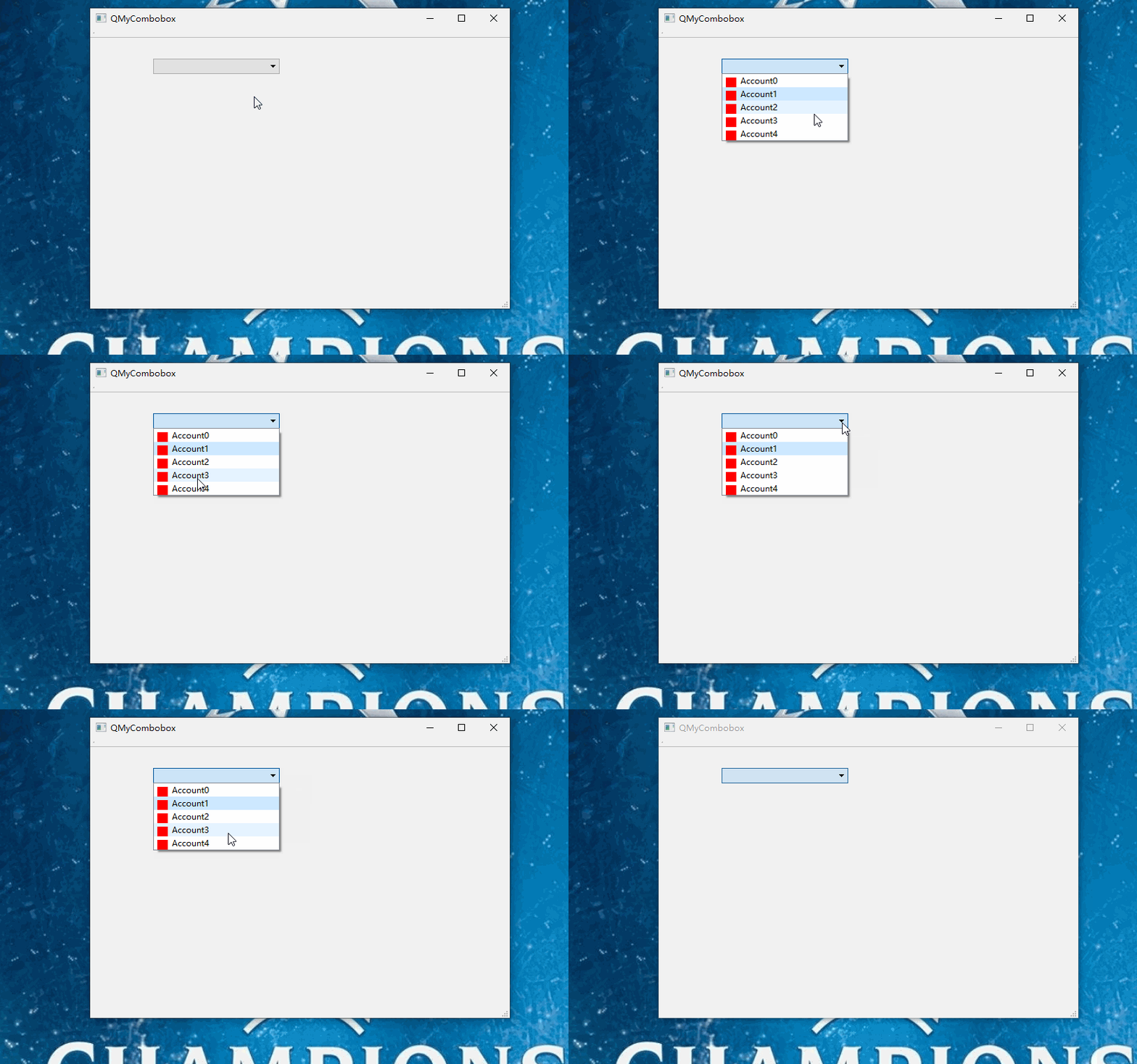
Qt 组合框QComboBox的定制的更多相关文章
- Qt Style Sheet实践(二):组合框QComboBox的定制
导读 组合框是一个重要且应用广泛的组件,一般由两个子组件组成:文本下拉单部分和按钮部分.在许多既需要用户选择.又需要用户手动输入的应用场景下,组合框能够很好的满足我们的需求.如我们经常使用的聊天软件Q ...
- Qt Style Sheet实践(二):组合框QComboBox的定制(24K纯开源)——非常漂亮
组合框是一个重要且应用广泛的组件,一般由两个子组件组成:文本下拉单部分和按钮部分.在许多既需要用户选择.又需要用户手动输入的应用场景下,组合框能够很好的满足我们的需求.如我们经常使用的聊天软件QQ登录 ...
- 第15.41节、PyQt(Python+Qt)入门学习:输入部件QComboBox组合框功能详解
专栏:Python基础教程目录 专栏:使用PyQt开发图形界面Python应用 专栏:PyQt入门学习 老猿Python博文目录 一.概述 Designer中输入工具部件中的Combo Box组合框与 ...
- 组合框里添加复选框的方法(使用勾选的假象,用图片代替而已,并非QT原生支持)
组合框可以看作是列表框和文本框的组合,因其占据的空间少,使用操作方便,常被界面设计人员用于界面开发设计中,在有限个输入的条件下,组合框常用来代替文本框,这样从用户使用角度来看,更趋人性化,所见即所得. ...
- 第三十四章、PyQt中的输入部件:QComboBox组合框功能详解
专栏:Python基础教程目录 专栏:使用PyQt开发图形界面Python应用 专栏:PyQt入门学习 老猿Python博文目录 一.概述 Designer中输入工具部件中的Combo Box组合框与 ...
- PyQt(Python+Qt)学习随笔:字体writingSystem、ProportionalFonts、MonospacedFonts的含义以及QFontComboBox字体组合框详解
专栏:Python基础教程目录 专栏:使用PyQt开发图形界面Python应用 专栏:PyQt入门学习 老猿Python博文目录 一.引言 在介绍QFontComboBox之前,我们先简单介绍一下字体 ...
- Qt自定义控件之可伸缩组合框(GroupBox)控件
摘要 本文基于QGroupBox扩展了一种可以伸缩的组合框,正常状态下,组合框处于收缩状态,内部的控件是隐藏的:需要的时候,可以将组合框进行伸展,并将内部控件显示出来. 正文 实现的代码比较简单,主要 ...
- 组合框QGroupBox
样式: 注意:内部必须使用布局控件 import sys from PyQt5.QtCore import Qt from PyQt5.QtGui import QPixmap from PyQt5. ...
- combox组合框设置高度
组合框设置高度 转载 2013年10月24日 22:54:03 1033 MFC进行界面编程时,组合框CComboBox控件在可视化设计组件的时候是无法进行高度编辑的,但是我们在实际的项目中经常需要定 ...
随机推荐
- 连接mysql报"ERROR 1130: Host xxx.xxx.xxx.xxx is not allowed to connect to this MySQL server"
最近在服务器上部署好的应用突然间连接不上mysql数据库,报错“ERROR 1130: Host xxx.xxx.xxx.xxx is not allowed to connect to this M ...
- 微信小程序获取用户手机号 记录 (PHP)
1. 用户登录时需要获取 openid ,同时可以获取 session_key, 二者同时返回, 此时我们要将二者存储在服务端. 2. 小程序端 button 按钮拉起授权, 向api 传递 iv 和 ...
- c#: 剪切板监视实现
CR TubeGet中有用户需要剪切板监视功能,记录代码以做备忘: using System; using System.Runtime.InteropServices; using System.W ...
- xtrabackup 使用
创建具有完全备份所需的最小权限的数据库用户的SQL示例如下 mysql> CREATE USER 'bkpuser'@'%' IDENTIFIED BY 's3cret';mysql> G ...
- php72w-common conflicts with php-common-5.4.16-46.el7.x86_64
安装PHP的BC扩展时,报的错. 使用的命令为 yum install php-bcmath 输出错误: --> Processing Conflict: php72w-common--.w7. ...
- Android中UID和PID的作用和区别
PID:为Process Identifier, PID就是各进程的身份标识,程序一运行系统就会自动分配给进程一个独一无二的PID.进程中止后PID被系统回收,可能会被继续分配给新运行的程序,但是在a ...
- ROS 的一些常用命令行功能
1.安装并添加源sudo gedit /etc/apt/sources.list更新下sudo apt-get update添加 sources.list,如sudo sh -c '. /etc/ls ...
- abp记录1
1在AbpWebApplication中的的构造函数中创建abpBootstrapper 实例,在Application_Start执行AbpBootstrapper值初始化方式 2AbpBootst ...
- python基础语法8 叠加装饰器,有参装饰器,wraps补充,迭代器
叠加装饰器: 叠加装饰器 - 每一个新的功能都应该写一个新的装饰器 - 否则会导致,代码冗余,结构不清晰,可扩展性差 在同一个被装饰对象中,添加多个装饰器,并执行. @装饰1 @装饰2 @装饰3 de ...
- Mac 上 brew 安装Tomcat
首先保证brew命令能够正常使用: 搜索tomcat是否存在:brew search tomcat 安装tomcat:brew install tomcat 检查是否安装成功:catalina -h ...