
Gin-Go学习笔记五:Gin-Web框架 文件的操作
文件的操作
1> 文件的创建,删除,写入内容,读取内容.(此实例使用的是text文件)
2> Gin 并没有提供文件的创建,删除,读写这个操作的专门的接口,所以采用的是常用的ioutil这个包进行文件的读写操作,使用os这个包进行文件的创建和删除
3> 在controller下面新建一个fileopt.go,作为实现文件操作的业务逻辑部分.具体代码如下:
package controllers

import (

	"io/ioutil"

	"fmt"

	"os"

	"github.com/gin-gonic/gin"

	"net/http"

)

/**文件读写创建删除操作页面**/

func Filerwhtml(c *gin.Context){

	c.HTML(http.StatusOK, "filerw.html", gin.H{

		"title": "GIN: 文件读写创建删除操作布局页面",

	})

}

/**创建文件**/

func FilerCreate(c *gin.Context){

	iscreate:=true    //创建文件是否成功

	//创建文件

	f, err:= os.Create("static/txtfile/log.text")

	if err!=nil{

		iscreate=false

	}

	defer f.Close()

	fmt.Println(f)

	//返回结果

	c.JSON(http.StatusOK, gin.H{

		"path":"static/txtfile/log.text",

		"success":iscreate,

	})

}

/**将内容写入文件**/

func FilerWrite(c *gin.Context){

	iswrite:=true                 //写入文件是否成功

	//需要写入到文件的内容

	info:=c.PostForm("info")

	path:=c.PostForm("path")

	d1 := []byte(info)

	err := ioutil.WriteFile(path, d1, 0644)

    if err!=nil{

		iswrite=false

	}

	//返回结果

	c.JSON(http.StatusOK, gin.H{

		"success":iswrite,

		"info":info,

	})

}

/**读取文件内容**/

func FilerRead(c *gin.Context){

	 isread:=true                 //读取文件是否成功

	 path:=c.PostForm("path")

	 //文件读取任务是将文件内容读取到内存中。

	 info, err := ioutil.ReadFile(path)

	 if err!=nil{

		 fmt.Println(err)

		 isread=false

	 }

	 fmt.Println(info)

	 result:=string(info)

	//返回结果

	c.JSON(http.StatusOK, gin.H{

		"content":result,

		"success":isread,

	})

}

/**删除文件**/

func FilerDelete(c *gin.Context){

	isremove:=false                      //删除文件是否成功

	path :=c.PostForm("path")    //源文件路径

	//删除文件

	cuowu := os.Remove(path)

    if cuowu != nil {

        //如果删除失败则输出 file remove Error!

        fmt.Println("file remove Error!")

        //输出错误详细信息

        fmt.Printf("%s", cuowu)

    } else {

        //如果删除成功则输出 file remove OK!

		fmt.Print("file remove OK!")

		isremove=true

    }

	//返回结果

	c.JSON(http.StatusOK, gin.H{

		"success":isremove,

	})

}
4> 在views下面新建一个fileopt.html作为页面展示效果
<!DOCTYPE html>


<html>

  <head>

    <title>{{.title}}</title>

    <link rel="shortcut icon" href="/static/img/favicon.png" />

    <link rel="stylesheet" href="/static/bootstrap/css/bootstrap.css"/>

    <script type="text/javascript" src="/static/js/jquery-2.1.1.min.js"></script>

    <script type="text/javascript" src="/static/bootstrap/js/bootstrap.min.js"></script>

  </head>

  <body>

    <div class="container">

      <!--创建text文件-->

      <div style="width:100%;height:50px;">

        <button onclick="createtxt()" class="btn btn-primary">创建text文件</button>

        <label id="txtname"></label>

     </div>

      <!--写入文件-->

      <div style="width:100%;height:300px;margin-top:20px;">

          <label>输入内容:</label>

          <textarea id="writeinfo" style="width:50%;height:200px;" class="form-control"></textarea>

          <button value="写入内容" onclick="txtwrite()" class="btn btn-primary" style="margin-top:20px;">写入内容</button>

      </div>

      <!--读取文件内容部分-->

      <div style="width:100%;height:300px;">

          <button value="读取内容" onclick="txtread()" class="btn btn-primary" style="margin-bottom:20px;">读取内容</button>

          <textarea id="readinfo" style="width:50%;height:200px;" class="form-control" ></textarea>

      </div>

      <button onclick="deletetxt()" class="btn btn-primary">删除text文件</button>

       </div>

        <!--JS部分-->

        <script type="text/javascript">

          //创建text文件

          function createtxt(){

            $.ajax({

               type:'post',

               url:'/home/addfile',

               data:{},

               success:function(result){

                   console.log('创建的结果')

                   console.log(result)

                   if(result.success){

                     $("#txtname").html(result.path);

                   }else{

                     $("#txtname").html("新增失败");

                   }

               }

            })

          }

          //写入文件的内容

          function txtwrite(){

            $.ajax({

               type:'post',

               url:'/home/writefile',

               data:{

                   "info":$("#writeinfo").val(),

                   "path":$("#txtname").html()

               },

               success:function(result){

                   console.log('写入的结果')

                   console.log(result)

                   if(result.success){

                      alert("写入成功")

                      $("#showinfo").html(result.info);

                   }else{

                     alert("写入内容失败");

                   }

               }

            })

          }

          //读取文件的内容

          function txtread(){

            $.ajax({

               type:'post',

               url:'/home/readfile',

               data:{

                "path":$("#txtname").html()

               },

               success:function(result){

                  console.log('读取的结果')

                  console.log(result)

                  if(result.success){

                    $("#readinfo").html(result.content);

                  }else{

                    alert("读取内容失败");

                  }

               }

            })

          }

           //删除text文件

           function deletetxt(){

            $.ajax({

               type:'post',

               url:'/home/deletefile',

               data:{

                "path":$("#txtname").html()

               },

               success:function(result){

                   console.log('删除的结果')

                   console.log(result)

                   if(result.success){

                      $("#txtname").html('');

                      alert("删除成功");

                   }else{

                      alert("删除失败");

                   }

               }

            })

          }

        </script>

    </body>

</html>
5> 在router.go路由器中添加文件操作的路由
package routers

import (

  "github.com/gin-gonic/gin"

  . "GinLearn/GinLearn/apis" //api部分

  . "GinLearn/GinLearn/controllers" //constroller部分

 )

func InitRouter() *gin.Engine{

  router := gin.Default()

  //Hello World

  router.GET("/", IndexApi)

  //渲染html页面

  router.LoadHTMLGlob("views/*")

  router.GET("/home/index", ShowHtmlPage)

  //列表页面

  router.GET("/home/list", ListHtml)

  router.POST("/home/PageData", GetDataList)

  router.POST("/home/PageNextData", PageNextData)

  //新增页面

  router.GET("/home/add", AddHtml)

  router.POST("/home/saveadd", AddPersonApi)

   //编辑页面

   router.GET("/home/edit", EditHtml)

   router.POST("/home/saveedit", EditPersonApi)

    //删除

    router.POST("/home/delete", DeletePersonApi)

    //Bootstrap布局页面

    router.GET("/home/bootstrap", Bootstraphtml)

    //文件的上传和下载

    router.GET("/home/fileopt", Fileopthtml)

    router.POST("/home/fileuplaod", Fileupload)

    router.GET("/home/filedown", Filedown)

    //文件的创建删除和读写

    router.GET("/home/filerw", Filerwhtml)

    router.POST("/home/addfile", FilerCreate)//创建文件

    router.POST("/home/writefile", FilerWrite)//写入文件

    router.POST("/home/readfile", FilerRead)//读取文件

    router.POST("/home/deletefile", FilerDelete)//删除文件

    return router

 }
6> 使用到的项目结构如下:
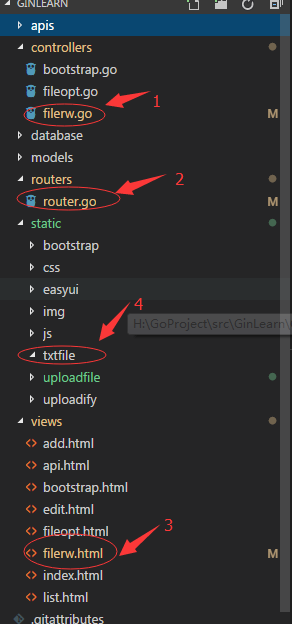
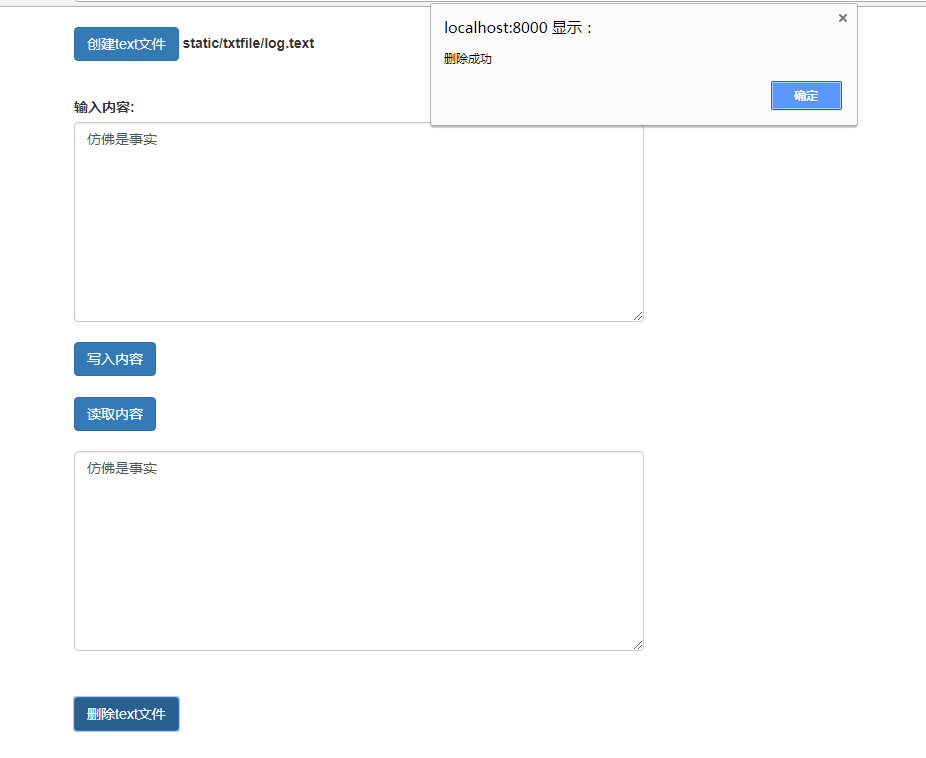
7> 编译运行代码,测试执行的效果如下
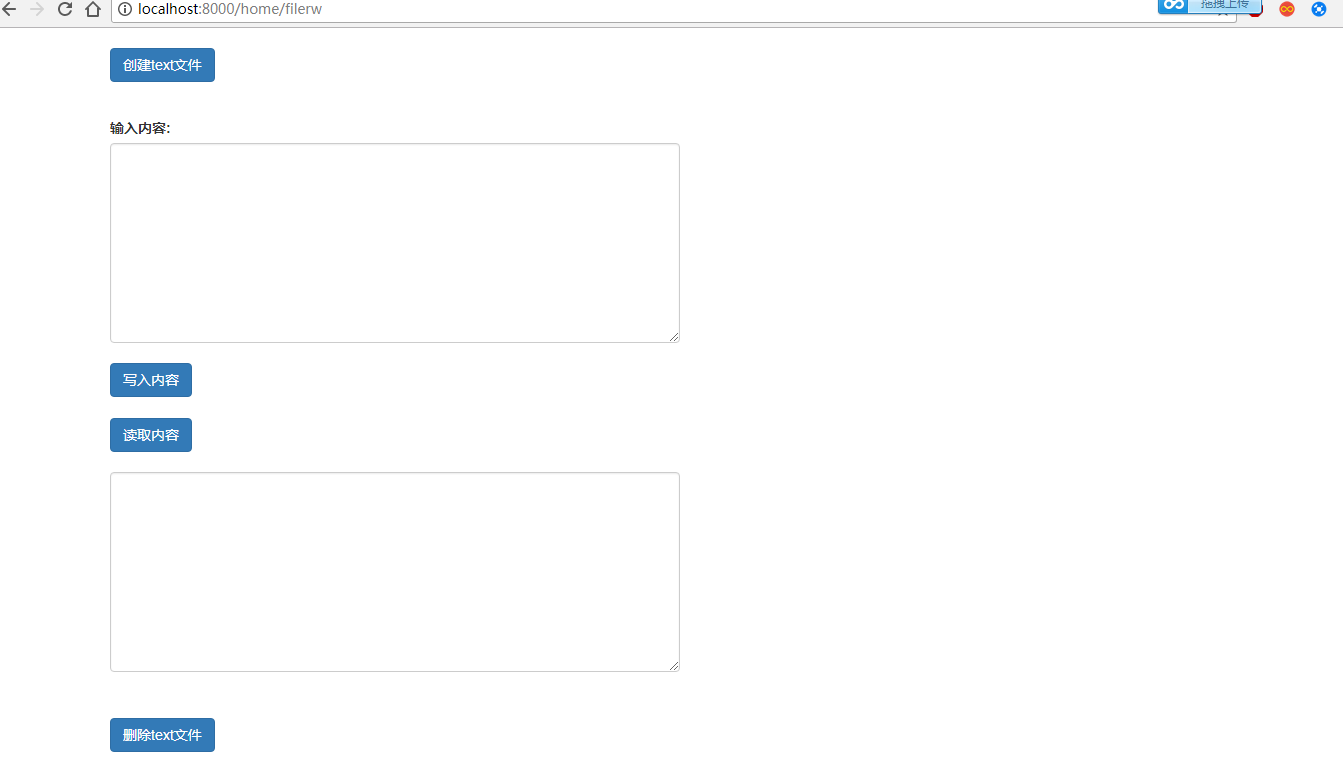

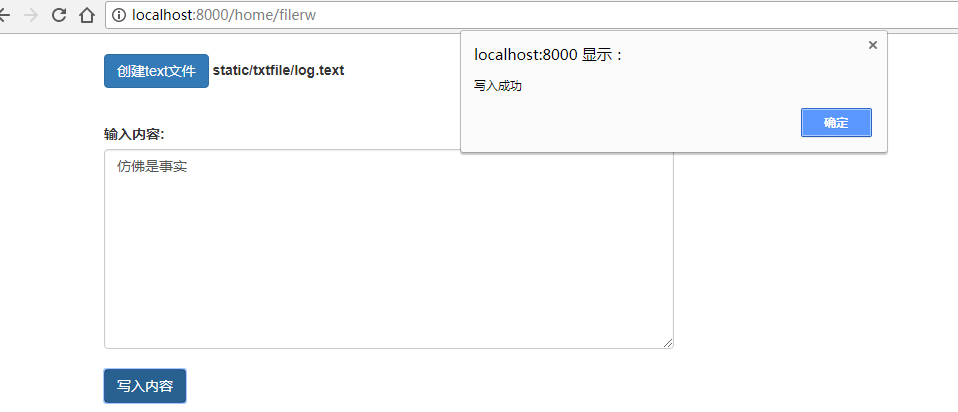
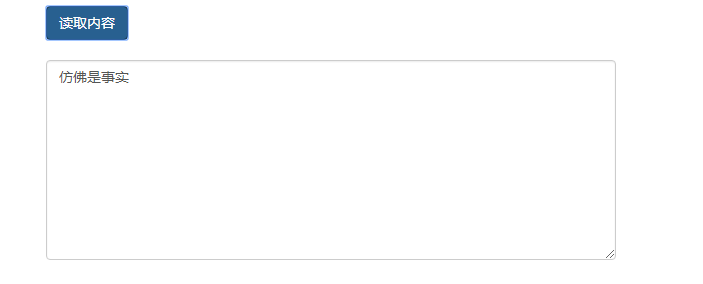
8> 下一章讲Api接口的编写
Gin-Go学习笔记五:Gin-Web框架 文件的操作的更多相关文章
- tornado 学习笔记9 Tornado web 框架---模板(template)功能分析
Tornado模板系统是将模板编译成Python代码. 最基本的使用方式: t = template.Template("<html>{{ myv ...
- Gin-Go学习笔记四:Gin-Web框架 文件的上传下载
文件的上传和下载 1->文件的上传 文件的上传,采用的是uploadify.js这个插件. 本事例实现的是上传图片文件,其他的文件上传也一样. 2->文件的下载 文件的下载有两个实现的方式 ...
- Python学习笔记五(读取提取写入文件)
#Python打开读取一个文件内容,然后写入一个新的文件中,并对某些字段进行提取,写入新的字段的脚本,与大家共同学习. import os import re def get_filelist(dir ...
- CodeIgniter学习笔记五:分页,文件上传,session,验证码
一.分页 示例代码: //装载类文件 $this -> load -> library('pagination'); $controller = $this->router-> ...
- Spring实战第五章学习笔记————构建Spring Web应用程序
Spring实战第五章学习笔记----构建Spring Web应用程序 Spring MVC基于模型-视图-控制器(Model-View-Controller)模式实现,它能够构建像Spring框架那 ...
- go微服务框架kratos学习笔记五(kratos 配置中心 paladin config sdk [断剑重铸之日,骑士归来之时])
目录 go微服务框架kratos学习笔记五(kratos 配置中心 paladin config sdk [断剑重铸之日,骑士归来之时]) 静态配置 flag注入 在线热加载配置 远程配置中心 go微 ...
- Spring实战第八章学习笔记————使用Spring Web Flow
Spring实战第八章学习笔记----使用Spring Web Flow Spring Web Flow是一个Web框架,它适用于元素按规定流程运行的程序. 其实我们可以使用任何WEB框架写流程化的应 ...
- Go语言笔记[实现一个Web框架实战]——EzWeb框架(一)
Go语言笔记[实现一个Web框架实战]--EzWeb框架(一) 一.Golang中的net/http标准库如何处理一个请求 func main() { http.HandleFunc("/& ...
- ASP.NET MVC Web API 学习笔记---第一个Web API程序
http://www.cnblogs.com/qingyuan/archive/2012/10/12/2720824.html GetListAll /api/Contact GetListBySex ...
随机推荐
- C语言之整除
除法运算符:/ 当除数和被除数都整形时,就是整除. 当浮点数和整数放到一起运算时,C语言会将整数转换成浮点数,然后进行浮点数的运算. #include<stdio.h> int main( ...
- appium 基础:常用api接口(2)
一.获取手机分辨率 size=driver.get_window_size()#获取手机屏幕大小,分辨率 print(size)#{'width': 720, 'height': 1280} 得到的是 ...
- 代码审计-sha()函数比较绕过
<?php $flag = "flag"; if (isset($_GET['name']) and isset($_GET['password'])) { var_dump ...
- 基于 webdriver 的测试代码日常调试方python 篇
看到论坛有人写了JAVA的测试代码日常设计,就给大家分享一下偶自己平时是如何测试测试代码的.主要基于python语言.基于 webdriver 的日常调试在 python交互模式下非常方便,打开pyt ...
- JDOJ 2254 Who am I?
JDOJ 2254: Who am I? Description 输出程序自己本身的源代码. Input 无 Output 输出程序自己本身的源代码. 我真是搞不懂了出这道题还把它归到程序语法基础题里 ...
- 启动hadoop后jps没有namenode,并且启动报错9000
启动hadoop报错: 解决方法: 我发现没有9000端口被占用,也不知道9000到哪去了,但是也没有NameNode,于是,直接把NameNode格式化了,再重启HDFS即可. 格式化命令:
- JAVA基础概念(三)
JAVA方法入参和返回类型 方法入参 基础数据类型 引用数据类型 修饰符 返回类型 方法名(参数类型 参数名,参数类型 参数名...){//方法体return} 方法返回类型 return xxx 具 ...
- 【day03】Xhtml
一.HTML公共属性 1. title 提示 2. class 3. id 4. style 说明:除了 html,head,body,link,meta外其他标记都可使用的属性 二.表单 1 ...
- cf1208G Polygons 欧拉函数
链接 cf 给你两个正整数\(n\)和\(k\),询问在一个圆上你最少需要几个点构才能造出\(k\)个边数小于等于\(n\)的正多边形 思路 深受迫害,所以写的详细一点,不会请留言. 性质1 考虑加进 ...
- 洛谷p3385【模板】负环
最近很久没怎么写最短路的题导致这个题交了好多遍 AC率是怎么下来的自己心里没点数 SPFA虽然臭名昭著但是他可以用来判负环 如果一个点进队的次数大于等于n说明存在负环 这道题一开始memset我给di ...