
tomcat Invalid character found in the request target. The valid characters are defined in RFC 7230 and RFC 3986
1.情景展示
tomcat 日志时不时会报出如下异常信息,到底是怎么回事?
java.lang.IllegalArgumentException: Invalid character found in the request target. The valid characters are defined in RFC 7230 and RFC 3986

	at org.apache.coyote.http11.AbstractNioInputBuffer.parseRequestLine(AbstractNioInputBuffer.java:283)

	at org.apache.coyote.http11.AbstractHttp11Processor.process(AbstractHttp11Processor.java:1017)

	at org.apache.coyote.AbstractProtocol$AbstractConnectionHandler.process(AbstractProtocol.java:684)

	at org.apache.tomcat.util.net.NioEndpoint$SocketProcessor.doRun(NioEndpoint.java:1520)

	at org.apache.tomcat.util.net.NioEndpoint$SocketProcessor.run(NioEndpoint.java:1476)

	at java.util.concurrent.ThreadPoolExecutor.runWorker(ThreadPoolExecutor.java:1142)

	at java.util.concurrent.ThreadPoolExecutor$Worker.run(ThreadPoolExecutor.java:617)

	at org.apache.tomcat.util.threads.TaskThread$WrappingRunnable.run(TaskThread.java:61)

	at java.lang.Thread.run(Thread.java:745)
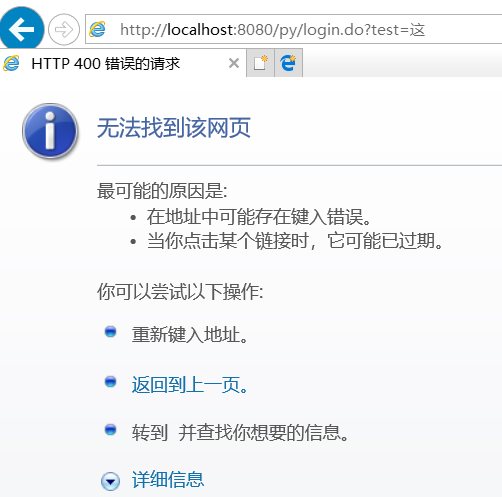
页面无法打开
2.原因分析
意思是:请求头中包含了 RFC 7230 and RFC 3986规范中定义的非法字符,在这种情况下就会导致页面报400异常。
原因就是:tomcat的版本过高造成的,网上说,tomcat高于 7.0.73的版本,添加了对于http头(请求头)的验证。
get请求,即问号传参,就是只有请求头,没有请求体
RFC3986文档规定,Url中只允许包含英文字母(a-zA-Z)、数字(0-9)、-_.~4个特殊字符以及所有保留字符。
RFC3986中指定了以下字符为保留字符:! * ’ ( ) ; : @ & = + $ , / ? # [ ]
同时RFC 3986规范在tomcat7.0.73版本中就已经提出了,RFC 7230也是对前者的一些补充或者说是完善,所以在tomcat7.0.73及以上版本都会有这种问题。
说明:这种情况,只在IE浏览器下会出现,因为IE浏览器不会对中文参数进行编码,而其它类型的浏览器会默认自动对中文进行编码。
3.解决方案
方法一:降低tomcat版本;
经过测试发现,网上关于tomcat的最高版本要求描述有误,不是低于7.0.73就可以。
我下载了一个tomcat7.0.70,运行项目后,还是会字符集的错误,导致网页无法打开。
但是,我测了tomcat7.0.61,完美正常运行项目,控制台不再报错,网页可以正常打开了。
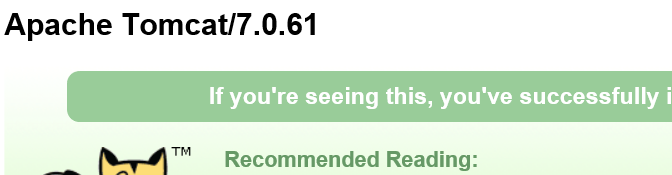
64位下载地址:https://archive.apache.org/dist/tomcat/tomcat-7/v7.0.61/bin/apache-tomcat-7.0.61-windows-x64.zip
32位下载地址:https://archive.apache.org/dist/tomcat/tomcat-7/v7.0.61/bin/apache-tomcat-7.0.61-windows-x86.zip
方法二:将get请求改为post请求;(推荐使用)
方法三:get请求(问号传参)
使用URIEncoder()函数,将中文进行编码
tomcat Invalid character found in the request target. The valid characters are defined in RFC 7230 and RFC 3986的更多相关文章
- Tomcat v7.0 java.lang.IllegalArgumentException: Invalid character found in the request target. The valid characters are defined in RFC 7230 and RFC 3986
十二月 , :: 下午 org.apache.coyote.http11.AbstractHttp11Processor process 信息: Error parsing HTTP request ...
- Tomcat报错Invalid character found in the request target. The valid characters are defined in RFC 7230 and RFC 3986
问题描述:后台报错 Note: further occurrences of HTTP header parsing errors will be logged at DEBUG level.java ...
- Tomcat 8 Invalid character found in the request target. The valid characters are defined in RFC 3986
终极解决方案: Invalid character found in the request target. The valid characters are defined in RFC 3986 ...
- Invalid character found in the request target. The valid characters are defined in RFC 7230 and RFC
解决Invalid character found in the request target. The valid characters are defined in RFC 7230 and RF ...
- 解决springboot项目请求出现非法字符问题 java.lang.IllegalArgumentException:Invalid character found in the request target. The valid characters are defined in RFC 7230 and RFC 3986
springboot版本: 2.1.5 最近使用springboot搭建了一个App后台服务的项目,开发接口的时候在本机使用postman工具做请求测试,请求返回一直很正常,但是在前端开发使用h5请求 ...
- 异常:Invalid character found in the request target. The valid characters are defined in RFC 3986
一.背景 事情是这样的,前几天做一个基本的数据库“增删改查”的需求,前端传参的方式是“JSON字符串”,后端接收到此参数后,使用阿里巴巴fastjson进行解析,然后入库.需求很简单吧,但是偏偏遇到问 ...
- 已解决:Invalid character found in the request target. The valid characters are defined in RFC 7230 and RFC 3986 问题
请求: http://127.0.0.1:8080/driverApp/findLikeAddress?json={"shopname":"广东省"," ...
- IE浏览器连接WebSocket报错:java.lang.IllegalArgumentException: Invalid character found in the request target. The valid characters are defined in RFC 7230 and RFC 3986
在项目开发中整合了WebSocket,本来没什么问题了,但是偶尔发现用IE浏览器打开web端不能推送消息,因为PC端与服务器建立连接失败了.网上查了很多资料, 又看了看源码,都不对症:又怀疑是Spri ...
- IE浏览器报400错误:Invalid character found in the request target. The valid characters are defined in RFC 7230 and RFC 3986
前言: 在用IE浏览器时访问tomcat项目时,页面报400错误,后台错误: java.lang.IllegalArgumentException: Invalid character found i ...
随机推荐
- sql server删除重复记录只保留一条
今天遇到一个历史导入数据重复的问题,于是要删除重复的记录,一开始想用子查询的方式找到要删除记录的id删除,后来发现DELETE语句可以直接用外连接,这样更加简单,效率也更高. delete sys_p ...
- 解决SpringBoot无法读取js/css静态资源的新方法
前言 作为依赖使用的SpringBoot工程很容易出现自身静态资源被主工程忽略的情况.但是作为依赖而存在的Controller方法却不会失效,我们知道,Spring MVC对于静态资源的处理也不外乎是 ...
- ListView 实现进度条显示
代码参考互联网,本人在Win10 + Delphi 10.3.2 社区版中测试通过,现将测试通过的代码分享如下: unit Unit1; interface uses Winapi.Windows, ...
- Java 8——Base64工具
在java 8之前如果需要使用base64编解码,必须使用三方库,如:apache的commons-codec. 但是java 8将base64编解码的工具引入进来: public class Tes ...
- 2019-11-29-WPF-依赖属性绑定不上调试方法
原文:2019-11-29-WPF-依赖属性绑定不上调试方法 title author date CreateTime categories WPF 依赖属性绑定不上调试方法 lindexi 2019 ...
- css3贝塞尔曲线过渡动画速率——transition-timing-function:cubic-bezier(n,n,n,n)
css3过渡动画速率用到的是三阶贝塞尔曲线,曲线有四个点,p0,p1,p2,p3 有几个属性: linear 规定以相同速度开始至结束的过渡效果(等于 cubic-bezier(0,0,1,1)). ...
- 我是如何一步步编码完成万仓网ERP系统的(十四)库存 3.库存日志
https://www.cnblogs.com/smh188/p/11533668.html(我是如何一步步编码完成万仓网ERP系统的(一)系统架构) https://www.cnblogs.com/ ...
- Mybatis连接MySQL时,可以使用的JDBC连接字符串参数
一.举例 spring.datasource.url=jdbc:mysql://127.0.0.1:3306/test_db?useAffectedRows=true&allowMultiQu ...
- 华为手机usb调试打开后自动关闭怎么办?华为手机 usb调试为什么自动关闭?usb调试老是自动关闭怎么回事?
01 解决方法一依次点击“设置”——“系统”——“开发人员选项”先开启“开发者选项”开关. 02 然后在开启“USB调试”开关后,一并将“'仅充电'模式下允许ADB调试”选项开关打开.这样,华为手机u ...
- 配置WDA程序到NWBC
NWBC是通过角色来做的权限管理,包括菜单项. 如果用户没有分配对应的,登陆后看到的东西很少,或者空白. 这里需要先将BC的个性化参数全部配齐,方便使用.BC最左上角,点击,设置,个性化设置. 如下几 ...