
tomcat Invalid character found in the request target. The valid characters are defined in RFC 7230 and RFC 3986
1.情景展示
tomcat 日志时不时会报出如下异常信息,到底是怎么回事?
java.lang.IllegalArgumentException: Invalid character found in the request target. The valid characters are defined in RFC 7230 and RFC 3986

	at org.apache.coyote.http11.AbstractNioInputBuffer.parseRequestLine(AbstractNioInputBuffer.java:283)

	at org.apache.coyote.http11.AbstractHttp11Processor.process(AbstractHttp11Processor.java:1017)

	at org.apache.coyote.AbstractProtocol$AbstractConnectionHandler.process(AbstractProtocol.java:684)

	at org.apache.tomcat.util.net.NioEndpoint$SocketProcessor.doRun(NioEndpoint.java:1520)

	at org.apache.tomcat.util.net.NioEndpoint$SocketProcessor.run(NioEndpoint.java:1476)

	at java.util.concurrent.ThreadPoolExecutor.runWorker(ThreadPoolExecutor.java:1142)

	at java.util.concurrent.ThreadPoolExecutor$Worker.run(ThreadPoolExecutor.java:617)

	at org.apache.tomcat.util.threads.TaskThread$WrappingRunnable.run(TaskThread.java:61)

	at java.lang.Thread.run(Thread.java:745)
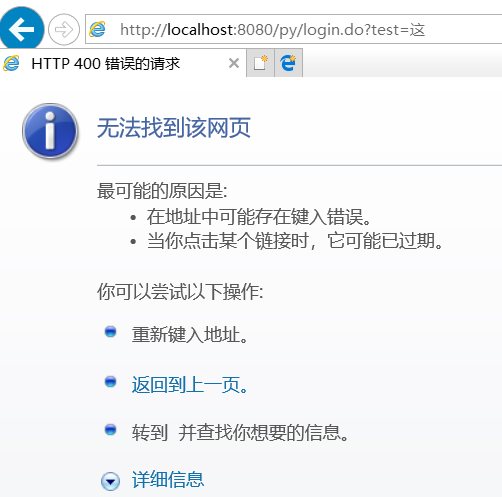
页面无法打开
2.原因分析
意思是:请求头中包含了 RFC 7230 and RFC 3986规范中定义的非法字符,在这种情况下就会导致页面报400异常。
原因就是:tomcat的版本过高造成的,网上说,tomcat高于 7.0.73的版本,添加了对于http头(请求头)的验证。
get请求,即问号传参,就是只有请求头,没有请求体
RFC3986文档规定,Url中只允许包含英文字母(a-zA-Z)、数字(0-9)、-_.~4个特殊字符以及所有保留字符。
RFC3986中指定了以下字符为保留字符:! * ’ ( ) ; : @ & = + $ , / ? # [ ]
同时RFC 3986规范在tomcat7.0.73版本中就已经提出了,RFC 7230也是对前者的一些补充或者说是完善,所以在tomcat7.0.73及以上版本都会有这种问题。
说明:这种情况,只在IE浏览器下会出现,因为IE浏览器不会对中文参数进行编码,而其它类型的浏览器会默认自动对中文进行编码。
3.解决方案
方法一:降低tomcat版本;
经过测试发现,网上关于tomcat的最高版本要求描述有误,不是低于7.0.73就可以。
我下载了一个tomcat7.0.70,运行项目后,还是会字符集的错误,导致网页无法打开。
但是,我测了tomcat7.0.61,完美正常运行项目,控制台不再报错,网页可以正常打开了。
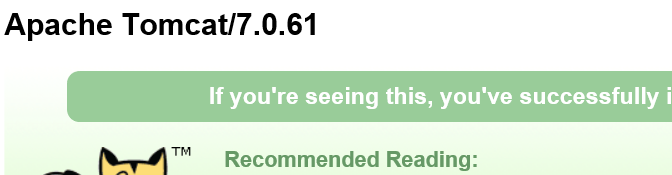
64位下载地址:https://archive.apache.org/dist/tomcat/tomcat-7/v7.0.61/bin/apache-tomcat-7.0.61-windows-x64.zip
32位下载地址:https://archive.apache.org/dist/tomcat/tomcat-7/v7.0.61/bin/apache-tomcat-7.0.61-windows-x86.zip
方法二:将get请求改为post请求;(推荐使用)
方法三:get请求(问号传参)
使用URIEncoder()函数,将中文进行编码
tomcat Invalid character found in the request target. The valid characters are defined in RFC 7230 and RFC 3986的更多相关文章
- Tomcat v7.0 java.lang.IllegalArgumentException: Invalid character found in the request target. The valid characters are defined in RFC 7230 and RFC 3986
十二月 , :: 下午 org.apache.coyote.http11.AbstractHttp11Processor process 信息: Error parsing HTTP request ...
- Tomcat报错Invalid character found in the request target. The valid characters are defined in RFC 7230 and RFC 3986
问题描述:后台报错 Note: further occurrences of HTTP header parsing errors will be logged at DEBUG level.java ...
- Tomcat 8 Invalid character found in the request target. The valid characters are defined in RFC 3986
终极解决方案: Invalid character found in the request target. The valid characters are defined in RFC 3986 ...
- Invalid character found in the request target. The valid characters are defined in RFC 7230 and RFC
解决Invalid character found in the request target. The valid characters are defined in RFC 7230 and RF ...
- 解决springboot项目请求出现非法字符问题 java.lang.IllegalArgumentException:Invalid character found in the request target. The valid characters are defined in RFC 7230 and RFC 3986
springboot版本: 2.1.5 最近使用springboot搭建了一个App后台服务的项目,开发接口的时候在本机使用postman工具做请求测试,请求返回一直很正常,但是在前端开发使用h5请求 ...
- 异常:Invalid character found in the request target. The valid characters are defined in RFC 3986
一.背景 事情是这样的,前几天做一个基本的数据库“增删改查”的需求,前端传参的方式是“JSON字符串”,后端接收到此参数后,使用阿里巴巴fastjson进行解析,然后入库.需求很简单吧,但是偏偏遇到问 ...
- 已解决:Invalid character found in the request target. The valid characters are defined in RFC 7230 and RFC 3986 问题
请求: http://127.0.0.1:8080/driverApp/findLikeAddress?json={"shopname":"广东省"," ...
- IE浏览器连接WebSocket报错:java.lang.IllegalArgumentException: Invalid character found in the request target. The valid characters are defined in RFC 7230 and RFC 3986
在项目开发中整合了WebSocket,本来没什么问题了,但是偶尔发现用IE浏览器打开web端不能推送消息,因为PC端与服务器建立连接失败了.网上查了很多资料, 又看了看源码,都不对症:又怀疑是Spri ...
- IE浏览器报400错误:Invalid character found in the request target. The valid characters are defined in RFC 7230 and RFC 3986
前言: 在用IE浏览器时访问tomcat项目时,页面报400错误,后台错误: java.lang.IllegalArgumentException: Invalid character found i ...
随机推荐
- IntelliJ idea 撤回(已经commit未push的)操作
VSC => Git => reset head => 退回到上次commit => 退回到第2次提交之前 => 退回到指定commit版本
- 并行 Webclient(一)
在 Stackoverflow 上看到了一个提问,关于并行的 WebClient,觉得回答者的代码很有参考性,下面记录一下,以便日后用到: 提问者: 我有一个功能基本上分为两个子功能. html=Re ...
- WPF DataGrid横向显示
前言 利用各种变换,将其水平改向至横向显示. 注意的是要固定好单元格的高宽,或者手动编写style 否者在滚动的时候,会有高宽比例不一样的时候 再其次,要注意datagrid的容器或者datagrid ...
- 一、hexo+github搭建个人博客的过程记录
前提: 1.新建一个github仓库 2.安装配置Node.js 3.安装配置Git 前提 步骤1.新建一个github仓库 打开github网站,(注册)登录账号,新建一个仓库; 注:==仓库名称要 ...
- 前端学习:学习笔记(HTML部分)
前端学习:学习笔记(HTML部分) HTML学习总结(图解) HTML简介 1.HTML是什么? 超文本标记语言 超文本:文字/图片/音频/视频.... 标记/标签 2.HTML的用途? 是用来编写静 ...
- Python - 注释 - 第四天
注释 确保对模块, 函数, 方法和行内注释使用正确的风格 Python中的注释有单行注释和多行注释: Python中单行注释以 # 开头,例如: # 这是一个注释 print('Hello Pytho ...
- Python——Scrapy爬取链家网站所有房源信息
用scrapy爬取链家全国以上房源分类的信息: 路径: items.py # -*- coding: utf-8 -*- # Define here the models for your scrap ...
- 在IE中点击转跳,并打开chorme浏览器继续浏览指定页面,IE自定义ocx控件开发
因项目需要,需要开发一个功能:在IE中点击转跳,并打开chorme浏览器继续浏览指定页面. 分析需求后,参考了: https://www.cnblogs.com/ffjiang/p/7908025.h ...
- Linux文本编辑器的常用命令
Vi文本编辑器 首先介绍命令模式,命令模式是在进入文本编辑器的时候的当前状态:输入模式(插入模式)是在插入文本时候按下的键,比如 大小 i 键,a键.o键:底行模式是在命令模式的状态直接输入冒号 & ...
- 由MQTT topic的正则表达式匹配引发的特殊字符"/"匹配思考
正则表达式中的'/'替换 近期项目对接OneNET的MQTT物联网套件,需要完成命令下发流程. 流程要求: (1)设备在接收平台下发的命令(topic为$sys/{pid}/{device-name} ...