
格式化输出(%用法和fomat用法)
一:%用法
1、整数输出
%o —— oct 八进制
%d —— dec 十进制
%x —— hex 十六进制
print('%o' % 20)  #

print('%d' % 20)  #

print('%x' % 20)  #
2、浮点数输出
%f ——保留小数点后面六位有效数字
%.3f,保留3位小数位
%e ——保留小数点后面六位有效数字,指数形式输出
%.3e,保留3位小数位,使用科学计数法
%g ——在保证六位有效数字的前提下,使用小数方式,否则使用科学计数法
%.3g,保留3位有效数字,使用小数或科学计数法
print('%f' % 1.11)  # 默认保留6位小数 1.110000

print('%.1f' % 1.11)  # 取1位小数 1.1

print('%e' % 1.11)  # 默认6位小数,用科学计数法 1.110000e+00

print('%.3e' % 1.11)  # 取3位小数,用科学计数法 1.110e+00

print('%g' % 1111.1111)  # 默认6位有效数字 1111.11

print('%.7g' % 1111.1111)  # 取7位有效数字 1111.111

print('%.2g' % 1111.1111)  # 取2位有效数字,自动转换为科学计数法 1.1e+03
3、字符串输出
%s
%10s——右对齐,占位符10位
%-10s——左对齐,占位符10位
%.2s——截取2位字符串
%10.2s——10位占位符,截取两位字符串
print('%s' % 'hello world')  # 字符串输出  hello world

print('%20s' % 'hello world')  # 右对齐,取20位,不够则补位           hello world

print('%-20s' % 'hello world')  # 左对齐,取20位,不够则补位 hello world

print('%.2s' % 'hello world')  # 取2位 he

print('%10.2s' % 'hello world')  # 右对齐,取2位         he

print('%-10.2s' % 'hello world')  # 左对齐,取2位 he
4、其他
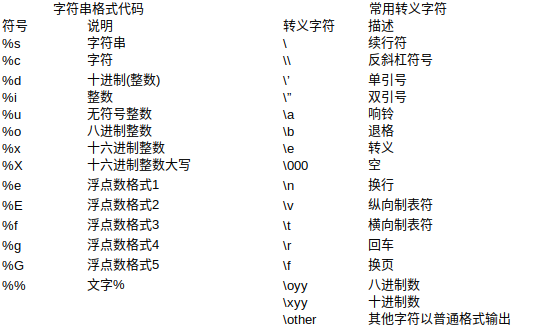
二:format用法
相对基本格式化输出采用‘%’的方法,format()功能更强大,该函数把字符串当成一个模板,通过传入的参数进行格式化,并且使用大括号‘{}’作为特殊字符代替‘%’
1、位置匹配
(1)不带编号,即“{}”
(2)带数字编号,可调换顺序,即“{1}”、“{2}”
(3)带关键字,即“{a}”、“{tom}”
print('{} {}'.format('hello','world'))  # 不带字段 hello world

print('{0} {1}'.format('hello','world'))  # 带数字编号 hello world

print('{0} {1} {0}'.format('hello','world'))  # 打乱顺序 hello world hello

print('{1} {1} {0}'.format('hello','world'))  # world world hello

print('{a} {tom} {a}'.format(tom='hello',a='world'))  # 带关键字 world hello world

# 通过位置匹配

print('{0}, {1}, {2}'.format('a', 'b', 'c')) # a, b, c

print('{}, {}, {}'.format('a', 'b', 'c'))  # 3.1+版本支持 a, b, c

print('{2}, {1}, {0}'.format('a', 'b', 'c')) # c, b, a

print('{2}, {1}, {0}'.format(*'abc'))  # 可打乱顺序 c, b, a

print('{0}{1}{0}'.format('abra', 'cad'))  # 可重复 abracadabra

# 通过类的属性匹配

class Point:

    def __init__(self, x, y):

        self.x, self.y = x, y

    def __str__(self):

        return 'Point({self.x}, {self.y})'.format(self=self)

print(str(Point(4, 2)))  # Point(4, 2)

# 通过下标或者key匹配参数

coord = (3, 5)

print('X: {0[0]};  Y: {0[1]}'.format(coord))  # X: 3;  Y: 5

a = {'a': 'test_a', 'b': 'test_b'}

print('X: {0[a]};  Y: {0[b]}'.format(a))  # X: test_a;  Y: test_b
2、格式转换
'b' - 二进制。将数字以2为基数进行输出。
'c' - 字符。在打印之前将整数转换成对应的Unicode字符串。
'd' - 十进制整数。将数字以10为基数进行输出。
'o' - 八进制。将数字以8为基数进行输出。
'x' - 十六进制。将数字以16为基数进行输出,9以上的位数用小写字母。
'e' - 幂符号。用科学计数法打印数字。用'e'表示幂。
'g' - 一般格式。将数值以fixed-point格式输出。当数值特别大的时候,用幂形式打印。
'n' - 数字。当值为整数时和'd'相同,值为浮点数时和'g'相同。不同的是它会根据区域设置插入数字分隔符。
'%' - 百分数。将数值乘以100然后以fixed-point('f')格式打印,值后面会有一个百分号。
print('{0:b}'.format(3)) #

print('{:c}'.format(20)) #

print('{:d}'.format(20)) #

print('{:o}'.format(20)) #

print('{:x}'.format(20)) #

print('{:e}'.format(20)) # 2.000000e+01

print('{:g}'.format(20.1)) # 20.1

print('{:f}'.format(20)) # 20.000000

print('{:n}'.format(20)) #

print('{:%}'.format(20)) # 2000.000000%
3、format变形用法
# f"xxxx"

# 可在字符串前加f以达到格式化的目的,在{}里加入对象,此为format的另一种形式:

a = "hello"

b = "world"

print(f"{a} {b}")

name = 'jack'

age = 18

sex = 'man'

job = "IT"

salary = 9999.99

print(f'my name is {name.capitalize()}.')  # my name is Jack.

print(f'I am {age:*^10} years old.')  # I am ****18**** years old.

print(f'I am a {sex}')  # I am a man

print(f'My salary is {salary:10.3f}')  # My salary is   9999.990
格式化输出(%用法和fomat用法)的更多相关文章
- python基础_格式化输出(%用法和format用法)(转载)
python基础_格式化输出(%用法和format用法) 目录 %用法 format用法 %用法 1.整数的输出 %o -- oct 八进制%d -- dec 十进制%x -- hex 十六进制 &g ...
- python基础_格式化输出(%用法和format用法)
目录 %用法 format用法 %用法 1.整数的输出 %o —— oct 八进制%d —— dec 十进制%x —— hex 十六进制 1 >>> print('%o' % 2 ...
- 【Python笔记】1、格式化输出(%用法和format用法)
转自:https://www.cnblogs.com/fat39/p/7159881.html 一.格式化输出1.整数的输出%o —— oct 八进制%d —— dec 十进制%x —— hex 十六 ...
- 自学Python1.8-python input/print用法 格式化输出
自学Python之路 自学Python1.8-python input/print用法 格式化输出 1.input函数 Python3.x 中 input() 函数接受一个标准输入数据,返回为 str ...
- golang格式化输出-fmt包用法详解
golang格式化输出-fmt包用法详解 注意:我在这里给出golang查询关于包的使用的地址:https://godoc.org 声明: 此片文章并非原创,大多数内容都是来自:https:// ...
- Python格式化输出——format用法示例
format OR % 提到Python中的格式化输出方法,一般来说有以下两种方式: print('hello %s' % 'world') # hello world print('hello {} ...
- python格式化输出之format用法
format用法 相对基本格式化输出采用‘%’的方法,format()功能更强大,该函数把字符串当成一个模板,通过传入的参数进行格式化,并且使用大括号‘{}’作为特殊字符代替‘%’ 使用方法由两种:b ...
- python格式化输出(% format用法)
%基本用法: 十进制输出:print('%d' % 6) 6也可以换成其它的数字变量 八进制输出:print('%o' % 6) 6也可以换成其它的数字变量 字符串输出:print('%s' ...
- Python print函数用法,print 格式化输出
原文地址:http://blog.csdn.net/zanfeng/article/details/52164124 使用print输出各型的 字符串 整数 浮点数 出度及精度控制 strHello ...
随机推荐
- ASP.NET Core应用程序的参数配置及使用(转载)
本文结构 提前准备 参数配置方式 appsettings.json 环境变量 命令行参数 在控制器中使用配置参数 注入IConfiguration对象 注入IOptions对象 总结 应用程序的开发不 ...
- vue数组更新界面无变化
1. vue数组更新界面无变化 1.1. 说明 对数组进行更新或者添加,一定要注意方式,我的情况是数组套数组,双重循环,在造数据的时候,不断从尾部添加数据,所以写成了如下形式,每次下拉都会去加载一批相 ...
- CSRF攻击与防御(转)
CSRF概念:CSRF跨站点请求伪造(Cross—Site Request Forgery),跟XSS攻击一样,存在巨大的危害性,你可以这样来理解: 攻击者盗用了你的身份,以你的名义发送 ...
- 为 Linux 应用程序编写 DLL
插件和 DLL 通常是用来无须编写整个新应用程序而添加功能的极好方法. 在 Linux 中,插件和 DLL 是以动态库形式实现的. 电子商务顾问兼设计师 Allen Wilson 介绍了动态库,并且向 ...
- C/C++ 函数参数传递:传值,传指针,传引用
前面我们介绍了函数的调用约定,明白了函数调用者与被调用者之间传递参数的顺序与如何进行栈恢复的. 实际上,函数调用者如何将参数传递给被调用者也是有讲究的. 总的来说,函数参数传递分为3种情况:传值,传指 ...
- 微信分享接口的java开发的一些小步骤
1.配置接口信息进行验证 代码如下: /** * 访问没认证的地址跳转 * * @param request * @return 登录页面 * @throws ...
- SPRINGBOOT注解最全详解(
# SPRINGBOOT注解最全详解(整合超详细版本) 使用注解的优势: 1.采用纯java代码,不在需要配置繁杂的xml文件 ...
- Jmeter jmeter-server.bat 无法启动
问题现象: 解决方法: 找到如下文件: 在目录\apache-jmeter-5.0\bin下,打开名为jmeter.properties的文件 找到server.rmi.ssl.disable=fal ...
- SQLAlchemy的常用数据类型
SQLAlchemy常用的数据类型 Column 代表数据库表中的一列 是创建对象时数据类型所依赖的对象,通过在Column对象中指明具体的数据类型来实现相应的数据库表中的列的格式自定义. Strin ...
- [SourceInsight].source insight 使用技巧
转自:https://www.veryarm.com/140428.html 1 开胃菜-初级应用 1.1 选择美丽的界面享受工作 虽然不能以貌取人,但似乎从来没有人责备以貌取软件的.SI的华丽界 ...