
postgresql学习之安装篇
---恢复内容开始---
安装方法:
1、可以使用操作系统自带的安装源
2、可以使用官网下载的源码进行安装
3、可以使用编译好的包入.run格式的安装包安装(本文使用的是这种安装方法,下载地址http://www.postgres.cn/download)
安装之前首先需要为postgresql数据库新建一个管理员用户:
groupadd postgres
mkdir /home/postgres
useradd postgres -g postgres -s /bin/bash -b /home/postgres
开始安装:
安装使用root用户安装,上传了赋予文件执行权限chmod +x postgresql-9.4.5-1-linux-x64.ru。根据提示一路安装至结束。安装完了之后进入安装目录ll查看一下目录信息,会发现.cache和data两个目录是postgres用户组的。
配置:
进入data目录下,配置文件说明:
pg_hba.conf--此文件是配置链接权限的,共分5列,请求连接类型--要连接的数据库--请求连接的用户--请求来的地址--请求认证的方式。默认的第一行local all all md5,意思是本地登陆,我们本地登录不验证密码,将md5换成trust
pg_ident.conf--此文件是配置登陆数据库所需要验证的用户名码,格式username:password
postgresql.conf--此文件是主要数据库的配置信息,具体的每个参数含义不再列出,listen_addresses和port使用默认的。
启动、关闭数据库:
为管理员用户postgres配置环境变量。cd && vim .profile,我能当末尾添加如下信息:
export PG_HOME=/opt/PostgreSQL/9.4
export PGDATA=/opt/PostgreSQL/9.4/data
export PATH=$PATH:$PG_HOME/bin
当让别忘记source .profile,下面就试试效果如何,直接输入pg_ 然后使用TAB键会带出很多pg_***的文件,这就说明环境变量已生效,那就开始启动数据库吧.
postgres@ubuntu:~$ pg_ctl start
pg_ctl: another server might be running; trying to start server anyway
server starting
postgres@ubuntu:~$ 2016-06-08 22:35:40 CST FATAL: lock file "postmaster.pid" already exists
2016-06-08 22:35:40 CST HINT: Is another postmaster (PID 2392) running in data directory "/opt/PostgreSQL/9.4/data"?
这个错误是说postmaster.pid这个文件已经存在了,说明这个数据库已经被启动了。那就先关掉吧
postgres@ubuntu:~$ pg_ctl stop
waiting for server to shut down.... done
server stopped
然后再启动一下。
postgres@ubuntu:~$ pg_ctl start
server starting
postgres@ubuntu:~$ 2016-06-08 22:37:16 CST LOG: redirecting log output to logging collector process
2016-06-08 22:37:16 CST HINT: Future log output will appear in directory "pg_log".
postgres@ubuntu:~$ ps -ef|grep postgres --说明postgresql启动成功
root 2660 1655 0 22:24 pts/2 00:00:00 su - postgres --这个用户切换的进程,不用管
postgres 2661 2660 0 22:24 pts/2 00:00:00 -su --同上
postgres 2719 1 0 22:37 pts/2 00:00:00 /opt/PostgreSQL/9.4/bin/postgres --这个是postgresql的主进程
postgres 2720 2719 0 22:37 ? 00:00:00 postgres: logger process --这个是子进程,在PostgreSQL中称为SysLogger(8.0),用于整个系统的日志输出;
postgres 2722 2719 0 22:37 ? 00:00:00 postgres: checkpointer process --这个是子进程,在PostgreSQL中称为Checkpointer(9.2),用于处理checkpoints;
postgres 2723 2719 0 22:37 ? 00:00:00 postgres: writer process --这个是子进程,在PostgreSQL中称为BgWriter,用于将脏页刷出到磁盘;
postgres 2724 2719 0 22:37 ? 00:00:00 postgres: wal writer process --这个是子进程,在PostgreSQL中称为WalWriter(8.3),处理预写日志输出;
postgres 2725 2719 0 22:37 ? 00:00:00 postgres: autovacuum launcher process --这个是子进程,在PostgreSQL中称为AutoVacuum(8.1),用于系统的自动清理;
postgres 2726 2719 0 22:37 ? 00:00:00 postgres: stats collector process --这个是子进程,在PostgreSQL中称为PgStat,用于统计数据收集。
postgres 2728 2661 0 22:37 pts/2 00:00:00 ps -ef
postgres 2729 2661 0 22:37 pts/2 00:00:00 grep postgres
此外,如果配置了副本的话,应该还有一个进程 postgres: archiver process: 在PostgreSQL中称为PgArch,用于预写日志归档;同步数据用的。
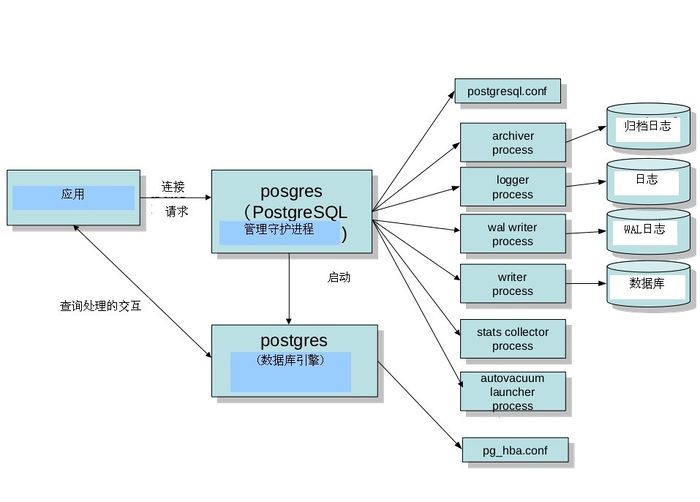
详细关于进程的可以参考http://wiki.postgresql.org/wiki/Pgsrcstructure
如果修改过配置需要执行pg_ctl reload重新加载数据库
postgres@ubuntu:~$ psql -h 127.0.0.1 -p 5432
Password:
psql (9.3.10, server 9.4.5)
WARNING: psql major version 9.3, server major version 9.4.
Some psql features might not work.
Type "help" for help.
postgres=# \l
List of databases
Name | Owner | Encoding | Collate | Ctype | Access privileges
-----------+----------+----------+------------+------------+-----------------------
postgres | postgres | UTF8 | zh_CN.utf8 | zh_CN.utf8 |
template0 | postgres | UTF8 | zh_CN.utf8 | zh_CN.utf8 | =c/postgres +
| | | | | postgres=CTc/postgres
template1 | postgres | UTF8 | zh_CN.utf8 | zh_CN.utf8 | =c/postgres +
| | | | | postgres=CTc/postgres
(3 rows)
postgresql学习之安装篇的更多相关文章
- SystemTap 学习笔记 - 安装篇
https://segmentfault.com/a/1190000000671438 在安装前,需要知道下自己的系统环境,我的环境如下: uname -r 2.6.18-308.el5 Linux ...
- PCI GXL学习之安装篇
作者:朱金灿 来源:http://blog.csdn.net/clever101 上周简单学习了PCI gxl的使用和二次开发.说实话gxl没有我想象中那么自动化,我原以为把一个数据处理作业扔给gxl ...
- Appium学习路-安装篇
比较好的文章:http://www.15yan.com/story/4GbuTwXQKDU/ 官网资料:http://appium.io/slate/cn/v1.2.0/?python#appium ...
- postgresql学习笔记--基础篇
1. 客户端程序和服务器端程序 1.1 客户端程序 Command Example Describe clusterdb clusterdb -h pghost1 -p 1921 -d mydb Cl ...
- Redis学习笔记-安装篇(Centos7)
1.安装 这里使用源代码安装的方式,如果你希望使用yum或者rpm包安装的方式,可以百度一下,安装方法可谓多如牛毛. # 下载安装包 # wget http://download.redis.io/r ...
- postgresql学习笔记--基础篇 - copy
1. psql 导入/导出数据 psql支持文件数据导入到数据库,也支持数据库表数据导出到文件中. COPY命令和\copy 命令都支持这两类操作,但两者有如下区别: COPY 命令是SQL命令,\c ...
- postgresql学习笔记--基础篇 -psql工具
--创建用户 CREATE ROLE pguser WITH ENCRYPTED PASSWORD 'pguser'; --创建表空间目录 mkdir -p /database/pg10/pg_tbs ...
- jmeter学习之安装篇(一)
一.Jmeter简介 Jmeter是Apache组织开发的基于Java开源项目,设计之初是用于做性能测试的,同时它在实现对各种接口的调用方面做的比较成熟,因此,常被用做接口功能测试和性能测试. Jme ...
- OracleDesigner学习笔记1――安装篇
OracleDesigner学习笔记1――安装篇 QQ:King MSN:qiutianwh@msn.com Email:qqking@gmail.com 一. 前言 Oracle是当 ...
随机推荐
- map访问key不存在的情况下,用find。比[]直接访问的意思不一样,map[key]不返null
key不存在的话则创建一个pair并调用默认构造函数 map<CGuid, CLibItem>::iterator iterItem = m_world->m_library_sce ...
- mark一下咕掉的题目
蒟蒻才普及组呀~ 大佬别D我 等集中补一下 CF980F:咋说捏,我觉得要联赛了做这题有点浪费时间,等想颓废了再来写写叭qwq 215E/279D/288E/331C3/431D/433E/750G/ ...
- 5098: [BZOJ1098][POI2007]办公楼biu
5098: [BZOJ1098][POI2007]办公楼biu 没有数据结构就很棒 一个看上去非常玄学的代码 const int N=1e5+10,M=2e6+10; int n,m; int fa[ ...
- 设计模式概要 & 六原则一法则
参考文章 http://blog.csdn.net/sinat_26342009/article/details/46419873 继承vs组合:http://www.cnblogs.com/feic ...
- tinylib
tinylib.h /* -------------------------------------------------------------------------------- oooo ` ...
- C-Store: A Column-oriented DBMS Mike
这篇paper比较老,是列存比较基础的论文 几乎所有列存,或olap的论文都会引用这篇 行存面向写,支持OLTP 列存面向读,支持OLAP 基于磁盘的DBMS,瓶颈基本在磁盘IO,所有做的工作都是用多 ...
- xml报文标签替换正则表达式
写在前面 需求是把所有标签中的信息替换成指定内容 例如: <transName>交易名称</transName><aaa></aaaa><tran ...
- [清华集训2015]灯泡(浙江大学ZOJ 3203 Light Bulb)
Time Limit: 1 Second Memory Limit: 32768 KB Compared to wildleopard's wealthiness, his brother ...
- springboot响应消息(http)的编码设置
一.方式一 在单个REST接口上设置 @ResponseBody @RequestMapping(value = "sys/getTree1",method = RequestMe ...
- OSS利用ossutil64上传文件
ossutil64下载地址: http://gosspublic.alicdn.com/ossutil/1.6.0/ossutil64?spm=a2c4g.11186623.2.12.3638159 ...