
商品分页查询 ego-prc 实现-easyui
使用 easyui 的 DataGrid 控件实现商品的分页查询,DataGrid 控件提交分页所需要的 page 和rows 参数,后台响应包含总记录数 total 和需要显示的商品对象的集合 rows 的 json 对象。
PageHelper 资源地址
https://github.com/pagehelper/Mybatis-PageHelper
PageHelper 实现原理
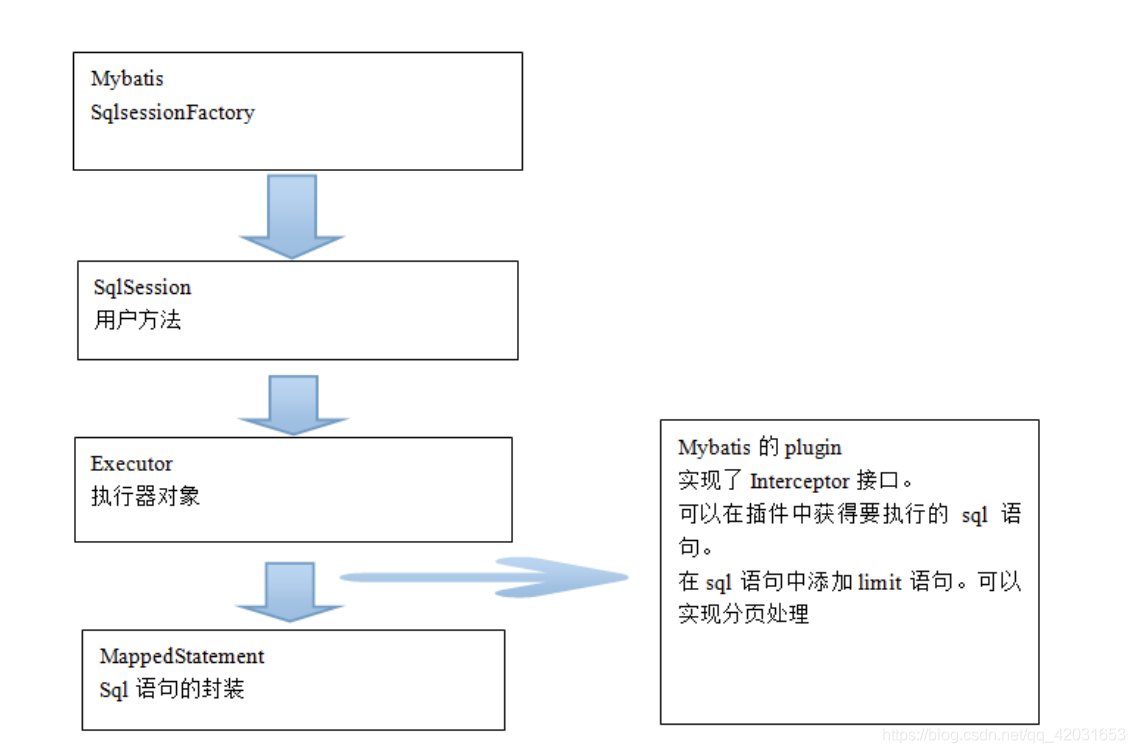
PageHelper 配置
mybatisConfig.xml
<!-- 配置分页插件 -->

	<plugins>

		<plugin interceptor="com.github.pagehelper.PageHelper">

			<!-- 设置数据库类型 Oracle,Mysql,MariaDB,SQLite,Hsqldb,PostgreSQL六种数据库 -->

			<property name="dialect" value="mysql" />

		</plugin>

	</plugins>
ego-common 创建 PageResult 类
com.bjsxt.ego.beans.PageResult
package com.bjsxt.ego.beans;

import java.io.Serializable;

import java.util.List;

public class PageResult<T> implements Serializable {

    private List<T> rows;

    private Long tota;

    public PageResult(List<T> rows, Long tota) {

        this.rows = rows;

        this.tota = tota;

    }

    public PageResult(){}

    public List<T> getRows() {

        return rows;

    }

    public void setRows(List<T> rows) {

        this.rows = rows;

    }

    public Long getTota() {

        return tota;

    }

    public void setTota(Long tota) {

        this.tota = tota;

    }

}
创建 ItemService 接口
com.bjsxt.ego.rpc.service.ItemService
package com.bjsxt.ego.rpc.service;

import com.bjsxt.ego.beans.EgoResult;

import com.bjsxt.ego.beans.PageResult;

import com.bjsxt.ego.rpc.pojo.TbItem;

import java.util.List;

public interface ItemService {

    /**

     * 实现商品的分页查询

     */

    public PageResult<TbItem> selectItemList(Integer page,Integer rows);

    /**

     * 完成商品上下架的处理

     */

    public EgoResult updataItemStatus(List<Long> itemIds,Boolean flag);

    public EgoResult deleteItem(List<Long> itemIds);

}
创建 ItemServiceImpl 实现类
com.bjsxt.ego.rpc.service.impl.ItemServiceImpl
package com.bjsxt.ego.rpc.service.impl;

import com.bjsxt.ego.beans.EgoResult;

import com.bjsxt.ego.beans.PageResult;

import com.bjsxt.ego.rpc.mapper.TbItemMapper;

import com.bjsxt.ego.rpc.pojo.TbItem;

import com.bjsxt.ego.rpc.pojo.TbItemExample;

import com.bjsxt.ego.rpc.service.ItemService;

import com.github.pagehelper.Page;

import com.github.pagehelper.PageHelper;

import org.springframework.beans.factory.annotation.Autowired;

import org.springframework.stereotype.Service;

import java.util.List;

@Service

public class ItemServiceImpl implements ItemService {

    @Autowired

    private TbItemMapper tbItemMapper;

    @Override

    public PageResult<TbItem> selectItemList(Integer page, Integer rows) {

        //执行分页操作

        Page ps = PageHelper.startPage(page, rows);

        TbItemExample tbItemExample=new TbItemExample();

        //执行数据库查询操作

        List<TbItem> list = tbItemMapper.selectByExample(tbItemExample);

        PageResult<TbItem> result=new PageResult<>();

        result.setRows(list);

        result.setTota(ps.getTotal());

        return result;

    }

    @Override

    public EgoResult updataItemStatus(List<Long> itemIds, Boolean flag) {

        //创建TbItem对象

        TbItem item=new TbItem();

        if (flag){

            item.setStatus((byte) 1);

        }else {

            item.setStatus((byte) 2);

        }

        //产生动态where条件

        TbItemExample tbItemExample=new TbItemExample();

        TbItemExample.Criteria c =tbItemExample.createCriteria();

        c.andIdIn(itemIds);

        tbItemMapper.updateByExampleSelective(item,tbItemExample);

        return EgoResult.ok();

    }

    @Override

    public EgoResult deleteItem(List<Long> itemIds) {

        //产生动态的where条件

        TbItemExample itemExample=new TbItemExample();

        TbItemExample.Criteria c = itemExample.createCriteria();

        c.andIdIn(itemIds);

        tbItemMapper.deleteByExample(itemExample);

        return EgoResult.ok();

    }

}
配置 applicationContext-dubbo.xml
applicationContext-dubbo.xml
<?xml version="1.0" encoding="UTF-8"?>
<beans xmlns="http://www.springframework.org/schema/beans"
xmlns:dubbo="http://code.alibabatech.com/schema/dubbo" xmlns:xsi="http://www.w3.org/2001/XMLSchema-instance"
xsi:schemaLocation="http://www.springframework.org/schema/beans
http://www.springframework.org/schema/beans/spring-beans.xsd
http://code.alibabatech.com/schema/dubbo
http://code.alibabatech.com/schema/dubbo/dubbo.xsd">
<!-- 添加服务提供者的标志 -->
<dubbo:application name="ego-rpc-provider" />
<!-- 指定注册中心 -->
<dubbo:registry address="192.168.181.129:2181,192.168.181.129:2182,192.168.181.129:2183" protocol="zookeeper" />
<!-- 指定当前项目发布dubbo服务的方式 -->
<!-- 指定服务发布的协议:dubbo协议 -->
<!-- 指定服务发布的端口:10000 -->
<dubbo:protocol name="dubbo" port="20000" />
<!-- <!– 发布dubbo服务 –>-->
<dubbo:service interface="com.bjsxt.ego.rpc.service.ItemService" ref="itemServiceImpl"></dubbo:service>
<dubbo:service interface="com.bjsxt.ego.rpc.service.ItemCatService" ref="itemCatServiceImpl"></dubbo:service>
</beans>启动 ego-rpc-service-impl 发布 RPC 服务
com.bjsxt.provider.test.ProviderTest
package com.bjsxt.provider.test;

import org.springframework.context.support.ClassPathXmlApplicationContext;

import java.io.IOException;

public class ProviderTest {

    public static void main(String[] args) {

        ClassPathXmlApplicationContext ac=new ClassPathXmlApplicationContext("spring/applicationContext-dao.xml",

                "spring/applicationContext-dubbo.xml",

                "spring/applicationContext-service.xml",

                "spring/applicationContext-tx.xml");

        ac.start();

        System.out.println("================完成!=================");

        //阻塞程序的运行

        try {

            System.in.read();

        } catch (IOException e) {

            e.printStackTrace();

        }

        ac.stop();

    }

}
商品分页查询 ego-manager-web 实现
配置 applicationContext-dubbo.xml
spring/applicationContext-dubbo.xml
<?xml version="1.0" encoding="UTF-8"?>
<beans xmlns="http://www.springframework.org/schema/beans"
xmlns:dubbo="http://code.alibabatech.com/schema/dubbo"
xmlns:xsi="http://www.w3.org/2001/XMLSchema-instance"
xsi:schemaLocation="http://www.springframework.org/schema/beans
http://www.springframework.org/schema/beans/spring-beans.xsd
http://code.alibabatech.com/schema/dubbo
http://code.alibabatech.com/schema/dubbo/dubbo.xsd">
<!-- 添加服务消费者的标志 -->
<dubbo:application name="ego-manager-web-consumer"/>
<!-- 指定注册中心 -->
<dubbo:registry address="192.168.181.129:2181,192.168.181.129:2182,192.168.181.129:2183" protocol="zookeeper" />
<!-- <!– spring容器中存在一个远程服务的代理对象 –>-->
<dubbo:reference interface="com.bjsxt.ego.rpc.service.ItemService" id="itemServiceProxy"></dubbo:reference>
<dubbo:reference interface="com.bjsxt.ego.rpc.service.ItemCatService" id="itemCatServiceProxy"></dubbo:reference>
</beans>
创建 ManagerItemService 接口
com.bjsxt.ego.manager.service.ManagerItemService
package com.bjsxt.ego.manager.service;

import com.bjsxt.ego.beans.EgoResult;

import com.bjsxt.ego.beans.PageResult;

import com.bjsxt.ego.rpc.pojo.TbItem;

public interface ManagerItemService {

    /**

     * 完成商品信息的分页查询

     * **/

    public PageResult<TbItem> selectItemListService(Integer page,Integer rows);

    /**

     * 完成商品上架处理

     * @param ids

     * @return

     */

    public EgoResult reshlfItem(Long[] ids);

    /**

     * 完成商品下架处理

     * @param ids

     * @return

     */

    public EgoResult instockItem(Long[] ids);

    /**

     * 完成商品的删除

     * @param ids

     * @return

     */

    public EgoResult deleteItem(Long[] ids);

}
创建 ManagerItemServiceImpl 实现类
com.bjsxt.ego.manager.service.impl.ManagerItemServiceImpl
package com.bjsxt.ego.manager.service.impl;

import com.bjsxt.ego.beans.EgoResult;

import com.bjsxt.ego.beans.PageResult;

import com.bjsxt.ego.manager.service.ManagerItemService;

import com.bjsxt.ego.rpc.pojo.TbItem;

import com.bjsxt.ego.rpc.service.ItemService;

import org.springframework.beans.factory.annotation.Autowired;

import org.springframework.stereotype.Service;

import java.util.Arrays;

import java.util.List;

@Service

public class ManagerItemServiceImpl implements ManagerItemService {

    @Autowired

    private ItemService itemServiceProxy;

    @Override

    public PageResult<TbItem> selectItemListService(Integer page, Integer rows) {

        PageResult<TbItem> pageResult = itemServiceProxy.selectItemList(page, rows);

        return pageResult;

    }

    @Override

    public EgoResult reshlfItem(Long[] ids) {

        List<Long> itemIds = Arrays.asList(ids);

        return itemServiceProxy.updataItemStatus(itemIds,true);

    }

    @Override

    public EgoResult instockItem(Long[] ids) {

        List<Long> itemIds = Arrays.asList(ids);

        return itemServiceProxy.updataItemStatus(itemIds,false);

    }

    @Override

    public EgoResult deleteItem(Long[] ids) {

        List<Long> itemIds=Arrays.asList(ids);

        return itemServiceProxy.deleteItem(itemIds);

    }

}
创建 ItemController 类
com.bjsxt.ego.manager.controller.ItemController
package com.bjsxt.ego.manager.controller;

import com.bjsxt.ego.beans.EgoResult;

import com.bjsxt.ego.beans.PageResult;

import com.bjsxt.ego.manager.service.ManagerItemService;

import com.bjsxt.ego.rpc.pojo.TbItem;

import com.google.gson.Gson;

import org.springframework.beans.factory.annotation.Autowired;

import org.springframework.http.MediaType;

import org.springframework.stereotype.Controller;

import org.springframework.web.bind.annotation.RequestMapping;

import org.springframework.web.bind.annotation.RequestParam;

import org.springframework.web.bind.annotation.ResponseBody;

@Controller

public class ItemController {

    @Autowired

    private ManagerItemService managerItemService;

    /***

     * 处理商品信息分页查询的请求

     * **/

    @RequestMapping(value = "item/list",produces = MediaType.APPLICATION_JSON_VALUE+";charset=UTF-8")

    @ResponseBody

    public PageResult<TbItem> itemList(@RequestParam(defaultValue = "1") Integer page,

                                       @RequestParam(defaultValue = "30") Integer rows){

        return managerItemService.selectItemListService(page,rows);

    }

    /**

     *处理商品上架

     * @param ids

     * @return

     */

    @RequestMapping(value = "item/reshelf")

    @ResponseBody

    public String reshelfItem(Long[] ids){

        EgoResult egoResult = managerItemService.reshlfItem(ids);

        String s = new Gson().toJson(egoResult);

        return s;

    }

    /**

     *处理商品下架

     * @param ids

     * @return

     */

    @RequestMapping(value = "item/instock")

    @ResponseBody

    public String instockItem(Long[] ids){

        EgoResult egoResult = managerItemService.instockItem(ids);

        String s = new Gson().toJson(egoResult);

        return s;

    }

    /**

     *处理商品删除

     * @param ids

     * @return

     */

    @RequestMapping(value = "item/delete")

    @ResponseBody

    public String deleteItem(Long[] ids){

        EgoResult egoResult = managerItemService.deleteItem(ids);

        String s = new Gson().toJson(egoResult);

        return s;

    }

}
发布 ego-manager-web 访问商品列表
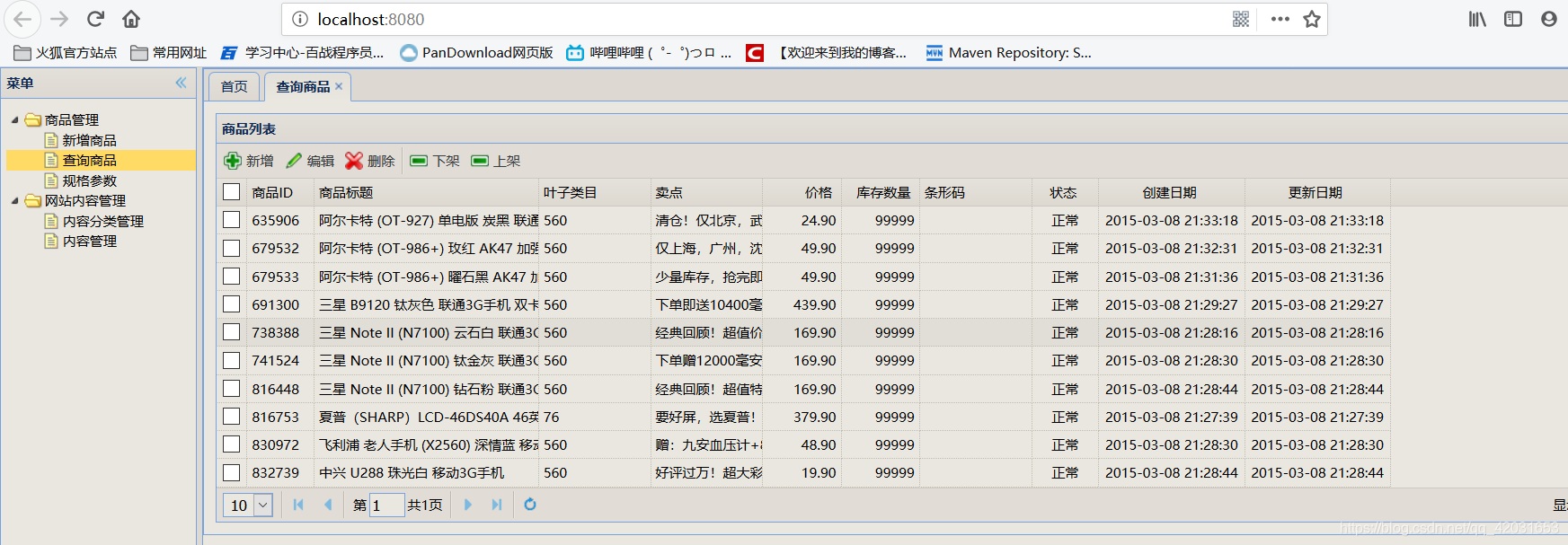
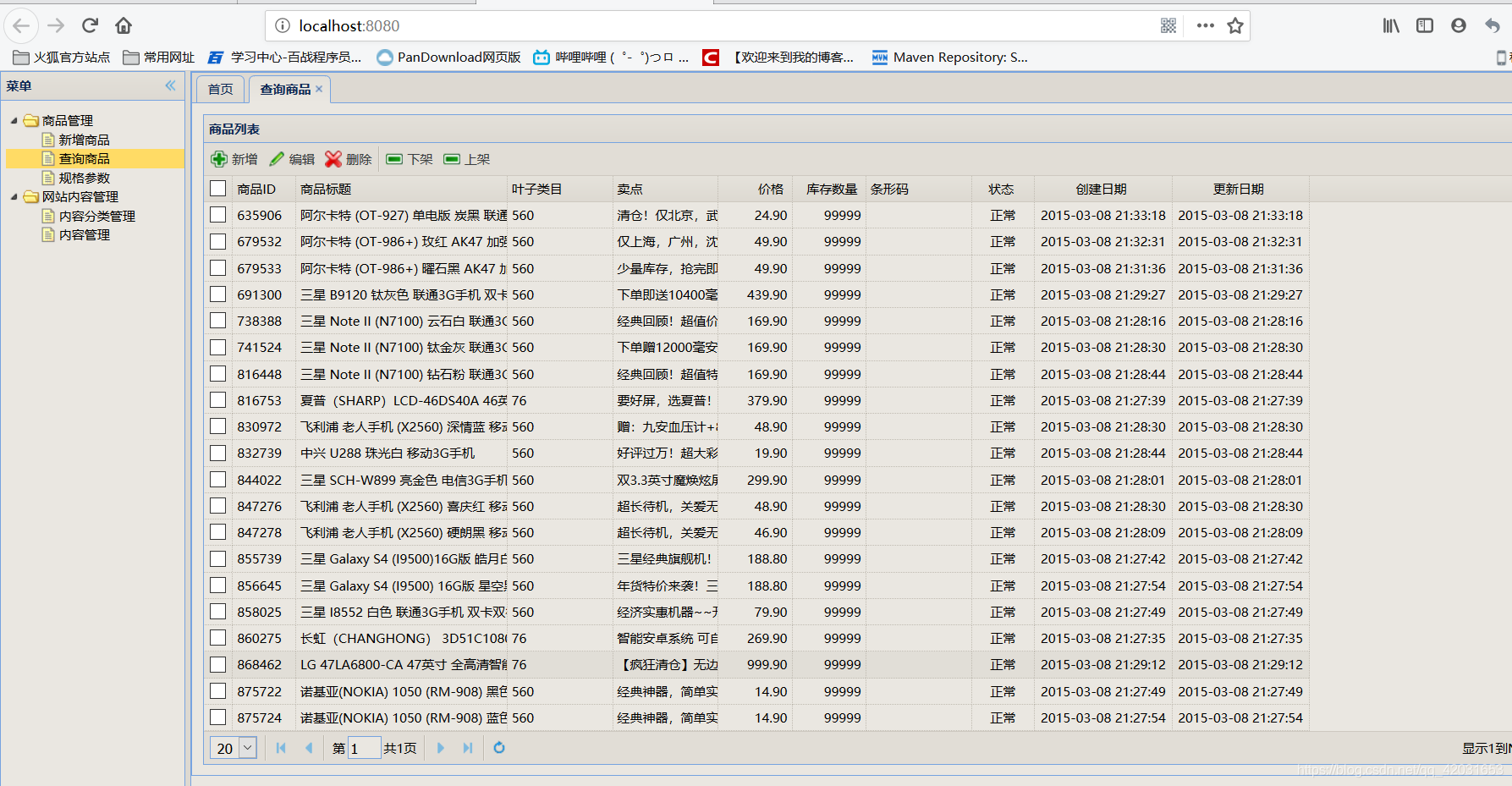
商品分页查询 ego-prc 实现-easyui的更多相关文章
- 【mybatis】在mybatis分页查询时,主表对关联表 一对多 分页查询怎么实现
现在有这样一个需求: 1.积分商品分页查询 2.一个积分商品会有多张商品图片在商品图片表 1:n的关系 这样在积分商品分页查询的时候,想要顺便把每个积分商品对应的商品图片信息也带出来 实现如下: 1 ...
- 商城02——dubbo框架整合_商品列表查询实现_分页
1. 课程计划 1.服务中间件dubbo 2.SSM框架整合. 3.测试使用dubbo 4.后台系统商品列表查询功能实现. 5.监控中心的搭建 2. 功能分析 2.1. 后台系统所用的技术 框 ...
- Struts2与easyui分页查询
easyui里面分页查询:在easyui框架里面已经进行一些分装,所以我们只要进行后台分页查询即可 web.xml和struts.xml文件的配置的就不需要我多说了,和分页前代码一样,不需要更改: 需 ...
- 一个共通的viewModel搞定所有的分页查询一览及数据导出(easyui + knockoutjs + mvc4.0)
前言 大家看标题就明白了我想写什么了,在做企业信息化系统中可能大家写的最多的一种页面就是查询页面了.其实每个查询页面,除了条件不太一样,数据不太一样,其它的其实都差不多.所以我就想提取一些共通的东西出 ...
- 分页查询关键代码 多条件查询关键代码 删除选中商品关键代码 修改要先回显再修改 修改要先回显再修改 同一业务集中使用同一servlet的方法
分页查询关键代码: 通过servlet转发回来的各种信息进行分页的设计(转发回的信息有 分页查询的List集合 查询的页码 查询的条数 查询的数据库总条数 查询的总页码) 从开始时循环10次出现十个数 ...
- EasyUi+Spring Data 实现按条件分页查询
Spring data 介绍 Spring data 出现目的 为了简化.统一 持久层 各种实现技术 API ,所以 spring data 提供一套标准 API 和 不同持久层整合技术实现 . 自己 ...
- EasyUI 之 DataGrid利用用拉姆达表达式实现分页查询
首先,我们在DataGrid的URL中加上我们要查询的条件:查询用户名不是“呵呵”的所有用户. <div> <table id="dg" class=&quo ...
- Node.js、express、mongodb 实现分页查询、条件搜索
前言 在上一篇Node.js.express.mongodb 入门(基于easyui datagrid增删改查) 的基础上实现了分页查询.带条件搜索. 实现效果 1.列表第一页. 2.列表第二页 3. ...
- [drp 5] pageModel的建立,实现分页查询
导读:之前做的分页,一直都是用的easy--UI分页,然后没有系统的整理过,就是知道传几个参数,然后云云.这次,从头到尾总结一下,了了我的这桩心愿.人事系统的重定向工作,一直刺激着我一定要总结总结这个 ...
随机推荐
- 【algo&ds】2.线性表
1.线性表 线性表(英语:Linear List)是由n(n≥0)个数据元素(结点)a[0],a[1],a[2]-,a[n-1]组成的有限序列. 其中: 数据元素的个数n定义为表的长度 = " ...
- C++中对C的扩展学习新增语法——函数重载
函数重载 1.函数重载语法 1.同一个作用域(全局作用域.命名空间作用域.类作用域) 2.参数个数不同 3.参数类型不同 4.参数顺序不同 代码实现: 当函数名字一样的时候,通过参数类型.参数个数.参 ...
- Laravel上传文件(单文件,多文件)
为了方便,先修改一个配置文件,再laravel框架中config配置中找到 filesystems.php 文件 修改代码如下 'local' => [ 'driver' => 'loc ...
- 爬虫多线程模板,xpath,etree
class QuiShi: def __init__(self): self.temp_url = "http://www.lovehhy.net/Joke/Detail/QSBK/{0}& ...
- DAL
using System;using System.Collections.Generic;using System.Linq;using System.Web;using System.Data;u ...
- Learning Markov Clustering Networks for Scene Text Detection
Learning Markov Clustering Networks for Scene Text Detection 论文下载:https://arxiv.org/pdf/1805.08365v1 ...
- Elasticsearch系列---全面了解Document
概要 本篇主要介绍一下document的知识,对document的元数据和基本的语法进行讲解. document核心元数据 前面入门实战一节有简单介绍过document数据示例,这次我们来详细了解一下 ...
- python3 pip报错 TypeError: 'module' object is not callable
使用命令:python -m pip install xx即可,需要在pip前加python -m
- 原生JS的移入溢出控制div的显示与隐藏
原生JS的移入溢出控制div的显示与隐藏的写法 上面的写法火狐存在兼容性
- 利用scrapy爬取腾讯的招聘信息
利用scrapy框架抓取腾讯的招聘信息,爬取地址为:https://hr.tencent.com/position.php 抓取字段包括:招聘岗位,人数,工作地点,发布时间,及具体的工作要求和工作任务 ...