
Spring Security从后台数据库查询实现登陆控制
Spring Security框架是一个控制登陆的框架,通过配置文件获取后台的用户名及密码,进行比较进行登陆判断
使用步骤
1、导入依赖

<!-- 身份验证 -->

            <dependency>

                <groupId>org.springframework.security</groupId>

                <artifactId>spring-security-web</artifactId>

                <version>4.1.0.RELEASE</version>

            </dependency>

            <dependency>

                <groupId>org.springframework.security</groupId>

                <artifactId>spring-security-config</artifactId>

                <version>4.1.0.RELEASE</version>

            </dependency>
2、web.xml文件中加载spring-security.xml文件
 <context-param>

      <param-name>contextConfigLocation</param-name>

      <param-value>classpath:spring/spring-security.xml</param-value>

      </context-param>

    <listener>

      <listener-class>

        org.springframework.web.context.ContextLoaderListener

      </listener-class>

    </listener>

    <filter>

      <filter-name>springSecurityFilterChain</filter-name>

      <filter-class>org.springframework.web.filter.DelegatingFilterProxy</filter-class>

    </filter>

      <filter-mapping>

        <filter-name>springSecurityFilterChain</filter-name>

        <url-pattern>/*</url-pattern>

      </filter-mapping>
3、前端页面
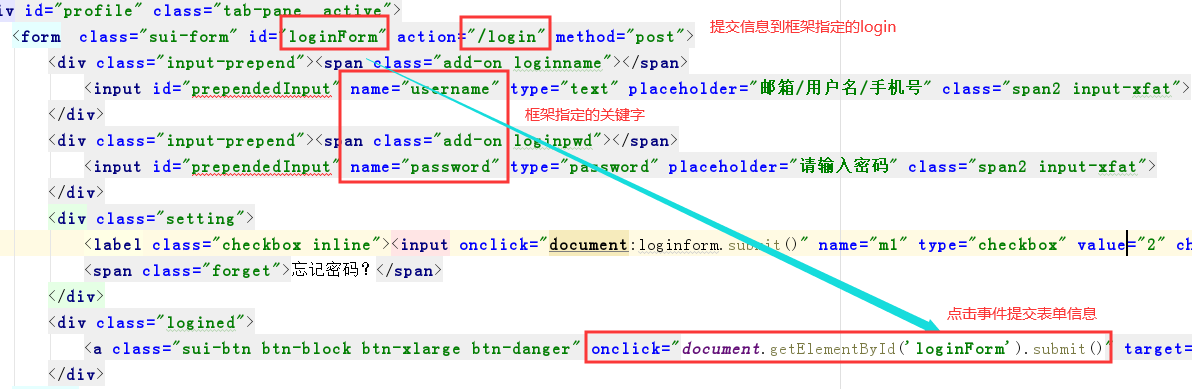
4、后台代码中创建一个实体类实现 UserDetailsService接口,实现其中的方法
//用户登录的认证类

public class UserDetailsServiceImpl  implements UserDetailsService {

  //service层是获取后台数据库中的用户名信息

    private SellerService sellerService;

    //set方法注入一个

    public void setSellerService(SellerService sellerService) {

        this.sellerService = sellerService;

    }

    //通过用户名去拿数据库中对象,

    @Override

    public UserDetails loadUserByUsername(String username) throws UsernameNotFoundException {

        System.out.println("经过了imp方法");

//        username是得到前端表单的用户名

        //哪些用户有登陆权限,

        List<GrantedAuthority> grant = new ArrayList<>();

        //添加用户的角色信息,能够去使用

        grant.add(new SimpleGrantedAuthority("ROLE_SELLER"));

        //username是控制框架规定的,其实就是实体类的seller_id

        Seller seller = sellerService.findOne(username);

//        若果不存在此用户

        if (seller !=null && "1".equals(seller.getStatus())){

            //只有当审核通过的商家才能登陆,返回的user是你输入的用户名,密码,角色,

                return new User(username,seller.getPassword(),grant);

        }else {

            return null;

        }

    }
5、spring-security
里面的细则,我上一篇博客有细说,大家可以回顾一下
<beans:beans

    xmlns="http://www.springframework.org/schema/security"

    xmlns:beans="http://www.springframework.org/schema/beans"

    xmlns:xsi="http://www.w3.org/2001/XMLSchema-instance"

    xmlns:dubbo="http://code.alibabatech.com/schema/dubbo"

    xsi:schemaLocation="http://www.springframework.org/schema/beans http://www.springframework.org/schema/beans/spring-beans.xsd

                        http://code.alibabatech.com/schema/dubbo http://code.alibabatech.com/schema/dubbo/dubbo.xsd

                        http://www.springframework.org/schema/security http://www.springframework.org/schema/security/spring-security.xsd">

    <!-- 以下页面不被拦截 -->

    <http pattern="/*.html" security="none"></http>

    <http pattern="/css/**" security="none"></http>

    <http pattern="/img/**" security="none"></http>

    <http pattern="/js/**" security="none"></http>

    <http pattern="/plugins/**" security="none"></http>

    <!--<http pattern="/seller/add.do" security="none"></http>-->

   <!-- 页面拦截规则 -->

    <http use-expressions="false">

        <intercept-url pattern="/**" access="ROLE_SELLER" />

        <form-login login-page="/shoplogin.html"  default-target-url="/admin/index.html" authentication-failure-url="/shoplogin.html" always-use-default-target="true"/>

        <csrf disabled="true"/>

        <headers>

            <frame-options policy="SAMEORIGIN"/> //角色信息

        </headers>

        <logout/>

    </http>

    <!-- 认证管理器 -->

    <authentication-manager>

        <authentication-provider user-service-ref="userDetailService">

        </authentication-provider>

    </authentication-manager>

    <!-- 应用dubbo-->

    <dubbo:application name="youlexuan-shop" />

    <dubbo:registry address="zookeeper://192.168.200.128:2181"/>

    <dubbo:reference id="sellerService"  interface="com.ghh.core.service.SellerService" >

    </dubbo:reference>
<!--自定义的配置类-->
  <beans:bean id="userDetailService" class="com.ghh.shop.service.UserDetailsServiceImpl">
    <beans:property name="sellerService" ref="sellerService"/> //ref引用dubbo中的sellerService
  </beans:bean>
</beans:beans>
自定义配置类中指向自定义的UserDetailsServiceImpl类中,将后台返回的用户名,密码,角色信息,进行控制判断
Spring Security从后台数据库查询实现登陆控制的更多相关文章
- 基于spring security 实现前后端分离项目权限控制
前后端分离的项目,前端有菜单(menu),后端有API(backendApi),一个menu对应的页面有N个API接口来支持,本文介绍如何基于spring security实现前后端的同步权限控制. ...
- Spring Security教程之基于方法的权限控制(十二)
目录 1.1 intercept-methods定义方法权限控制 1.2 使用pointcut定义方法权限控制 1.3 使用注解定义方法权限控制 1.3.1 JSR-25 ...
- spring security使用hibernate进行查询数据库验证
前面查询数据库采用的都是jdbc方式,如果系统使用的是hibernate,该如何进行呢,下面就是实现步骤,关键还是实现自定义的UserDetailsService 项目结构如下: 使用hibernat ...
- spring security进阶 使用数据库中的账户和密码认证
目录 spring security 使用数据库中的账户和密码认证 一.原理分析 二.代码实现 1.新建一个javaWeb工程 2.用户认证的实现 3.测试 三.总结 spring security ...
- 转 zabbix 优化方法 以及 后台数据库查询方法 两则
############sample 1 https://blog.51cto.com/sfzhang88/1558254 如何从Zabbix数据库中获取监控数据 sfzhang关注6人评论40627 ...
- Spring Security 入门学习--数据库认证和授权
首先是使用的SpringBoot框架 基础需要的pom以来如下,基础的springboot项目的创建就不一一赘述了. <!--spring web--> <dependency> ...
- spring boot:spring security用mysql数据库实现RBAC权限管理(spring boot 2.3.1)
一,用数据库实现权限管理要注意哪些环节? 1,需要生成spring security中user类的派生类,用来保存用户id和昵称等信息, 避免页面上显示用户昵称时需要查数据库 2,如果需要在页面上显示 ...
- Spring+SpringMVc+Mybatis实现数据库查询
大家好,本篇博客小Y将会给大家带来一篇SSM框架实现数据查询的Demo,使用的数据库是Mysql,Server是TomCat.现在的SSM整合非常流行,因为springmvc的高效和mybatis的灵 ...
- 【spring mvc】后台API查询接口,get请求,后台Date字段接收前台String类型的时间,报错default message [Failed to convert property value of type 'java.lang.String' to required type 'java.util.Date' for property 'createDate';
后台API查询接口,get请求,后台Date字段接收前台String类型的时间筛选条件 后台接口接收 使用的实体 而createDate字段在后台实体中是Date类型 报错信息: org.spring ...
随机推荐
- spring data jpa 操作pipelinedb 的continuous view 与stream
一. 由于pipelinedb是postgreSQL的扩展,因此相关依赖于配置都合集成postgreSQL是一样的. springboot + spring data jpa + postgreSQL ...
- Ubuntu系统下arm-linux-gcc交叉编译环境搭建过程
搭建所需环境Linux版本:Ubuntu 14.10 交叉编译器版本:arm-linux-gcc-4.4.3资源链接 何为交叉编译环境搭建交叉编译环境,即安装.配置交叉编译工具链.在Ubuntu环境下 ...
- spring源码学习(四)-spring生命周期用到的后置处理器
生命周期的九大后置处理器 第一次调用后置处理器org.springframework.beans.factory.support.AbstractAutowireCapableBeanFactory# ...
- linux中文件压缩介绍
原文内容来自于LZ(楼主)的印象笔记,如出现排版异常或图片丢失等问题,可查看当前链接:https://app.yinxiang.com/shard/s17/nl/19391737/1c62bb7f-f ...
- Ubuntu Server 上在安装Nginx时执行./confgiure后提示:C compiler cc is not found
场景 Ubuntu Server 16.04 LTS上怎样安装下载安装Nginx并启动: https://blog.csdn.net/BADAO_LIUMANG_QIZHI/article/detai ...
- 百度大脑UNIT3.0解读之对话式文档问答——上传文档获取对话能力
在日常生活中,用户会经常碰到很多复杂的规章制度.规则条款.比如:乘坐飞机时,能不能带宠物上飞机,3岁小朋友是否需要买票等.在工作中,也会面对公司多样的规定制度和报销政策.比如:商业保险理赔需要什么材料 ...
- bayaim——听课笔记_01.Docker基础应用 10课.txt
===========2019年8月5日18:39:06====================10.20.100.21rootbayaim ==========01-Docker介绍======== ...
- 如何使用 RxJS 更优雅地进行定时请求
在用 Angular 做项目的时候,遇到了一个有点麻烦的问题.具体问题如下: 轮循请求某个接口,如何保证接口返回的数据与请求的顺序相同? 实际的业务场景是这样的:前端需要轮循请求后端接口获取文件处理进 ...
- .Net Core 项目发布到Linux - CentOS 7(一)
由于项目的需求,需要发布到Linux服务器上,在这里记录一下我发布的过程. 安装Linux 安装liunx系统很简单,网上也有很多教程,我是直接使用阿里云的CentOS 7.7 64位 部署环境 Li ...
- (转)两种高效过滤敏感词算法--DFA算法和AC自动机算法
原文:https://blog.csdn.net/u013421629/article/details/83178970 一道bat面试题:快速替换10亿条标题中的5万个敏感词,有哪些解决思路? 有十 ...