
ZooKeeper实现同步屏障(Barrier)
按照维基百科的解释:同步屏障(Barrier)是并行计算中的一种同步方法。对于一群进程或线程,程序中的一个同步屏障意味着任何线程/进程执行到此后必须等待,直到所有线程/进程都到达此点才可继续执行下文。
在ZK官网https://zookeeper.apache.org/doc/current/zookeeperTutorial.html ,提供了一个示例实现,但这个例子比较复杂,代码同时包括了Barrier和Queue两种实现,对例子做了修改,仅介绍Barrier的实现。
使用请客吃饭的场景:一张桌子坐四个人,四个人都到齐后,才能开饭;四个人都吃完以后,才能离开。
1 实现原理
为一个餐桌创建一个节点如/table-3,每一个客人是它的一个子节点/table-3/张三。所有客人都监听/table-3的事件,收到事件后检查子节点个数,如果达到要求的人数就开饭;当吃完以后,删除自己的子节点,并继续监听/table-3的事件,当子节点个数为0时,退出程序。
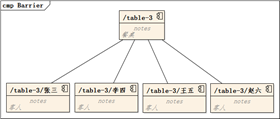
2 客人落座
落座的流程分两步:首先,创建自己的子节点;然后,等待其他客人落座直到坐满。创建客人子节点时CreateMode使用的是CreateMode.EPHEMERAL,这是属于当前zk会话的节点,当会话关闭时,如果节点没有删除,ZK会自动删除。
|
String nodeName = tableSerial + "/" + customerName; log.info("{}: 自己坐下来 {}", customerName, nodeName); zk.create(nodeName, new byte[0], Ids.OPEN_ACL_UNSAFE, CreateMode.EPHEMERAL); while (true) { synchronized (mutex) { // 读出子节点列表,并继续监听 List<String> list = zk.getChildren(tableSerial, true); if (list.size() < tableCapacity) { log.info("{}: 当前人数 = {} , 总人数 = {}, 人还不够: 吃饭不积极,一定有问题...", customerName, list.size(), tableCapacity); mutex.wait(); } else { log.info("{}: 人终于够了,开饭...", customerName); return true; } } } |
3 客人准备离开
客人准备离开的逻辑同落座类似,首先删除自己的子节点,然后判断是否所有的子节点都已经被删除。删除子节点时,直接设置版本号为0,这是因为在这个示例中创建后没有修改过数据。真实业务场景,应该先读出zk中数据的版本号,然后作为参数传入到delete命令。
|
String nodeName = tableSerial + "/" + customerName; log.info("{}: 已经吃完,准备离席,删除节点 {}", customerName, nodeName); zk.delete(nodeName, 0); while (true) { // 读出子节点列表,并继续监听 List<String> list = zk.getChildren(tableSerial, true); if (list.size() > 0) { log.info("{}: 还有 {} 人没吃完,你们吃快点...", customerName, list.size()); synchronized (mutex) { mutex.wait(); } } else { log.info("{}: 所有人都吃完了,准备散伙", customerName); return true; } } |
4 尝试用Stat获取子节点个数
代码中使用getChildren获取子节点列表,然后统计个数。ZooKeeper还有另一个方法也能获取子节点数:org.apache.zookeeper.data.Stat#numChildren。
将代码leave修改为
|
String nodeName = tableSerial + "/" + customerName; log.info("{}: 已经吃完,准备离席,删除节点 {}", customerName, nodeName); zk.delete(nodeName, 0); while (true) { // 使用Stat判断子节点个数 Stat tableStat = new Stat(); zk.getData(tableSerial, true, tableStat); if (tableStat.getNumChildren() > 0) { log.info("{}: 还有 {} 人没吃完,你们吃快点...", customerName, tableStat.getNumChildren()); synchronized (mutex) { mutex.wait(); } } else { log.info("{}: 所有人都吃完了,准备散伙", customerName); return true; } } |
运行后发现:能够读出子节点个数,但再也无法监听 EventType.NodeChildrenChanged事件,这是ZooKeeper的监听机制决定的。网上搜索到 https://my.oschina.net/u/587108/blog/484203 有介绍,可以自己看一下。简单说就是:
getData()和exists()会监听节点自己的NodeCreated、NodeDeleted、NodeDataChanged事件;getChildren()会监听节点的NodeChildrenChanged事件。
5 完整源码
这个例子没有使用main()函数,改为创建一个 testng 测试用例启动。
5.1 ZooKeeperBarrier.java
|
package tech.codestory.zookeeper.barrier; import java.io.IOException; import java.util.List; import java.util.concurrent.CountDownLatch; import org.apache.zookeeper.*; import org.apache.zookeeper.ZooDefs.Ids; import org.apache.zookeeper.data.Stat; import org.slf4j.profiler.Profiler; import lombok.extern.slf4j.Slf4j; /** * @author junyongliao * @date 2019/8/13 * @since 1.0.0 */ @Slf4j public class ZooKeeperBarrier implements Watcher { /** 等待连接建立成功的信号 */ CountDownLatch connectedSemaphore = new CountDownLatch(1); /** ZooKeeper 客户端 static */ ZooKeeper zk = null; /** 子节点发生变化的信号 static */ Integer mutex; /** 避免重复构建餐桌 */ static Integer tableSerialInitial = Integer.valueOf(1); /** 餐桌容量 */ int tableCapacity; /** 餐桌编号 */ String tableSerial; /** 客人姓名 */ String customerName; /** * 构造函数,用于创建zk客户端,以及记录记录barrier的名称和容量 * * @param address ZooKeeper服务器地址 * @param tableSerial 餐桌编号 * @param tableCapacity 餐桌容量 * @param customerName 客人姓名 */ ZooKeeperBarrier(String address, String tableSerial, int tableCapacity, String customerName) { this.tableSerial = tableSerial; this.tableCapacity = tableCapacity; this.customerName = customerName; try { Profiler profiler = new Profiler(customerName + " 连接到ZooKeeper"); profiler.start("开始连接"); zk = new ZooKeeper(address, 3000, this); profiler.start("等待连接成功的Event"); connectedSemaphore.await(); profiler.stop(); profiler.setLogger(log); profiler.log(); mutex = Integer.valueOf(-1); } catch (IOException e) { log.error("IOException", e); zk = null; } catch (InterruptedException e) { log.error("InterruptedException", e); } synchronized (tableSerialInitial) { // 创建 tableSerial 的zNode try { Stat existsStat = zk.exists(tableSerial, false); if (existsStat == null) { this.tableSerial = zk.create(tableSerial, new byte[0], Ids.OPEN_ACL_UNSAFE, CreateMode.PERSISTENT); } } catch (KeeperException e) { log.error("KeeperException", e); } catch (InterruptedException e) { log.error("InterruptedException", e); } } } @Override public void process(WatchedEvent event) { if (Event.EventType.None.equals(event.getType())) { // 连接状态发生变化 if (Event.KeeperState.SyncConnected.equals(event.getState())) { // 连接建立成功 connectedSemaphore.countDown(); } } else if (Event.EventType.NodeChildrenChanged.equals(event.getType())) { log.info("{} 接收到了通知 : {}", customerName, event.getType()); // 子节点有变化 synchronized (mutex) { mutex.notify(); } } } /** * 客人坐在饭桌上 * * @return 当等到餐桌坐满时返回 true * @throws KeeperException * @throws InterruptedException */ boolean enter() throws KeeperException, InterruptedException { String nodeName = tableSerial + "/" + customerName; log.info("{}: 自己坐下来 {}", customerName, nodeName); // 属于客人自己的节点,如果会话结束没删掉会自动删除 zk.create(nodeName, new byte[0], Ids.OPEN_ACL_UNSAFE, CreateMode.EPHEMERAL); while (true) { synchronized (mutex) { // 读出子节点列表,并继续监听 List<String> list = zk.getChildren(tableSerial, true); if (list.size() < tableCapacity) { log.info("{}: 当前人数 = {} , 总人数 = {}, 人还不够: 吃饭不积极,一定有问题...", customerName, list.size(), tableCapacity); mutex.wait(); } else { log.info("{}: 人终于够了,开饭...", customerName); return true; } } } } /** * 客人吃完饭了,可以离开 * * @return 所有客人都吃完,再返回true * @throws KeeperException * @throws InterruptedException */ boolean leave() throws KeeperException, InterruptedException { String nodeName = tableSerial + "/" + customerName; log.info("{}: 已经吃完,准备离席,删除节点 {}", customerName, nodeName); zk.delete(nodeName, 0); while (true) { // 读出子节点列表,并继续监听 List<String> list = zk.getChildren(tableSerial, true); if (list.size() > 0) { log.info("{}: 还有 {} 人没吃完,你们吃快点...", customerName, list.size()); synchronized (mutex) { mutex.wait(); } } else { log.info("{}: 所有人都吃完了,准备散伙", customerName); return true; } } } } |
5.2 ZooKeeperBarrierTest.java
|
package tech.codestory.zookeeper.barrier; import lombok.extern.slf4j.Slf4j; import org.apache.zookeeper.KeeperException; import org.testng.annotations.Test; import java.security.SecureRandom; import java.util.Random; import java.util.concurrent.CountDownLatch; import static org.testng.Assert.*; /** * 测试 ZooKeeperBarrier * * @author code story * @date 2019/8/15 */ @Slf4j public class ZooKeeperBarrierTest { Random random = new SecureRandom(); @Test public void testBarrierTest() { /** 等待连接建立成功的信号 */ String address = "192.168.5.128:2181"; String barrierName = "/table-" + random.nextInt(10); int barrierSize = 4; CountDownLatch countDown = new CountDownLatch(barrierSize); String[] customerNames = {"张三", "李四", "王五", "赵六"}; for (int i = 0; i < barrierSize; i++) { String customerName = customerNames[i]; new Thread() { @Override public void run() { log.info("{}: 准备吃饭", customerName); ZooKeeperBarrier barrier = new ZooKeeperBarrier(address, barrierName, barrierSize, customerName); try { boolean flag = barrier.enter(); log.info("{}: 坐在了可以容纳 {} 人的饭桌", customerName, barrierSize); if (!flag) { log.info("{}: 想坐在饭桌时出错了", customerName); } } catch (KeeperException e) { log.error("KeeperException", e); } catch (InterruptedException e) { log.error("InterruptedException", e); } // 假装在吃饭,随机时间 randomWait(); // 假装吃完了,离开barrier try { barrier.leave(); } catch (KeeperException e) { log.error("KeeperException", e); } catch (InterruptedException e) { log.error("InterruptedException", e); } countDown.countDown(); } }.start(); // 等一会儿再开始下一个进程 randomWait(); } try { countDown.await(); log.info("这一桌吃完了,散伙"); } catch (InterruptedException e) { log.error("InterruptedException", e); } } /** 随机等待 */ private void randomWait() { int r = random.nextInt(100); for (int j = 0; j < r; j++) { try { Thread.sleep(100); } catch (InterruptedException e) { log.error("InterruptedException", e); } } } } |
6 测试日志
如下是测试日志
|
33:34.198 [INFO] ZooKeeperBarrierTest.run(36) 张三: 准备吃饭 33:40.497 [INFO] ZooKeeperBarrierTest.run(36) 李四: 准备吃饭 33:43.333 [DEBUG] ZooKeeperBarrier.log(201) + Profiler [张三 连接到ZooKeeper] |-- elapsed time [开始连接] 71.684 milliseconds. |-- elapsed time [等待连接成功的Event] 9046.279 milliseconds. |-- Total [张三 连接到ZooKeeper] 9118.483 milliseconds. 33:43.346 [INFO] ZooKeeperBarrier.enter(110) 张三: 自己坐下来 /table-2/张三 33:43.353 [INFO] ZooKeeperBarrier.enter(118) 张三: 当前人数 = 1 , 总人数 = 4, 人还不够: 吃饭不积极,一定有问题... 33:49.515 [DEBUG] ZooKeeperBarrier.log(201) + Profiler [李四 连接到ZooKeeper] |-- elapsed time [开始连接] 4.365 milliseconds. |-- elapsed time [等待连接成功的Event] 9011.503 milliseconds. |-- Total [李四 连接到ZooKeeper] 9015.873 milliseconds. 33:49.520 [INFO] ZooKeeperBarrier.enter(110) 李四: 自己坐下来 /table-2/李四 33:49.528 [INFO] ZooKeeperBarrier.process(93) 张三 接收到了通知 : NodeChildrenChanged 33:49.528 [INFO] ZooKeeperBarrier.enter(118) 李四: 当前人数 = 2 , 总人数 = 4, 人还不够: 吃饭不积极,一定有问题... 33:49.532 [INFO] ZooKeeperBarrier.enter(118) 张三: 当前人数 = 2 , 总人数 = 4, 人还不够: 吃饭不积极,一定有问题... 33:50.107 [INFO] ZooKeeperBarrierTest.run(36) 王五: 准备吃饭 33:50.307 [INFO] ZooKeeperBarrierTest.run(36) 赵六: 准备吃饭 33:59.122 [DEBUG] ZooKeeperBarrier.log(201) + Profiler [王五 连接到ZooKeeper] |-- elapsed time [开始连接] 4.956 milliseconds. |-- elapsed time [等待连接成功的Event] 9008.505 milliseconds. |-- Total [王五 连接到ZooKeeper] 9013.468 milliseconds. 33:59.125 [INFO] ZooKeeperBarrier.enter(110) 王五: 自己坐下来 /table-2/王五 33:59.128 [INFO] ZooKeeperBarrier.process(93) 张三 接收到了通知 : NodeChildrenChanged 33:59.132 [INFO] ZooKeeperBarrier.process(93) 李四 接收到了通知 : NodeChildrenChanged 33:59.133 [INFO] ZooKeeperBarrier.enter(118) 李四: 当前人数 = 3 , 总人数 = 4, 人还不够: 吃饭不积极,一定有问题... 33:59.135 [INFO] ZooKeeperBarrier.enter(118) 王五: 当前人数 = 3 , 总人数 = 4, 人还不够: 吃饭不积极,一定有问题... 33:59.136 [INFO] ZooKeeperBarrier.enter(118) 张三: 当前人数 = 3 , 总人数 = 4, 人还不够: 吃饭不积极,一定有问题... 33:59.335 [DEBUG] ZooKeeperBarrier.log(201) + Profiler [赵六 连接到ZooKeeper] |-- elapsed time [开始连接] 10.184 milliseconds. |-- elapsed time [等待连接成功的Event] 9014.981 milliseconds. |-- Total [赵六 连接到ZooKeeper] 9025.175 milliseconds. 33:59.339 [INFO] ZooKeeperBarrier.enter(110) 赵六: 自己坐下来 /table-2/赵六 33:59.343 [INFO] ZooKeeperBarrier.process(93) 张三 接收到了通知 : NodeChildrenChanged 33:59.345 [INFO] ZooKeeperBarrier.enter(122) 赵六: 人终于够了,开饭... 33:59.346 [INFO] ZooKeeperBarrierTest.run(41) 赵六: 坐在了可以容纳 4 人的饭桌 33:59.346 [INFO] ZooKeeperBarrier.process(93) 王五 接收到了通知 : NodeChildrenChanged 33:59.346 [INFO] ZooKeeperBarrier.process(93) 李四 接收到了通知 : NodeChildrenChanged 33:59.348 [INFO] ZooKeeperBarrier.enter(122) 王五: 人终于够了,开饭... 33:59.348 [INFO] ZooKeeperBarrierTest.run(41) 王五: 坐在了可以容纳 4 人的饭桌 33:59.350 [INFO] ZooKeeperBarrier.enter(122) 李四: 人终于够了,开饭... 33:59.350 [INFO] ZooKeeperBarrierTest.run(41) 李四: 坐在了可以容纳 4 人的饭桌 33:59.352 [INFO] ZooKeeperBarrier.enter(122) 张三: 人终于够了,开饭... 33:59.352 [INFO] ZooKeeperBarrierTest.run(41) 张三: 坐在了可以容纳 4 人的饭桌 33:59.646 [INFO] ZooKeeperBarrier.leave(138) 赵六: 已经吃完,准备离席,删除节点 /table-2/赵六 33:59.650 [INFO] ZooKeeperBarrier.process(93) 赵六 接收到了通知 : NodeChildrenChanged 33:59.651 [INFO] ZooKeeperBarrier.process(93) 张三 接收到了通知 : NodeChildrenChanged 33:59.652 [INFO] ZooKeeperBarrier.leave(144) 赵六: 还有 3 人没吃完,你们吃快点... 33:59.652 [INFO] ZooKeeperBarrier.process(93) 李四 接收到了通知 : NodeChildrenChanged 33:59.652 [INFO] ZooKeeperBarrier.process(93) 王五 接收到了通知 : NodeChildrenChanged 33:59.654 [INFO] ZooKeeperBarrier.leave(144) 赵六: 还有 3 人没吃完,你们吃快点... 34:04.356 [INFO] ZooKeeperBarrier.leave(138) 王五: 已经吃完,准备离席,删除节点 /table-2/王五 34:04.361 [INFO] ZooKeeperBarrier.process(93) 赵六 接收到了通知 : NodeChildrenChanged 34:04.363 [INFO] ZooKeeperBarrier.leave(144) 王五: 还有 2 人没吃完,你们吃快点... 34:04.363 [INFO] ZooKeeperBarrier.leave(144) 赵六: 还有 2 人没吃完,你们吃快点... 34:05.958 [INFO] ZooKeeperBarrier.leave(138) 张三: 已经吃完,准备离席,删除节点 /table-2/张三 34:05.963 [INFO] ZooKeeperBarrier.process(93) 王五 接收到了通知 : NodeChildrenChanged 34:05.961 [INFO] ZooKeeperBarrier.leave(138) 李四: 已经吃完,准备离席,删除节点 /table-2/李四 34:05.967 [INFO] ZooKeeperBarrier.leave(144) 张三: 还有 1 人没吃完,你们吃快点... 34:05.968 [INFO] ZooKeeperBarrier.process(93) 赵六 接收到了通知 : NodeChildrenChanged 34:05.971 [INFO] ZooKeeperBarrier.process(93) 张三 接收到了通知 : NodeChildrenChanged 34:05.973 [INFO] ZooKeeperBarrier.leave(149) 赵六: 所有人都吃完了,准备散伙 34:05.981 [INFO] ZooKeeperBarrier.leave(149) 王五: 所有人都吃完了,准备散伙 34:05.982 [INFO] ZooKeeperBarrier.leave(149) 张三: 所有人都吃完了,准备散伙 34:05.983 [INFO] ZooKeeperBarrier.leave(149) 李四: 所有人都吃完了,准备散伙 34:05.985 [INFO] ZooKeeperBarrierTest.testBarrierTest(72) 这一桌吃完了,散伙 |
ZooKeeper实现同步屏障(Barrier)的更多相关文章
- Java并发编程的艺术(八)——闭锁、同步屏障、信号量详解
1. 闭锁:CountDownLatch 1.1 使用场景 若有多条线程,其中一条线程需要等到其他所有线程准备完所需的资源后才能运行,这样的情况可以使用闭锁. 1.2 代码实现 // 初始化闭锁,并设 ...
- Java多线程之CountDownLatch和CyclicBarrier同步屏障的使用
转载请注明原文地址:http://www.cnblogs.com/ygj0930/p/6558349.html 一:CountDownLatch CountDownLatch是一个执行 完成任务 ...
- 并发工具类(二)同步屏障CyclicBarrier
前言 JDK中为了处理线程之间的同步问题,除了提供锁机制之外,还提供了几个非常有用的并发工具类:CountDownLatch.CyclicBarrier.Semphore.Exchanger.Ph ...
- Java并发(十三):并发工具类——同步屏障CyclicBarrier
先做总结 1.CyclicBarrier 是什么? CyclicBarrier 的字面意思是可循环使用(Cyclic)的屏障(Barrier).它要做的事情是,让一组线程到达一个屏障(也可以叫同步点) ...
- zookeeper应用:屏障、队列、分布式锁
zookeeper工具类: 获取连接实例:创建节点:获取子节点:设置节点数据:获取节点数据:访问控制等. package org.windwant.zookeeper; import org.apac ...
- Java并发编程的艺术(九)——闭锁、同步屏障和信号量
闭锁:CountDownLatch 使用场景 当前线程需要等待若干条线程执行完毕后,才能继续执行的情况. 也可以是若干个步骤执行完毕后的情况. 使用方法 初始化闭锁的时候,填入计数值,然后等待其他线程 ...
- Java--CyclicBarrier同步屏障原理,使用
package com; import java.util.Map; import java.util.concurrent.BrokenBarrierException; import java.u ...
- Java核心-多线程-并发控制器-CyclicBarrier同步屏障
1.基本概念 中文译本同步屏障,同样来自jdk并发工具包中一个并发控制器,它的使用和CountDownLatch有点相似,能够完成某些相同并发场景,但是它们却不相同. 2.抽象模型 主要用来实现多个线 ...
- 倒计数锁存器(CountDown Latch)和 CyclicBarrier(同步屏障)
倒计数锁存器(CountDown Latch)是异常性障碍,允许一个或多个线程等待一个或者多个其他线程来做某些事情. public static long time(Executor executor ...
随机推荐
- WPF 入门笔记之布局
一.布局原则: 1. 不应显示的设定元素的尺寸,反而元素可以改变它的尺寸,并适应它们的内容 2. 不应使用平布的坐标,指定元素的位置. 3. 布局容器和它的子元素是共享可以使用的空间 4. 可以嵌套的 ...
- mongon库加上权限认证后,java程序连接异常
现象: linux库中mongo库,用超级管理员添加了一个超级管理员,并加了认证. 通过spring等相关的配置文件获取Mongo数据库连接,抛出异常,如下: Caused by: org.sprin ...
- 剑指offer第二版-8.二叉树的下一个节点
描述:给定一棵二叉树和其中的一个节点,找出中序遍历序列的下一个节点.树中应定义指向左节点.右节点.父节点的三个变量. 思路: 1.如果输入的当前节点有右孩子,则它的下一个节点即为该右孩子为根节点的子树 ...
- js 使用ES6 实现从json中取值并返回新的数组或者字符串
1.获取的json数据是这样的: data:[ { 'Id': '1', 'Phone': '123456', 'Name': '张三', }, { 'Id': '2', 'Phone': '7894 ...
- 个人永久性免费-Excel催化剂功能第43波-文本处理类函数增强
Excel的函数有400多个,真正常用的50多个,而常有的文本处理类函数也不多,不是因为文本类处理简单,而是Excel真的有点挤牙膏式的每个版本更新那么几个小函数,普通用户等得急切,但实际上这些小函数 ...
- python面向过程编程小程序 -ATM(里面用了终端打印)
06.09自我总结 1.文件摆放 ├── xxxx │ ├── run.py │ └── fil_mode.py │ └── data_time.py │ └── loading.py │ └── d ...
- http面试笔试常考知识点(一)
1.什么是http HTTP是客户端和服务器端请求和应答的标准.通过使用Web浏览器.网络爬虫或者其它的工具,客户端发起一个到服务器上指定端口(默认端口为80)的HTTP请求.(我们称这个客户端)叫用 ...
- C#的DateTime得到特定日期
//指定时间 DateTime dt = new DateTime(2016, 6, 1); //当前时间 DateTime dt = DateTime.Now; //本周周一 DateTime st ...
- 小白学python-day02-二进制、计算机单位、编程语言分类介绍、
今天是第二天,以下是学习内容总结. 但行努力,莫问前程. ----------------------------------------------------------------------- ...
- 【HTML】HTML标签介绍
1. < 小于号2. > 小于号3. 空格4. <p> </p> 内容作为一个段落5. <br/> 表示换行6. <h1> ...