
颜色下拉菜单(combox)
using System;

using System.Drawing;

using System.Collections;

using System.ComponentModel;

using System.Windows.Forms;

using System.Data;

namespace Combox

{

    /// <summary>

    /// Form1 的摘要说明。

    /// </summary>

    public class Form1 : System.Windows.Forms.Form

    {

        private System.Windows.Forms.ComboBox comboBox1;

        private System.Windows.Forms.Label label1;

        private System.Windows.Forms.Panel panel1;

        /// <summary>

        /// 必需的设计器变量。

        /// </summary>

        private System.ComponentModel.Container components = null;

        public Form1()

        {

            //

            // Windows 窗体设计器支持所必需的

            //

            InitializeComponent();

            //

            // TODO: 在 InitializeComponent 调用后添加任何构造函数代码

            //

        }

        /// <summary>

        /// 清理所有正在使用的资源。

        /// </summary>

        protected override void Dispose( bool disposing )

        {

            if( disposing )

            {

                if (components != null)

                {

                    components.Dispose();

                }

            }

            base.Dispose( disposing );

        }

        #region Windows 窗体设计器生成的代码

        /// <summary>

        /// 设计器支持所需的方法 - 不要使用代码编辑器修改

        /// 此方法的内容。

        /// </summary>

        private void InitializeComponent()

        {

            this.comboBox1 = new System.Windows.Forms.ComboBox();

            this.label1 = new System.Windows.Forms.Label();

            this.panel1 = new System.Windows.Forms.Panel();

            this.SuspendLayout();

            //

            // comboBox1

            //

            this.comboBox1.DrawMode = System.Windows.Forms.DrawMode.OwnerDrawFixed;

            this.comboBox1.DropDownStyle = System.Windows.Forms.ComboBoxStyle.DropDownList;

            this.comboBox1.Location = new System.Drawing.Point(, );

            this.comboBox1.Name = "comboBox1";

            this.comboBox1.Size = new System.Drawing.Size(, );

            this.comboBox1.TabIndex = ;

            this.comboBox1.SelectedIndexChanged  = new System.EventHandler(this.comboBox1_SelectedIndexChanged);

            this.comboBox1.MeasureItem  = new System.Windows.Forms.MeasureItemEventHandler(this.comboBox1_MeasureItem);

            this.comboBox1.DrawItem  = new System.Windows.Forms.DrawItemEventHandler(this.comboBox1_DrawItem);

            //

            // label1

            //

            this.label1.Location = new System.Drawing.Point(, );

            this.label1.Name = "label1";

            this.label1.Size = new System.Drawing.Size(, );

            this.label1.TabIndex = ;

            this.label1.Text = "请在组合框中选择颜色值:";

            //

            // panel1

            //

            this.panel1.BorderStyle = System.Windows.Forms.BorderStyle.Fixed3D;

            this.panel1.Location = new System.Drawing.Point(, );

            this.panel1.Name = "panel1";

            this.panel1.Size = new System.Drawing.Size(, );

            this.panel1.TabIndex = ;

            //

            // Form1

            //

            this.AutoScaleBaseSize = new System.Drawing.Size(, );

            this.ClientSize = new System.Drawing.Size(, );

            this.Controls.Add(this.panel1);

            this.Controls.Add(this.label1);

            this.Controls.Add(this.comboBox1);

            this.MaximizeBox = false;

            this.Name = "Form1";

            this.StartPosition = System.Windows.Forms.FormStartPosition.CenterScreen;

            this.Text = "演示制作带图形的组合框";

            this.Load  = new System.EventHandler(this.Form1_Load);

            this.ResumeLayout(false);

        }

        #endregion

        /// <summary>

        /// 应用程序的主入口点。

        /// </summary>

        [STAThread]

        static void Main()

        {

            Application.Run(new Form1());

        }

        private void Form1_Load(object sender, System.EventArgs e)

        {

        //  this.comboBox1.DisplayMember="Color";

            this.comboBox1.Items.Add(Brushes.Cyan);

            this.comboBox1.Items.Add(Brushes.DarkSalmon);

            this.comboBox1.Items.Add(Brushes.Gray);

            this.comboBox1.Items.Add(Brushes.Green);

            this.comboBox1.Items.Add(Brushes.AliceBlue);

            this.comboBox1.Items.Add(Brushes.Black);

            this.comboBox1.Items.Add(Brushes.Blue);

            this.comboBox1.Items.Add(Brushes.Chocolate);

            this.comboBox1.Items.Add(Brushes.Pink);

            this.comboBox1.Items.Add(Brushes.Red);

            this.comboBox1.Items.Add(Brushes.LightBlue);

            this.comboBox1.Items.Add(Brushes.Brown);

            this.comboBox1.Items.Add(Brushes.DodgerBlue);

            this.comboBox1.Items.Add(Brushes.MediumPurple);

            this.comboBox1.Items.Add(Brushes.White);

            this.comboBox1.Items.Add(Brushes.Yellow);

        }

        private void comboBox1_MeasureItem(object sender, System.Windows.Forms.MeasureItemEventArgs e)

        {//设置列表项宽

            e.ItemHeight=this.comboBox1.ItemHeight-;

        }

        private void comboBox1_DrawItem(object sender, System.Windows.Forms.DrawItemEventArgs e)

        {//绘制列表项

            ComboBox MyCombox=(ComboBox)sender;

            if(e.Index==-)

                return;

            if(sender==null)

                return;

            SolidBrush MyBrush=(SolidBrush)MyCombox.Items[e.Index];

            Graphics g=e.Graphics;

            //如果已经进行选择,则绘制正确的背景颜色和聚集框

            e.DrawBackground();

            e.DrawFocusRectangle();

            //绘制颜色的预览框

            Rectangle MyRect=e.Bounds;

            MyRect.Offset(,);

            MyRect.Width=;

            MyRect.Height-=;

            g.DrawRectangle(new Pen(e.ForeColor),MyRect);

            //获取选定颜色的相应画刷对象,并填充预览框

            MyRect.Offset(,);

            MyRect.Width-=;

            MyRect.Height-=;

            g.FillRectangle(MyBrush,MyRect);

            //绘制选定颜色的名称

            g.DrawString(MyBrush.Color.Name.ToString(),Font,new SolidBrush(e.ForeColor),e.Bounds.X ,e.Bounds.Y );

        }

        private void comboBox1_SelectedIndexChanged(object sender, System.EventArgs e)

        {//显示选择的颜色

            if(this.comboBox1.SelectedIndex>=)

            {

                SolidBrush MyBrush=(SolidBrush)(this.comboBox1.SelectedItem);

                this.panel1.BackColor=MyBrush.Color;

            }

        }

    }

}
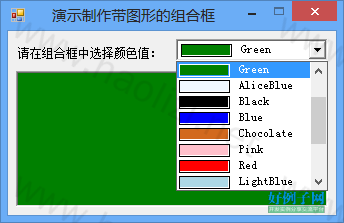
颜色下拉菜单(combox)的更多相关文章
- jQuery 小特效【文本框折叠隐藏,展开显示】【下拉菜单】【颜色渐变】【弹窗+遮罩】
<%@ Page Language="C#" AutoEventWireup="true" CodeFile="Default.aspx.cs& ...
- vue实现隔行换色,下拉菜单控制隔行换色的颜色
<!DOCTYPE html> <html lang="en"> <head> <meta charset="UTF-8&quo ...
- IOS第二天-新浪微博 - 添加搜索框,弹出下拉菜单 ,代理的使用 ,HWTabBar.h(自定义TabBar)
********HWDiscoverViewController.m(发现) - (void)viewDidLoad { [super viewDidLoad]; // 创建搜索框对象 HWSearc ...
- Bootstrap之样式风格与下拉菜单
背景颜色 bg-primary 字体颜色 text-primary 文字居中 text-center 按钮 btn btn-primary btn-default默认 btn-link链接 按钮大小 ...
- SJPullDownMenu下拉菜单框架使用
SJPullDownMenu 快速集成类似淘宝筛选下拉菜单 如果页面显示不全等问题请转至:http://www.jianshu.com/p/d07c6393830c 查看使用 Getting Star ...
- Bootstrap框架(基础篇)之按钮,网格,导航栏,下拉菜单
一,按钮 注意:虽然在Bootstrap框架中使用任何标签元素都可以实现按钮风格,但个人并不建议这样使用,为了避免浏览器兼容性问题,个人强烈建议使用button或a标签来制作按钮. 框架中提供了基础按 ...
- Dwz下拉菜单的二级联动
在DWZ文档中对组合框combox的是这样描述的: 在传统的select 用class 定义:class=”combox”, html 扩展:保留原有属性name, 增加了属性:ref. ref 属 ...
- 形行色色的下拉菜单(HTML/CSS JS方法 jQuery方法实现)
HTML/CSS方法实现下拉菜单来源:慕课网<!DOCTYPE html PUBLIC "-//W3C//DTD XHTML 1.0 Transitional//EN" &q ...
- excel设置下拉菜单,并且不同值会显示不同颜色
工作中常常要用的excel,每次都会有新的需求,然后不会,然后百度,然后过段时间可能就又忘了,于是就想说,自己记录下来~~~因为自己用的都是2010,其实哪个版本都差不多,都是应该可以找到相应的按钮滴 ...
随机推荐
- EF 使用遇到过的错误记录备忘
1. is only supported for sorted input in LINQ to Entities The method :只支持排序输入实体LINQ 的方法 是使用skip()时没 ...
- python 3.7 新特性 - popitem
百度上大多文章说 popitem 随机删除字典的一个键值对 python 3.7 官方文档已经说了,popitem 删除字典最后一个添加进去的键值对
- Apache struts2 Freemarker标签远程命令执行_CVE-2017-12611(S2-053)漏洞复现
Apache struts2 Freemarker标签远程命令执行_CVE-2017-12611(S2-053)漏洞复现 一.漏洞描述 Struts2在使用Freemarker模块引擎的时候,同时允许 ...
- [小米OJ] 5. 找出旋转有序数列的中间值
排序,输出 #include <bits/stdc++.h> using namespace std; int main() { string input; while (cin > ...
- apache自动打包日志脚本
#!/bin/bash # apachedata=$(date +%Y%m%d) time=$(date +%Y%m%d%H --date='1 hour ago') cd /logs/apache/ ...
- 分组在re模块中的使用以及使用正则表达式的技巧
1.split:切割 使用split不会返回被切割的字符 import re ret = re.split("\d+","5as46asf46asf46a") ...
- spark 源码分析之七--Spark RPC剖析之RpcEndPoint和RpcEndPointRef剖析
RpcEndpoint 文档对RpcEndpoint的解释:An end point for the RPC that defines what functions to trigger given ...
- web设计_8_数据表格内容样式分离
1.页面需要用到table的时候,样式重置CSS要设置: table{ border-collapse: collapse; border-spacing:; } 2. HTML结构 <tabl ...
- RobotFramework_1.简介和安装
RobotFramework_1.简介与安装 *:first-child { margin-top: 0 !important; } body>*:last-child { margin-bot ...
- 洛谷 P3387 题解
题面 裸跑一遍SPFA,统计每个点的入队次数: 如果该点的入队次数>=总点数,那么该点便是一个负环上的点: 重点!!!: 1.不是“YES”,是“YE5”: 2.不是“NO”,是“N0”:(是零 ...