
android POI搜索,附近搜索,周边搜索定位介绍
POI搜索有三种方式。依据范围和检索词发起范围检索poiSearchInbounds。城市poi检索poiSearchInCity,周边检索poiSearchNearBy。
下以周边检索为例介绍怎样进行检索并显示覆盖物PoiOverlay:
public int poiSearchNearBy(java.lang.String key, title=Android%E5%B9%B3%E5%8F%B0/%E7%B1%BB%E5%8F%82%E8%80%83/GeoPoint" title="Android平台/类參考/GeoPoint" style="color:rgb(38,121,186); text-decoration:none">GeoPoint
int radius)
- 依据中心点、半径与检索词发起周边检索.
- 异步函数,返回结果在MKSearchListener里的onGetPoiResult方法通知
- 參数:
- key - 关键词
- pt - 中心点地理坐标
- radius - 半径。单位:米
- 返回:
- 成功返回0,否则返回-1
Demo: 检索天安门周边5000米之内的KFC餐厅
- mMKSearch.poiSearchNearBy("KFC", new GeoPoint((int) (39.915 * 1E6), (int) (116.404 * 1E6)), 5000);
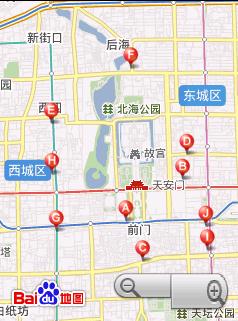
- public void onGetPoiResult(MKPoiResult result, int type, int iError) {
- if (result == null) {
- return;
- }
- PoiOverlay poioverlay = new PoiOverlay(MyMapActivity.this, mMapView);
- poioverlay.setData(result.getAllPoi());
- mMapView.getOverlays().add(poioverlay);
- }
- package xiaosi.baiduMap;
- import android.os.Bundle;
- import com.baidu.mapapi.BMapManager;
- import com.baidu.mapapi.GeoPoint;
- import com.baidu.mapapi.MKAddrInfo;
- import com.baidu.mapapi.MKDrivingRouteResult;
- import com.baidu.mapapi.MKPoiResult;
- import com.baidu.mapapi.MKSearch;
- import com.baidu.mapapi.MKSearchListener;
- import com.baidu.mapapi.MKTransitRouteResult;
- import com.baidu.mapapi.MKWalkingRouteResult;
- import com.baidu.mapapi.MapActivity;
- import com.baidu.mapapi.MapController;
- import com.baidu.mapapi.MapView;
- import com.baidu.mapapi.PoiOverlay;
- public class BaiduMapActivity extends MapActivity
- {
- /** Called when the activity is first created. */
- private BMapManager mapManager = null;
- private String key = "1B79478DA01F7800AEA8602517A6D89B38151105";
- private MapView mapView = null;
- @Override
- public void onCreate(Bundle savedInstanceState)
- {
- super.onCreate(savedInstanceState);
- setContentView(R.layout.main);
- mapManager = new BMapManager(getApplication());
- mapManager.init(key, null);
- super.initMapActivity(mapManager);
- mapView = (MapView) findViewById(R.id.mapsView);
- mapView.setBuiltInZoomControls(true); // 设置启用内置的缩放控件
- MapController mapController = mapView.getController(); // 得到mMapView的控制权,能够用它控制和驱动平移和缩放
- mapController.setZoom(12); // 设置地图zoom级别
- MKSearch mKSearch = new MKSearch();
- mKSearch.init(mapManager, new MySearchListener());// 注意。MKSearchListener仅仅支持一个。以最后一次设置为准
- mKSearch.poiSearchNearBy("KFC", new GeoPoint((int) (39.915 * 1E6),
- (int) (116.404 * 1E6)), 5000);
- }
- public class MySearchListener implements MKSearchListener
- {
- public void onGetAddrResult(MKAddrInfo arg0, int arg1)
- {}
- public void onGetDrivingRouteResult(MKDrivingRouteResult arg0, int arg1)
- {}
- public void onGetPoiResult(MKPoiResult arg0, int arg1, int arg2)
- {
- if (arg0 == null) {
- return;
- }
- PoiOverlay poioverlay = new PoiOverlay(BaiduMapActivity.this, mapView);
- poioverlay.setData(arg0.getAllPoi());
- mapView.getOverlays().add(poioverlay);
- }
- public void onGetTransitRouteResult(MKTransitRouteResult arg0, int arg1)
- {}
- public void onGetWalkingRouteResult(MKWalkingRouteResult arg0, int arg1)
- {}
- }
- @Override
- protected boolean isRouteDisplayed()
- {
- return false;
- }
- @Override
- protected void onDestroy()
- {
- if (mapManager != null)
- {
- mapManager.destroy();
- mapManager = null;
- }
- super.onDestroy();
- }
- @Override
- protected void onPause()
- {
- if (mapManager != null)
- {
- mapManager.stop();
- }
- super.onPause();
- }
- @Override
- protected void onResume()
- {
- if (mapManager != null)
- {
- mapManager.start();
- }
- super.onResume();
- }
- }
android POI搜索,附近搜索,周边搜索定位介绍的更多相关文章
- Android必知必会-带列表的地图POI周边搜索
如果移动端访问不佳,请尝试–> Github版 2016-08-22 更新 注意:在 Activity 代码中的onPoiSearched(PoiResult result, int rCode ...
- 【微信公众平台开发】百度周边搜索接口php封装
watermark/2/text/aHR0cDovL2Jsb2cuY3Nkbi5uZXQvcWl2YW4=/font/5a6L5L2T/fontsize/400/fill/I0JBQkFCMA==/d ...
- ZT android -- 蓝牙 bluetooth (三)搜索蓝牙
android -- 蓝牙 bluetooth (三)搜索蓝牙 分类: Android的原生应用分析 2013-05-31 22:03 2192人阅读 评论(8) 收藏 举报 bluetooth蓝牙s ...
- 用google map实现周边搜索功能
项目要实现根据经纬度获取附近的建筑,由于项目在海外运营,谷歌地图首当其冲. 首先说明的是,该功能需要在服务端实现,也就是安卓的SDK不适用. api文档地址: https://developers.g ...
- 高德地图搜索功能以及清除搜索结果maker
第一次写文章,写得不好各位看官见谅~ (pσ_σ)P首先这是一个vue里面的项目,高德地图api是直接CDN进来的,所以使用了global来调用,默认已经初始化了一个地图,为了实现一个输入框搜索功能和 ...
- CMake库搜索函数居然不搜索LD_LIBRARY_PATH
摘要: 本文通过编译后运行找不到库文件的问题引入,首先分析了find_package(JNI)的工作流程,而后针对cmake不搜索LD_LIBRARY_PATH的问题,提出了一种通用的解决办法. 本文 ...
- [转载]SharePoint 2013搜索学习笔记之搜索构架简单概述
Sharepoint搜索引擎主要由6种组件构成,他们分别是爬网组件,内容处理组件,分析处理组件,索引组件,查询处理组件,搜索管理组件.可以将这6种组件分别部署到Sharepoint场内的多个服务器上, ...
- 点击搜索取消UISearchDisplayController的搜索状态
一般,我们用到UISearchDisplayController的时候,都是须要对一个数据源进行刷选,在UISearchDisplayController自带的tableView中展示出来,然后点击退 ...
- lucene全文搜索之四:创建索引搜索器、6种文档搜索器实现以及搜索结果分析(结合IKAnalyzer分词器的搜索器)基于lucene5.5.3
前言: 前面几章已经很详细的讲解了如何创建索引器对索引进行增删查(没有更新操作).如何管理索引目录以及如何使用分词器,上一章讲解了如何生成索引字段和创建索引文档,并把创建的索引文档保存到索引目录,到这 ...
随机推荐
- Linux常用的操作指令
1.pwd-显示当前所在位置 2.cd-进入当前目录 3.cd..-返回上一级目录 4..ls命令参数选项有很多,ls也是经常使用到的命令.如果不清楚命令的使用方式可以直接 ls --help来查看 ...
- 使用SpringBoot-JPA进行自定义的保存及批量保存
更多精彩博文,欢迎访问我的个人博客 说明 SpringBoot版本:2.1.4.RELEASE java版本:1.8 文中所说JPA皆指spring-boot-starter-data-jpa 使用J ...
- mkdir与makedirs
mkdir创建的是一级目录 makedirs可以创建多级目录 mkdir -p可以递归创建目录
- 对faster rcnn代码讲解的很好的一个
http://www.cnblogs.com/houkai/p/6824455.html http://blog.csdn.net/u014696921/article/details/6032142 ...
- Windows虚拟桌面
PROCESS_INFORMATION ProcessInfo; STARTUPINFO StartupInfo; HDESK hDesktop; HDESK hOriginalThread; HDE ...
- [LUOGU] [NOIP2017] P3960 列队
题目描述 Sylvia 是一个热爱学习的女孩子. 前段时间,Sylvia 参加了学校的军训.众所周知,军训的时候需要站方阵. Sylvia 所在的方阵中有 n \times mn×m 名学生,方阵的行 ...
- mysql主从同步 change master to配置
CHANGE MASTER TO MASTER_HOST='10.0.0.52', MASTER_PORT=3308, MASTER_AUTO_POSITION=1, MASTER_USER='rep ...
- SpringMVC中controller的跳转
controller中的重定向 (1)不需要传递参数重定向 方式一:使用ModelAndView return new ModelAndView("redirect:/toLi ...
- 【HDU 6008】Worried School(模拟)
Problem Description You may already know that how the World Finals slots are distributed in EC sub-r ...
- python013 Python3 条件控制
Python3 条件控制Python条件语句是通过一条或多条语句的执行结果(True或者False)来决定执行的代码块.可以通过下图来简单了解条件语句的执行过程: if 语句Python中if语句的一 ...