
Setting up Storm and Running Your First Topology
http://www.haroldnguyen.com/blog/2015/01/setting-up-storm-and-running-your-first-topology/
------------------------------------------------------------------------------------------------------------------------
Setting up Storm and Running Your First Topology
This guide will setup Storm on a single Ubuntu instance, and show you how to run a simple Word Count Topology. This guide assumes no experience with Storm.
Storm was created by Nathan Marz, and is designed for real-time event processing, and improves on some of Hadoop’s distributed design. Storm provides excellent documentation, which you are highly encouraged to go through. If you’re pressed for time, though, the following guide gets you started with running a simple real-time event processor (this is called a topology, but I assume you haven’t read any documentation and just want to get the thing up and running. Though this puts you at a conceptual disadvantage, there’s nothing like getting your hands dirty right away).
Setting up Storm
First grab version 0.9.2 of Storm (already compiled version)
$ wget http://apache.mesi.com.ar/storm/apache-storm-0.9.2-incubating/apache-storm-0.9.2-incubating.tar.gz
Extract the files:
$ tar -zxvf apache-storm-0.9.2-incubating.tar.gz
Grab the latest version of maven:
$ sudo apt-get install maven
If you are on a Mac:
$ brew install maven
also set the JAVA_HOME path in Mac through the ~/.bash_profile file:
$ export JAVA_HOME=$(/usr/libexec/java_home)
Check the maven version to see that it installed correctly:
$ mvn -version

If you checked out the src version of Storm, you can build and install the Storm jars locally with the following command (requires pom.xml file). This doesn’t need to be done if you already downloaded the compiled version as this guide has shown. However, it’s worth noting now because you’ll be using this command to compile your projects if you modify any of the source code.
Instead of building jars for the Storm project (since we’ve checked out the compiled version), let’s build the jar file for the storm-starter example project. First go into the storm-starter project within the apache-storm-0.9.2-incubating/examples folder:
$ cd apache-storm-0.9.2-incubating/examples/storm-starter
Now compile and build the jar files:
$ mvn clean install -DskipTests=true
It should take a few minutes, and you’ll see a lot of output. At the end of the output, you should see:

You are now ready to run your first Storm job (called a “topology”). We are going to run the topology located in apache-storm-0.9.2-incubating/examples/storm-starter/src/jvm/storm/starter/WordCountTopology.java
Let’s run the topology first, and then go briefly into the details of what is happening.
In the storm-starter directory, issue:
$ mvn compile exec:java -Dstorm.topology=storm.starter.WordCountTopology
The whole process will take about 50 seconds, and you will see a whole bunch of output. The main thing to look for in this output is something like this:

It should occur near the middle of all the output being shown. The end of the output should a bunch of shutdown messages, along with a success message like this:

Congratulations! You have ran your first Storm topology!
Storm has a local mode (called “Local Cluster”) and a production-cluster mode. The local mode is helpful for development and debugging, while the production-cluster mode is intended to run in a production environment. You just submitted the WordCountTopology in local mode.
Let’s take a look at what you just did.
A Storm topology consists of “Spouts” and “Bolts”. You can think of Spouts as obtaining the data, and Bolts as transforming the data. In a topology, you typically have one or more Bolts stemming from one Spout. The “data” in a Storm topology is called a “Tuple”.

In the WordCountTopology, the Spout used is the RandomSentenceSpout:

RandomSetenceSpout is located at apache-storm-0.9.2-incubating/examples/storm-starter/src/jvm/storm/starter/spout/RandomSentenceSpout.java
If you take a peak at this file, you can see the sentences being used:

That explains our output in our example – the words being “emitted” are taken from these sentences. The nextTuple method is common in all Spouts, and determines what you want the Spout to do. As you can see, it is a method that is commonly overridden.
Let’s now take a look at the Bolts in WordCountTopology.java:

These bolts are methods defined with the same file (WordCountTopology.java). By their name, we can guess what they do. Let’s take a look at “SplitSentence”:

It looks like it is calling a python script called “splitsentence.py”. Doing a little digging, we find this script located in apache-storm-0.9.2-incubating/examples/storm-starter/multilang/resources/splitsentence.py
We’ve just stumbled upon a cool thing that Storm can do – bolts are allowed to be language-agnostic! This means, we can write our logic in any language we please. In this case, we are splitting sentences with Python! Here is the splitsentence.py logic:

As you can see, it’s splitting the sentences by a single space, and “emitting” each word in that sentence.
So our first bolt “SplitSentence” is actually a python script that splits the sentences into words. Let’s take a look at our second bolt, “WordCount”, which is defined in WordCountTopology.java:

As you can see, a HashMap called “counts” is created, which stores the counts of each word going through.
This is the basic and fundamental template of a Storm topology. All other topologies you see are just different variations on this.
Just for completeness, let’s take a look at the rest of WordCountTopology:

As you might guess based on the names of the variables, the rest of the file is used for configuration information.
conf.setDebug controls the verbosity of the output. The block of code within the “if” statement is configuration for production, and the block of code in the “else” statement is for local mode (which is what we just saw). The topology being submitted is called “word-count”, and we’ve asked the job to run for 10 seconds.
In the meantime, as a “homework” assignment, you are encouraged to get the ExplanationTopology.java working, located in examples/storm-starter/src/jvm/ExclamationTopology.java
If you are feeling ambitious, try modifying the input Spout (TestWordSpout.java), and see how things change. However, you will need to download the source version and build storm-core from scratch, as TestWordSpout.java is part of storm-core. Remember to issue the compile command at the top storm level after each modification of the code:
$ mvn clean install -DskipTests=true
Deploying Storm on Production
Package the project for use on a Storm cluster. For instance, in storm-starter, do:
$ mvn package
The package should be in:
target/storm-starter-{version}-jar-with-dependences.jar
You can check out the binary version of storm (as we did above), and use the “storm” command from there. You can also add the bin path to $PATH.
Read this to fill in the storm.yam part.
I only modified the following in storm.yam:
storm.zookeeper.servers:
– “localhost”
# – “server2”
nimbus.host: “localhost”
Then start nimbus, supervisor, and UI:
$ storm nimbus$ storm supervisor$ storm ui
(localhost:8080 by default)
Then, from the machine that has the storm-jar-dependencies.jar, submit it:
$ storm jar /Users/haroldnguyen/workspace/storm-tutorial/apache-storm-0.9.2-incubating-src/examples/storm-starter/target/storm-starter-0.9.2-incubating-jar-with-dependencies.jar storm.starter.ExclamationTopology production-topology-1
The logs are located in the binary version of storm/logs.
The storm ui is pretty neat, giving you a summary of running topologies and visualization:

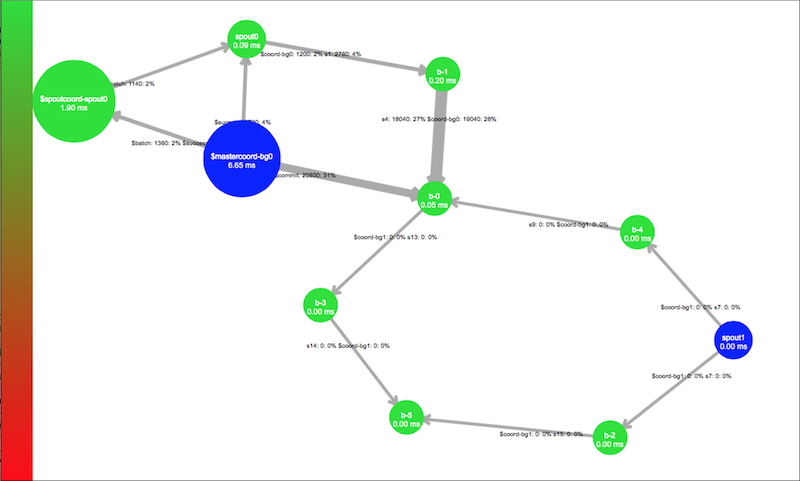
If you still have trouble, please read through this excellent documentation on Running Topologies on a Production Cluster.
Conclusion
Congratulations – you went from knowing nothing about Storm to running a Word Count topology! The world is really your oyster!
In our next post, we’ll see how to connect Storm with Kafka!
This entry was posted in Storm. Bookmark the permalink.
Setting up Storm and Running Your First Topology的更多相关文章
- storm源码分析之topology提交过程
storm集群上运行的是一个个topology,一个topology是spouts和bolts组成的图.当我们开发完topology程序后将其打成jar包,然后在shell中执行storm jar x ...
- storm的作业单元:Topology
Storm系统的数据处理应用单元,是被打包的被称为Topology的作业. 它是由多个数据处理阶段组合而成的,而每个处理阶段在构造时被称为组件(Component),在运行时被称为任务. 那么,组件根 ...
- 通过 IDE 向 Storm 集群远程提交 topology
转载: http://weyo.me/pages/techs/storm-topology-remote-submission/ http://www.javaworld.com/article/20 ...
- kerberos环境storm配置:Running Apache Storm Securely
Running Apache Storm Securely Apache Storm offers a range of configuration options when trying to se ...
- 关于Storm 中Topology的并发度的理解
来自:https://storm.apache.org/documentation/Understanding-the-parallelism-of-a-Storm-topology.html htt ...
- storm环境搭建(前言)—— 翻译 Setting Up a Development Environment
Setting Up a Development Environment 搭建storm开发环境所需步骤: Download a Storm release , unpack it, and put ...
- Storm入门教程 第二章 构建Topology[转]
2.1 Storm基本概念 在运行一个Storm任务之前,需要了解一些概念: Topologies Streams Spouts Bolts Stream groupings Reliability ...
- 2 storm的topology提交执行
本博文的主要内容有 .storm单机模式,打包,放到storm集群 .Storm的并发机制图 .Storm的相关概念 .附PPT 打包,放到storm集群去.我这里,是单机模式下的storm. wee ...
- Storm编程入门API系列之Storm的Topology的stream grouping
概念,见博客 Storm概念学习系列之stream grouping(流分组) Storm的stream grouping的Shuffle Grouping 它是随机分组,随机派发stream里面的t ...
随机推荐
- 动态生成表格呈现还是将表格直接绑定gridview等控件呈现的开发方式选择依据
动态生成表格呈现还是将表格直接绑定gridview等控件呈现的开发方式选择依据:由存储过程决定,如果编写的存储过程可以生成需要呈现的表格则直接绑定,否则要动态生成表格
- MYSQL之错误代码----mysql错误代码与JAVA实现
原文地址:MYSQL之错误代码----mysql错误代码与JAVA实现作者:戒定慧 his chapter lists the errors that may appear when you call ...
- Learning Discriminative and Transformation Covariant Local Feature Detectors实验环境搭建详细过程
依赖项: Python 3.4.3 tensorflow>1.0.0, tqdm, cv2, exifread, skimage, glob 1.安装tensorflow:https://www ...
- 2019年,Linux运维行业的趋势,跟不上学习就被淘汰
运维行业经历了多年的发展,已经有了很大的变化,最开始的机房.网线.人肉,到现在一步步的自动化.智能化.容器化,运维人员的职业技能要求越来越高,稍不注意就可能被淘汰. 今天马小哥就来盘点一下2019年运 ...
- Stack in c#
public static void SaveStack() { string result = "Hello World"; Stack st = new Stack(); fo ...
- 修改mysql数据默认存储路径
1:停止mysql服务 2:找到配置文件路径 C:\ProgramData\MySQL\MySQL Server 5.6\my.ini 3:修改属性datadir 1.将C:/ProgramData/ ...
- Dijkstra+set堆优化局部模板
这是某天2018-10-25写的某题(P1613-luogu)的局部代码,目的是方便自己记忆一些细节,所以这里不过多赘述算法原理或题目 邻接矩阵mapp表示有向图 struct ELE { int i ...
- centos6 rpm安装mysql(5.5版本)包括 error : Failed dependencies:libaio的解决办法.
1.先在/opt目录下放了两个rpm包 2.先看系统中是否有其他版本的mysql的rpm包 rpm -qa | grep -i mysql 命令结果如下图: 如果没有此步跳过,否则执行一下命令将其删除 ...
- ehcache的学习笔记(一)
学习ehcache文档: 介绍:Ehcache是一个开源的项目,用来提高性能的基于标准化的缓存,无需使用数据库,简化了可扩展性.他是最广泛使用的基于java的缓存,因为他是强壮的,被证实的,功能全面的 ...
- [Python3网络爬虫开发实战] 7-动态渲染页面爬取
在前一章中,我们了解了Ajax的分析和抓取方式,这其实也是JavaScript动态渲染的页面的一种情形,通过直接分析Ajax,我们仍然可以借助requests或urllib来实现数据爬取. 不过Jav ...