
Linux Shell ssh登录脚本
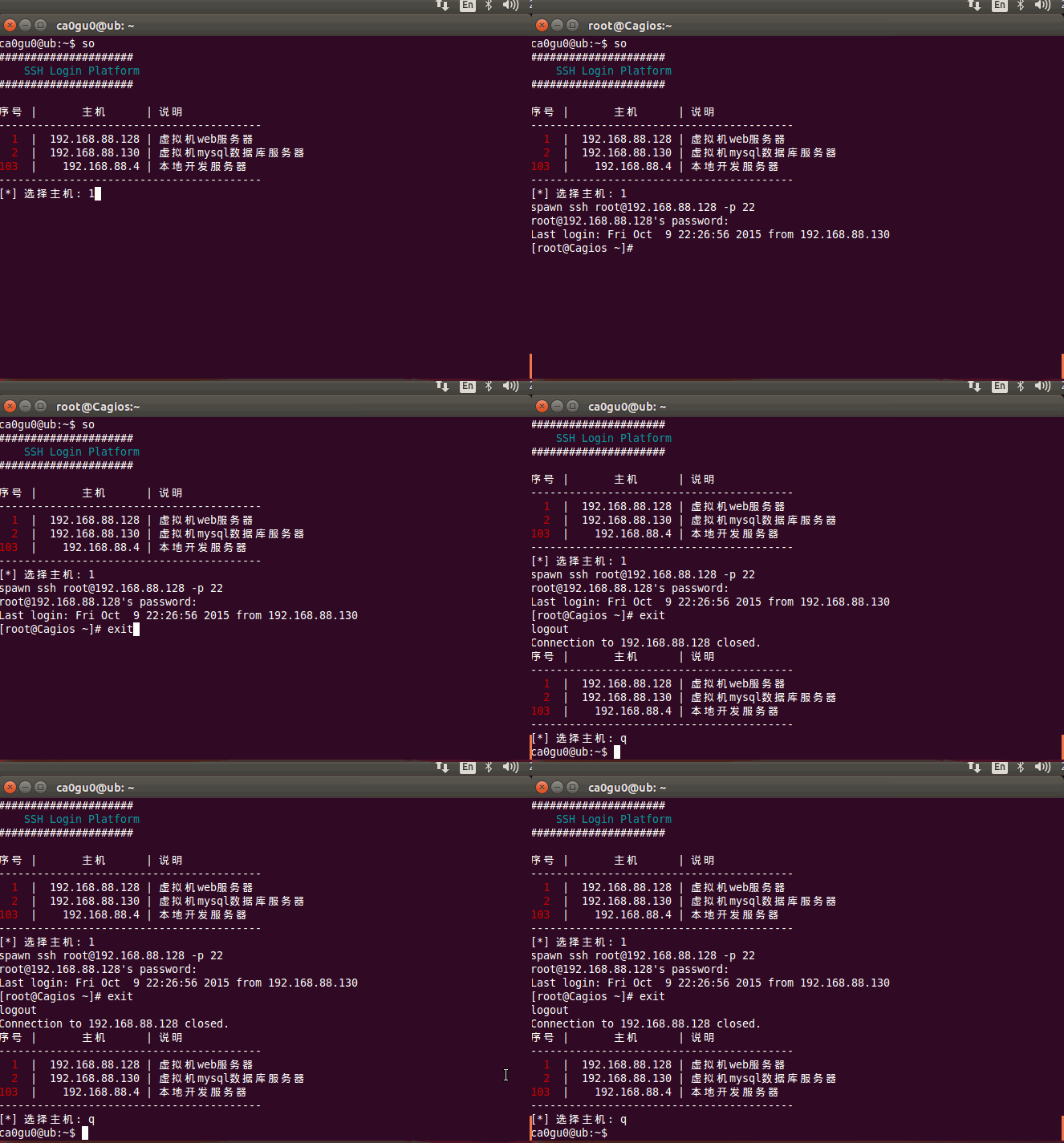
Linux 登陆服务器敲命令太多,某时候确实不便,所以就用shell写了一个
我的blog地址: http://www.cnblogs.com/caoguo
一.说明
- 支持秘密和密钥两种格式
- 用户名和密码都是写文件的,明文保存
二.配置
- 密码文件配置:
序号:IP:端口:用户:密码:说明 1:192.168.88.128:22:root:toor:虚拟机web服务器
- 密钥文件放在keys文件夹下,密码位置写成密钥文件名,文件名必须以.pem结尾
github地址:https://github.com/ca0gu0/so
脚本下载:git clone git@github.com:ca0gu0/so.git
补充:
发现没有代码还是不好,把代码还是贴上
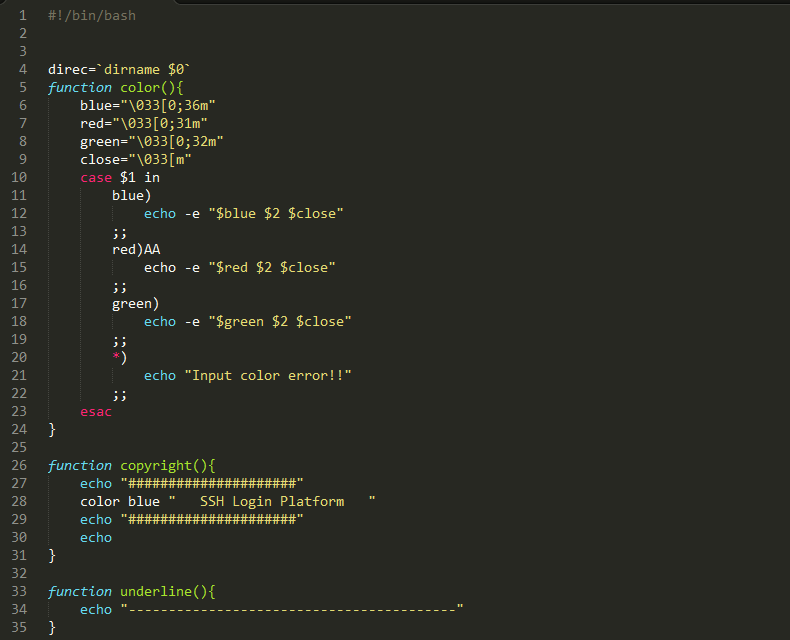
so.sh文件的内容
#!/bin/bash

direc=`dirname $`

function color(){

    blue="\033[0;36m"

    red="\033[0;31m"

    green="\033[0;32m"

    close="\033[m"

    case $ in

        blue)

            echo -e "$blue $2 $close"

        ;;

        red)

            echo -e "$red $2 $close"

        ;;

        green)

            echo -e "$green $2 $close"

        ;;

        *)

            echo "Input color error!!"

        ;;

    esac

}

function copyright(){

    echo "#####################"

    color blue "   SSH Login Platform   "

    echo "#####################"

    echo

}

function underline(){

    echo "-----------------------------------------"

}

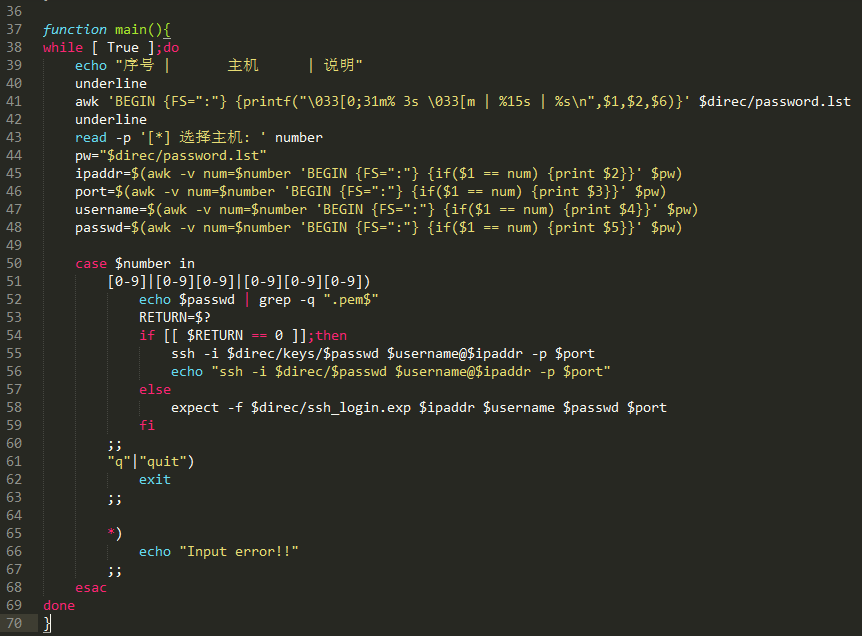
function main(){

while [ True ];do

    echo "序号 |       主机      | 说明"

    underline

    awk 'BEGIN {FS=":"} {printf("\033[0;31m% 3s \033[m | %15s | %s\n",$1,$2,$6)}' $direc/password.lst

    underline

    read -p '[*] 选择主机: ' number

    pw="$direc/password.lst"

    ipaddr=$(awk -v num=$number 'BEGIN {FS=":"} {if($1 == num) {print $2}}' $pw)

    port=$(awk -v num=$number 'BEGIN {FS=":"} {if($1 == num) {print $3}}' $pw)

    username=$(awk -v num=$number 'BEGIN {FS=":"} {if($1 == num) {print $4}}' $pw)

    passwd=$(awk -v num=$number 'BEGIN {FS=":"} {if($1 == num) {print $5}}' $pw)

    case $number in

        [-]|[-][-]|[-][-][-])

            echo $passwd | grep -q ".pem$"

            RETURN=$?

            if [[ $RETURN ==  ]];then

                ssh -i $direc/keys/$passwd $username@$ipaddr -p $port

                echo "ssh -i $direc/$passwd $username@$ipaddr -p $port"

            else

                expect -f $direc/ssh_login.exp $ipaddr $username $passwd $port

            fi

        ;;

        "q"|"quit")

            exit

        ;;

        *)

            echo "Input error!!"

        ;;

    esac

done

}

copyright

main
ssh_login.exp 这个一个expect脚本,用户写交互的工具
#!/usr/bin/expect -f

set TARGET [lindex $argv ]

set USER [lindex $argv ]

set PASSWD [lindex $argv ]

set PORT [lindex $argv ]

set timeout

spawn ssh $USER@$TARGET -p $PORT

expect {

    "*yes/no" {send "yes\r"; exp_continue}

    "*password:" {send "$PASSWD\r"}

}

interact
password.lst密码文件格式
:192.168.88.128::root:toor:虚拟机web服务器

:192.168.88.130::ca0gu0:toor:虚拟机mysql数据库服务器

:192.168.88.4::root:sellercube:本地开发服务器

Linux Shell ssh登录脚本的更多相关文章
- linux shell except tcl login ssh Automatic interaction
/*************************************************************************************** * linux she ...
- Linux Shell脚本攻略 读书笔记
Linux Shell脚本攻略 读书笔记 这是一本小书,总共253页,但内容却很丰富,书中的示例小巧而实用,对我这样总是在shell门前徘徊的人来说真是如获至宝:最有价值的当属文本处理,对这块我单独整 ...
- 73条日常Linux shell命令汇总,总有一条你需要!
转载: 73条日常Linux shell命令汇总,总有一条你需要! 1.检查远程端口是否对bash开放: echo >/dev/tcp/8.8.8.8/53 && echo &q ...
- Linux shell用法和技巧(转)
原文出处: techbar 译文出处: 外刊IT评论 使用Linux shell是我每天的基本工作,但我经常会忘记一些有用的shell命令和技巧.当然,命令我能记住,但我不敢说能记得如何用它执行某 ...
- Linux shell 常用
使用Linux shell是我每天的基本工作,但我经常会忘记一些有用的shell命令和l技巧.当然,命令我能记住,但我不敢说能记得如何用它执行某个特定任务.于是,我开始在一个文本文件里记录这些用法,并 ...
- 详细介绍Linux shell脚本基础学习
Linux shell脚本基础学习这里我们先来第一讲,介绍shell的语法基础,开头.注释.变量和 环境变量,向大家做一个基础的介绍,虽然不涉及具体东西,但是打好基础是以后学习轻松地前提.1. Lin ...
- Linux shell用法和技巧
使用Linux shell是我每天的基本工作,但我经常会忘记一些有用的shell命令和l技巧.当然,命令我能记住,但我不敢说能记得如何用它执行某个特定任务.于是,我开始在一个文本文件里记录这 ...
- Linux shell日常命令和技巧
转自:http://www.vaikan.com/linux-shell-tips-and-tricks/ 原文:http://www.techbar.me/linux-shell-tips/ 使用L ...
- Linux shell入门基础(一)
Linux shell入门基础(一): 01.增加删除用户: #useradd byf userdel byf(主目录未删除) userdel -r byf 该用户的属性:usermod 用 ...
随机推荐
- HDFS2.0之简单总结
新特性 NameNode支持HA 命名空间支持分区(Federation) 支持ViewFS 支持目录快照 支持权限ACL 支持缓存指定的文件 QJM实现名字节点HA (图片来源互联网) 命名空间分区 ...
- 移动智能设备功耗优化系列--前言(NVIDIA资深project师分享)
本文是嵌入式企鹅圈原创团队成员.NVIDIA资深开发project师Terry发表的第一篇文章,其将对"移动智能设备功耗优化"这个专题展开一个系列的总结分享. Terry毫无保留地 ...
- [Vue-rx] Switch to a Function which Creates Observables with Vue.js and Rxjs
Wrapping the creation of an Observable inside of a Function allows you delay the creation of the Obs ...
- 智能家居APP开发
智能家居APP开发 APP开发技术qq交流群:347072638 前言,随着智能硬件设备的流行,智能家居開始红火,智能家居就是家用电器的智能化.包含智能锁,灯,空调,灯,音箱等等,移动设备通过WIFI ...
- 输入两个整数n 和m,从数列1,2,3.......n 中任意取几个数, 使其和等于m ,要求将当中全部的可能组合列出来
中兴面试题之中的一个.难度系数中. 题目描写叙述例如以下:输入两个整数n 和m,从数列1,2.3.......n 中任意取几个数, 使其和等于m ,要求将当中全部的可能组合列出来. 逻辑分析: 1.比 ...
- 《Java设计模式》之解释器模式
解释器模式是类的行为模式.给定一个语言之后,解释器模式能够定义出其文法的一种表示,并同一时候提供一个解释器. client能够使用这个解释器来解释这个语言中的句子. 解释器模式的结构 以下就以一个示意 ...
- 极客标签互动课程系列 - Javascript生成SVG动画素描特效
课程描写叙述:在这个课程中,我们将介绍SVG.而且介绍怎样使用javascript来控制SVG生成素描动画效果 课程地址:http://www.gbtags.com/gb/gbliblist/21.h ...
- 小胖说事22-----iOS开发技巧之取消键盘响应和截屏功能
1.UILable内容模糊 在非Retina的iPad mini 的屏幕上,一个UILable的frame的origin值假设是有小数位(如0.5),就会造成显示模糊,所以不妨用整数值的origin. ...
- unity3D游戏开发实战原创视频讲座系列11之相扑游戏开发并公布到Win\WP8
解说文件夹 第一讲 游戏的演示和资源介绍 第二讲 场景的建设 第三讲 玩家的移动 第四讲 对手的AI(让对手动起来) 第五讲 游戏的管理(上) 第六讲 游戏的管理(下) 第七讲 公布到Win8系 ...
- android kl 文件的作用【转】
本文转载自:http://blog.csdn.net/u013308744/article/details/49274069 首先看touchscreen的kl文件 # Copyright (c) 2 ...