
TensorFlow alexnet在华为Mate10上运行方法
我使用的caffe模型:https://github.com/BVLC/caffe/tree/ea455eb29393ebe6de9f14e88bfce9eae74edf6d/models/bvlc_alexnet
其中,需要下载deploy prototxt文件和caffmodel以供转换模型用。
首先将caffe模型转换为TensorFlow,参考:https://github.com/ethereon/caffe-tensorflow
但是将其生产pb模型参考了如下代码,见https://github.com/ethereon/caffe-tensorflow/issues/23
from googlenet import GoogleNet # the output python script of caffe2tensorflow

import tensorflow as tf

from freeze_graph import freeze_graph # tensorflow comes up with a tool allowing freeze graph

x = tf.placeholder(tf.float32, shape=[1, 224, 224, 3])

y = tf.placeholder(tf.float32, shape=[1, 1000])

net = GoogleNet({'data': x})

sess = tf.InteractiveSession()

sess.run(tf.initialize_all_variables())

 net.load('googlenet.npy', sess)

saver = tf.train.Saver()

saver.save(sess, 'chkpt', global_step=0, latest_filename='chkpt_state')

tf.train.write_graph(sess.graph.as_graph_def(), './', googlenet.pb', False)

input_saver_def_path = ''

input_binary=True

input_checkpoint_path = 'chkpt-0'

input_graph_path = 'googlenet.pb'

output_graph_path = 'googlenet.pb'

output_node_names = 'prob'

restore_op_name = "save/restore_all"

filename_tensor_name = "save/Const:0"

clear_devices = True

freeze_graph(input_graph_path, input_saver_def_path,

                              input_binary, input_checkpoint_path,

                              output_node_names, restore_op_name,

                              filename_tensor_name, output_graph_path,

                              clear_devices, "")
注意,input node name改变了,自己print graph就知道。
另外一个博客里 见 https://ndres.me/post/convert-caffe-to-tensorflow/ ,提到自己fork的caffe to TensorFlow可以生成pb,但是我自己尝试发现针对alexnet抛出了异常。因此就没有使用。
还有就是 https://www.cs.toronto.edu/~guerzhoy/tf_alexnet/ 里提到有现成的模型,原文如下:
AlexNet implementation + weights in TensorFlow
This is a quick and dirty AlexNet implementation in TensorFlow. You may also be interested in Davi Frossard's VGG16 code/weights.
- myalexnet_forward.py -- the implementation itself + testing code for versions of TensorFlow current in 2017 (Python 3).
- myalexnet_forward.py -- for older versions of TensorFlowm in Python 2(See this version for a variable rather than placeholder input; you probably want the myalexnet_forward.py version if you want to fine-tune the networks.)
- bvlc_alexnet.npy -- the weights; they need to be in the working directory
- caffe_classes.py -- the classes, in the same order as the outputs of the network
- poodle.png, laska.png, dog.png, dog2.png, quail227.JPEG -- test images (images should be 227x227x3)


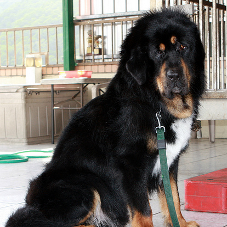

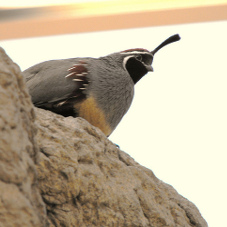
Credits:
- The model and weights are from Caffe
- The weights were converted using caffe-tensorflow, and code was taken from there as well
但是我自己使用的时候发现会抛出异常,可能是因为我使用的TensorFlow 1.3版本问题。因此最后也没有使用。
其次,就是模型压缩,命令为:
~/tensorflow-master/transform_graph/tensorflow/tools/graph_transforms/transform_graph --in_graph=alexnet.pb --outputs="prob" --out_graph=quantized_alexnet.pb --transforms='quantize_weights'
最后,导入pb到andriod项目里,我参考了:http://blog.csdn.net/u014432647/article/details/74743332和https://github.com/ppplinday/alexnet-tensorflow-android-withoutfc67
注意我是自己bazel compile TensorFlow 1.0生成的arm64-v8a的inferance so和jar文件。
值得一提的是,在https://github.com/ppplinday/alexnet-tensorflow-android-withoutfc67里提到,其使用的模型在android红米机器上inference时间是0.713s,华为mate10上稍微快点,是0.6s。
贴下http://blog.csdn.net/u014432647/article/details/74743332 原文内容:
首先先说明一下这个alexnet是进过修改的网络,由于模型太大,我把alexnet的全连接层6和全连接7给删除了,测试手机是红米Note 4X,cpu是高通骁龙625。
分别放出测试代码的github
arm compute library:
https://github.com/ppplinday/alexnet-armcomputelibrary-android-withoutfc67
tensorflow:
https://github.com/ppplinday/alexnet-tensorflow-android-withoutfc67
测试结果为:
arm compute lilrary:0.422s
tensorflow:0.713s
arm compute library比tensorflow快了差不多百分之40。arm这个也是有一定的优化,但是现在还是有挺多bug,而且接口暂时只提供C++,可以等之后成熟了再使用。
大致过程记录在此,以备忘。
TensorFlow alexnet在华为Mate10上运行方法的更多相关文章
- TensorFlow分布式在Amazon AWS上运行
TensorFlow分布式在Amazon AWS上运行 Amazon AWS 提供采用 NVIDIA K8 GPU 的 P2.x 机器.为了能够使用,第一步还需要创建一个 Amazon AWS 账户, ...
- Android项目的targetSDK>=23,在低于Android6.0的部分测试机(类似华为)上运行时出现的系统权限问题
相信大家对Android6.0以上的动态权限已经有所了解,很多童鞋也已经跃跃欲试地将自己项目的targetSDK升级到了23及其以上,很不幸的是我也成为了其中一员,然而我还是图样图森破了,升级之后的问 ...
- Firefox上运行自动化测试脚本提示元素无法点击“WebDriverException: Message: Element is not clickable at point“解决方法
1. Firefox上运行脚本时提示“WebDriverException: Message: Element is not clickable at point (934.316650390625, ...
- Visual Studio写的项目在 IIS 服务器上运行的两种简单方法
首先需要PC上开启了IIS服务,相关方法网上很多,也很简单 第一种:直接在项目中操作 1.创建一个项目,然后右击选中项目,右击,单击属性,打开项目属性标签页面 如图,选择Web标签,在服务器栏目中选中 ...
- mac 上运行cassandra出现的java.net.MalformedURLException: Local host name unknown: java.net.UnknownHostException: : : unknown error错误解决方法
mac 上运行cassandra出现的java.net.MalformedURLException: Local host name unknown: java.net.UnknownHostExce ...
- 在PC上运行安卓(Android)应用程序的4个方法
我有一部荣耀3C,一般放在宿舍(我随身携带的是一部诺基亚E63,小巧.稳定.待机时间长),在宿舍我就会用它在微信上看公众号里的文章,最近要考驾照也在上面用驾考宝典.最近想在实验室用这两个软件,但又懒得 ...
- 发布Qt Quick桌面应用程序的方法(使得planets在XP上运行)
发布Qt Quick桌面应用程序的方法 Qt是一款优秀的跨平台开发框架,它可以在桌面.移动平台以及嵌入式平台上运行.目前Qt 5介绍程序发布的文章帖子比较少.大家又非常想要知道如何发布Qt应用程序,于 ...
- pycharm上运行django服务器端、以及创建app方法
快来加入群[python爬虫交流群](群号570070796),发现精彩内容. 安装Django 下载Django包,解压缩. CMD 进入解压路径下. 执行:python setup.py in ...
- iOS开发手记 - iOS9.3 Xcode7打包ipa文件在其他越狱机器上运行的方法和一些问题
现在Xcode7可以用一个appleid就可以往手机上部署测试app,不再需要$99,这也是方便.但是要把app发给别人的手机上运行还是不行,除非别人的手机在你身边可以直接通过Xcode安装 关于怎么 ...
随机推荐
- CAD绘制自定义实体(com接口)
在cad使用过程中,用户可以绘制自定义实体.点击此处下载演示实例. 调用DrawCustomEntity函数,绘制一个自定义实体对象. 下面代码绘制一个自定义实体,C#代码实现如下: private ...
- 梦想MxWeb3D协同设计平台 2019.01.24更新
SDK开发包下载地址:http://www.mxdraw.com/ndetail_10124.html1. 编写快速入门教程2. 重构前端代码,支持一个页面多个三维控件同时加载,或二维和三维同时加 ...
- 08Java Server Pages 语法
Java Server Pages 语法 基础语法 注释 <!-- -->可以在客户端通过源代码看到:<%-- --%>在客户端通过查看源代码看不到. <!--浏 ...
- 02Microsoft SQL Server 安装,卸载,系统服务,系统组件及系统数据库
Microsoft SQL Server 安装,卸载,系统服务,系统组件及系统数据库 1. Microsoft SQL Server 安装 通过单击下拉框,选择浏览,然后在Active Directo ...
- docker搭建日志收集系统EFK
EFK Elasticsearch是一个数据搜索引擎和分布式NoSQL数据库的组合,提过日志的存储和搜索功能. Fluentd是一个消息采集,转化,转发工具,目的是提供中心化的日志服务. Kibana ...
- C++ 实现Golang里的defer
不多说了,直接贴代码.就一个hpp文件. 1 #include <functional> 2 3 #define CONCAT_(a, b) a##b 4 #define CONCAT(a ...
- [Python数据结构] 使用 Circular List实现Queue
[Python数据结构] 使用 Circular List实现Queue 1. Queue队列,又称为伫列(queue),是先进先出(FIFO, First-In-First-Out)的线性表.在具体 ...
- 移动端禁止滑动的js处理方式
下面是禁止移动端滑动事件的方式,慎用 document.querySelector('body').addEventListener('touchmove', function (ev) { ...
- vb 运行ppt示例代码
来源:http://support.microsoft.com/kb/222929 通过使用 PowerPoint 中的自动运行功能,您可以以编程方式打印.显示幻灯片及执行以交互式执行的大多数事情.按 ...
- [luoguP1316] 丢瓶盖(二分答案)
传送门 二分答案再判断即可 ——代码 #include <cstdio> #include <iostream> #include <algorithm> #def ...