
微信小程序商品展示页面(仿咸鱼)
项目中做了一个商品发布展示的页面,记录下来
解决问题:
- 想在setData中更改数组具体下标中的某个值:
let one = "lowMoney[" + 0 + "].money";
this.setData({
[one]: (product.currentPrice * 0.1).toFixed(2), //1折
})
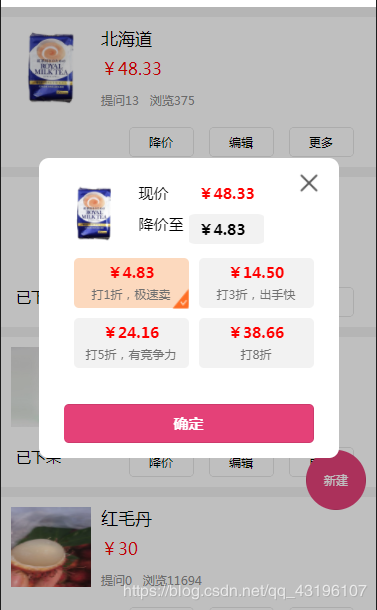
<block wx:if="{{release}}">
<view class='null_release'>
<image class='null_img' src='/resources/images/purchase-record.png'></image>
<text class='null_text_release'>快去发布商品吧~~~</text>
</view>
</block>
<block wx:else>
<view class='release' wx:for="{{releases}}" wx:key="index" wx:for-index="index">
<view data-id='{{item.productID}}' bindtap='productDetail'>
<image src='http://qhds.drefore.cn{{item.image}}'></image>
<text class='out' wx:if="{{item.state === 0}}">已下架</text>
<text class='release_text'>{{item.title}}</text>
<text class='release_money'>¥{{item.currentPrice}}</text>
<text class='pv ' decode="{{true}}">提问{{item.comment}} 浏览{{item.pv}}</text>
</view>
<view class='button'>
<button data-index='{{index}}' data-productid='{{item.productID}}' bindtap='onClickShowMoney'>降价</button>
<button data-productid='{{item.productID}}' bindtap='edit'>编辑</button>
<button data-productid='{{item.productID}}' data-state='{{item.state}}' bindtap='onClickShowMore'>更多</button>
</view>
</view>
<!--降价-->
<view class=" {{ showLowMoney ? 'mask' : '' }}" data-id='0' bindtap="onClickHidden" />
<view class="modalDlg" wx:if="{{showLowMoney}}">
<view class="lowMoney">
<image class='low_img' src='http://qhds.drefore.cn{{image}}' />
<image class='close' src='/resources/images/close.png' data-id='0' bindtap="onClickHidden" />
<view class='now_money'>
<view>
<span>现价</span>
<span class="now_mon">¥{{now_mon}}</span>
</view>
<view class='low_money'>
<span>降价至</span>
<view class="low_mon">
<view class="low_mon_span">¥{{low_mon}}</view>
</view>
</view>
</view>
<view class='dis'>
<view data-index='{{index}}' bindtap="clickLowMoney" wx:for="{{lowMoney}}" class='discount {{index== lowind? "background-color" : " "}}'>
<image class='check' src='{{index== lowind ?"/resources/images/check.png" : " "}}'></image>
<view class='lowMoney_mon discount_view'>¥{{item.money}}</view>
<view class='lowMoney_tip discount_view'>{{item.tip}}</view>
</view>
</view>
<button class='sure_but' data-id='0' bindtap="updatePrice">确定</button>
</view>
</view>
<!--更多-->
<view class=" {{ showMore ? 'mask' : '' }}" data-id='1' bindtap="onClickHidden" />
<view class="modalDlg" wx:if="{{showMore}}">
<view class="more">
<view wx:if="{{productState}}" class='more_view more_bot' bindtap='putaway'>上架</view>
<view wx:else class='more_view more_bot' bindtap='soldOut'>下架</view>
<view class='more_view more_bot' bindtap='productDel'>删除</view>
<view data-id='1' bindtap='onClickHidden' class='more_view'>取消</view>
</view>
</view>
<button class='new' bindtap='newRelease'>新建</button>
<view class='bottom '>--没有更多了--</view>
</block>
WXML
// pages/myRelease/myRelease.js
var app = getApp();
Page({

  /**
   * 页面的初始数据
   */
  data: {
    releases: [],
    low_mon: 0, //降价至
    now_mon: 0, //现价
    image: "", //降价图片
    productID: 0,
    limit: 5,
    release: false,
    showMore: false,
    showLowMoney: false,
    lowMoney: [{
        money: 0,
        tip: "打1折,极速卖"
      },
      {
        money: 0,
        tip: "打3折,出手快"
      },
      {
        money: 0,
        tip: "打5折,有竞争力"
      }, {
        money: 0,
        tip: "打8折"
      }
    ],
    lowind: 0,
    productState: false,
  },

  /**
   * 生命周期函数--监听页面显示
   */
  onShow: function(options) {
    this.getMyRelease();
  },

  /**
   * 降价显示
   */
  onClickShowMoney(e) {
    let index = e.currentTarget.dataset.index;
    let productID = e.currentTarget.dataset.productid;
    let product = this.data.releases[index];
    let one = "lowMoney[" + 0 + "].money";
    let three = "lowMoney[" + 1 + "].money";
    let five = "lowMoney[" + 2 + "].money";
    let eight = "lowMoney[" + 3 + "].money";
    this.setData({
      showLowMoney: !this.data.showLowMoney,
      now_mon: product.currentPrice,
      [one]: (product.currentPrice * 0.1).toFixed(2), //1折
      [three]: (product.currentPrice * 0.3).toFixed(2), //3折
      [five]: (product.currentPrice * 0.5).toFixed(2), //5折
      [eight]: (product.currentPrice * 0.8).toFixed(2), //8折
      low_mon: (product.currentPrice * 0.1).toFixed(2), //默认1折
      productID: productID,
      image: product.image
    })
  },

  /**
   * 更多显示
   */
  onClickShowMore(e) {
    this.setData({
      showMore: !this.data.showMore,
      productID: e.currentTarget.dataset.productid
    });
    if (e.currentTarget.dataset.state === 0) {
      this.setData({
        productState: true
      })
    } else {
      this.setData({
        productState: false
      })
    }
  },
  /**
   * 降价&更多隐藏
   */

  onClickHidden(e) {
    let that = this;
    switch (e.currentTarget.dataset.id) {
      case '0':
        that.setData({
          showLowMoney: !this.data.showLowMoney,
          lowind: 0
        });
        break;
      case '1':
        that.setData({
          showMore: !this.data.showMore
        });
        break;
    }
  },
  /**
   * 修改价钱
   * updatePrice
   */
  updatePrice(e) {
    let params = {
      userID: app.globalData.userID,
      id: this.data.productID,
      price: this.data.low_mon,
    }
    app.updatePrice(params).then(res => {
      if (res.state === 1) {
        this.getMyRelease();
        this.setData({
          showLowMoney: !this.data.showLowMoney,
          lowind: 0
        })
      }
    })

  },
  /**
   * 下架
   * soldOut
   */
  soldOut() {
    let params = {
      userID: app.globalData.userID,
      id: this.data.productID,
      flag: this.data.productState
    }
    app.soldOut(params).then(res => {
      if (res.state === 1) {
        wx.showToast({
          title: '已下架',
          icon: "none",
          duration: 1000,
          mask: true,
        })
        this.getMyRelease();
        this.setData({
          showMore: !this.data.showMore,
          lowind: 0
        })
      }
    })
  },

  /**
   * 上架
   *putaway
   */
  putaway() {
    let params = {
      userID: app.globalData.userID,
      id: this.data.productID,
      flag: this.data.productState
    }
    app.soldOut(params).then(res => {
      if (res.state === 1) {
        wx.showToast({
          title: '已上架',
          icon: "none",
          duration: 1000,
          mask: true,
        })
        this.getMyRelease();
        this.setData({
          showMore: !this.data.showMore,
          lowind: 0
        })
      }
    })
  },
  /**
   * 删除
   * productDel
   */
  productDel() {
    let params = {
      userID: app.globalData.userID,
      id: this.data.productID
    }
    app.productDel(params).then(res => {
      if (res.state === 1) {
        this.getMyRelease();
        this.setData({
          showMore: !this.data.showMore,
          lowind: 0
        })
      }

    })
  },
  /**
   * 选择打折力度
   */
  clickLowMoney(e) {
    let price = this.data.lowMoney[e.currentTarget.dataset.index].money;
    if (this.data.lowind == e.currentTarget.dataset.index) {
      this.setData({
        lowind: -1
      })
    } else {
      this.setData({
        lowind: e.currentTarget.dataset.index,
        low_mon: price
      })
    }
  },
  /**
   * 编辑
   */
  edit(e) {
    let productID = e.currentTarget.dataset.productid
    wx.navigateTo({
      url: '../productReleased/productReleased?productID=' + productID,
    })
  },
  /**
   * 新建我的发布
   */
  newRelease() {
    wx.navigateTo({
      url: '../productReleased/productReleased?productID=' + 0,
    })
  },

  productDetail(e) {
    wx.navigateTo({
      url: '../product/product?id=' + e.currentTarget.dataset.id,
    })
  },
  //上拉事件
  onReachBottom: function() {
    this.data.limit = this.data.limit + 5
    this.getMyRelease();
  },
  /**
   * 获取我的发布
   */
  getMyRelease() {
    let params = {
      userID: app.globalData.userID,
      limit: this.data.limit,
      offset: 0,
    }
    app.getMyRelease(params).then(res => {
      let release = res.data.release
      this.setData({
        releases: release
      })
    })
  },

})
JS
/* pages/order/order.wxss */

page {
  background-color: #f1f1f1;
}

.null_img {
  position: absolute;
  color: #e5447b;
  width: 200rpx;
  height: 190rpx;
  margin-left: 40%;
  margin-top: 40%;
}

.null_text_release {
  position: absolute;
  font-size: 20px;
  color: #e5447b;
  margin-left: 35%;
  margin-top: 70%;
}

.null_release {
  background-color: white;
  width: 100vw;
  height: 100vh;
}

.bottom {
  padding-top: 10px;
  height: 40px;
  text-align: center;
  color: rgba(32, 27, 27, 0.173);
  font-size: small;
}

.release {
  width: 100%;
  height: 300rpx;
  background-color: white;
  margin-top: 20rpx;
}

.release image {
  width: 160rpx;
  height: 160rpx;
  margin: 20rpx;
}

.release_text {
  position: absolute;
  width: 550rpx;
  left: 200rpx;
  font-size: 35rpx;
  padding-top: 20rpx;
  overflow: hidden;
  text-overflow: ellipsis;
  white-space: nowrap;
}

.release_money {
  color: red;
  position: absolute;
  padding-top: 80rpx;
  font-size: 35rpx;
}

.pv {
  font-size: 25rpx;
  position: absolute;
  padding-top: 150rpx;
  color: #8f8f8f;
}

.button {
  display: flex;
  width: 480rpx;
  margin-left: 240rpx;
  margin-top: 10rpx;
}

.button button {
  width: 130rpx;
  height: 60rpx;
  font-size: 25rpx;
  background: white;
}

.out {
  position: absolute;
  padding-top: 220rpx;
  left: 30rpx;
  width: 100rpx;
  font-size: 30rpx;
}

.more {
  width: 450rpx;
  height: 380rpx;
  background: white;
  border-radius: 20rpx;
}

.more_view {
  font-size: 30rpx;
  color: #0095f2;
  display: flex;
  justify-content: center;
  align-items: center;
  width: 100%;
  height: 120rpx;
}

.more_bot {
  border-bottom: 1px solid #cfcfcf;
}

.lowMoney {
  width: 600rpx;
  height: 600rpx;
  background: white;
  border-radius: 20rpx;
  display: flex;
  flex-direction: row;
}

.low_img {
  width: 120rpx;
  height: 120rpx;
  margin: 50rpx;
}

.close {
  width: 60rpx;
  height: 60rpx;
  position: absolute;
  right: -70rpx;
  top: 20rpx;
}

.now_money {
  font-size: 30rpx;
  position: absolute;
  left: 100rpx;
  top: 50rpx;
}

.now_mon {
  color: red;
  padding-left: 60rpx;
  font-weight:;
}

.low_money {
  padding-top: 23rpx;
  display: flex;
  flex-direction: row;
}

.low_mon {
  width: 150rpx;
  height: 60rpx;
  background-color: #f2f2f2;
  border-radius: 10%;
  margin-left: 10rpx;
}

.low_mon_span {
  font-weight:;
  padding-left: 20rpx;
  padding-top: 10rpx;
}

.dis {
  width: 500rpx;
  height: 220rpx;
  display: flex;
  flex-wrap: wrap;
  position: absolute;
  margin-top: 180rpx;
  margin-left: 50rpx;
}

.discount {
  font-size: 30rpx;
  width: 230rpx;
  height: 100rpx;
  border-radius: 10rpx;
  background-color: #f2f2f2;
  margin-left: 20rpx;
  margin-top: 20rpx;
}

.background-color {
  background-color: #fcd9be;
}

.check {
  width: 80rpx;
  height: 70rpx;
  position: absolute;
  margin-top: 48rpx;
  margin-left: 174rpx;
  border-bottom-right-radius:10rpx;
}

.discount_view {
  display: flex;
  justify-content: center;
  align-items: center;
  padding-top: 8rpx;
}

.lowMoney_mon {
  color: red;
  font-weight:;
}

.lowMoney_tip {
  font-size: 25rpx;
  color: #707070;
}

.sure_but {
  width: 500rpx;
  height: 13%;
  position: absolute;
  bottom: 30rpx;
  margin-left: 50rpx;
  font-size: 30rpx;
  display: flex;
  justify-content: center;
  align-items: center;
  background-color: #e44178;
  color: white;
  font-weight:;
}

/* 遮罩层 */

.mask {
  /* display: block; */
  width: 100%;
  height: 100%;
  position: fixed;
  top:;
  left:;
  background: rgba(0, 0, 0, 0.5);
  z-index:;
  opacity: 0.5;
}

/* 弹出层 */

.modalDlg {
  width: 400rpx;
  position: fixed;
  top: 25vh;
  left:;
  right:;
  z-index:;
  margin: 0 auto;
  background-color: #fff;
  border-radius: 5px;
  display: flex;
  flex-direction: column;
  align-items: center;
}

.new {
  width: 120rpx;
  height: 120rpx;
  border-radius: 50%;
  background-color: #e44179;
  color: white;
  font-size: 25rpx;
  display: flex;
  justify-content: center;
  align-items: center;
  position: fixed;
  bottom: 200rpx;
  right: 20rpx;
}
CSS
微信小程序商品展示页面(仿咸鱼)的更多相关文章
- 微信小程序:页面配置 page.json
微信小程序:页面配置 page.json 一.页面配置 page.json 如果整个小程序的风格是蓝色调,那么可以在 app.json 里边声明顶部颜色是蓝色即可. 实际情况可能不是这样,可能你小程序 ...
- 微信小程序开发--页面结构
一.微信小程序开发--页面文件组成 [page.name].js 页面逻辑文件,用于创建页面对象,以及处理页面生命周期控制和数据处理 [page.name].wxml wxml指的是Wei Xin M ...
- 微信小程序前端页面书写
微信小程序前端页面书写 WXML(WeiXin Markup Language)是框架设计的一套标签语言,结合基础组件.事件系统,可以构建出页面的结构. 一.数据绑定 1. 普通写法 <view ...
- 图解微信小程序---实现页面的跳转与返回操作
图解微信小程序---实现页面的跳转与返回操作 代码笔记 操作步骤 第一步:在app.json配置文件中,创建跳转页面 第二步:编写首页跳转(注意跳转方式,和设置点击样式类名) 第三步:编写首页样式 第 ...
- 前端微信小程序电影类仿淘票票微信小程序
需求描述及交互分析设计思路和相关知识点电影界面顶部页签切换效果设计正在热映界面布局设计即将上映界面布局设计电影详情页设计我的界面列表导航设计登录设计 相关知识点(1)swiper滑块视图容器组件,可以 ...
- 微信小程序之页面路由
路由方式 简介 对于路由的触发方式以及页面生命周期函数如下: 路由方式 触发时机 路由前页面 路由后页面 初始化 小程序打开的第一个页面 onLoad, onSHow 打开新页面 调用 API w ...
- 微信小程序的页面渲染(if/for)
下面,粗略的介绍一下微信小程序的条件渲染.列表渲染.数据绑定等,详细的内容大家可以去看微信小程序的API,在此只做简单描述,希望能帮助到大家 条件渲染 <!--wxml--> <vi ...
- 微信小程序之页面传值(路由、页面栈、globalData、缓存)
1. 通过url带参数传递 1.1 固定参数传递 例如,从 list 页面到 detail 页面, 传递一个或多个固定值 list页面传值: <!--pages/list/list.js--&g ...
- 开发 | 如何在微信小程序的页面间传递数据?
我们在之前发布过小程序页面传值方法的简单介绍,说明了在小程序开发中,两种常见的页面之间传值方法. 本期,知晓程序(微信号 zxcx0101)为你带来的是「倒数记日」小程序开发者带来的,小程序开发中,有 ...
随机推荐
- STM32单片机串口一键下载电路与操作方法详解
STM32三种启动模式对应的存储介质均是芯片内置的,它们是:1)用户闪存 = 芯片内置的Flash.2)SRAM = 芯片内置的RAM区,就是内存啦.3)系统存储器 = 芯片内部一块特定的区域,芯片出 ...
- [bzoj4300][绝世好题] (动规)
Description 给定一个长度为n的数列ai,求ai的子序列bi的最长长度,满足bi&bi-1!=0(2<=i<=len). Input 输入文件共2行. 第一行包括一个整数 ...
- ansible roles例子
#理解 changed_when failed_when become become_user ansible_become ansible_become_user static #检查group_v ...
- P1082||T1200 同余方程 codevs|| 洛谷
时间限制: 1 s 空间限制: 128000 KB 题目等级 : 钻石 Diamond http://codevs.cn/problem/1200/||https://www.luogu.o ...
- [CH#56]过河(贪心)
题目:http://ch.ezoj.tk/contest/CH%20Round%20%2356%20-%20%E5%9B%BD%E5%BA%86%E8%8A%82%E6%AC%A2%E4%B9%90% ...
- 7、Java并发性和多线程-如何创建并运行线程
以下内容转自http://ifeve.com/creating-and-starting-java-threads/: Java线程类也是一个object类,它的实例都继承自java.lang.Thr ...
- innodb-internals
https://www.pythian.com/blog/exposing-innodb-internals-via-system-variables-part-1-memory/
- J2SE基础:5.面向对象的特性2
Final的使用 final在类之前 表示该类是终于类.表示该类不能再被继承. final在方法之前 表示该方法是终于方法,该方法不能被不论什么派生的子类覆盖. final在变量之前 表示变量的值在初 ...
- 自己动手写reg注册表文件
自己动手写reg注册表文件 2015-01-12 20:23 1161人阅读 评论(1) 收藏 举报 分类: 玩转Windows应用层编程(12) 版权声明:本文为博主原创文章,未经博主允许不得转 ...
- LeetCode 970. Powerful Integers (强整数)
题目标签:HashMap 题目让我们找出所有独一的powerful integers 小于bound的情况下. 把 x^i 看作 a:把 y^j 看作b, 代入for loop,把所有的情况都遍历一遍 ...