
【three.js练习程序】创建地球贴图
<!DOCTYPE html>

<html>

<head>

    <meta charset="utf-8">

    <title>ceshi</title>

    <script type="text/javascript" src=".\build\three.js"></script>

    <script src=".\examples\js\controls\TrackballControls.js"></script>

    <script src=".\examples\js\controls\DragControls.js"></script>

    <style>

        body

        {

            margin: 0;

            overflow: hidden;

        }

    </style>

</head>

<body>

<!-- 作为Three.js渲染器输出元素 -->

<div id="WebGL-output">

</div>

<!-- 第一个 Three.js 样例代码 -->

<script type="text/javascript">

    var camera, scene, renderer;

    var sphere;

    var controls;

    var objects = [];

    var fov = 45;

    var near = 0.1;

    var far = 1000;

    init();

    render();

    function init() {

        scene = new THREE.Scene();      //创建场景

        camera = new THREE.PerspectiveCamera(fov, window.innerWidth / window.innerHeight, near, far);   //创建摄像机

        camera.position.x = 100;

        camera.position.y = 100;

        camera.position.z = 100;

        camera.lookAt(scene.position);

        renderer = new THREE.WebGLRenderer();                    //创建一个WebGL渲染器并设置其大小

        renderer.setClearColor(new THREE.Color("#000000"));

        renderer.shadowMapEnabled = true;

        renderer.setSize(window.innerWidth, window.innerHeight);

        var ambientLight = new THREE.AmbientLight("#ffffff");       //加入场景光

        scene.add(ambientLight);

       // var pointLight = new THREE.PointLight("#ffffff");         //加入点光源

       // pointLight.position.set(110, 110, 110);

       // pointLight.castShadow = true;

        //scene.add(pointLight);

        var axes = new THREE.AxisHelper(200);               //创建三轴表示

        scene.add(axes);

        controls = new THREE.TrackballControls(camera);     //创建场景旋转缩放事件

        controls.rotateSpeed = 2.5;

        controls.zoomSpeed = 1.2;

        controls.panSpeed = 0.8;

        controls.noZoom = false;

        controls.noPan = false;

        controls.staticMoving = true;

        controls.dynamicDampingFactor = 0.3;

        sphere = createMesh(new THREE.SphereGeometry(100, 100, 100), "./earth.jpg");

        scene.add(sphere);

        window.addEventListener('resize', onWindowResize, false);

    }

    function createMesh(geom, imageFile) {

        var texture = THREE.ImageUtils.loadTexture(imageFile);

        var mat = new THREE.MeshPhongMaterial({ map: texture });

        var mesh = new THREE.Mesh(geom, mat);

        return mesh;

    }

    function onWindowResize() {

        camera.aspect = window.innerWidth / window.innerHeight;

        camera.updateProjectionMatrix();

        renderer.setSize(window.innerWidth, window.innerHeight);

    }

    function render() {

        requestAnimationFrame(render);

        controls.update();

        sphere.material.map.needsUpdate = true;

        renderer.render(scene, camera);

    }

    document.getElementById("WebGL-output").appendChild(renderer.domElement);

</script>

</body>

</html>
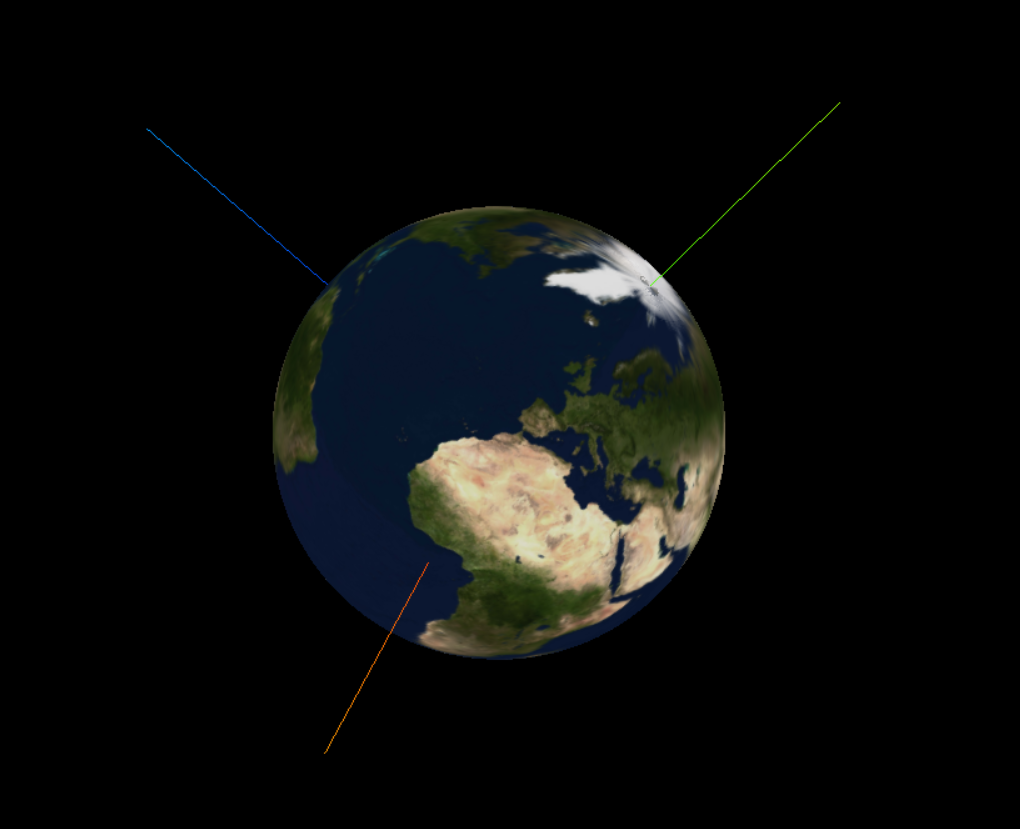
不知道为什么,我再IE下能显示地球,在chrome下显示不了。
地球贴图下载地址:https://pan.baidu.com/s/1kVflpNh
【three.js练习程序】创建地球贴图的更多相关文章
- 在 Web 应用中创建 Node.js 应用程序
本分步指南将通过 Azure Web 应用帮助您启动并运行示例 Node.JS 应用程序.除 Node.JS 外,Azure Web 应用还支持其他语言,如 PHP..NET.Node.JS.Pyth ...
- 用chrome的snippets片段功能创建页面js外挂程序,从控制台创建js小脚本
用chrome的snippets片段功能创建页面js外挂程序,从控制台创建js小脚本 Chrome的snippets是小脚本,还可以创作并在Chrome DevTools的来源面板中执行.可以访问和从 ...
- nw.js桌面程序自动更新(node.js表白记)
Hello Google Node.js 一个基于Google V8 的JavaScript引擎. 一个伟大的端至端语言,或许我对你的热爱源自于web这门极富情感的技术吧! 注: 光阴似水,人生若梦, ...
- [渣译文] 使用 MVC 5 的 EF6 Code First 入门 系列:为ASP.NET MVC应用程序创建更复杂的数据模型
这是微软官方教程Getting Started with Entity Framework 6 Code First using MVC 5 系列的翻译,这里是第六篇:为ASP.NET MVC应用程序 ...
- Xamarin iOS编写第一个应用程序创建工程
Xamarin iOS编写第一个应用程序创建工程 在Xcode以及Xamarin安装好后,就可以在Xamarin Studio中编写程序了.本节将主要讲解在Xamarin Studio中如何进行工程的 ...
- 编程第一个Apple Watch程序创建项目
编程第一个Apple Watch程序创建项目 2.4 编程第一个程序 本节将通过编写第一个程序,为开发者讲解如何添加Watch应用对象.运行程序.界面设计.编写代码等内容本文选自Apple Watc ...
- Contoso 大学 - 1 - 为 ASP.NET MVC 应用程序创建 EF 数据模型
原文 Contoso 大学 - 1 - 为 ASP.NET MVC 应用程序创建 EF 数据模型 原文地址:Creating an Entity Framework Data Model for an ...
- MVC中使用EF(1):为ASP.NET MVC程序创建Entity Framework数据模型
为ASP.NET MVC程序创建Entity Framework数据模型 (1 of 10) By Tom Dykstra |July 30, 2013 Translated by litdwg ...
- 为ASP.NET MVC应用程序创建更复杂的数据模型
为ASP.NET MVC应用程序创建更复杂的数据模型 2014-05-07 18:27 by Bce, 282 阅读, 1 评论, 收藏, 编辑 这是微软官方教程Getting Started wit ...
随机推荐
- Git for Windows之日志查看与版本切换
1.查看本地版本库的修改日志 (1).通过log指令查看完整日志 (2).通过 log --pretty=oneline查看简易版日志 2.版本切换 (1).切换到本地版本库最新的版本,通过reset ...
- dispatchEvent相关内容
意思就是:手动触发事件. 我的理解是:类似于jquery中的trigger方法,可以在点击某个dom的时候,触发另一个dom的事件,下面一个我自己尝试的例子: <!DOCTYPE html> ...
- CentOS安装PHP7+Nginx+MySQL
本文属于动手搭建PHP开发环境的一部分,更多点击链接查看. 本文以centos6为例.命令部分均省略sudo命令. 安装PHP 下载 http://cn2.php.net/distributions/ ...
- 单线程实现同时监听多个端口(windows平台c++代码)
前言 多年前开发了一套网络库,底层实现采用IOCP(完成端口).该库已在公司多个程序中应用:经过多次修改,长时间检验,已经非常稳定高效. 最近把以前的代码梳理了一下,又加进了一些新的思路.代码结构更加 ...
- 深度学习在CTR预估中的应用
欢迎大家前往腾讯云+社区,获取更多腾讯海量技术实践干货哦~ 本文由鹅厂优文发表于云+社区专栏 一.前言 二.深度学习模型 1. Factorization-machine(FM) FM = LR+ e ...
- mongodb副本集数据同步的踩坑
一.故事 最近随着搞活动比较频繁导致数据库出现了波动,后端日志总是报数据库连接和读取的问题.由于我设置的是读写分离(伪的,通过设置副本集的读取策略实现的,设置的db.getMongo().setRea ...
- 使用Unicode字符实现换行
要让inline元素换行可以使用Unicode字符实现: <!DOCTYPE html> <html lang="en"> <head> < ...
- 扒一扒HTTPS网站的内幕
215年6月,维基媒体基金会发布公告,旗下所有网站将默认开启HTTPS,这些网站中最为人所知的当然是全球最大的在线百科-维基百科.而更早时候的3月,百度已经发布公告,百度全站默认开启HTTPS.淘宝也 ...
- @Styles的nameSpace是什么
先参考下面一篇<创建第一个MVC应用程序> http://www.cnblogs.com/insus/p/3358560.html,Insus.NET创建了一个空的MVC应用程序. 在创建 ...
- 怎样删除windows.old文件
方法1: 1.在C盘上点右键,选择属性.2.在常规选项卡中点击”磁盘清理“3.稍等片刻再弹出的选项卡中点击清理系统文件4.选中以前Windows的安装5.点击确定即可安全清理 方法二: WIN7中的w ...