
zookeeper(3) zookeeper的实践及原理
一、基于java API初探zookeeper的使用
(1)建立连接
public static void main(String[] args) {

		//NOT_CONNECTED-->CONNECTING-->CONNECTED-->CLOSE 连接的状态

		try {

			final CountDownLatch countDownLatch = new CountDownLatch(1);

			ZooKeeper zooKeeper = new ZooKeeper("192.168.25.129:2181,192.168.25.130:2181,192.168.25.131:2181", 4000, new Watcher() {

				@Override

				public void process(WatchedEvent event) {

					// TODO Auto-generated method stub

					if(Event.KeeperState.SyncConnected == event.getState()){

						//如果接收到服务端响应事件,连接成功

						countDownLatch.countDown();

					}

				}

			});

			countDownLatch.await();

			System.out.println(zooKeeper.getState());//CONNECTING

			//Thread.sleep(1000);

			//System.out.println(zooKeeper.getState());//CONNECTED

			zooKeeper.close();

		} catch (Exception e) {

			// TODO Auto-generated catch block

			e.printStackTrace();

		}

	}
(2)节点数据的增删改查
public static void main(String[] args) {

		//NOT_CONNECTED-->CONNECTING-->CONNECTED-->CLOSE 连接的状态

		try {

			final CountDownLatch countDownLatch = new CountDownLatch(1);

			ZooKeeper zooKeeper = new ZooKeeper("192.168.25.129:2181,192.168.25.130:2181,192.168.25.131:2181", 4000, new Watcher() {

				@Override

				public void process(WatchedEvent event) {

					// TODO Auto-generated method stub

					if(Event.KeeperState.SyncConnected == event.getState()){

						//如果接收到服务端响应事件,连接成功

						countDownLatch.countDown();

					}

				}

			});

			countDownLatch.await();

			System.out.println(zooKeeper.getState());//CONNECTING

			//Thread.sleep(1000);

			//System.out.println(zooKeeper.getState());//CONNECTED

			//添加节点

			zooKeeper.create("/lf00","123".getBytes(), ZooDefs.Ids.OPEN_ACL_UNSAFE, CreateMode.PERSISTENT);

			Thread.sleep(1000);

			Stat stat = new Stat();

			//得到当前节点的值

			byte[] data = zooKeeper.getData("/lf00", null, stat);

			System.out.println(data.toString()+"---"+stat.getVersion());

			//修改当前节点的值

			zooKeeper.setData("/lf00", "124".getBytes(), stat.getVersion());

			//得到当前节点的值

			byte[] data2 = zooKeeper.getData("/lf00", null, stat);

			System.out.println(data2.toString()+"---"+stat.getVersion());

			//删除节点

			zooKeeper.delete("/lf00", stat.getVersion());

			zooKeeper.close();

			System.in.read();//阻塞进程

		} catch (Exception e) {

			// TODO Auto-generated catch block

			e.printStackTrace();

		}

	}
(3)事件特性
Watcher特性:当数据发生变化的时候,zookeeper会产生一个watcher事件,并且会发送到客户端。但是客户端是会收到一次通知。如果后续这个节点再次发生变化,那么之前设置watcher的客户端不会再次收到通知(watcher是一次性的操作),可以通过循环监听达到永久监听的效果。
如何注册事件机制:getDate、Exists、getChildren
public static void main(String[] args) {

			try {

				final CountDownLatch countDownLatch = new CountDownLatch(1);

				ZooKeeper zooKeeper = new ZooKeeper("192.168.25.129:2181,192.168.25.130:2181,192.168.25.131:2181", 4000, new Watcher() {

					@Override

					public void process(WatchedEvent event) {

						System.out.println("全局默认事件:"+event.getType()+"->"+event.getPath());

						// TODO Auto-generated method stub

						if(Event.KeeperState.SyncConnected == event.getState()){

							//如果接收到服务端响应事件,连接成功

							countDownLatch.countDown();

						}

					}

				});

				countDownLatch.await();

				System.out.println(zooKeeper.getState());//CONNECTING

				zooKeeper.create("/lf", "111".getBytes(), ZooDefs.Ids.OPEN_ACL_UNSAFE, CreateMode.PERSISTENT);

				//通过Exists、getData、getChildren绑定watcher事件

				//Stat stat = zooKeeper.exists("/lf", true);

				Stat stat = zooKeeper.exists("/lf", new Watcher() {

					@Override

					public void process(WatchedEvent event) {

						// TODO Auto-generated method stub

						System.out.println(event.getType()+"->"+event.getPath());

					}

				});

				//通过修改事务操作来触发监听

				stat = zooKeeper.setData("/lf", "222".getBytes(), stat.getVersion());

				Thread.sleep(1000);

				zooKeeper.delete("/lf", stat.getVersion());

			} catch (Exception e) {

				// TODO: handle exception

				e.printStackTrace();

			}

		}

运行结果:

全局默认事件:None

CONNECTED

NodeDataChanged->/lf  只会有一次事务监听,删除节点的事务监听没通知
循环监听:
public static void main(String[] args) {

			try {

				final CountDownLatch countDownLatch = new CountDownLatch(1);

				ZooKeeper zooKeeper = new ZooKeeper("192.168.25.129:2181,192.168.25.130:2181,192.168.25.131:2181", 4000, new Watcher() {

					@Override

					public void process(WatchedEvent event) {

						System.out.println("全局默认事件:"+event.getType()+"->"+event.getPath());

						// TODO Auto-generated method stub

						if(Event.KeeperState.SyncConnected == event.getState()){

							//如果接收到服务端响应事件,连接成功

							countDownLatch.countDown();

						}

					}

				});

				countDownLatch.await();

				System.out.println(zooKeeper.getState());//CONNECTING

				zooKeeper.create("/lf", "111".getBytes(), ZooDefs.Ids.OPEN_ACL_UNSAFE, CreateMode.PERSISTENT);

				//通过Exists、getData、getChildren绑定watcher事件

				//Stat stat = zooKeeper.exists("/lf", true);

				Stat stat = zooKeeper.exists("/lf", new Watcher() {

					@Override

					public void process(WatchedEvent event) {

						// TODO Auto-generated method stub

						System.out.println(event.getType()+"->"+event.getPath());

						try {

							//zooKeeper.exists("/lf", true);

							 zooKeeper.exists("/lf", new Watcher() {

								@Override

								public void process(WatchedEvent event) {

									// TODO Auto-generated method stub

									System.out.println(event.getType()+"->"+event.getPath());

								}

							});

						} catch (Exception e) {

							e.printStackTrace();

						}

					}

				});

				//通过修改事务操作来触发监听

				stat = zooKeeper.setData("/lf", "222".getBytes(), stat.getVersion());

				//再通过修改事务操作来触发监听,发现还是两次,还得添加在上面嵌套//zooKeeper.exists("/lf", true);监听

				//stat = zooKeeper.setData("/lf", "322".getBytes(), stat.getVersion());

				Thread.sleep(1000);

				zooKeeper.delete("/lf", stat.getVersion());

				System.in.read();

			} catch (Exception e) {

				// TODO: handle exception

				e.printStackTrace();

			}

		}

结果;

全局默认事件:None->null

CONNECTED

NodeDataChanged->/lf

NodeDeleted->/lf
放开标记绿色部分,运行结果:
全局默认事件:None->null
CONNECTED
NodeDataChanged->/lf
NodeDataChanged->/lf 再通过修改事务操作来触发监听,发现还是两次,还得添加在上面嵌套//zooKeeper.exists("/lf", true);监听
Watcher事件类型:
         None (-1), // 客户端连接状态发生变化的时候 会受到none事件

         NodeCreated (1), // 节点创建事件

         NodeDeleted (2), // 节点删除事件

         NodeDataChanged (3), // 节点数据变化

         NodeChildrenChanged (4); // 子节点被创建 删除触发该事件
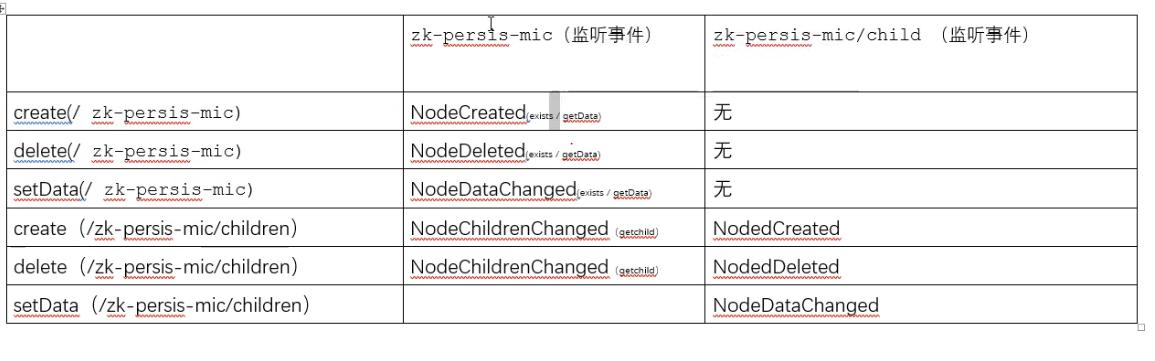
什么样的操作会产生什么样的事件的?
Watcher事件机制原理:
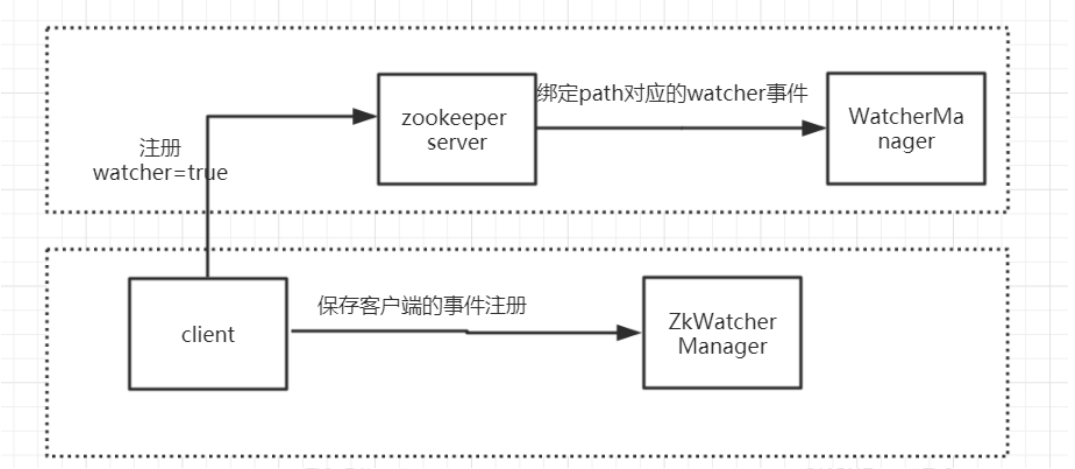
client 端连接后会注册一个事件,然后客户端会保存这个事件,通过zkWatcherManager 保存客户端的事件注册,通知服务端 Watcher 为 true,然后服务端会通过WahcerManager 会绑定path对应的事件。如下图:
Curator的使用
public static void main(String[] args) throws Exception {

		CuratorFramework curatorFramework = CuratorFrameworkFactory.builder()

				.connectString("192.168.25.129:2181," + "192.168.25.130:2181," + "192.168.25.131:2181")

				.sessionTimeoutMs(4000).retryPolicy(new ExponentialBackoffRetry(1000, 3)).namespace("curator").build();

		curatorFramework.start();

		//创建节点

		curatorFramework.create().creatingParentsIfNeeded().withMode(CreateMode.PERSISTENT).forPath("/lf001/node002",

				"111".getBytes());

		Stat stat = new Stat();

		byte[] path = curatorFramework.getData().storingStatIn(stat).forPath("/lf001/node002");

		String value = new String(path);

		System.out.println("创建节点"+value);

		stat = curatorFramework.setData().withVersion(stat.getVersion()).forPath("/lf001/node002", "222".getBytes());

		byte[] path2 = curatorFramework.getData().storingStatIn(stat).forPath("/lf001/node002");

		String value2 = new String(path2);

		System.out.println("创建节点"+value2);

		curatorFramework.delete().deletingChildrenIfNeeded().forPath("/curator");

		System.out.println("执行结束!");

		curatorFramework.close();

	}
Curator的Watcher机制
package com.lf.zookeeper;

import org.apache.curator.framework.CuratorFramework;

import org.apache.curator.framework.CuratorFrameworkFactory;

import org.apache.curator.framework.recipes.cache.NodeCache;

import org.apache.curator.framework.recipes.cache.NodeCacheListener;

import org.apache.curator.framework.recipes.cache.PathChildrenCache;

import org.apache.curator.framework.recipes.cache.PathChildrenCacheEvent;

import org.apache.curator.framework.recipes.cache.PathChildrenCacheListener;

import org.apache.curator.framework.recipes.cache.TreeCache;

import org.apache.curator.framework.recipes.cache.TreeCacheEvent;

import org.apache.curator.framework.recipes.cache.TreeCacheListener;

import org.apache.curator.retry.ExponentialBackoffRetry;

public class CuratorWatcherDemo {

	public static void main(String[] args) throws Exception {

		CuratorFramework curatorFramework = CuratorFrameworkFactory.builder()

				.connectString("192.168.25.129:2181," + "192.168.25.130:2181," + "192.168.25.131:2181")

				.sessionTimeoutMs(4000).retryPolicy(new ExponentialBackoffRetry(1000, 3)).namespace("curator").build();

		curatorFramework.start();

		 //当前节点的创建和删除事件监听 ---永久的

//      addListenerWithNodeCache(curatorFramework,"/lf");

      //子节点的增加、修改、删除的事件监听

      addListenerWithPathChildCache(curatorFramework,"/lf");

      //综合节点监听事件

//      addListenerWithTreeCache(curatorFramework,"/lf");

      System.in.read();

  }

  public static void addListenerWithTreeCache(CuratorFramework curatorFramework,String path) throws Exception {

      TreeCache treeCache=new TreeCache(curatorFramework,path);

      TreeCacheListener treeCacheListener=new TreeCacheListener() {

          @Override

          public void childEvent(CuratorFramework client, TreeCacheEvent event) throws Exception {

              System.out.println(event.getType()+"->"+event.getData().getPath());

          }

      };

      treeCache.getListenable().addListener(treeCacheListener);

      treeCache.start();

  }

  /**

   * PathChildrenCache 监听一个节点下子节点的创建、删除、更新

   * NodeCache  监听一个节点的更新和创建事件

   * TreeCache  综合PathChildrenCache和NodeCache的特性

   */

  public static void addListenerWithPathChildCache(CuratorFramework curatorFramework,String path) throws Exception {

      PathChildrenCache pathChildrenCache=new PathChildrenCache(curatorFramework,path,true);

      PathChildrenCacheListener pathChildrenCacheListener=new PathChildrenCacheListener() {

          @Override

          public void childEvent(CuratorFramework client, PathChildrenCacheEvent event) throws Exception {

              System.out.println("Receive Event2:"+event.getType());

          }

      };

      pathChildrenCache.getListenable().addListener(pathChildrenCacheListener);

      pathChildrenCache.start(PathChildrenCache.StartMode.NORMAL);

  }

  // 监听一个节点的更新,创建/lf节点事件

  public static void addListenerWithNodeCache(CuratorFramework curatorFramework,String path) throws Exception {

      final NodeCache nodeCache=new NodeCache(curatorFramework,path,false);

      NodeCacheListener nodeCacheListener=new NodeCacheListener() {

          @Override

          public void nodeChanged() throws Exception {

              System.out.println("Receive Event1:"+nodeCache.getCurrentData().getPath());

          }

      };

      nodeCache.getListenable().addListener(nodeCacheListener);

	}

}
zookeeper(3) zookeeper的实践及原理的更多相关文章
- ZooKeeper教程资源收集(简介/原理/示例/解决方案)
菩提树下的杨过: ZooKeeper 笔记(1) 安装部署及hello world ZooKeeper 笔记(2) 监听数据变化 ZooKeeper 笔记(3) 实战应用之[统一配置管理] ZooKe ...
- Zookeeper+Kafka+Storm+HDFS实践
Kafka是一种高吞吐量的分布式发布订阅消息系统,它可以处理消费者规模的网站中的所有动作流数据. Hadoop一般用在离线的分析计算中,而storm区别于hadoop,用在实时的流式计算中,被广泛用来 ...
- Zookeeper的Watcher 机制的实现原理
基于 Java API 初探 zookeeper 的使用: 先来简单看一下API的使用: public class ConnectionDemo { public static void main(S ...
- ZooKeeper分布式锁简单实践
ZooKeeper分布式锁简单实践 在分布式解决方案中,Zookeeper是一个分布式协调工具.当多个JVM客户端,同时在ZooKeeper上创建相同的一个临时节点,因为临时节点路径是保证唯一,只要谁 ...
- 【Java面试】Zookeeper中的Watch机制的原理?
一个工作了7年的粉丝,遇到了一个Zookeeper的问题. 因为接触过Zookeeper这个技术,不知道该怎么回答. 我说一个工作了7年的程序员,没有接触过主流技术,这不正常. 于是我问了他工资以后, ...
- Zookeeper之Zookeeper的Client的分析【转】
Zookeeper之Zookeeper的Client的分析 1)几个重要概念 ZooKeeper:客户端入口 Watcher:客户端注册的callback ZooKeeper.SendThread: ...
- ERROR [main] zookeeper.RecoverableZooKeeper: ZooKeeper create failed after 4 attempts
ERROR [main] zookeeper.RecoverableZooKeeper: ZooKeeper create failed after 4 attempts ERROR [main] m ...
- Dubbo+Zookeeper(一)Zookeeper初识
前面花了一段时间去学习SpringCloud的相关知识,主要是理解微服务的概念并使用SpringCloud的一系列组件实现微服务落地.学习这些组件本身是简单的,跟着操作一遍基本就会了,这也得益于Spr ...
- 什么是Zookeeper,Zookeeper的作用是什么,在Hadoop及hbase中具体作用是什么
什么是Zookeeper,Zookeeper的作用是什么,它与NameNode及HMaster如何协作?在没有接触Zookeeper的同学,或许会有这些疑问.这里给大家总结一下. 一.什么是Zooke ...
随机推荐
- java中经常使用的Swing组件总结
1.按钮(Jbutton) Swing中的按钮是Jbutton,它是javax.swing.AbstracButton类的子类,swing中的按钮可以显示图像,并且可以将按钮设置为窗口的默认图标,而且 ...
- 《亲测》nginx webscoket ssl conf配置示例
非crt证书,用的pem,其中 http://localhost:5003 是你要转发到的站点网址 配置的就是 server { listen 80; server_name smarthome.yi ...
- Maven 专题
目录: Maven的安装 Eclipse安装Maven插件 Nexus私服搭建 Maven+Nexus配置 发布自己的构件(至Nexus) 创建maven多模块工程group 整理中[...] 先放一 ...
- 写在vue总结之前(一)
在大概2016年6月吧,知道了vue,博客园有个博主用vue写了一个不算完整的博客园app,做出来的效果相比博客园原本的app看上去要华丽很多,那时候做前端还没多久,很多东西都不知道,别人说用vue开 ...
- 工具类System,Runtime,Math,Date,Calendar
API--- java.lang.System: 属性和行为都是静态的. long currentTimeMillis(); // 返回当前时间毫秒值 exit(); // 退出虚拟机 Prop ...
- P2871 手链
传送 这个题的数据限制没有翻译出来,所以有可能产生爆内存现象 再此翻译一下:1<=n(物品个数)<=3402,1<=M(总重量)<=12880 (就这两个有点用) 显然这是一个 ...
- PAT 乙级 1071 小赌怡情(15 分)
1071 小赌怡情(15 分) 常言道“小赌怡情”.这是一个很简单的小游戏:首先由计算机给出第一个整数:然后玩家下注赌第二个整数将会比第一个数大还是小:玩家下注 t 个筹码后,计算机给出第二个数.若玩 ...
- Java学习——读写txt文件
package HHH; import java.io.*; import static java.lang.System.out; public class OpenFile { public st ...
- C/S模型服务端vsftpd的安装与卸载
c/s模型 连接光驱DVD 设置环境(软件安装的环境) mkdir /mnt/yw----------------------(创建一个在mnt下yw目录) mount /dev.sr0 /mnt/y ...
- 视角同步NewViewTarget
SetViewTargetwithBlen说明: http://api.unrealengine.com/INT/BlueprintAPI/Game/Player/SetViewTargetwithB ...