
mac中svn服务器的搭建以及如何在eclipse中使用
mac自带了svn客户端和服务端功能。
1.查看svn版本
svnserve --version
yintingtingdeMacBook-Pro:~ yintingting$ svnserve --version

svnserve, version 1.9.4 (r1740329)

   compiled Nov 15 2016, 20:35:27 on x86_64-apple-darwin15.0.0

Copyright (C) 2016 The Apache Software Foundation.

This software consists of contributions made by many people;

see the NOTICE file for more information.

Subversion is open source software, see http://subversion.apache.org/

The following repository back-end (FS) modules are available:

* fs_fs : Module for working with a plain file (FSFS) repository.

* fs_x : Module for working with an experimental (FSX) repository.
2.创建svn目录
sudo mkdir -p /Users/yintingting(根据自己的用户名修改)/svn/mycode //创建了一个文件夹,这个文件夹路径可以自己随意设定
sudo svnadmin create /Users/yintingting(根据自己的用户名修改)/svn/mycode //将之前创建的文件夹设置为svn的代码库
(下图svn_dir相当于mycode文件夹的样子)

3.
conf文件夹是配置文件夹,里面有相关配置,先选择svnserve.conf配置,如下图:
# anon-access = read
# auth-access = write
# password-db = passwd
# authz-db = authz
去掉这几个前面的#和空格,
anon-access 表示匿名访问权限(如果把anon-access=read修改为anon-access=none,这样就禁止了匿名访问,只有输入账号密码才可以访问)
4.
我们创建个帐户,要进passwd文件配置,在[users]后面加ytt=123,表示创建了ytt帐户,密码是123.
### This file is an example password file for svnserve.

### Its format is similar to that of svnserve.conf. As shown in the

### example below it contains one section labelled [users].

### The name and password for each user follow, one account per line.

[users]

# harry = harryssecret

# sally = sallyssecret

ytt = 123
xsd = 123
5.文件authz可以配置用户组及权限,可以把passwd里添加的用户加到一个用户组里或创建一个用户组,这样就可以对整个组设置权限了,还不用对每个用户进行单独权限设置。我们这里加了个zyxgroup组,包括用户zyx,权限是对根目录有读写权限,[/]表示根目录。
修改文件时写入不了就用vi编辑器,如果vi编辑器加了!还改不了,那就修改文件权限。
比如:切换到root用户:sudo -i
读写权限:chmod 666 你的文件(777也行,随便你,关键有w权限)
### This file is an example authorization file for svnserve.

### Its format is identical to that of mod_authz_svn authorization

### files.

### As shown below each section defines authorizations for the path and

### (optional) repository specified by the section name.

### The authorizations follow. An authorization line can refer to:

###  - a single user,

###  - a group of users defined in a special [groups] section,

###  - an alias defined in a special [aliases] section,

###  - all authenticated users, using the '$authenticated' token,

###  - only anonymous users, using the '$anonymous' token,

###  - anyone, using the '*' wildcard.

###

### A match can be inverted by prefixing the rule with '~'. Rules can

### grant read ('r') access, read-write ('rw') access, or no access

### ('').

[aliases]

# joe = /C=XZ/ST=Dessert/L=Snake City/O=Snake Oil, Ltd./OU=Research Institute/CN=Joe Average

[groups]

# harry_and_sally = harry,sally

# harry_sally_and_joe = harry,sally,&joe

yttgroup = xsd,ytt

# [/foo/bar]

# harry = rw

# &joe = r

# * =

# [repository:/baz/fuz]

# @harry_and_sally = rw

# * = r

[/]

@yttgroup=rw
6.启动svn服务器
svnserve -d -r /Users/yintingting/svn
注意不要输入svnserve -d -r /Users/yintingting/svn/mycode
7.关闭svn服务器的话,可以用ps找到它的pid,然后kill它就可以了。或者用活动监视器
ps -e | grep svnserve
5137 ??         0:00.00 /Library/Developer/CommandLineTools/usr/bin/svnserve -d -r svn_dir

 5142 ttys000    0:00.00 grep svnserve
kill 5137进程即可。
下面就是怎样在eclipse中使用了。。。。。。。
1.eclipse装上subclipse插件,help ->eclipse marketplace,搜索subclipse,安装,注意下面勾选内容(最好subclipse和svnkit都选)

安装成功,window->show view->other,会出现如下图窗口
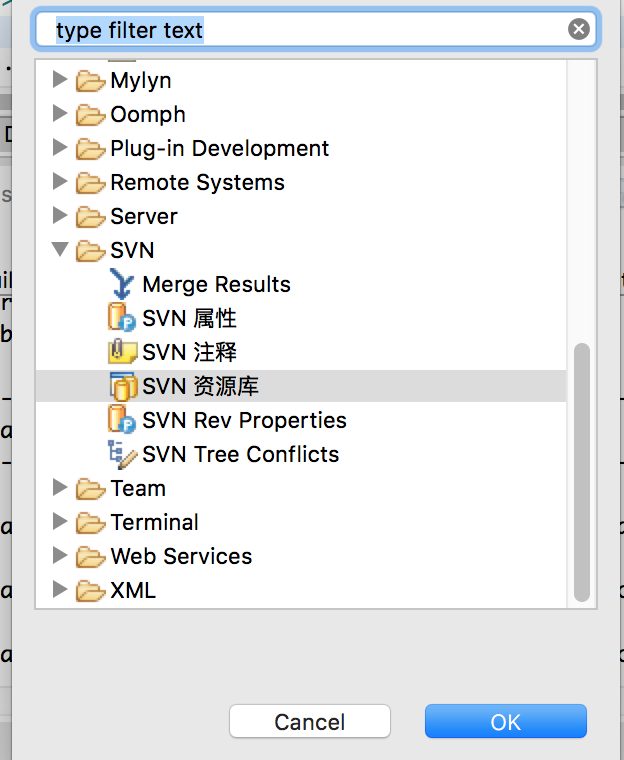
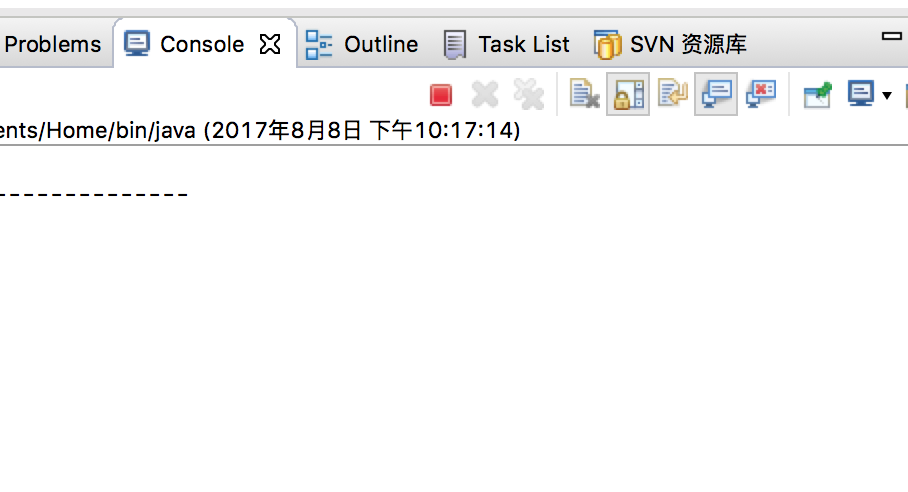
选择SVN资源库,点击OK,下方出现svn资源库
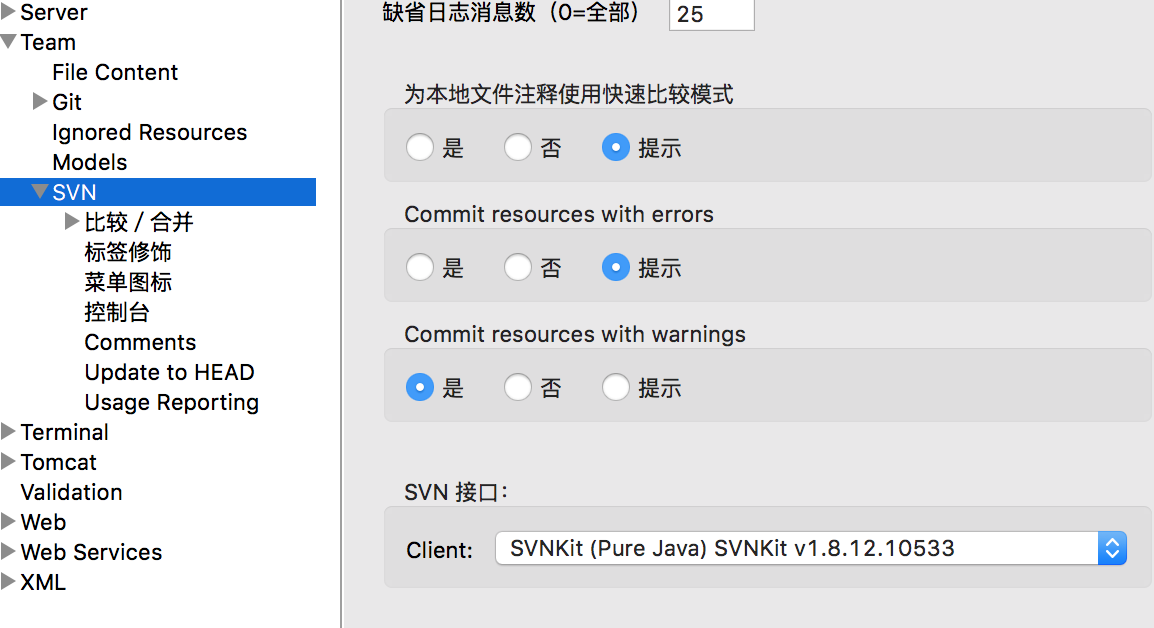
打开eclipse偏好设置,svn接口选一个(我这里选的是SVNKit,因为JavaHL(JNI) not available,而mac电脑用这个太麻烦),如果JavaHL可用那就用JavaHL好了。
切换到“SVN资源库”,新建-》资源库位置,
URL填写svn://ytt@localhost/mycode (ytt是用户名,之前创建的),在出来界面中输入用户名和密码,OK.
mac中svn服务器的搭建以及如何在eclipse中使用的更多相关文章
- 基于Cent os 云服务器中SVN 服务器的搭建---具体实践是可行的 一次备注便于后续查找
https://blog.csdn.net/shadowyingjian/article/details/80588544http://www.hongyanliren.com/2015m04/329 ...
- Mac下SVN服务器环境的搭建和配置(除展示图片外,所有命令在Linux/Unix下适用)
这几天领导没有安排工作,闲着没事就想把自己这两年做iOS开发时感觉知识有欠缺的地方想好好深入地补习一下,昨天和今天就计划好好学习下SVN和git的从创建和到原理,到命令,到界面的使用.一不小心被另一领 ...
- linux(centos7)下SVN服务器如何搭建
linux(centos)下SVN服务器如何搭建?说到SVN服务器,想必大家都知道,可以是在LINUX下如何搭建SVN服务器呢?那么今天给大家分享一下linux(centos)搭建SVN服务器的思路! ...
- svn服务器的搭建备份和还原和svnmanager的使用
svn服务器的搭建备份和还原和svnmanager的使用 一.svn服务端软件的安装和配置 1.安装svn版本库软件 # yum install -y subversion 2.建立svn版本库数据存 ...
- centos7下SVN服务器如何搭建
Centos7 搭建svn服务器 linux(centos)下SVN服务器如何搭建?说到SVN服务器,想必大家都知道,可以是在LINUX下如何搭建SVN服务器呢?那么今天给大家分享一下linux(ce ...
- Ubuntu SVN服务器的搭建与配置(转)
Ubuntu SVN服务器的搭建与配置 一. 安装 sudo apt-get install subversion sudo apt-get install libapache2-sv ...
- 配置mac机svn服务器
这几天一直纠结如何配置mac机svn服务器,在网上查了很多资料,无奈本人底子太差,菜鸟级别,理解能力有限,照网上的总是配置不好,最后无奈问了刘超老师,终于配置成功.现在写一下具体配置过程,菜鸟级别可以 ...
- svn 服务器的搭建以及客户端的使用
1.svn 服务器的搭建以及客户端的使用,安装见下面的博客 https://blog.csdn.net/zh123456zh789/article/details/80921179 说明:服务器只是用 ...
- SVN服务器本地搭建与使用
转载请注明原文地址:http://www.cnblogs.com/ygj0930/p/6623026.html 使用SVN进行代码管理,需要搭建服务端资源库,然后在使用SVN的电脑安装SVN客户端或 ...
随机推荐
- mysql常用函数总结
一.数学函数 abs(x) 返回x的绝对值 bin(x) 返回x的二进制(oct返回八进制,hex返回十六进制) ceiling(x) / ceil(x) 返回不小于x的最小整数值 floor(x) ...
- Android 如何让EditText不自动获取焦点 (转)
在项目中,一进入一个页面, EditText默认就会自动获取焦点. 那么如何取消这个默认行为呢? 在网上找了好久,有点 监听软键盘事件,有点 调用 clearFouse()方法,但是测试了都没有! x ...
- 黄聪:Jquery+DataTables插件,如何在ajax调用服务器数据后,自动给tr添加id属性
http://legacy.datatables.net/usage/callbacks#fnRowCallback 主要通过 fnCreatedRow 事件来实现 var table = $('#t ...
- node.js 学习的一个链接
Node.js简介 点击查看 狼叔 的
- DS图遍历--深度优先搜索
DS图遍历--深度优先搜索 题目描述 给出一个图的邻接矩阵,对图进行深度优先搜索,从顶点0开始 注意:图n个顶点编号从0到n-1 代码框架如下: 输入 第一行输入t,表示有t个测试实例 第二行输入n, ...
- MySQL中int(M)和tinyint(M)数值类型中M值的意义
在一开始接触MySQL数据库时,对于int(M)及tinyint(M)两者数值类型后面的M值理解是最多能够插入数据库中的值不能大于M: 后来工作后,也是一边学习一边使用,之后的理解是其中的M的意思是插 ...
- PyQt—QTableWidget实现翻页功能
主要使用QTableWidget中的三个函数实现: verticalScrollBar().setSliderPosition() 设置当前滑动条的位置 verticalScrollBar().max ...
- python3学习笔记二(注释、缩进)
注释 单行注释,用#开头即可 多行注释,用''' ''' 或""" """ 缩进 python不能像其他语言一样采用{}或者begin... ...
- [C#][Report]Cry
本文来自:https://wiki.scn.sap.com/wiki/display/BOBJ/Crystal+Reports%2C+Developer+for+Visual+Studio+Downl ...
- jquery 点击元素以外任意地方隐藏该元素的方法
文章来源:百度知道 我的思路是给body绑定一个click事件,然后判断当前鼠标点击的区域是当前元素还是元素以外区域,如果点击对象不是当前元素,则隐藏该元素. 假设对象的id为divBtn,则代码如下 ...