
pytest 学习笔记一:参数化与组织分层
组织分层:
1、普通方式,和unittest分层类似:
setup_module() # 通常放在类外
setup_class(cls)
setup(self)
teardown(self)
teardown_class(cls)
teardown_module()
2、pytest特有的分层方式
@pytest.fixture() 装饰fixture
@pytest.mark.usefixtures() 使用fixture
例一:
@pytest.fixture()  # 默认scope是function,等同于@pytest.fixture(scope="function"),作用于每个test用例
def before():
    print u"清除数据"

class TestClass(common): # 继承common类中setup_class

    def setup(self):    # 可以和before并存,如果某个用例使用了before,共同生效。
        print "start"

    def teardown(self):
        print "end"

    @pytest.mark.usefixtures("before")  #使用fixture的方法一
    def test_one(self):
        x = "this"
        assert "h" in x

    def test_two(self,before):  # 使用fixture的方法二
        x = "hello"
        assert x == "hello"

if __name__=="__main__":
    pytest.main("-s test_pt2.py")  # 指定测试文件
执行后结果:
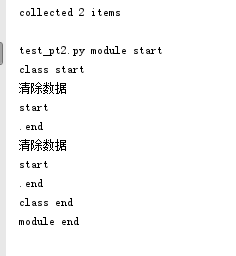
@pytest.fixture(scope="xxx") 有4个范围,function、class、module、session 。session是作用于整个项目。
例二:
#coding:utf8
import pytest

class DB(object):
    def __init__(self):
        self.intransaction = []
    def begin(self, name):
        self.intransaction.append(name)
    def rollback(self):
        self.intransaction.pop()

@pytest.fixture(scope="module")
def db():  # 工厂模式
    print "module start"
    return DB()

# @pytest.mark.usefixtures("transact")  #作用于整个类,即对类中所有用例都生效
class TestClass(object):
    @pytest.fixture(autouse=True)  # 设置一个function级别的fixture, autouse=True 表示对所有用例生效 ,等效于在测试类前@pytest.mark.usefixtures("transact")
    def transact(self,request, db):
        db.begin(request.function.__name__)
        print "transact"
        yield                 # yield之后的内容可以当成teardown !!!
        db.rollback()
        print "rollback"

    def test_method1(self,db):  # 这里需要引入db ,db是module范围,每个模块只运行一次
                                #module只运行一次,那么在这个module范围(module表示同一层目录中?)中所有的用例引用db得到的参数DB()是同一个。这里类似于module范围的一个全局变量
        assert db.intransaction == ["test_method1"]

    def test_method2(self,db):
        assert db.intransaction == ["test_method2"]

if __name__=="__main__":
    pytest.main("-s autofixtures.py")
执行结果:
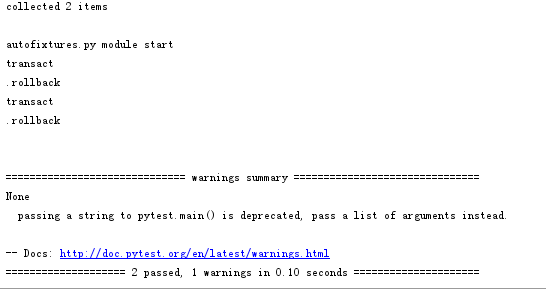
参数化:
#参数化一,先定义函数,更灵活
@pytest.fixture(params=[2,3,4])
def before3(request):          #request固定格式
    param=request.param
    print param
    return  param+1

再使用:
def test_four(self,before3):  # 参数化
    assert before3 !=3
# 参数化二,简便
@pytest.mark.parametrize("param", [1, 2, 3])
def test_three(self,param):   # 参数化
    assert param !=2

参数覆盖fixture: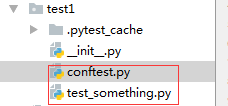
conftest.py :
import pytest

@pytest.fixture
def username():
    return 'username'

@pytest.fixture
def other_username(username):
    return 'other-' + username
test_something.py:
#coding:utf8
import pytest

# 同一层级的fixture可以直接引用

@pytest.mark.parametrize('username', ['directly-overridden-username'])
def test_username(username):  # conftest中的fixture:username,这里被参数username直接覆盖
    assert username == 'directly-overridden-username'

@pytest.mark.parametrize('username', ['directly-overridden-username-other'])
def test_username_other(other_username): # conftest中的fixture:other_username,other_username引用了username,这里被参数usename间接覆盖了
    assert other_username == 'other-directly-overridden-username-other'

if __name__=="__main__":
    pytest.main("-s test_something.py")

更多fixture覆盖参考:https://blog.csdn.net/huitailang1991/article/details/74053781
pytest 学习笔记一:参数化与组织分层的更多相关文章
- [转载]pytest学习笔记
pytest学习笔记(三) 接着上一篇的内容,这里主要讲下参数化,pytest很好的支持了测试函数中变量的参数化 一.pytest的参数化 1.通过命令行来实现参数化 文档中给了一个简单的例子, ...
- Pytest学习笔记8-参数化
前言 我们在实际自动化测试中,某些测试用例是无法通过一组测试数据来达到验证效果的,所以需要通过参数化来传递多组数据 在unittest中,我们可以使用第三方库parameterized来对数据进行参数 ...
- pytest学习笔记
From: https://blog.csdn.net/gaowg11/article/details/54910974 由于对测试框架了解比较少,所以最近看了下pytest测试框架,对学习心得做个记 ...
- pytest学习笔记(一)
这两天在学习pytest,之前有小用到pytest,觉得这个测试框架很灵巧,用在实现接口自动化(pytest+requests)非常的轻便,然后很有兴致的决定学习下,然后又发现了pytest-sele ...
- pytest学习笔记(三)
接着上一篇的内容,这里主要讲下参数化,pytest很好的支持了测试函数中变量的参数化 一.pytest的参数化 1.通过命令行来实现参数化 文档中给了一个简单的例子, test_compute.py ...
- pytest学习笔记(二)
继续文档的第二章 (一)pytest中可以在命令行中静态/动态添加option,这里没什么好讲的,略过... 这里面主要讲下如何试用skip/xfail,还有incremental(包含一些列的测试步 ...
- 学习笔记之TCP/IP协议分层与OSI參考模型
1.协议的分层 ISO在制定标准化OSI之前,对网络体系结构相关的问题进行了充分的讨论, 终于提出了作为通信协议设计指标的OSI參考模型.这一模型将通信协议中必要 的功能分成了7层.通过这些 ...
- pytest 学习笔记一 入门篇
前言 之前做自动化测试的时候,用的测试框架为Python自带的unittest框架,随着工作的深入,发现了另外一个框架就是pytest (官方地址文档http://www.pytest.org/en/ ...
- Pytest学习笔记3-fixture
前言 个人认为,fixture是pytest最精髓的地方,也是学习pytest必会的知识点. fixture用途 用于执行测试前后的初始化操作,比如打开浏览器.准备测试数据.清除之前的测试数据等等 用 ...
随机推荐
- 3. java.lang.UnsupportedClassVersionError: javax/annotation/ManagedBean : Unsupported major.minor version 51.0
问题描述:
- kubernetes下安装mysql
参考文档:https://blog.csdn.net/sealir/article/details/81177747 注:有mysql安装在k8s集群内,集群外且通过k8s service endpo ...
- Linux 下 Bash配置文件读取
Linux安装时可能要修改的配置文件:/etc/profile./etc/bashrc(ubuntu没有这个文件,对应地,其有/etc/bash.bashrc文件.我用的是ubuntu系统,所以下面将 ...
- STM32F105开发板
- TCP的窗口滑动机制
TCP的滑动窗口主要有两个作用,一是提供TCP的可靠性,二是提供TCP的流控特性.同时滑动窗口机制还体现了TCP面向字节流的设计思路. 可靠:对发送的数据进行确认 流控制:窗口大小随链路变化. 一.t ...
- 06——react组件的基本定义和使用
<!DOCTYPE html> <html lang="en"> <head> <meta charset="UTF-8&quo ...
- linux之Ubuntu下Django+uWSGI+nginx部署
http://www.chenxm.cc/post/275.html?segmentfault
- 为什么java实体类需要重写toString方法
如果没重写toString的情况: Object 类的 toString 方法 返回一个字符串,该字符串由类名(对象是该类的一个实例).at 标记符“@”和此对象哈希码的无符号十六进制表示组成.换句话 ...
- 使用dig或nslookup指定dns服务器查询域名解析
一般来说linux下查询域名解析有两种选择,nslookup或者dig,而在使用上我觉得dig更加方便顺手.如果是在linux下的话,只要装上dnsutils这个包就可以使用dig命令, 安装bind ...
- JS 实现分页打印
在调用window.print()时,可以实现打印效果,但内容太多时要进行分页打印. 在样式中有规定几个打印的样式 page-break-before和page-break-after CSS属性并不 ...