
kbmmw 的HTTPSmartService入门
前面介绍过kbmmw 中的smartservice. 这个既可以用于kbmmw 的客户端,也可以使用http 访问。
在新版的kbmmw里面,作者加强了http 的支持,我们可以只使用HTTPSmartService
,这样可以省去很多代码,可以更方便、简单的实现REST 服务。
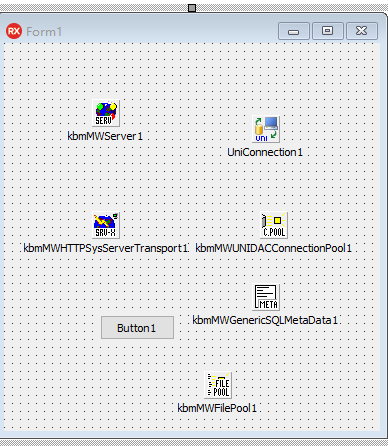
首先先建一个工程文件,放置对应的控件。
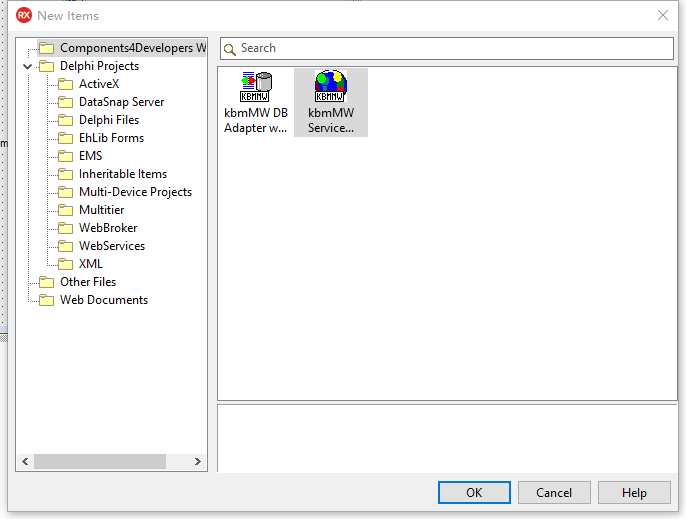
新建一个kbmmw service
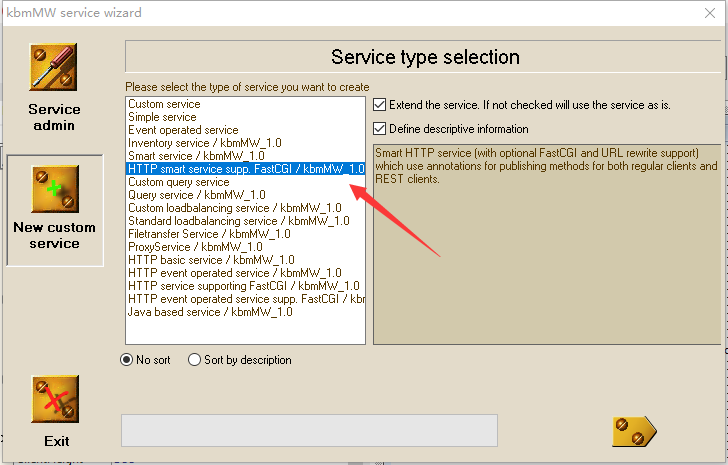
选HTTP smart service ,(这个向导界面太丑了,希望作者以后能请个美工处理一下)。
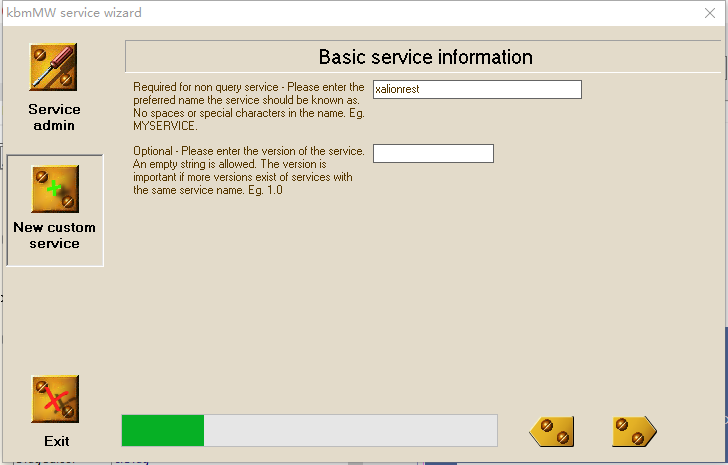
剩下的一路点过去,到最后生成代码。
回到主窗口,输入以下对应的代码
procedure TForm1.Button1Click(Sender: TObject);

begin

 kbmmwserver1.Active:=True;

end;

procedure TForm1.FormCreate(Sender: TObject);

begin

kbmmwserver1.AutoRegisterServices;

end;
再看看生成的代码
 [kbmMW_Service('name:xalionrest, flags:[listed]')]

  [kbmMW_Rest('path:/xalionrest')]

  // Access to the service can be limited using the [kbmMW_Auth..] attribute.

  // [kbmMW_Auth('role:[SomeRole,SomeOtherRole], grant:true')]

  TkbmMWCustomHTTPSmartService1 = class(TkbmMWCustomHTTPSmartService)

  private

     { Private declarations }

  protected

     { Protected declarations }

  public

     { Public declarations }

     // HelloWorld function callable from both a regular client,

     // due to the optional [kbmMW_Method] attribute,

     // and from a REST client due to the optional [kbmMW_Rest] attribute.

     // The access path to the function from a REST client (like a browser)+

     // is in this case relative to the services path.

     // In this example: http://.../xalionhttp/helloworld

     // Access to the function can be limited using the [kbmMW_Auth..] attribute.

     // [kbmMW_Auth('role:[SomeRole,SomeOtherRole], grant:true')]

     [kbmMW_Rest('method:get, path:helloworld')]

     [kbmMW_Method]

     function HelloWorld:string;

  end;

implementation

uses kbmMWExceptions;

{$R *.dfm}

// Service definitions.

//---------------------

function TkbmMWCustomHTTPSmartService1.HelloWorld:string;

begin

     Result:='Hello world';

end;

initialization

  TkbmMWRTTI.EnableRTTI(TkbmMWCustomHTTPSmartService1);

end.
由于我们是要做rest,因此,修改一下helloworld 的代码,使其更符合rest 的格式
function TkbmMWCustomHTTPSmartService1.HelloWorld:string;

begin

     Result:='{"result":"Hello world"}';

end;
ok, 编译运行,使用浏览器访问
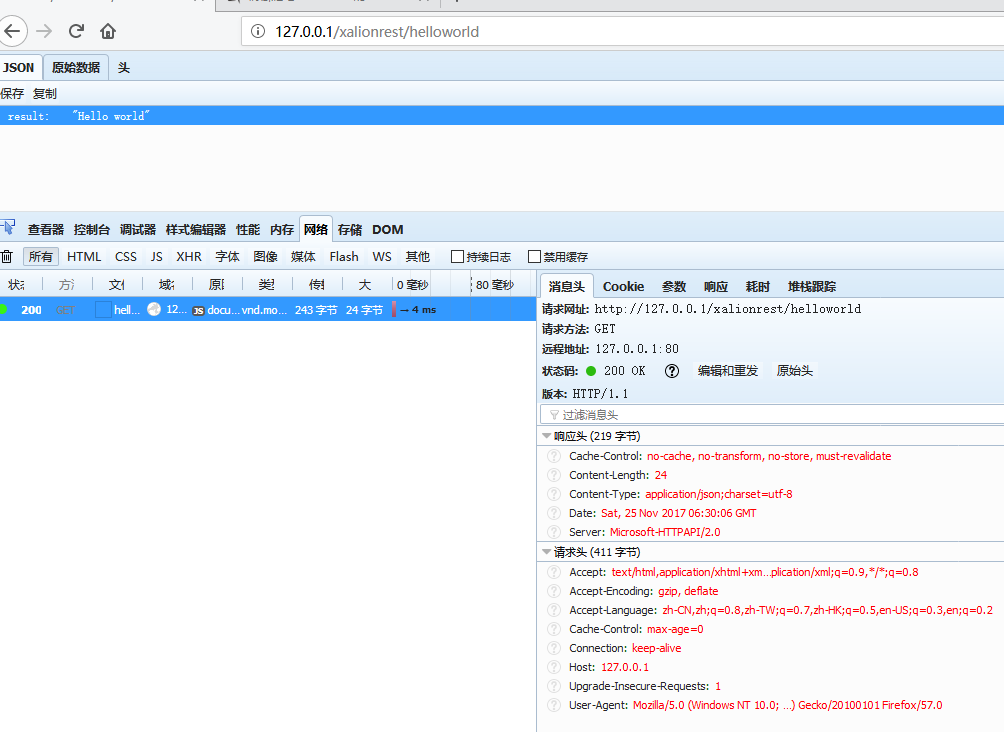
没有任何问题,非常简单方便。
我们可以直接增加新的函数。
     [kbmMW_Rest('method:get, path:version')]

     [kbmMW_Method]

     function version:string;

  end;

implementation

uses kbmMWExceptions;

{$R *.dfm}

// Service definitions.

//---------------------

function TkbmMWCustomHTTPSmartService1.version: string;

begin

      Result:='{"result":"'+self.Server.Version+'"}';

end;
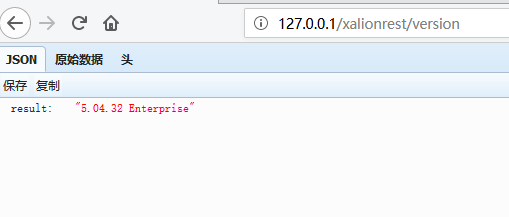
运行显示
处理参数
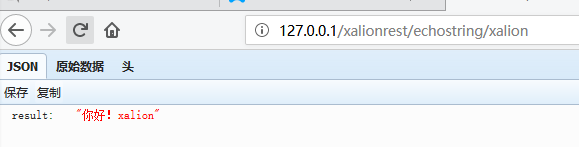
如果只有一个参数,可以直接使用 http://127.0.0.1/xalionrest/echostring/{参数}
[kbmMW_Method('EchoString')]       // 回应输入的串

     [kbmMW_Rest('method:get, path: ["echostring/{AString}","myechostring/{AString}" ]')]

     [kbmMW_Auth('role:[SomeRole,SomeOtherRole], grant:true')]

     function EchoString([kbmMW_Rest('value: "{AString}"')] const AString:string):string;
function TkbmMWCustomHTTPSmartService1.EchoString(

  const AString: string): string;

begin

     result:='{"result":"你好!'+astring+'"}';;

end;
如果是多个参数,可以使用http://127.0.0.1/xalionrest/cal/numbers?arg1=10&arg2=20
[kbmMW_Method]

     [kbmMW_Rest('method:get, path: "cal/addnumbers"')]

     function AddNumbers([kbmMW_Rest('value: "$arg1", required: true')] const AValue1:integer;

                         [kbmMW_Rest('value: "$arg2", required: true')] const AValue2:integer;

                         [kbmMW_Arg(mwatRemoteLocation)] const ARemoteLocation:string):string;
function TkbmMWCustomHTTPSmartService1.AddNumbers(const AValue1,

  AValue2: integer; const ARemoteLocation: string):string;

begin

      Result:='{"result":"'+(AValue1+AValue2).ToString+'"}';;

end;
运行结果

下面处理一下post 的函数,首先做一个含有form 的html 文件

<table width="770" border="0" align="center" cellpadding="0" cellspacing="0" class="unnamed2">

  <tr>

    <td width="848" align="center"><span class="style1">新生录取查询</span><br></td>

  </tr>

  <form name="form1" method="post" action="/xalionrest/postdata">

  <tr>

    <td align="center">

             <span class="style2">姓名:</span>          <input name="xsxm" type="text" id="xsxm">

           <span class="style2">身份证号:</span>          <input name="sfzh" type="text" id="sfzh">

     </td>

  </tr>

  <tr>

    <td align="center">

      <br>

      <input type="submit" name="Submit" value="提交" onClick="return B1_onclick()">

      <input type="reset" name="Submit" value="重置">

    </td>

  </tr>

 </form>

</table>
对应的函数为
 [kbmMW_Rest('method:post, path:postdata')]

     [kbmMW_Method]

     function postdata:string;
function TkbmMWCustomHTTPSmartService1.postdata: string;

var

  vl:TkbmMWHTTPCustomValues;

  s,xsxm,sfzh:string;

  p:Tbytes;

 begin

       vl:=TkbmMWHTTPQueryValues.Create;

               try

                p:= RequestStream.SaveToBytes;

                vl.AsString:= Tencoding.ASCII.GetString(p);

                  xsxm:= vl.ValueByName['xsxm'];

                  sfzh:=vl.ValueByName['sfzh'];

                     // 这里就可以向数据库里面操作了

                   result:='姓名:'+xsxm+'      身份证号'+sfzh;

                   finally

                    vl.Free ;

                   end;

         SetResponseMimeType('text/html');

end;
运行结果

基本上就是这样。
kbmmw 5.04.40 新增加了post 内容文本自动识别功能,上面的函数可以变得更简单。
 [kbmMW_Rest('method:post, path:poststring')]

     [kbmMW_Method]

     function poststring([kbmMW_Rest('value: "body", required: true')] const body:string):string;
function TkbmMWCustomHTTPSmartService1.poststring(const body: string): string;

var

  vl:TkbmMWHTTPCustomValues;

  s,xsxm,sfzh:string;

begin

     vl:=TkbmMWHTTPQueryValues.Create;

               try

                vl.AsString:= body;

                xsxm:= vl.ValueByName['xsxm'];

                sfzh:=vl.ValueByName['sfzh'];

                     // 这里就可以向数据库里面写了

                    result:='姓名:'+xsxm+'      身份证号'+sfzh;

                   finally

                    vl.Free ;

                   end;

         SetResponseMimeType('text/html');

end;
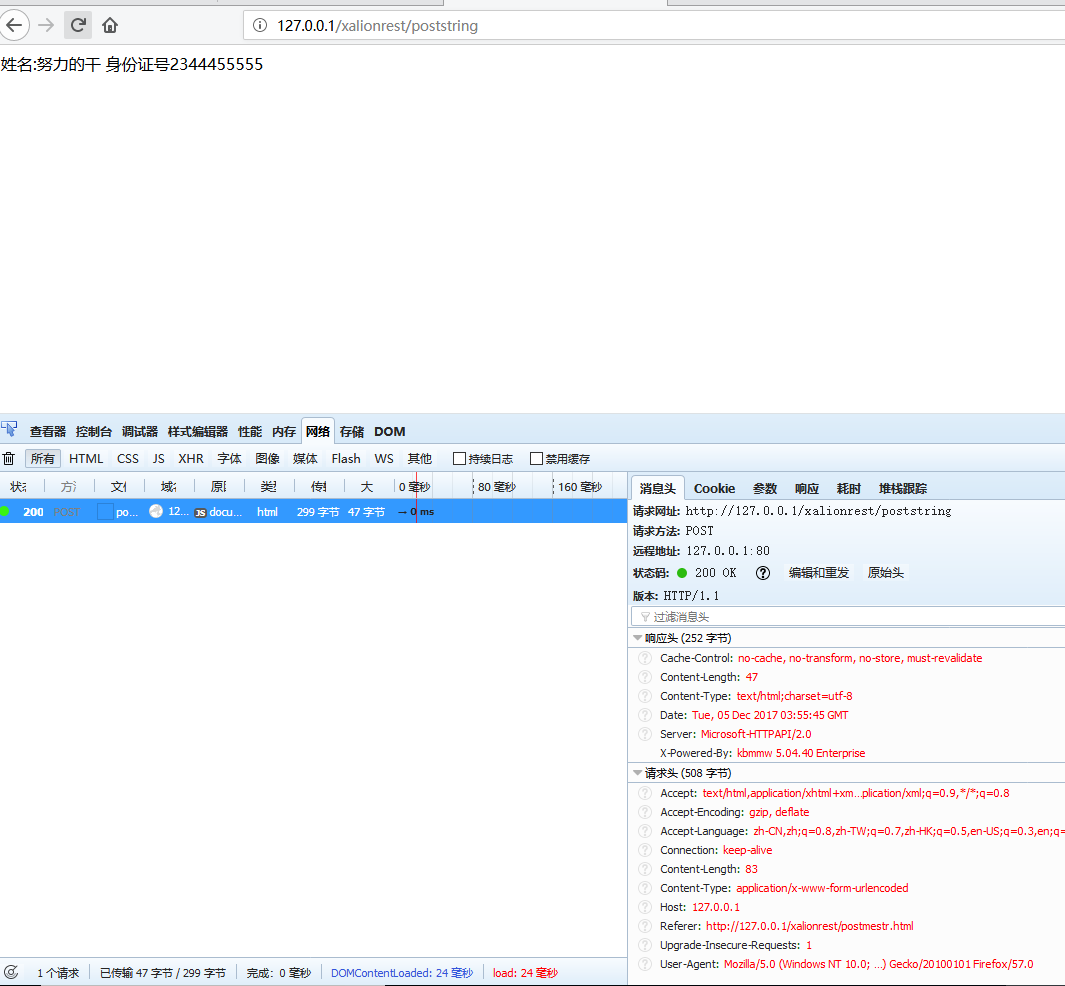
运行结果
后面我们再介绍数据库的操作。
kbmmw 的HTTPSmartService入门的更多相关文章
- kbmmw 的HTTPSmartService 上传文件到服务器端
前面我写过了 HTTPSmartService 使用介绍,可以参见以前的文章. 前一向有同学问如何在http 页面表单上上传文件.一直没有时间回答,自己简单做了例子, 发现无法实现功能,今天花了一天时 ...
- kbmmw 的HTTPSmartService中的跨域访问
有同学在使用kbmmw 与extjs 结合的时候,涉及到了跨域访问,这个在 kbmmw 里面已经完全解决. extjs 在访问跨域的时候,首先会使用OPIONS 调用,服务端要根据浏览器请求的 he ...
- kbmmw 中虚拟文件操作入门
kbmmw 中一直有一个功能,但是基本上都没有提过,但是在实际应用中,却非常有用,这个功能就是 虚拟文件包功能,他可以把一大堆文件保存到一个文件里面,方便后台管理. kbmmw 的虚拟文件在单元kbm ...
- kbmmw 中XML 操作入门
delphi 很早以前就自带了xml 的操作,最新版里面有三种XML 解释器,一种是MSXML,看名字就知道 这个是微软自带的,这个据delphi 官方称是速度是最快的,但是只能在windows 上使 ...
- kbmmw 中JSON 操作入门
现在各种系统中JSON 用的越来越多.delphi 也自身支持JSON 处理. 今天简要说一下kbmmw 内部如何使用和操作JSON. kbmmw 中json的操作是以TkbmMWJSONStream ...
- kbmmw 中XML 操作入门(跨平台,而且可以与JSON,YAML,BSON 直接互相转换)
delphi 很早以前就自带了xml 的操作,最新版里面有三种XML 解释器,一种是MSXML,看名字就知道 这个是微软自带的,这个据delphi 官方称是速度是最快的,但是只能在windows 上使 ...
- REST easy with kbmMW #20 – OpenAPI and Swagger UI
即将推出的kbmMW更新不仅是一些bug修正,同时将包含一个新的主要功能:客户端存根生成器框架. 那什么是客户端存根生成器框架呢? 他是一个基于kbmMW smart services,可以生成由各种 ...
- Angular2入门系列教程7-HTTP(一)-使用Angular2自带的http进行网络请求
上一篇:Angular2入门系列教程6-路由(二)-使用多层级路由并在在路由中传递复杂参数 感觉这篇不是很好写,因为涉及到网络请求,如果采用真实的网络请求,这个例子大家拿到手估计还要自己写一个web ...
- ABP入门系列(1)——学习Abp框架之实操演练
作为.Net工地搬砖长工一名,一直致力于挖坑(Bug)填坑(Debug),但技术却不见长进.也曾热情于新技术的学习,憧憬过成为技术大拿.从前端到后端,从bootstrap到javascript,从py ...
随机推荐
- jasper打印实例2 ----通过文件字节流获得PDF格式图片
public class IspReportUtil { public static String exportReportToByte(CommonReportHandler handler)thr ...
- Maximum GCD(fgets读入)
Maximum GCD https://vjudge.net/contest/288520#problem/V Given the N integers, you have to find the m ...
- Android模拟器故障:waiting for target deviceto come online
关闭再打开模拟器.删除再新建模拟器均无效. 解决办法:在AVD Manager中,选择立即冷启动(Cold Boot Now)模拟器.
- 【python】入门指南1
基础的数据结构:int, float, string 注意:python入门系列的文章的示例均使用python3来完成. #!/bin/python a = 1 b = 1.0 c = 'string ...
- bbs项目中的零碎点记录
一.切换django的语言 在settings中修改django默认的语言 # LANGUAGE_CODE = 'en-us' # 切换django的语言,默认是英语的,我们把他修改为中文 LANGU ...
- 纯java+maven+sqlserver使用mybatis
第一部分:基本实现 @参考文章,在此基础上略作修改 1,新建maven项目JavaMybatis导入依赖 <dependencies> <dependency> <gro ...
- swift - 自定义tabbar按钮的操作
1.自定义tabbar按钮 只能 present出来VC 或者 nav. 因为它本身 没有导航控制器, 只有在tabbar 的根导航控制器的 VC 才能push
- java正则表达式(regular)
哎呀妈呀,脑瓜疼----正则表达式 正则是用来处理复杂文本类型的 标准字符集合: \d --->代表0-9任意一个数字 \D ---->除了数字之外的任意字符 \w ----->字母 ...
- day 05 字典,字典嵌套
字典: 1.列表如果存储大量数据,查询速度相对慢一些 2.列表存储的数据,一般没有什么关联性 针对以上原因,python提供了一个基础数据类型,dict 字典 数据类型的分类 : 容器型数据类型:li ...
- Bootstrap(5)栅格系统
一.移动设备优先 在 HTML5 的项目中,我们做了移动端的项目.它有一份非常重要的 meta,用于设置屏幕和设备等宽以及是否运行用户缩放,及缩放比例的问题. //分别为:屏幕宽度和设备一致.初始缩放 ...