
Asp.Net Core Web相对路径、绝对路径整理
一、相对路径
1.关于Asp.Net Core中的相对路径主要包括两个部分:一、Web根目录,即当前网站的目录为基础;二、内容目录wwwroot文件夹,对于静态文件都放在这个目录。
2.获取控制器,Action的路径
对于控制器、视图的链接生成,主要通过视图上下文、控制器上下文的Url对象
Url对象实现了IUrlHelper接口,主要功能是获取网站的相对目录,也可以将‘~’发号开头的转换成相对目录。
    //

    // 摘要:

    //     Defines the contract for the helper to build URLs for ASP.NET MVC within an application.

    public interface IUrlHelper

    {

        //

        // 摘要:

        //     Gets the Microsoft.AspNetCore.Mvc.IUrlHelper.ActionContext for the current request.

        ActionContext ActionContext { get; }

        //

        // 摘要:

        //     Generates a URL with an absolute path for an action method, which contains the

        //     action name, controller name, route values, protocol to use, host name, and fragment

        //     specified by Microsoft.AspNetCore.Mvc.Routing.UrlActionContext. Generates an

        //     absolute URL if Microsoft.AspNetCore.Mvc.Routing.UrlActionContext.Protocol and

        //     Microsoft.AspNetCore.Mvc.Routing.UrlActionContext.Host are non-null.

        //

        // 参数:

        //   actionContext:

        //     The context object for the generated URLs for an action method.

        //

        // 返回结果:

        //     The generated URL.

        string Action(UrlActionContext actionContext);

        //

        // 摘要:

        //     Converts a virtual (relative) path to an application absolute path.

        //

        // 参数:

        //   contentPath:

        //     The virtual path of the content.

        //

        // 返回结果:

        //     The application absolute path.

        //

        // 备注:

        //     If the specified content path does not start with the tilde (~) character, this

        //     method returns contentPath unchanged.

        string Content(string contentPath);

        //

        // 摘要:

        //     Returns a value that indicates whether the URL is local. A URL is considered

        //     local if it does not have a host / authority part and it has an absolute path.

        //     URLs using virtual paths ('~/') are also local.

        //

        // 参数:

        //   url:

        //     The URL.

        //

        // 返回结果:

        //     true if the URL is local; otherwise, false.

        bool IsLocalUrl(string url);

        //

        // 摘要:

        //     Generates an absolute URL for the specified routeName and route values, which

        //     contains the protocol (such as "http" or "https") and host name from the current

        //     request.

        //

        // 参数:

        //   routeName:

        //     The name of the route that is used to generate URL.

        //

        //   values:

        //     An object that contains route values.

        //

        // 返回结果:

        //     The generated absolute URL.

        string Link(string routeName, object values);

        //

        // 摘要:

        //     Generates a URL with an absolute path, which contains the route name, route values,

        //     protocol to use, host name, and fragment specified by Microsoft.AspNetCore.Mvc.Routing.UrlRouteContext.

        //     Generates an absolute URL if Microsoft.AspNetCore.Mvc.Routing.UrlActionContext.Protocol

        //     and Microsoft.AspNetCore.Mvc.Routing.UrlActionContext.Host are non-null.

        //

        // 参数:

        //   routeContext:

        //     The context object for the generated URLs for a route.

        //

        // 返回结果:

        //     The generated URL.

        string RouteUrl(UrlRouteContext routeContext);

    }
使用示例:
<p>

  ~转相对目录:  @Url.Content("~/test/one")

</p>
输出:/test/one
3.获取当前请求的相对路径
1.在Asp.Net Core中请求路径信息对象为PathString 对象
注:改对象没有目前没有绝对路径相关信息。
<p>

    @{

        PathString _path = this.Context.Request.Path;

        //获取当前请求的相对地址

        this.Write(_path.Value);

    }

</p>
输出:/path
2.获取当前视图的相对路径
注:视图上下文中的Path对象就是当前视图的相对位置,string类型
<p>

 当前视图的相对目录:   @Path

</p>
输出:/Views/Path/Index.cshtml
二、获取绝对路径
HostingEnvironment是承载应用当前执行环境的描述,它是对所有实现了IHostingEnvironment接口的所有类型以及对应对象的统称。
如下面的代码片段所示,一个HostingEnvironment对象承载的执行环境的描述信息体现在定义这个接口的6个属性上。ApplicationName和EnvironmentName分别代表当前应用的名称和执行环境的名称。WebRootPath和ContentRootPath是指向两个根目录的路径,前者指向的目录用于存放可供外界通过HTTP请求访问的资源,后者指向的目录存放的则是应用自身内部所需的资源。至于这个接口的ContentRootFileProvider和WebRootFileProvider属性返回的则是针对这两个目录的FileProvider对象。如下所示的HostingEnvironment类型是对IHostingEnvironment接口的默认实现。
更多参考:http://www.cnblogs.com/artech/p/hosting-environment.html
    //

    // 摘要:

    //     Provides information about the web hosting environment an application is running

    //     in.

    public interface IHostingEnvironment

    {

        //

        // 摘要:

        //     Gets or sets the name of the environment. This property is automatically set

        //     by the host to the value of the "ASPNETCORE_ENVIRONMENT" environment variable.

        string EnvironmentName { get; set; }

        //

        // 摘要:

        //     Gets or sets the name of the application. This property is automatically set

        //     by the host to the assembly containing the application entry point.

        string ApplicationName { get; set; }

        //

        // 摘要: wwwroot目录的绝对目录

        string WebRootPath { get; set; }

        //

        // 摘要:

        //     Gets or sets an Microsoft.Extensions.FileProviders.IFileProvider pointing at

        //     Microsoft.AspNetCore.Hosting.IHostingEnvironment.WebRootPath.

        IFileProvider WebRootFileProvider { get; set; }

        //

        // 摘要:当前网站根目录绝对路径

        string ContentRootPath { get; set; }

        //

        // 摘要:

        //     Gets or sets an Microsoft.Extensions.FileProviders.IFileProvider pointing at

        //     Microsoft.AspNetCore.Hosting.IHostingEnvironment.ContentRootPath.

        IFileProvider ContentRootFileProvider { get; set; }

    }
获取当前网站根目录绝对路径,设置任何地方可以使用:
1.定义全局静态变量:
    public class TestOne

    {

        public static IHostingEnvironment HostEnv;

    }
2.在启动文件Startup中赋值:
public void Configure(IApplicationBuilder app, IHostingEnvironment env, IServiceProvider svp)

{

    TestOne.ServiceProvider = svp;

    TestOne.HostEnv = env;

}
3.输出根目录信息:
<p>

    @{

        string json = Newtonsoft.Json.JsonConvert.SerializeObject(TestOne.HostEnv);

        this.Write(json);

        <script>

            console.info(@Html.Raw(json));

        </script>

    }

</p>
结果:
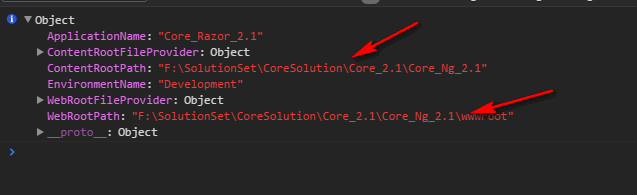
三、相对路径转绝对路径
注:目前没有找到直接转换的方法,但是网站根目录绝对路径+相对路径,就是视图或静态文件的绝对路径。可以自己封装一下。
<p>

    @{

        //获取当前视图的绝对路径

        string viewPath = TestOne.HostEnv.ContentRootPath + Path;

        this.Write(viewPath);

    }

</p>
输出:F:\SolutionSet\CoreSolution\Core_2.1\Core_Ng_2.1/Views/Path/Index.cshtml,可以直接访问到文件。
更多:
Asp.Net Core Web相对路径、绝对路径整理的更多相关文章
- 使用 Swagger 自动生成 ASP.NET Core Web API 的文档、在线帮助测试文档(ASP.NET Core Web API 自动生成文档)
对于开发人员来说,构建一个消费应用程序时去了解各种各样的 API 是一个巨大的挑战.在你的 Web API 项目中使用 Swagger 的 .NET Core 封装 Swashbuckle 可以帮助你 ...
- 在docker中运行ASP.NET Core Web API应用程序
本文是一篇指导快速演练的文章,将介绍在docker中运行一个ASP.NET Core Web API应用程序的基本步骤,在介绍的过程中,也会对docker的使用进行一些简单的描述.对于.NET Cor ...
- docker中运行ASP.NET Core Web API
在docker中运行ASP.NET Core Web API应用程序 本文是一篇指导快速演练的文章,将介绍在docker中运行一个ASP.NET Core Web API应用程序的基本步骤,在介绍的过 ...
- ASP.NET Core Web开发学习笔记-1介绍篇
ASP.NET Core Web开发学习笔记-1介绍篇 给大家说声报歉,从2012年个人情感破裂的那一天,本人的51CTO,CnBlogs,Csdn,QQ,Weboo就再也没有更新过.踏实的生活(曾辞 ...
- VS 2017开发ASP.NET Core Web应用过程中发现的一个重大Bug
今天试着用VS 2017去开发一个.net core项目,想着看看.net core的开发和MVC5开发有什么区别,然后从中发现了一个VS2017的Bug. 首先,我们新建项目,ASP.NET Cor ...
- 支持多个版本的ASP.NET Core Web API
基本配置及说明 版本控制有助于及时推出功能,而不会破坏现有系统. 它还可以帮助为选定的客户提供额外的功能. API版本可以通过不同的方式完成,例如在URL中添加版本或通过自定义标头和通过Accept- ...
- Gitlab CI 自动部署 asp.net core web api 到Docker容器
为什么要写这个? 在一个系统长大的过程中会经历不断重构升级来满足商业的需求,而一个严谨的商业系统需要高效.稳定.可扩展,有时候还不得不考虑成本的问题.我希望能找到比较完整的开源解决方案来解决持续集成. ...
- 在ASP.NET Core Web API中为RESTful服务增加对HAL的支持
HAL(Hypertext Application Language,超文本应用语言)是一种RESTful API的数据格式风格,为RESTful API的设计提供了接口规范,同时也降低了客户端与服务 ...
- Asp.Net Core Web应用程序—探索
前言 作为一个Windows系统下的开发者,我对于Core的使用机会几乎为0,但是考虑到微软的战略规划,我觉得,Core还是有先了解起来的必要. 因为,目前微软已经搞出了两个框架了,一个是Net标准( ...
- ASP.NET Core Web API 集成测试
本文需要您了解ASP.NET Core Web API 和 xUnit的相关知识. 这里有xUnit的介绍: https://www.cnblogs.com/cgzl/p/9178672.html#t ...
随机推荐
- 【LOJ】#2535. 「CQOI2018」九连环
题解 简单分析一下,有\(k\)个环肯定是,我拆掉了\(k - 2\)个,留最左两个,1步拆掉最左的,这个时候我还要把这\(k - 2\)个环拼回去,拆一次\(k - 1\) 所以方案数就是\(f[k ...
- 003.iSCSI客户端管理
一 启动器介绍 iSCSI启动器通常在软件中实施,也可以采用硬件启动器.软件启动器需要安装iSCSI-initiator-utils软件包.包含如下文件: /etc/iscsi/iscsid.conf ...
- sublime安装package control 的方法
1.安装sublime3后,点击菜单 view>show console,复制以下代码按回车即可,安装时稍微有些卡,需要耐心等待. import urllib.request,os; pf = ...
- 21.python中的闭包和装饰器
python中的闭包从表现形式上定义(解释)为:如果在一个内部函数里,对在外部作用域(但不是在全局作用域)的变量进行引用,那么内部函数就被认为是闭包(closure). 以下说明主要针对 python ...
- luoguP4000 斐波那契数列
题目链接 luoguP4000 斐波那契数列 题解 根据这个东西 https://www.cnblogs.com/sssy/p/9418732.html 我们可以找出%p意义下的循环节 然后就可以做了 ...
- bash编程之xargs实用技巧
xargs结合管道操作符|,可以完成很多看似复杂的问题: 1.快速删除所有.log日志文件 机器运行久了,就会有各式各样的日志文件,散落在各个目录下,可以利用下面的方法: find ./ -name ...
- Godaddy新手教程
Godaddy新版域名空间管理控制面板使用方法和更换IP与机房问题 http://www.freehao123.com/godaddy-new/ //设置DNS 最新Godaddy绑定域名教程设置DN ...
- WCF中的REST是什么
基于SOAP消息格式的WCF之所以强大原因之一是因为SOAP消息头的高度扩展性.相应的WS-*协议很多都体现在消息头封装的信息上,包括诸如寻址,需要调用方法名,维护Session的信息等等…… SOA ...
- [Winform]通过钩子监控键盘操作和鼠标移动
摘要 有这样一个需求,在程序隐藏之后,需要监控当前电脑是否有操作,如果1分钟内,无操作,则弹出视频,循环播放. 解决办法 从网上找的一个解决办法,可以通过钩子的方式实现,这里记录一下. /// < ...
- Xamarin.Android,Xamarin.iOS, Linking
Xamarin.Android applications use a linker in order to reduce the size of the application. The linker ...