
CentOS7 设置集群时间同步
1. 安装ntp时间同步工具
yum -y install ntp ntpdate #安装ntpdate时间同步工具

ntpdate cn.pool.ntp.org    #设置时间同步

hwclock --systohc          #将系统时间写入硬件时间

timedatectl                #查看系统时间
一般来讲,经过这几部之后,应该就OK了。关于时间服务的网址,可以到http://www.ntp.org.cn/pool.php查阅.
有些时候,在执行ntpdate cn.pool.ntp.org的时候会出现下面的错误:
no server suitable for synchronization found
可以使用ntpdate -d {ip or url} 来查看调试信息,如果出现类似下面的信息,说明服务器连接不上,
transmit(192.168.30.22)

transmit(192.168.30.22)

transmit(192.168.30.22)

transmit(192.168.30.22)

transmit(192.168.30.22)

192.168.30.22: Server dropped: no data

server 192.168.30.22, port

.....

 Jul :: ntpdate[]: no server suitable for synchronization found
解决办法之一为:
ntpq -c version #查看ntp版本
如果版本是ntp4.2(包括4.2)之后的版本,在restrict的定义中使用了notrust的话,会导致以上错误,官网说明
The behavior of notrust changed between versions 4.1 and 4.2.
In 4.1 (and earlier) notrust meant "Don't trust this host/subnet for time".
In 4.2 (and later) notrust means "Ignore all NTP packets that are not cryptographically authenticated." This forces remote time servers to authenticate themselves to your (client) ntpd
解决:
sudo vim /etc/ntp.conf
把notrust去掉。
如果这个还不能解决,就只能自己选择集群中一台机器为ntp时间服务器,其他机器以此机器的时间为基准来进行同步了。
2. 搭建ntp服务器进行集群时间同步
本节以两台服务器为例
192.168.1.101
192.168.1.102
本节以192.168.1.101作为ntp服务器,192.168.1.102作为客户端来同步服务器的时间, 在多节点的集群中道理是一样的。
2.1 集群中所有机器安装ntp时间同步工具
sudo yum -y install ntp ntpdate #安装ntpdate时间同步工具
2.2 192.168.1.101时间同步服务器设置
启动时间同步服务器
sudo systemctl start ntpd     #启动时间同步程序

sudo systemctl enable ntpd  #允许时间同步程序开机启动
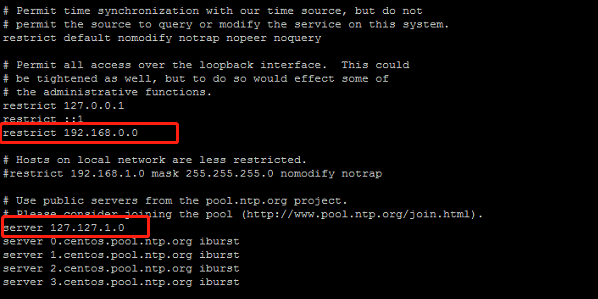
修改/etc/ntp.conf文件,添加server设置127.127.1.0为其自身
sudo vim /etc/ntp.conf
在public servers节下添加
server 127.127.1.0 #设置自己作为时间同步服务器
在access节下新增加一个restrict段为可以接受服务的网段,本例为192.168.0.0
restrict 192.168.0.0
如下图所示:
保存退出,并重启ntp系统服务
sudo systemctl restart ntpd
2.3 ntp同步客户端设置
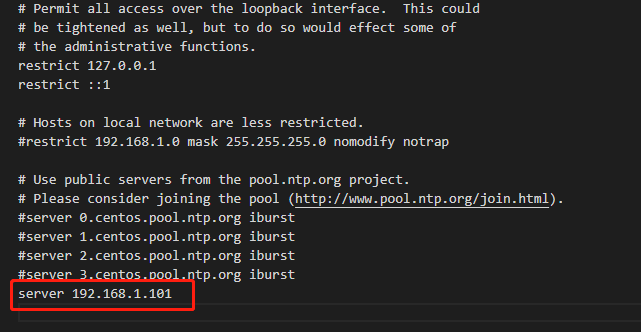
本例中192.168.1.102为作为时间同步客户端来同步服务器的时间。在192.168.1.102中编辑/etc/ntp.conf
sudo vim /etc/ntp.conf
在server下面添加一个时间同步服务器地址,本例为192.168.1.101
server 192.168.1.101
如图:
在192.168.1.102中同步时间
sudo ntpdate 192.168.1.101 #如果需要查看调试信息,可以添加参数-d

2.4 所有节点设置ntp服务开启启动
sudo systemctl start ntpd       #启动ntp服务

sudo systemctl enable ntpd    #设置ntp服务开机启动
2.5 所有节点启动时间同步
sudo timedatectl set-ntp yes
CentOS7 设置集群时间同步的更多相关文章
- CentOS7设置集群环境SSH免密访问
1.准备工作 1)通过克隆或者其他方式获得可互相通信的多台节点(本文为3台虚拟机:hadoop101.hadoop102.hadoop103) 2)配置节点的静态IP.hostname.hosts,参 ...
- RAC集群时间同步服务
集群时间同步服务在集群中的两个 Oracle RAC 节点上执行以下集群时间同步服务配置.Oracle Clusterware 11g 第 2 版及更高版本要求在部署了 Oracle RAC 的集群的 ...
- centos7搭建集群必知:centos7已经无iptables,只有firewall
1.防火墙概述 centos7搭建集群,发现没有iptables,需要安装.防火墙为firewalle CentOS7默认的防火墙不是iptables,而是firewalle. CentOS 7.0默 ...
- Hadoop入门 集群时间同步
集群时间同步 如果服务器在公网环境(能连接外网),可以不采用集群时间同步.因为服务器会定期和公网时间进行校准. 如果服务器在内网环境,必须要配置集群时间同步,否则时间久了,会产生时间偏差,导致集群执行 ...
- CDH集群安装配置(三)- 集群时间同步(主节点)和 免密码登录
集群时间同步(主节点) 1. 查看是否安装ntp服务,如果没有安装 rpm -qa |grep ntpd查看命令 yum install ntp安装命令 2. 修改配置 vi /etc/ntp.con ...
- Ambari 集群时间同步配置教程
本文原始地址:https://sitoi.cn/posts/27560.html 步骤 在时间同步主节点创建 ntp.conf 文件 在时间同步从节点上创建 ntp.conf 文件 修改所有节点时区 ...
- Elasticsearch-6.7.0系列(六)ES设置集群密码
感谢此老兄:<手把手教你搭建一个 Elasticsearch 集群> 前提准备 安装kibana-6.7.0: <Elasticsearch-6.7.0系列(三)5601端口 kib ...
- k8s设置集群角色
查看所有的node节点 [root@test1 ~]# kubectl get nodes NAME STATUS ROLES AGE VERSION test1 Ready <none> ...
- ntp集群时间同步
1. NTP 简介 网络时间协议(英语:Network Time Protocol,简称NTP)是在数据网络潜伏时间可变的计算机系统之间通过分组交换进行时钟同步的一个网络协议.自1985年以来,NTP ...
随机推荐
- MySQL中正则表达式
正则表达式是用来匹配文本的特殊的串(字符集合),将一个模式(正则表达式)与一个文本串进行比较 从文本文件中提取电话号码 查找名字中间带有数字的文件 文本块中重复出现的单词 替换页面的URL为这些URL ...
- windows可以使用curl啦(以及其他的Linux下面的指令)!
windows可以使用cUrl了!同期放出了tar指令,去年下半年才放出来的. 介绍文章 https://blogs.technet.microsoft.com/virtualization/2017 ...
- 手动增加pe节并修改oep
一直想学学怎么动动pe文件,学习了几篇文章尤其是寒晨的文章后,自己动手也尝试了一下加节和修改oep,写出来供和我一样菜的一起进步. 一. 增加pe节需要的操作 1. 确定内存中的节的 ...
- 虚拟机ubuntu新增挂载点进行磁盘扩展
参考: http://m.blog.csdn.net/blog/pcsxk/38501579 一.vmware下扩展原来的磁盘空间 这个比较直观 1.关机状态下,选择磁盘->实用工具->扩 ...
- Device Identifier and Device DNA初识
Device Identifier and Device DNA初识 信息来源 怎么样去用这个DNA:
- MySQL 快速构造一亿条记录的表
在上一次朋友问我如何快速构造一亿条记录的表后,我理出了实行的办法,见:http://blog.csdn.net/mchdba/article/details/52938114,但是因为录入一亿表需要2 ...
- 第一个Django项目
安装 pip install Django==2.0.5 命令行下创建Django项目 django-admin startproject first_project # 创建项目 cd first_ ...
- oracle sql 添加、修改数据库操作方式
年龄大了,写程序总记不住.记录一下格式: private const string SQL_INSTERT = @"INSERT INTO QS_ROOM_QUEUE (QUEUEID,RO ...
- axios 上传图片
let data = new FormData(); for (var i = 0; i < files.length; i++) { let file = files.item(i); dat ...
- MDIEMDIE双心封装版0.3.0.0RC6V2
MDIEMDIE双心封装版0.3.0.0 RC6V2官方主页:http://cres.s28.xrea.com/MDIE(多文档界面资源管理器)是一个MDI类型的文件管理软件,是代替资源管理器的一个无 ...