
Boost StateChart实现状态机----秒表例程
Boost 提供了状态机的实现接口,采用了CRTP技术实现,下面以秒表为例子实现一个状态机,这是一个官方的例子,也可以参考资料:Boost Statechart 庫,状态机的状态转换图如下所示:
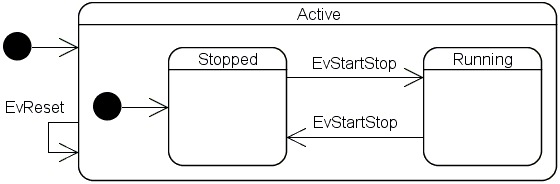
实现代码如下:
#include <stdio.h>

#include <stdlib.h>

#include <iostream> // std::cout

#include <thread>   // std::thread

#include <string>

#include <vector>

#include <ros/ros.h>

#include <boost/statechart/state_machine.hpp>

#include <boost/statechart/state.hpp>

#include <boost/statechart/event.hpp>

#include <boost/statechart/transition.hpp>

#include <boost/statechart/custom_reaction.hpp>

#include <boost/range/irange.hpp>

#include <boost/thread/thread.hpp>

#include <ctime>

using namespace std;

namespace sc = boost::statechart;

class EvStartStop : public sc::event<EvStartStop>

{

};

class EvReset : public sc::event<EvReset>

{

};

/*虚类,用于状态机获取状态*/

class IElapsedTime

{

 public:

  virtual double elapsedTime() const = ;

  virtual ~IElapsedTime(){};

};

class Active;

/*秒表,状态机*/

class StopWatch : public sc::state_machine<StopWatch, Active>

{

 public:

  double elapsedTime() const

  {

    return state_cast<const IElapsedTime &>().elapsedTime();

  }

};

class Stopped;

/*活动状态*/

class Active : public IElapsedTime, public sc::state<Active, StopWatch, Stopped>

{

 public:

  typedef sc::transition<EvReset, Active> reactions;

  Active(my_context ctx)

      : my_base(ctx),

        elapsed_time_()

  {

    cout << "Entry Active" << endl;

  }

  ~Active()

  {

    cout << "Exit Active" << endl;

  }

  double elapsedTime() const

  {

    return elapsed_time_;

  }

  double& elapsedTime()

  {

    return elapsed_time_;

  }

 private:

  double elapsed_time_;

};

/*计时状态*/

class Running : public IElapsedTime, public sc::state<Running, Active>

{

 public:

  typedef sc::transition<EvStartStop, Stopped> reactions;

  Running(my_context ctx)

      : my_base(ctx),

        start_time_(std::time())

  {

    cout << "Entry Running" << endl;

  }

  ~Running()

  {

    context<Active>().elapsedTime() = elapsedTime();

    cout << "Exit Running" << endl;

  }

  virtual double elapsedTime() const

  {

    return context<Active>().elapsedTime()

        + std::difftime(std::time(), start_time_);

  }

 private:

  std::time_t start_time_;

};

/*停止状态*/

class Stopped : public IElapsedTime, public sc::state<Stopped, Active>

{

 public:

  typedef sc::transition<EvStartStop, Running> reactions;

  Stopped(my_context ctx)

      : my_base(ctx)

  {

    cout << "Entry Stopped" << endl;

  }

  ~Stopped()

  {

    cout << "Exit Stopped" << endl;

  }

  virtual double elapsedTime() const

  {

    return context<Active>().elapsedTime();

  }

};

int main(int argc, char** argv)

{

  StopWatch myWatch;

  myWatch.initiate();

  cout << "---" << endl;

  myWatch.process_event(EvStartStop());

  for(int i = ; i < ; i++)

  {

    boost::this_thread::sleep(boost::posix_time::seconds());  //休眠1秒

    std::cout << "time:" << myWatch.elapsedTime() << "\n";

  }

  myWatch.process_event(EvStartStop());

  boost::this_thread::sleep(boost::posix_time::seconds());

  std::cout << "current time:" << myWatch.elapsedTime() << "\n";

  cout << "---" << endl;

  myWatch.process_event(EvReset());

  std::cout << "reset time:" << myWatch.elapsedTime() << "\n";

  cout << "---" << endl;

  return ;

}
运行效果如下:
Entry Active

Entry Stopped

---

Exit Stopped

Entry Running

time:

time:

time:

time:

time:

time:

time:

time:

time:

time:

Exit Running

Entry Stopped

current time:

---

Exit Stopped

Exit Active

Entry Active

Entry Stopped

reset time:

---

Exit Stopped

Exit Active
Boost StateChart实现状态机----秒表例程的更多相关文章
- c# 状态机实现
c#仿boost statechart的状态机.去年转到unity使用c#,statechart原来的风格蛮爽的,缺点是编译忒慢,在c#则编译根本不是问题. 不一样的地方首先是简单!因为没做一些东西如 ...
- boost状态机学习二(秒表)
基础主题:秒表 下面我们要为一个机械秒表建模一个状态机.这样一个秒表通常会有两个按钮. * Start/Stop * Reset 同时有两种状态: * Stoped: 表针停留在上次停止时的位置: o ...
- Boost的状态机库教程(1)
介绍 Boost状态机库一个应用程序框架,你可以用它将UML状态图快速的转换为可执行的c++代码,而不需要任何的代码生成器.它支持几乎所有的UML特征,可以直接了当的转换,并且转换后的c++代码就像对 ...
- Boost 1.61.0 Library Documentation
http://www.boost.org/doc/libs/1_61_0/ Boost 1.61.0 Library Documentation Accumulators Framework for ...
- Ceph源码解析:PG peering
集群中的设备异常(异常OSD的添加删除操作),会导致PG的各个副本间出现数据的不一致现象,这时就需要进行数据的恢复,让所有的副本都达到一致的状态. 一.OSD的故障和处理办法: 1. OSD的故障种类 ...
- Ceph:pg peering过程分析
转自:https://www.ustack.com/blog/ceph%ef%bc%8dpg-peering/ Peering:互为副本的三个(此处为设置的副本个数,通常设置为3)pg的元数据达到一致 ...
- 【资料下载区】【iCore3相关代码、资料下载地址】更新日期2017/1/5
[iCore3 ARM代码下载地址][全部]DEMO1.0测试程序发布例程一:ARM驱动三色LED例程二:读取arm按键状态例程三:EXTI中断输入实验——读取ARM按键状态例程四:USART通信实验 ...
- Important Programming Concepts (Even on Embedded Systems) Part V: State Machines
Earlier articles in this series: Part I: Idempotence Part II: Immutability Part III: Volatility Part ...
- 记录一次ceph recovery经历
一次ceph recovery经历 背景 这是一个測试环境. 该环境中是cephfs 一共12个节点, 2个client.2个mds.8个osd mds: 2颗CPU,每一个4核.一共是8核. 128 ...
随机推荐
- XHR工厂的实现
ajax这种常见的开发模式已经遍布我们日常的开发之中了,ajax本质还是采用一种轮询的模式,就是隔一段时间去发送一次http请求,获取数据,然后显示在页面之上,当然,ajax比起新兴的WebScoke ...
- CS229 笔记05
CS229 笔记05 生成学习方法 判别学习方法的主要思想是假设属于不同target的样本,服从不同的分布. 例如 \(P(x|y=0) \sim {\scr N}(\mu_1,\sigma_1^2) ...
- iOS 远程推送注册的小问题
iOS8有了新方法,用新方法后,用7.0版本运行会奔溃.只要加一句判断就ok: #ifdef __IPHONE_8_0 // 在 iOS 8 下注册苹果推送,申请推送权限. UIUserNotific ...
- zookeeper笔记之基于zk实现分布式锁
一.分布式锁概述 Java中基于AQS框架提供了一系列的锁,但是当需要在集群中的多台机器上互斥执行一段代码或使用资源时Java提供的这种单机锁就没了用武之地,此时需要使用分布式锁协调它们.分布式锁有很 ...
- 关于Python IDLE reload(sys)后无法正常执行命令的原因
转载自:http://blog.csdn.net/kxcfzyk/article/details/41414247?utm_source=tuicool&utm_medium=referral ...
- cas:覆盖安装
1.首先到github上下载最新的模板代码 https://github.com/apereo/cas-overlay-template 下载完成后,导入该工程. 2.编译打包 cd cas-over ...
- ASP.NET MVC 路由学习
参考 http://www.cnblogs.com/yaozhenfa/p/asp_net_mvc_route_2.html 说明 1."解决与物理路径的冲突"这段教程这里如果不起 ...
- LeetCode(12):整数转罗马数字
Medium! 题目描述: 罗马数字包含以下七种字符: I, V, X, L,C,D 和 M. 字符 数值 I 1 V 5 X 10 L 50 C 100 D 500 M 1000 例如, 罗马数字 ...
- 【linux】sed -e 's/-//g'
sed是用来处理文本的 s/正则表达式/替换字符串/ :表示将正则表达式的内容替换为后面的字符串 g :表示替换全部,即如果不加g,则只会替换第一个 -e :多点编辑(这个没懂) 例 ...
- Zookeeper命令行zkCli.sh&zkServer.sh的使用(四)
上篇博文,我们成功的安装和启动了zookeeper服务器,zookeeper还提供了很多方便的功能,方便我们查看服务器的状态,增加,修改,删除数据(入口是zkServer.sh和zkCli.sh).还 ...