
Boost StateChart实现状态机----秒表例程
Boost 提供了状态机的实现接口,采用了CRTP技术实现,下面以秒表为例子实现一个状态机,这是一个官方的例子,也可以参考资料:Boost Statechart 庫,状态机的状态转换图如下所示:
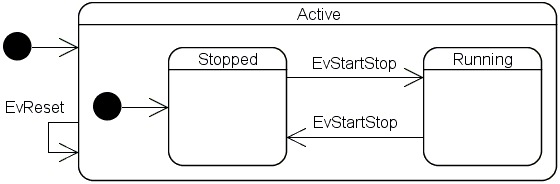
实现代码如下:
#include <stdio.h>

#include <stdlib.h>

#include <iostream> // std::cout

#include <thread>   // std::thread

#include <string>

#include <vector>

#include <ros/ros.h>

#include <boost/statechart/state_machine.hpp>

#include <boost/statechart/state.hpp>

#include <boost/statechart/event.hpp>

#include <boost/statechart/transition.hpp>

#include <boost/statechart/custom_reaction.hpp>

#include <boost/range/irange.hpp>

#include <boost/thread/thread.hpp>

#include <ctime>

using namespace std;

namespace sc = boost::statechart;

class EvStartStop : public sc::event<EvStartStop>

{

};

class EvReset : public sc::event<EvReset>

{

};

/*虚类,用于状态机获取状态*/

class IElapsedTime

{

 public:

  virtual double elapsedTime() const = ;

  virtual ~IElapsedTime(){};

};

class Active;

/*秒表,状态机*/

class StopWatch : public sc::state_machine<StopWatch, Active>

{

 public:

  double elapsedTime() const

  {

    return state_cast<const IElapsedTime &>().elapsedTime();

  }

};

class Stopped;

/*活动状态*/

class Active : public IElapsedTime, public sc::state<Active, StopWatch, Stopped>

{

 public:

  typedef sc::transition<EvReset, Active> reactions;

  Active(my_context ctx)

      : my_base(ctx),

        elapsed_time_()

  {

    cout << "Entry Active" << endl;

  }

  ~Active()

  {

    cout << "Exit Active" << endl;

  }

  double elapsedTime() const

  {

    return elapsed_time_;

  }

  double& elapsedTime()

  {

    return elapsed_time_;

  }

 private:

  double elapsed_time_;

};

/*计时状态*/

class Running : public IElapsedTime, public sc::state<Running, Active>

{

 public:

  typedef sc::transition<EvStartStop, Stopped> reactions;

  Running(my_context ctx)

      : my_base(ctx),

        start_time_(std::time())

  {

    cout << "Entry Running" << endl;

  }

  ~Running()

  {

    context<Active>().elapsedTime() = elapsedTime();

    cout << "Exit Running" << endl;

  }

  virtual double elapsedTime() const

  {

    return context<Active>().elapsedTime()

        + std::difftime(std::time(), start_time_);

  }

 private:

  std::time_t start_time_;

};

/*停止状态*/

class Stopped : public IElapsedTime, public sc::state<Stopped, Active>

{

 public:

  typedef sc::transition<EvStartStop, Running> reactions;

  Stopped(my_context ctx)

      : my_base(ctx)

  {

    cout << "Entry Stopped" << endl;

  }

  ~Stopped()

  {

    cout << "Exit Stopped" << endl;

  }

  virtual double elapsedTime() const

  {

    return context<Active>().elapsedTime();

  }

};

int main(int argc, char** argv)

{

  StopWatch myWatch;

  myWatch.initiate();

  cout << "---" << endl;

  myWatch.process_event(EvStartStop());

  for(int i = ; i < ; i++)

  {

    boost::this_thread::sleep(boost::posix_time::seconds());  //休眠1秒

    std::cout << "time:" << myWatch.elapsedTime() << "\n";

  }

  myWatch.process_event(EvStartStop());

  boost::this_thread::sleep(boost::posix_time::seconds());

  std::cout << "current time:" << myWatch.elapsedTime() << "\n";

  cout << "---" << endl;

  myWatch.process_event(EvReset());

  std::cout << "reset time:" << myWatch.elapsedTime() << "\n";

  cout << "---" << endl;

  return ;

}
运行效果如下:
Entry Active

Entry Stopped

---

Exit Stopped

Entry Running

time:

time:

time:

time:

time:

time:

time:

time:

time:

time:

Exit Running

Entry Stopped

current time:

---

Exit Stopped

Exit Active

Entry Active

Entry Stopped

reset time:

---

Exit Stopped

Exit Active
Boost StateChart实现状态机----秒表例程的更多相关文章
- c# 状态机实现
c#仿boost statechart的状态机.去年转到unity使用c#,statechart原来的风格蛮爽的,缺点是编译忒慢,在c#则编译根本不是问题. 不一样的地方首先是简单!因为没做一些东西如 ...
- boost状态机学习二(秒表)
基础主题:秒表 下面我们要为一个机械秒表建模一个状态机.这样一个秒表通常会有两个按钮. * Start/Stop * Reset 同时有两种状态: * Stoped: 表针停留在上次停止时的位置: o ...
- Boost的状态机库教程(1)
介绍 Boost状态机库一个应用程序框架,你可以用它将UML状态图快速的转换为可执行的c++代码,而不需要任何的代码生成器.它支持几乎所有的UML特征,可以直接了当的转换,并且转换后的c++代码就像对 ...
- Boost 1.61.0 Library Documentation
http://www.boost.org/doc/libs/1_61_0/ Boost 1.61.0 Library Documentation Accumulators Framework for ...
- Ceph源码解析:PG peering
集群中的设备异常(异常OSD的添加删除操作),会导致PG的各个副本间出现数据的不一致现象,这时就需要进行数据的恢复,让所有的副本都达到一致的状态. 一.OSD的故障和处理办法: 1. OSD的故障种类 ...
- Ceph:pg peering过程分析
转自:https://www.ustack.com/blog/ceph%ef%bc%8dpg-peering/ Peering:互为副本的三个(此处为设置的副本个数,通常设置为3)pg的元数据达到一致 ...
- 【资料下载区】【iCore3相关代码、资料下载地址】更新日期2017/1/5
[iCore3 ARM代码下载地址][全部]DEMO1.0测试程序发布例程一:ARM驱动三色LED例程二:读取arm按键状态例程三:EXTI中断输入实验——读取ARM按键状态例程四:USART通信实验 ...
- Important Programming Concepts (Even on Embedded Systems) Part V: State Machines
Earlier articles in this series: Part I: Idempotence Part II: Immutability Part III: Volatility Part ...
- 记录一次ceph recovery经历
一次ceph recovery经历 背景 这是一个測试环境. 该环境中是cephfs 一共12个节点, 2个client.2个mds.8个osd mds: 2颗CPU,每一个4核.一共是8核. 128 ...
随机推荐
- python assert 断言语句的作用
python assert 断言语句的作用 assert语句的应用场景 使用assert语句是一个很好的习惯. 我们在编写代码的时候, 不知道程序会在什么时候崩溃, 与其让它在深度运行时崩溃, 不如预 ...
- Rime中州韵导入QQ五笔词库
过程记录如下: 1.在QQ五笔中导出QQ五笔系统词库 2.使用「深蓝词库转换」转换QQ五笔系统词库,输入源修改为”五笔86版“,输出方式修改为Rime中州韵-五笔. 3.在Ubuntu中打开Termi ...
- 总有一些实用javascript的元素被人遗忘在角落-slice
slice() 方法可从已有的数组中返回选定的元素. 好吧,我承认我竟然把它忘了! 这次我在回顾一下它 语法 arrayObject.slice(start,end) 数组.slice(起始,结束) ...
- Oracle Logminer 分析重做日志RedoLog和归档日志ArchiveLog
在实际开发过程中,有时我们很有可能需要某个表的操作痕迹,或通过记录的SQL语句进行有目的性的数据恢复(此时POINT-IN-TIME恢复已经满足不了更细的粒度).或仅仅是查看: 据说Oracle8i之 ...
- perl6: Proc::Async (new)
# command with arguments my $proc = Proc::Async.new('whoami'); # subscribe to new output from out an ...
- MFC小型工具通用界面框架CLIST控件+右键菜单功能
MFC-小型工具通用界面框架 0x1 场景 由于工作需要我会写代码开发工具给客户或者同事用.代码都能实现,但写个黑乎乎的命令行工具给别人用确实显得不够专业,用别人写好的成型工具又担心有后门. 所以掌握 ...
- git 入门常用命令(转)
Git工作流程:D:\projects\Setup2\Setup2\Setup2\Express\SingleImage\DiskImages\DISK1 git clone工作开始之初,可通过git ...
- jexus配置支持Owin
vi打开配置文件,加一行 OwinMain=xxx.dll ###################### # Web Site: Default ########################### ...
- 深入理解java虚拟机-01 走进java
第一章是对java的产生,历史的整体介绍 java的使用很广泛,安装jdk的时候会看到一句广告语runs in 10 billions machines.使用java的设备多达几十亿台 1.概述 优点 ...
- Error:Makefile:452: target 'config' given more than once in the same rule
在解压的 linux2.6.15 文件夹下 make menuconfig 的时候出现下面的错误: Makefile:452: target 'config' given more than once ...