
eclipse-搭建maven的war项目集合spring注解方式
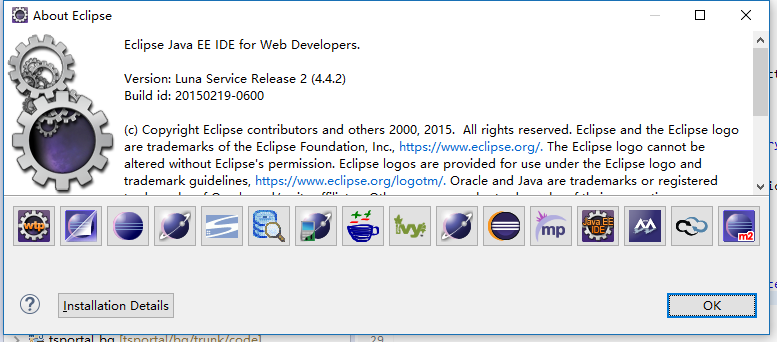
工具:eclipse 4.4.2 版本号:20150219-0600
jdk:1.7
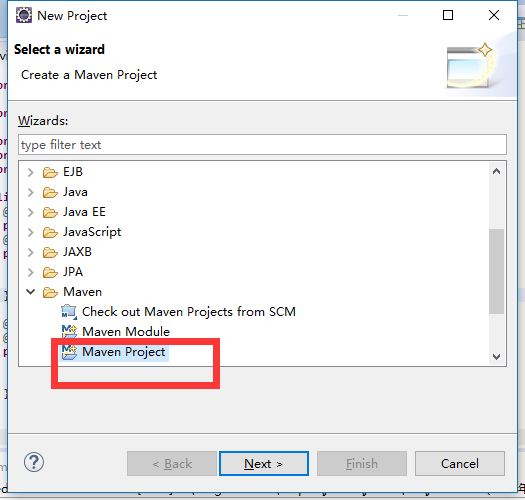
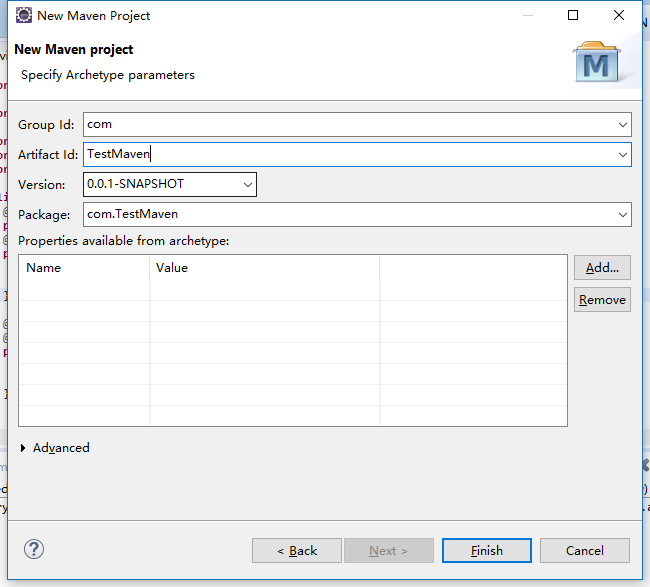
1.下图创建maven工程,然后next
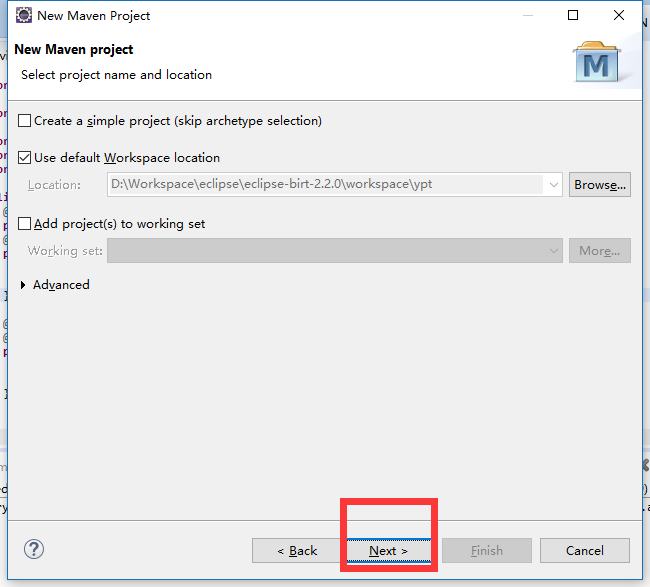
下图选择工程保存位置(这里选择默认),next
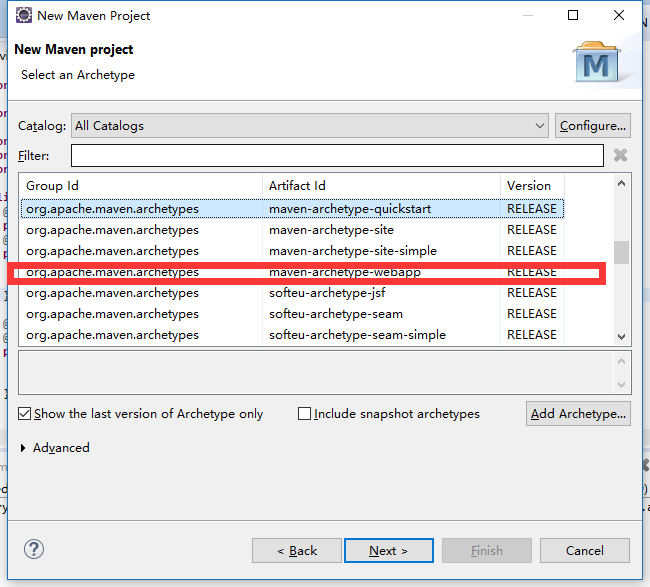
下图选择webapp项目(war包,mvaen默认选择的quickstart一般为jar工程),next
下图,其中
group ID:一般设置起点报名,随便定义
artifact ID:项目名称
Version:版本号名称
package:初始化类文件名称
其他暂不填finish
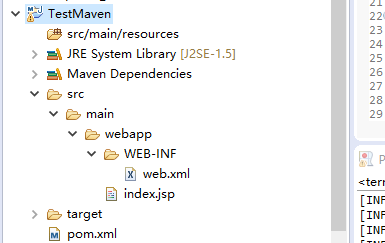
项目新建完成
结构
2.接下来到需要的jar
jdk=修改成官方的1.7,finish
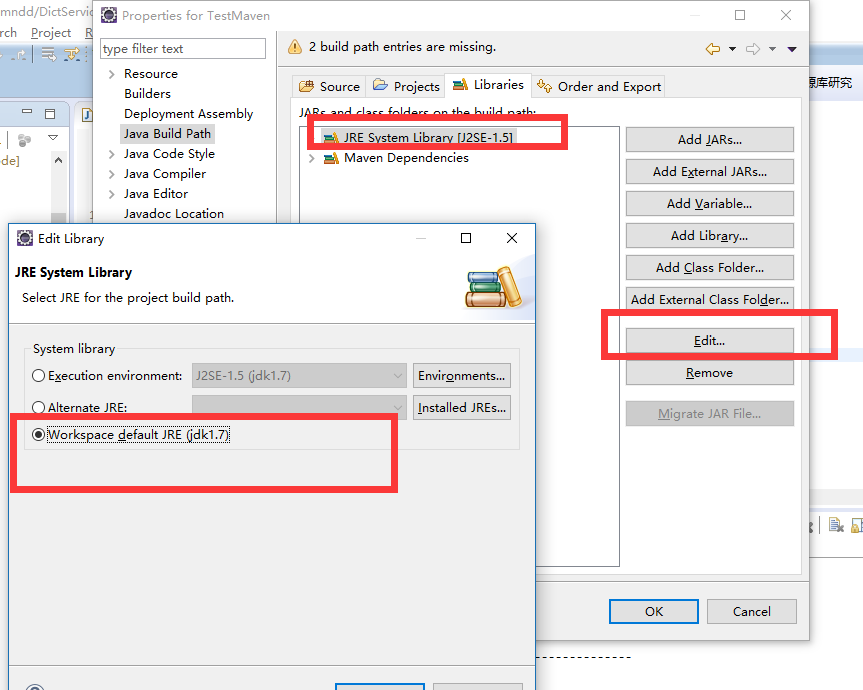
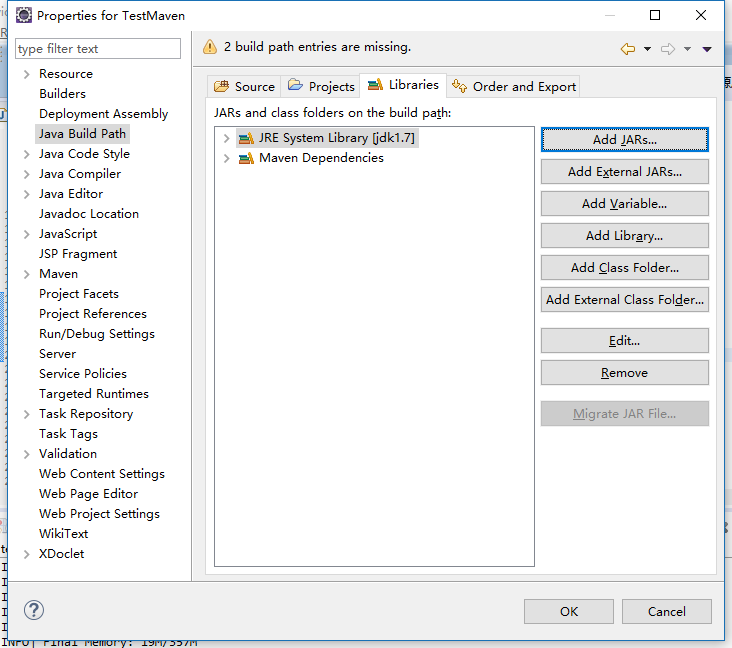
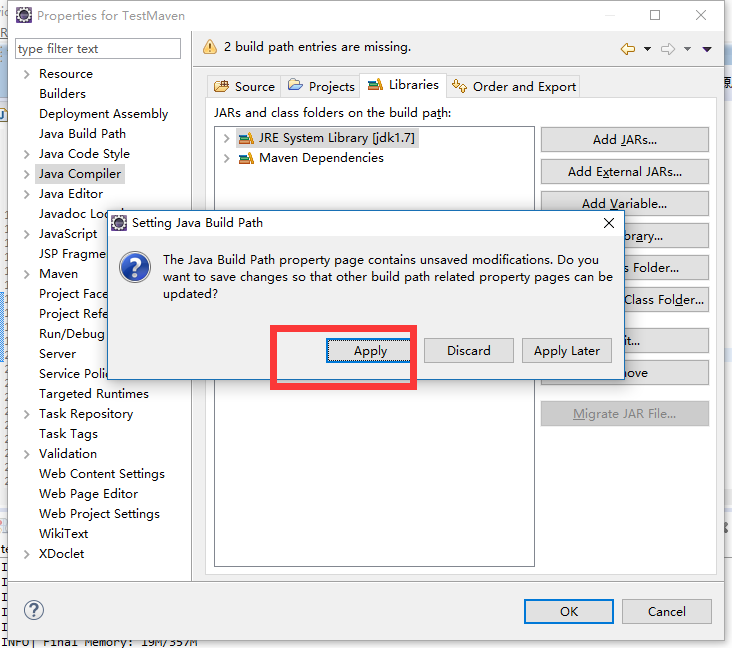
还有

解下来下面两个版本号不太好改,直接在eclipse中改好像改 不了
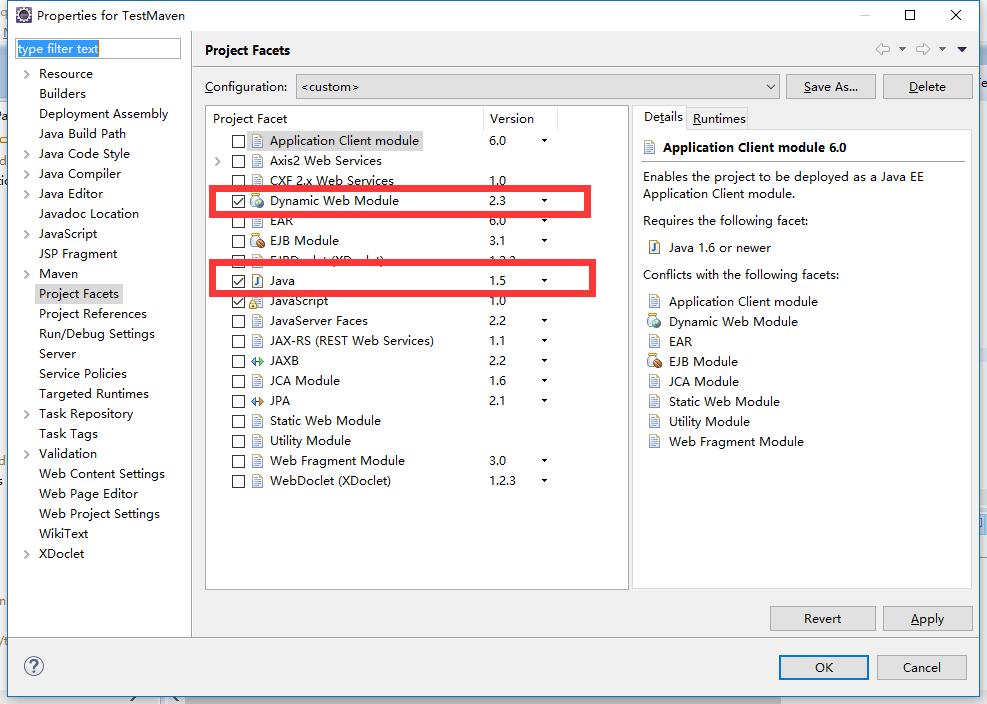
所以需要到项目下面去改文件
打开项目地址
例如:c:workspace\TestMaven\.settings\下面
找到文件org.eclipse.wst.common.project.facet.core.xml
原文件内容
<?xml version="1.0" encoding="UTF-8"?>

<faceted-project>

  <fixed facet="wst.jsdt.web"/>

  <installed facet="java" version="1.5"/>

  <installed facet="jst.web" version="2.3"/>

  <installed facet="wst.jsdt.web" version="1.0"/>

</faceted-project>
修改其中的jst.web和java为对应的版本
<?xml version="1.0" encoding="UTF-8"?>

<faceted-project>

  <fixed facet="wst.jsdt.web"/>

  <installed facet="java" version="1.7"/>

  <installed facet="jst.web" version="3.0"/>

  <installed facet="wst.jsdt.web" version="1.0"/>

</faceted-project>
保存
到这么一个正常的maven web项目搭建好了
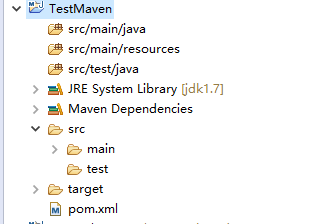
3.接下来引入spring
在pom.xml中引入相关配置文件
<project xmlns="http://maven.apache.org/POM/4.0.0" xmlns:xsi="http://www.w3.org/2001/XMLSchema-instance"

    xsi:schemaLocation="http://maven.apache.org/POM/4.0.0 http://maven.apache.org/maven-v4_0_0.xsd">

    <modelVersion>4.0.0</modelVersion>

    <groupId>com</groupId>

    <artifactId>TestMaven</artifactId>

    <packaging>war</packaging>

    <version>0.0.1-SNAPSHOT</version>

    <name>TestMaven Maven Webapp</name>

    <url>http://maven.apache.org</url>

    <dependencies>

        <!-- 工具类 -->

        <dependency>

            <groupId>junit</groupId>

            <artifactId>junit</artifactId>

            <version>4.8</version>

            <scope>test</scope>

        </dependency>

        <dependency>

            <groupId>org.apache.httpcomponents</groupId>

            <artifactId>httpclient</artifactId>

            <version>4.4</version>

        </dependency>

        <dependency>

            <groupId>commons-io</groupId>

            <artifactId>commons-io</artifactId>

            <version>2.2</version>

        </dependency>

        <dependency>

            <groupId>commons-httpclient</groupId>

            <artifactId>commons-httpclient</artifactId>

            <version>3.1</version>

        </dependency>

        <dependency>

            <groupId>commons-fileupload</groupId>

            <artifactId>commons-fileupload</artifactId>

            <version>1.3</version>

        </dependency>

        <dependency>

            <groupId>commons-beanutils</groupId>

            <artifactId>commons-beanutils</artifactId>

            <version>1.8.0</version>

        </dependency>

        <dependency>

            <groupId>commons-lang</groupId>

            <artifactId>commons-lang</artifactId>

            <version>2.5</version>

        </dependency>

        <!-- 框架类 -->

        <dependency>

            <groupId>org.freemarker</groupId>

            <artifactId>freemarker</artifactId>

            <version>2.3.20</version>

        </dependency>

        <dependency>

            <groupId>org.springframework</groupId>

            <artifactId>spring-test</artifactId>

            <version>3.2.8.RELEASE</version>

        </dependency>

        <dependency>

            <groupId>org.springframework</groupId>

            <artifactId>spring-orm</artifactId>

            <version>3.2.8.RELEASE</version>

        </dependency>

        <dependency>

            <groupId>org.springframework</groupId>

            <artifactId>spring-webmvc</artifactId>

            <version>3.2.8.RELEASE</version>

        </dependency>

        <dependency>

            <groupId>org.aspectj</groupId>

            <artifactId>aspectjweaver</artifactId>

            <version>1.7.4</version>

        </dependency>

        <dependency>

            <groupId>org.hibernate</groupId>

            <artifactId>hibernate-core</artifactId>

            <version>4.2.2.Final</version>

        </dependency>

        <dependency>

            <groupId>org.hibernate</groupId>

            <artifactId>hibernate-c3p0</artifactId>

            <version>4.2.2.Final</version>

        </dependency>

        <dependency>

            <groupId>org.hibernate</groupId>

            <artifactId>hibernate-ehcache</artifactId>

            <version>4.2.2.Final</version>

        </dependency>

        <!-- mysql -->

        <dependency>

            <groupId>mysql</groupId>

            <artifactId>mysql-connector-java</artifactId>

            <version>5.0.7</version>

        </dependency>

        <dependency>

            <groupId>org.springframework</groupId>

            <artifactId>spring-context-support</artifactId>

            <version>3.2.8.RELEASE</version>

        </dependency>

        <dependency>

            <groupId>org.slf4j</groupId>

            <artifactId>slf4j-log4j12</artifactId>

            <version>1.6.1</version>

        </dependency>

        <dependency>

            <groupId>net.sf.json-lib</groupId>

            <artifactId>json-lib</artifactId>

            <version>2.4</version>

            <classifier>jdk15</classifier>

        </dependency>

        <dependency>

            <groupId>javax.servlet</groupId>

            <artifactId>servlet-api</artifactId>

            <version>2.5</version>

            <scope>provided</scope>

        </dependency>

        <dependency>

            <groupId>javax.servlet.jsp</groupId>

            <artifactId>jsp-api</artifactId>

            <version>2.2</version>

            <scope>provided</scope>

        </dependency>

    </dependencies>

    <build>

        <finalName>TestMaven</finalName>

    </build>

</project>
开始加入spring机制
首先在web.xml加载spring
<!DOCTYPE web-app PUBLIC

 "-//Sun Microsystems, Inc.//DTD Web Application 2.3//EN"

 "http://java.sun.com/dtd/web-app_2_3.dtd" >

<web-app>

    <display-name>Archetype Created Web Application</display-name>

    <context-param>

        <param-name>log4jConfigLocation</param-name>

        <param-value>classpath:prop/log4j.properties</param-value>

    </context-param>

    <listener>

        <listener-class>org.springframework.web.util.Log4jConfigListener</listener-class>

    </listener>

    <context-param>

        <param-name>contextConfigLocation</param-name>

        <param-value>

            classpath*:xml/spring-context.xml

        </param-value>

    </context-param>

    <!--spring监听器的配置,用于在启动Web容器时,自动装配ApplicationContext的配置信息 -->

    <listener>

        <listener-class>org.springframework.web.context.ContextLoaderListener</listener-class>

    </listener>

    <!-- spring mvc servlet -->

    <servlet>

        <servlet-name>spring-mvc</servlet-name>

        <servlet-class>org.springframework.web.servlet.DispatcherServlet</servlet-class>

        <init-param>

            <param-name>contextConfigLocation</param-name>

            <param-value>classpath*:xml/spring-mvc.xml</param-value>

        </init-param>

        <load-on-startup>1</load-on-startup>

    </servlet>

    <servlet-mapping>

        <servlet-name>spring-mvc</servlet-name>

        <url-pattern>/web/*</url-pattern>

    </servlet-mapping>

    <!-- 配置session存在时间 -->

    <session-config>

        <session-timeout>60</session-timeout>

    </session-config>

    <welcome-file-list>

        <welcome-file>/index.jsp</welcome-file>

    </welcome-file-list>

</web-app>
spring配置文件(这里将配置文件设定到指定位置)
目录结构
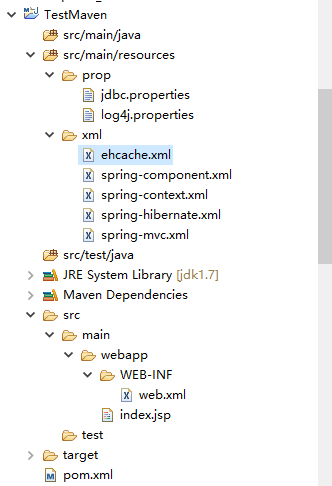
其中,三个在web.xml中配置的基础文件
log4j.properties(配置网上有详细介绍)
log4j.rootLogger=INFO,DAY_ROLLING_FILE,stdout

### direct log messages to stdout ###

log4j.appender.stdout=org.apache.log4j.ConsoleAppender

log4j.appender.stdout.layout=org.apache.log4j.PatternLayout

#log4j.appender.stdout.layout.ConversionPattern=%-d{HH:mm:ss} %-5p [%c{1}] %M (line:%L) %m%n

log4j.appender.stdout.layout.ConversionPattern=%d %p [%c:%L] - %m%n

log4j.logger.org.hibernate.type=INFO

log4j.logger.java.sql=DEBUG

log4j.logger.org.hibernate=ERROR

log4j.logger.org.springframework=ERROR

log4j.logger.net.sf=ERROR

log4j.logger.org.quartz=ERROR

########################

# Rolling File

########################

log4j.appender.ROLLING_FILE=org.apache.log4j.RollingFileAppender

log4j.appender.ROLLING_FILE.Threshold=DEBUG

log4j.appender.ROLLING_FILE.File=broker.log

log4j.appender.ROLLING_FILE.Append=true

log4j.appender.ROLLING_FILE.MaxFileSize=10240KB

log4j.appender.ROLLING_FILE.MaxBackupIndex=20

log4j.appender.ROLLING_FILE.layout=org.apache.log4j.PatternLayout

log4j.appender.ROLLING_FILE.layout.ConversionPattern=[%d %t %c] %m%n

########################

# Daily Rolling File \u65E5\u5FD7\u8F93\u51FA\u5230\u6587\u4EF6\uFF0C${catalina.home}\u53EF\u4EE5\u7528\u5176\u4ED6\u8DEF\u5F84\u4EE3\u66FF

########################

log4j.appender.DAY_ROLLING_FILE=org.apache.log4j.DailyRollingFileAppender

log4j.appender.DAY_ROLLING_FILE.File=${catalina.home}/logs/tsportal

#websphere

##log4j.appender.DAY_ROLLING_FILE.File=${SERVER_LOG_ROOT}/logs/xbrl_bank

log4j.appender.DAY_ROLLING_FILE.DatePattern='_'yyyy-MM-dd'.log'

log4j.appender.DAY_ROLLING_FILE.layout=org.apache.log4j.PatternLayout

log4j.appender.DAY_ROLLING_FILE.layout.ConversionPattern=%d{HH:mm:ss} %-5p [%C] (%F:%L) - %m%n
spring-mvc.xml
<?xml version="1.0" encoding="UTF-8"?>

<beans xmlns="http://www.springframework.org/schema/beans"

    xmlns:p="http://www.springframework.org/schema/p" xmlns:mvc="http://www.springframework.org/schema/mvc"

    xmlns:util="http://www.springframework.org/schema/util" xmlns:xsi="http://www.w3.org/2001/XMLSchema-instance"

    xmlns:context="http://www.springframework.org/schema/context"

    xsi:schemaLocation="

    http://www.springframework.org/schema/beans http://www.springframework.org/schema/beans/spring-beans-3.2.xsd

    http://www.springframework.org/schema/context http://www.springframework.org/schema/context/spring-context-3.2.xsd

    http://www.springframework.org/schema/mvc http://www.springframework.org/schema/mvc/spring-mvc-3.2.xsd">

    <context:component-scan base-package="com.*.web" />(http请求ctrl控制器,后面访问后提ctrl用到)

    <!-- SpringMVC上传文件时,需要配置MultipartResolver处理器 -->

     <bean id="multipartResolver" class="org.springframework.web.multipart.commons.CommonsMultipartResolver">

        <property name="defaultEncoding" value="utf-8" />

           <!--

           <property name="maxUploadSize" value="10485760000" />

           <property name="maxInMemorySize" value="40960" />

            -->

     </bean>

    <!-- 配置action中返回的视图配置 -->

    <bean

        class="org.springframework.web.servlet.view.freemarker.FreeMarkerViewResolver">

        <property name="suffix" value=".ftl"></property>

        <property name="viewClass"

            value="org.springframework.web.servlet.view.freemarker.FreeMarkerView" />

        <property name="contentType" value="text/html;charset=utf-8" />

        <property name="requestContextAttribute" value="rc"/>

        <property name="exposeRequestAttributes" value="true" />

        <property name="exposeSessionAttributes" value="true" />

        <property name="exposeSpringMacroHelpers" value="true" />

    </bean>

    <bean id="freemarkerConfigurer"

        class="org.springframework.web.servlet.view.freemarker.FreeMarkerConfigurer">

        <property name="templateLoaderPath">

            <value>/</value>

        </property>

        <property name="freemarkerSettings">

            <props>

                <prop key="defaultEncoding">UTF-8</prop>

            </props>

        </property>

    </bean>

</beans>
spring-context.xml
<?xml version="1.0" encoding="UTF-8"?>

<!DOCTYPE beans PUBLIC "-//SPRING//DTD BEAN//EN" "http://www.springframework.org/dtd/spring-beans.dtd">

<beans default-autowire="byName" default-lazy-init="true">

    <import resource="spring-hibernate.xml"/>

    <import resource="spring-component.xml"/>

</beans>
中期配置的文件有
spring-component.xml(配置交给spring管理的文件夹)
<?xml version="1.0" encoding="UTF-8"?>

<beans xmlns="http://www.springframework.org/schema/beans"

    xmlns:xsi="http://www.w3.org/2001/XMLSchema-instance" xmlns:context="http://www.springframework.org/schema/context"

    xmlns:task="http://www.springframework.org/schema/task"

    xsi:schemaLocation="http://www.springframework.org/schema/beans http://www.springframework.org/schema/beans/spring-beans-3.2.xsd

            http://www.springframework.org/schema/task http://www.springframework.org/schema/task/spring-task-3.2.xsd

            http://www.springframework.org/schema/context http://www.springframework.org/schema/context/spring-context-3.2.xsd">

    <context:component-scan base-package="com.test.*" />

    <task:annotation-driven />

</beans>
spring-hibernate.xml
<?xml version="1.0" encoding="UTF-8"?>

<beans default-autowire="byName"

    xmlns="http://www.springframework.org/schema/beans"

    xmlns:xsi="http://www.w3.org/2001/XMLSchema-instance"

    xmlns:aop="http://www.springframework.org/schema/aop"

    xmlns:tx="http://www.springframework.org/schema/tx"

    xmlns:context="http://www.springframework.org/schema/context"

    xsi:schemaLocation="

    http://www.springframework.org/schema/beans http://www.springframework.org/schema/beans/spring-beans-3.2.xsd

    http://www.springframework.org/schema/tx http://www.springframework.org/schema/tx/spring-tx-3.2.xsd

    http://www.springframework.org/schema/aop http://www.springframework.org/schema/aop/spring-aop-3.2.xsd

    http://www.springframework.org/schema/context http://www.springframework.org/schema/context/spring-context-3.2.xsd">

    <bean id="propertyConfigure" class="org.springframework.beans.factory.config.PropertyPlaceholderConfigurer">

        <property name="locations">

            <list>

                <value>classpath:prop/jdbc.properties</value>

            </list>

        </property>

    </bean>

    <bean id="dataSource" class="com.mchange.v2.c3p0.ComboPooledDataSource" destroy-method="close">

        <property name="driverClass" value="${hibernate.connection.driver_class}"/>

        <property name="jdbcUrl" value="${hibernate.connection.url}"/>

        <property name="user" value="${hibernate.connection.username}"/>

        <property name="password" value="${hibernate.connection.password}"/>

        <property name="minPoolSize" value="1"/>

        <!-- 达到最大连接数后可以增加的连接个数  -->

        <property name="acquireIncrement" value="2"/>

        <property name="maxPoolSize" value="3"/>

        <!-- 最大闲置时间 秒 -->

        <property name="maxIdleTime" value="600"/>

        <property name="maxStatements" value="100"/>

        <!-- 闲置的连接测试周期 秒 -->

        <property name="idleConnectionTestPeriod" value="1200"/>

    </bean>

    <bean id="sessionFactory" class="org.springframework.orm.hibernate4.LocalSessionFactoryBean">

        <property name="dataSource" ref="dataSource"/>

        <property name="packagesToScan" value="com.*.*.model" />(hibernate注解使用的存放model文件夹)

        <property name="hibernateProperties">

            <props>

                <prop key="hibernate.dialect">${hibernate.dialect}</prop>

                <!--

                <prop key="hibernate.hbm2ddl.auto">true</prop>

                <prop key="hibernate.hbm2ddl.auto">create</prop>

                  -->

                <prop key="hibernate.max_fetch_depth">1</prop>

                <prop key="hibernate.jdbc.fetch_size">50</prop>

                <prop key="hibernate.jdbc.batch_size">20</prop>

                <prop key="hibernate.jdbc.use_scrollable_resultset">false</prop>

                <prop key="hibernate.use_outer_join">true</prop>

                <prop key="hibernate.show_sql">false</prop>

                <prop key="current_session_context_class">thread</prop>

                <prop key="hibernate.format_sql">true</prop>

                <prop key="hibernate.cache.use_query_cache">true</prop>

                <prop key="hibernate.connection.pool_size">20</prop>

                <prop key="hibernate.cache.region.factory_class">org.hibernate.cache.ehcache.EhCacheRegionFactory</prop>

                <prop key="hibernate.cache.provider_class">net.sf.ehcache.hibernate.EhCacheProvider</prop>

            </props>

        </property>

    </bean>

    <bean id="transactionManager" class="org.springframework.orm.hibernate4.HibernateTransactionManager">

        <property name="sessionFactory" ref="sessionFactory"/>

    </bean>

    <bean id="cacheManager"

        class="org.springframework.cache.ehcache.EhCacheManagerFactoryBean">

        <property name="configLocation">

            <value>

                classpath:xml/ehcache.xml

            </value>

        </property>

    </bean>

    <!-- 声明式事务管理begin -->

    <aop:config>

        <aop:advisor pointcut="execution(* com.*.service.impl..*ServiceImpl.*(..))" advice-ref="txAdvice"/>

        <aop:advisor pointcut="execution(* com.*.*.service.impl..*ServiceImpl.*(..))" advice-ref="txAdvice"/>

    </aop:config>

    <tx:advice id="txAdvice" transaction-manager="transactionManager">

        <tx:attributes>

            <tx:method name="find*" read-only="true"/>

            <tx:method name="get*" read-only="true"/>

            <tx:method name="load*" read-only="true"/>

            <tx:method name="query*" read-only="true"/>

            <tx:method name="*" rollback-for="Exception"/>

        </tx:attributes>

    </tx:advice>

    <!-- 声明式事务管理end -->

</beans>
其中文件
jdbc.properties
#mysql

hibernate.dialect=org.hibernate.dialect.MySQLDialect

hibernate.connection.url=jdbc:mysql://localhost:3306/数据库名称?useUnicode=true&characterEncoding=UTF-8&zeroDateTimeBehavior=convertToNull

hibernate.connection.driver_class=com.mysql.jdbc.Driver

hibernate.connection.username=root

hibernate.connection.password=数据库密码
和ehcache.xml(缓存文件记录)
<ehcache>

    <!-- Sets the path to the directory where cache .data files are created.

             If the path is a Java System Property it is replaced by

             its value in the running VM.

             The following properties are translated:

             user.home - User's home directory

             user.dir - User's current working directory

             java.io.tmpdir - Default temp file path -->

    <diskStore path="user.dir"/>

    <!--Default Cache configuration. These will applied to caches programmatically created through

            the CacheManager.

            The following attributes are required:

            maxElementsInMemory            - Sets the maximum number of objects that will be created in memory

            eternal                        - Sets whether elements are eternal. If eternal,  timeouts are ignored and the

                                             element is never expired.

            overflowToDisk                 - Sets whether elements can overflow to disk when the in-memory cache

                                             has reached the maxInMemory limit.

            The following attributes are optional:

            timeToIdleSeconds              - Sets the time to idle for an element before it expires.

                                             i.e. The maximum amount of time between accesses before an element expires

                                             Is only used if the element is not eternal.

                                             Optional attribute. A value of 0 means that an Element can idle for infinity.

                                             The default value is 0.

            timeToLiveSeconds              - Sets the time to live for an element before it expires.

                                             i.e. The maximum time between creation time and when an element expires.

                                             Is only used if the element is not eternal.

                                             Optional attribute. A value of 0 means that and Element can live for infinity.

                                             The default value is 0.

            diskPersistent                 - Whether the disk store persists between restarts of the Virtual Machine.

                                             The default value is false.

            diskExpiryThreadIntervalSeconds- The number of seconds between runs of the disk expiry thread. The default value

                                             is 120 seconds.

            -->

    <defaultCache

            maxElementsInMemory="10000"

            eternal="false"

            overflowToDisk="false"

            timeToIdleSeconds="0"

            timeToLiveSeconds="0"/>

    <!-- security cache-->

    <cache name="userCache"

           maxElementsInMemory="10000"

           eternal="true"

           overflowToDisk="false"/>

    <!-- security cache-->

    <cache name="resourceCache"

           maxElementsInMemory="10000"

           eternal="true"

           overflowToDisk="false"/>

    <!-- dict cache-->

    <cache name="dictCache"

           maxElementsInMemory="10000"

           eternal="true"

           overflowToDisk="false"/>

    <!-- See http://ehcache.sourceforge.net/documentation/#mozTocId258426 for how to configure caching for your objects -->

</ehcache>
新建测试类
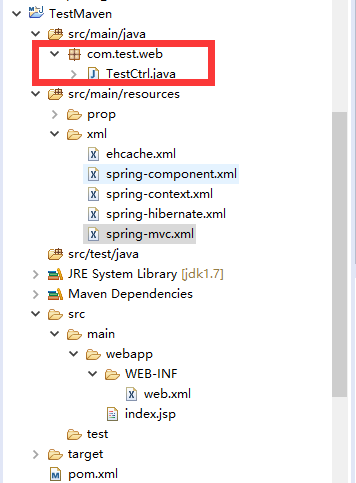
TestCtrl内容,其中包名在spring-mvc.xml中配置spring注入机制
package com.test.web;

import java.io.IOException;

import javax.servlet.http.HttpServletRequest;

import javax.servlet.http.HttpServletResponse;

import org.springframework.stereotype.Controller;

import org.springframework.web.bind.annotation.RequestMapping;

@Controller

@RequestMapping("test")

public class TestCtrl {

    @RequestMapping("index")

    public void index(HttpServletRequest req, HttpServletResponse res){

        System.out.println("coming.....");

        try {

            res.getWriter().append("you request success.");

        } catch (IOException e) {

            e.printStackTrace();

        }

    }

}
放入tomcat
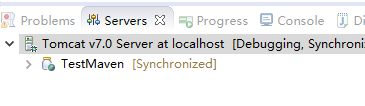
启动
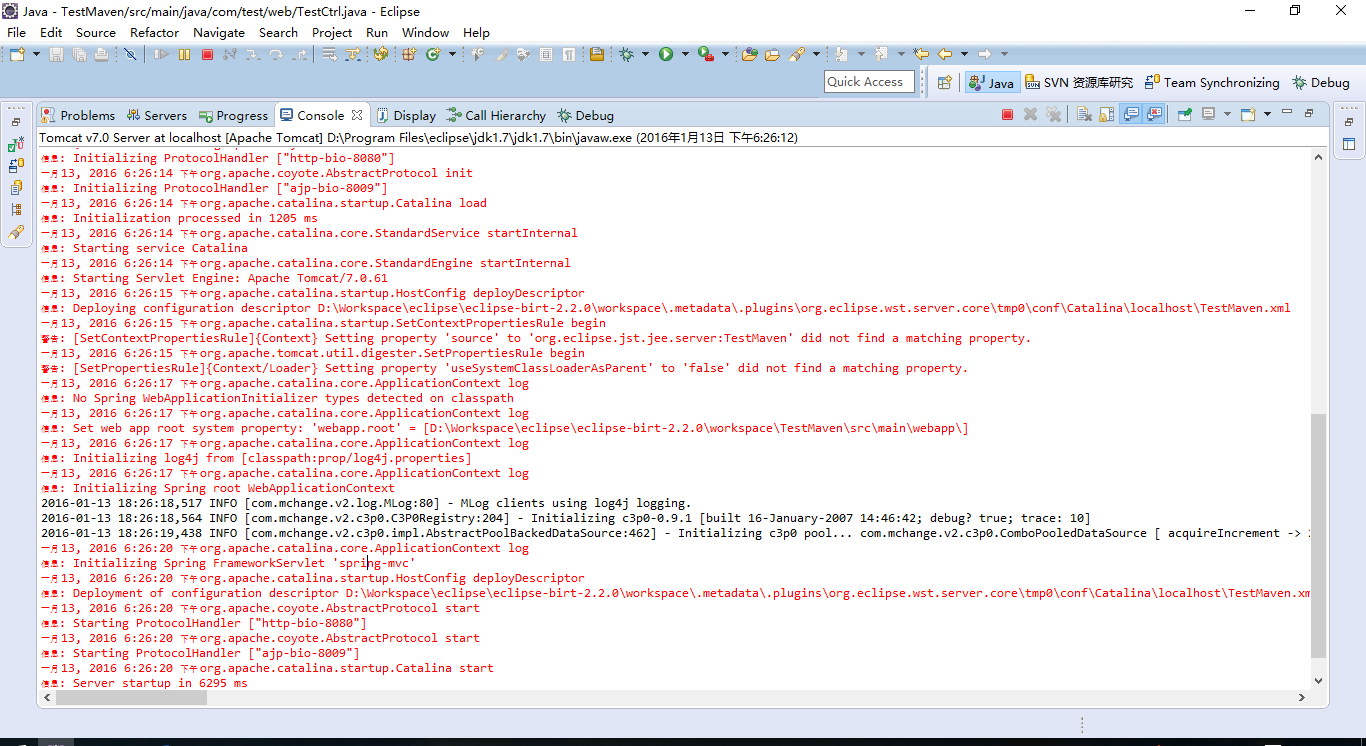
网站访问
http://localhost:8080/TestMaven/web/test/index
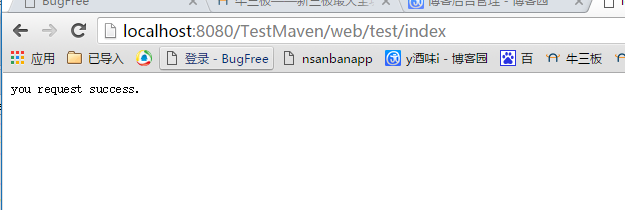
后台打印
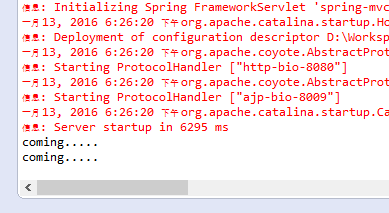
测试service是否有注入(service注入也需要提前将需要交个spring管理的报名通知给spring,想通知在spring-component中配置)
创建TestService
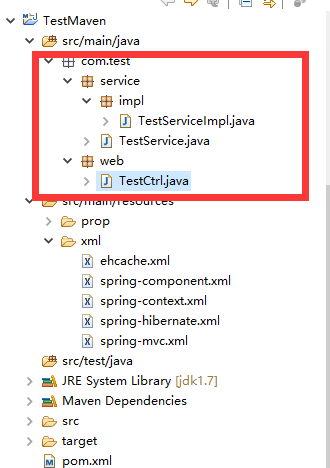
TestService
package com.test.service;

public interface TestService {

}
TestServiceImpl
package com.test.service.impl;

import org.springframework.stereotype.Service;

import com.test.service.TestService;

@Service("testService")

public class TestServiceImpl implements TestService {

}
TestCtrl注入Service
package com.test.web;

import java.io.IOException;

import javax.annotation.Resource;

import javax.servlet.http.HttpServletRequest;

import javax.servlet.http.HttpServletResponse;

import org.springframework.stereotype.Controller;

import org.springframework.web.bind.annotation.RequestMapping;

import com.test.service.TestService;

@Controller

@RequestMapping("test")

public class TestCtrl {

    @Resource

    private TestService testService;

    @RequestMapping("index")

    public void index(HttpServletRequest req, HttpServletResponse res){

        System.out.println("coming....."+testService);

        try {

            res.getWriter().append("you request success.");

        } catch (IOException e) {

            e.printStackTrace();

        }

    }

}
重新启动,访问地址http://localhost:8080/TestMaven/web/test/index
后台打印
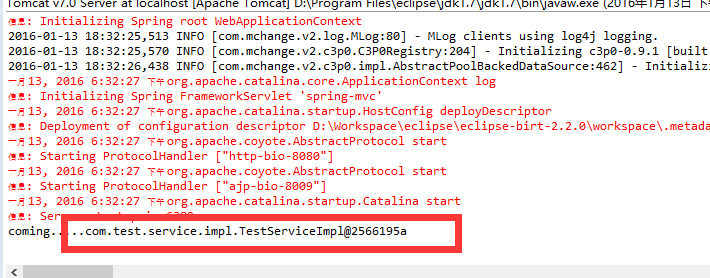
到此,整个项目基本完成
后期在对项目进行spring权限控制等,另开文章,尽请期待
eclipse-搭建maven的war项目集合spring注解方式的更多相关文章
- 使用eclipse搭建maven多module项目(构建父子项目)
创建空maven项目 File–>new–>project… 2.next 3.next 4.finish 5.配置pom.xml <project xmlns="http ...
- 使用Eclipse创建Maven的JSP项目
使用Eclipse创建Maven的JSP项目 MyEclipse2015根本不行,试过各种解决方案都无济于事. 创建Maven项目 此时项目上有错,pom.xml有错. 修改Java版本 生成web. ...
- Eclipse搭建maven项目的流程,聚合所有的子模块项目
Eclipse搭建maven项目的流程 2018年03月01日 15:47:03 阅读数:22 1:搭建parent工程,用来聚合所有的子模块项目 2:搭建公共使用的模块common 这里你要点击空白 ...
- Eclipse 搭建 Maven Web项目
第一步:安装JDK: 第二步:安装Eclipse: 第三步:安装tomcat7: 第四步:安装maven插件: 4.1 下载maven:http://maven.apache.org/download ...
- Eclipse下Maven新建Web项目index.jsp报错完美解决(war包)
Eclipse下Maven新建Web项目步骤 1. 2. 3. 4. 5. 问题描述 最近用eclipse新建了一个maven项目,结果刚新建完成index.jsp页面就报错了,先把错误信息贴出来看看 ...
- 如何使用eclipse搭建maven环境以及常见的错误
这篇博客适合零基础学习maven,搭建maven以及运行项目,常见的错误,我会在结尾写出说明白,看是否和大家的错误一样,或者文章的括号注释部分也会写出一些注意点. 第一步:就是下载maven,以及配置 ...
- Eclipse使用maven创建SSM-web项目
1.环境准备 (1)maven:apache-maven-3.5.2,我的maven安装在D:\apache-maven-3.5.2,eclipse中maven配置如下: 先add ,添加好自己的ma ...
- Eclipse搭建Maven Prooject(终于)
今天我们一起来探讨eclipse搭建maven项目的步骤 一.建一个maven项目, 1.找到File ,点击 2.弹出窗口,再点击new 3.弹出窗口,点击other 4.输入maven,找到mav ...
- Maven学习:Eclipse使用maven构建web项目(转)
Maven学习:Eclipse使用maven构建web项目(转) 8.更改class路径:右键项目,Java Build Path -> Source 下面应该有4个文件夹.src/main/j ...
随机推荐
- Github 下载单个文件
前言 通常我们对Github上的项目都是完整的clone下来,但对于某些大型项目,或者某些时候只需要其中一两个文件,那该怎么办呢? 本文就是教你如何在github上下载单个文件. 方法 1.找到需要下 ...
- 深入Java核心 Java内存分配原理精讲
深入Java核心 Java内存分配原理精讲 栈.堆.常量池虽同属Java内存分配时操作的区域,但其适用范围和功用却大不相同.本文将深入Java核心,详细讲解Java内存分配方面的知识. Java内存分 ...
- [No00000F]Excel快捷键大全 Excel2013/2010/2007/2003常用快捷键大全
一个软件最大的用处是提高工作效率,衡量一个软件的好坏,除了是否出名之外,最主就是能否让一个新手更快的学会这个软件和提高工作速度.就拿Excel表格来说吧,平常办公中我们经常会用它来制作表格,统计数据或 ...
- 使用 Fastlane 实现 IOS 持续集成
简介 持续集成是个“一次配置长期受益”的工作.但很多小公司都没有.以前在做Windows开发配置感觉简单一些,这次配置iOS的,感觉步骤还挺多.整理出来,分享给大家,不正确的地方请及时指正. 本文主要 ...
- 043医疗项目-模块四:采购单模块—采购单明细查询(Dao,Service,Action三层)
前一篇文章我们做的是在医院的角度上添加在采购单里面添加药品.这一篇文章是查看我们添加的采购单信息. 我们先看一下要实现的效果:当: 按下确认添加时,会在这里 显示出刚才添加的数据. 好,我们就来做这个 ...
- [转]java去除List中重复的元素
java去除List中重复的元素 如果用Set ,倘若list里边的元素不是基本数据类型而是对象, 那么请覆写Object的boolean equals(Object obj) 和int ...
- tomcat 新手上路
前提:本机先安装好JDK,保证常规java环境已经具备 1.下载Tomcat 7.0现在官网上好象已经没有安装程序版了,只有免解压zip版本(现在最新的版本是7.0.42) 下载地址 http://t ...
- python 图
class Graph(object): def __init__(self,*args,**kwargs): self.node_neighbors = {} self.visited = {} d ...
- 大新闻!HoloLens即将入华商用
昨天微软搞了大新闻,Terry和Alexi到了深圳,在WinHEC大会上宣布了2017上半年HoloLens正式入华商用. 关于HoloLens的技术原理和细节官方文档和报道已经披露很多了,他是一款真 ...
- bootstrap - typeahead自动补全插件
$('#Sale').typeahead({ ajax: { url: '@Url.Action("../Contract/GetSale")', //timeout: 300, ...