
Maven with Multi-module
Well, A project made of multi modules.
For example, the hongten-security project, the structure of the hongten-security project display as below(In eclipse tool):
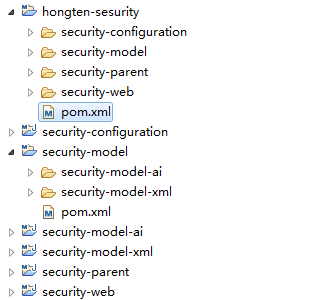
and in the windows 7 operating system, the folder structure of the hongten-security project display as below,

then, you have TWO choices to run(or install) this project to you local liberary(repository).
The first one :
Back to eclipse tool, select the "Package explorer" window, and select the "/hongten-sesurity/pom.xml" to run(or install) this project.
The second:
Back to Window 7 operating system, go to the directory "D:\Development\j2ee\workspace\hongten-sesurity", and open the command window to run(or install) this project.
I will display with the second method, and type the command "mvn install" in the command window.

WOW, there is an ERROR!!!!
The Maven can NOT find the parent.relativePath , it means that the "security-parent" model must install before you run(or install) the "hongten-security" project.
en, you should go to the derictory "D:\Development\j2ee\workspace\hongten-sesurity\security-parent" to install "security-parent" model.

After installing the "security-parent" model, rember to back to parent folder("D:\Development\j2ee\workspace\hongten-sesurity")
and type the command "mvn install"
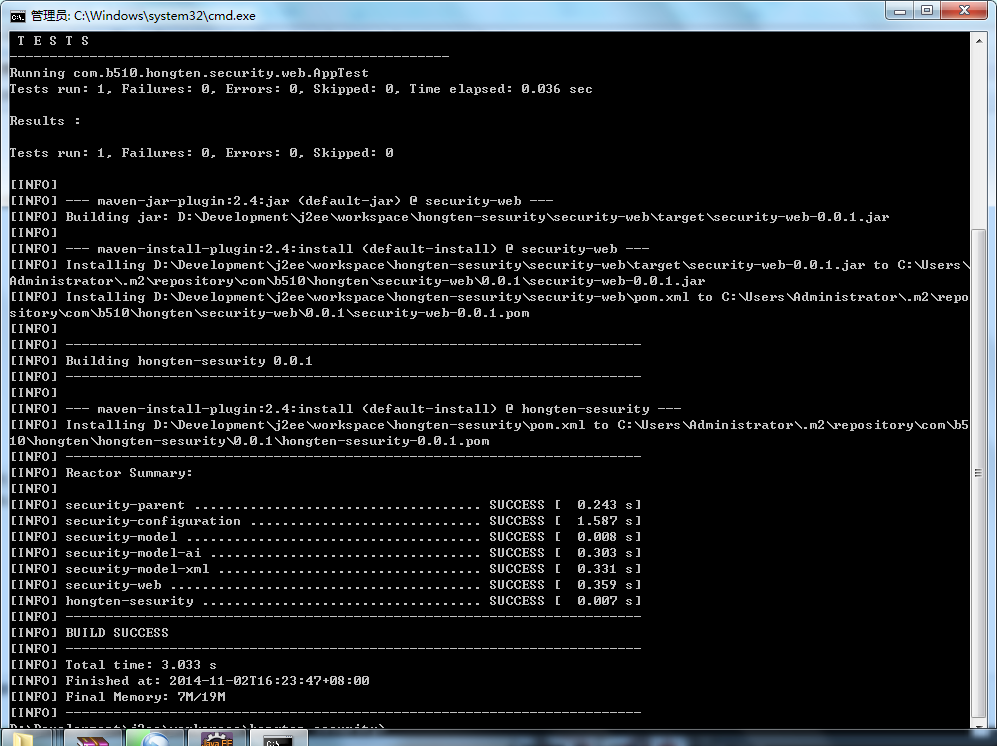
============================================
Source Code
============================================
/hongten-sesurity/pom.xml
<project xmlns="http://maven.apache.org/POM/4.0.0" xmlns:xsi="http://www.w3.org/2001/XMLSchema-instance"

  xsi:schemaLocation="http://maven.apache.org/POM/4.0.0 http://maven.apache.org/xsd/maven-4.0.0.xsd">

  <modelVersion>4.0.0</modelVersion>

  <groupId>com.b510.hongten</groupId>

  <artifactId>hongten-sesurity</artifactId>

  <version>0.0.1</version>

  <packaging>pom</packaging>

  <name>hongten-sesurity</name>

  <url>http://maven.apache.org</url>

  <modules>

      <module>security-parent</module>

      <module>security-configuration</module>

      <module>security-model</module>

      <module>security-web</module>

  </modules>

</project>
/security-configuration/pom.xml
<project xmlns="http://maven.apache.org/POM/4.0.0" xmlns:xsi="http://www.w3.org/2001/XMLSchema-instance"

    xsi:schemaLocation="http://maven.apache.org/POM/4.0.0 http://maven.apache.org/xsd/maven-4.0.0.xsd">

    <modelVersion>4.0.0</modelVersion>

    <parent>

        <groupId>com.b510.hongten</groupId>

        <artifactId>security-parent</artifactId>

        <version>0.0.1</version>

    </parent>

    <artifactId>security-configuration</artifactId>

    <name>security-configuration</name>

    <packaging>jar</packaging>

</project>
/security-model/pom.xml
<project xmlns="http://maven.apache.org/POM/4.0.0" xmlns:xsi="http://www.w3.org/2001/XMLSchema-instance"

  xsi:schemaLocation="http://maven.apache.org/POM/4.0.0 http://maven.apache.org/xsd/maven-4.0.0.xsd">

  <modelVersion>4.0.0</modelVersion>

  <parent>

      <groupId>com.b510.hongten</groupId>

      <artifactId>security-parent</artifactId>

      <version>0.0.1</version>

  </parent>

  <artifactId>security-model</artifactId>

  <name>security-model</name>

  <packaging>pom</packaging>

  <modules>

      <module>security-model-ai</module>

      <module>security-model-xml</module>

  </modules>

</project>
/security-model-ai/pom.xml
<project xmlns="http://maven.apache.org/POM/4.0.0" xmlns:xsi="http://www.w3.org/2001/XMLSchema-instance"

    xsi:schemaLocation="http://maven.apache.org/POM/4.0.0 http://maven.apache.org/xsd/maven-4.0.0.xsd">

    <modelVersion>4.0.0</modelVersion>

    <parent>

        <groupId>com.b510.hongten</groupId>

        <artifactId>security-model</artifactId>

        <version>0.0.1</version>

    </parent>

    <artifactId>security-model-ai</artifactId>

    <name>security-model-ai</name>

    <packaging>jar</packaging>

</project>
/security-model-xml/pom.xml
<project xmlns="http://maven.apache.org/POM/4.0.0" xmlns:xsi="http://www.w3.org/2001/XMLSchema-instance"

    xsi:schemaLocation="http://maven.apache.org/POM/4.0.0 http://maven.apache.org/xsd/maven-4.0.0.xsd">

    <modelVersion>4.0.0</modelVersion>

    <parent>

        <groupId>com.b510.hongten</groupId>

        <artifactId>security-model</artifactId>

        <version>0.0.1</version>

    </parent>

    <artifactId>security-model-xml</artifactId>

    <name>security-model-xml</name>

    <packaging>jar</packaging>

</project>
/security-parent/pom.xml
<project xmlns="http://maven.apache.org/POM/4.0.0" xmlns:xsi="http://www.w3.org/2001/XMLSchema-instance"

    xsi:schemaLocation="http://maven.apache.org/POM/4.0.0 http://maven.apache.org/xsd/maven-4.0.0.xsd">

    <modelVersion>4.0.0</modelVersion>

    <!-- security-parent -->

    <groupId>com.b510.hongten</groupId>

    <artifactId>security-parent</artifactId>

    <version>0.0.1</version>

    <packaging>pom</packaging>

    <name>security-parent</name>

    <url>http://maven.apache.org</url>

    <!-- All properties declare here -->

    <properties>

        <project.build.sourceEncoding>UTF-8</project.build.sourceEncoding>

        <junit.version>4.10</junit.version>

        <hibernate.core.version>3.6.10.Final</hibernate.core.version>

        <javassist.version>3.18.1-GA</javassist.version>

        <mysql.connector.version>5.1.33</mysql.connector.version>

        <log4j.version>1.2.17</log4j.version>

    </properties>

    <dependencies>

        <dependency>

            <groupId>junit</groupId>

            <artifactId>junit</artifactId>

            <version>${junit.version}</version>

            <scope>test</scope>

        </dependency>

        <!-- Configuration for Hibernate -->

        <dependency>

            <groupId>org.hibernate</groupId>

            <artifactId>hibernate-core</artifactId>

            <version>${hibernate.core.version}</version>

        </dependency>

        <dependency>

            <groupId>org.javassist</groupId>

            <artifactId>javassist</artifactId>

            <version>${javassist.version}</version>

        </dependency>

        <!-- Configuration for mysql -->

        <dependency>

            <groupId>mysql</groupId>

            <artifactId>mysql-connector-java</artifactId>

            <version>${mysql.connector.version}</version>

        </dependency>

        <!-- Configuration for log4j -->

        <dependency>

            <groupId>log4j</groupId>

            <artifactId>log4j</artifactId>

            <version>${log4j.version}</version>

        </dependency>

    </dependencies>

</project>
/security-web/pom.xml
<project xmlns="http://maven.apache.org/POM/4.0.0" xmlns:xsi="http://www.w3.org/2001/XMLSchema-instance"

    xsi:schemaLocation="http://maven.apache.org/POM/4.0.0 http://maven.apache.org/xsd/maven-4.0.0.xsd">

    <modelVersion>4.0.0</modelVersion>

    <parent>

        <groupId>com.b510.hongten</groupId>

        <artifactId>security-parent</artifactId>

        <version>0.0.1</version>

    </parent>

    <artifactId>security-web</artifactId>

    <name>security-web</name>

    <packaging>jar</packaging>

</project>
Source Code Download : http://files.cnblogs.com/hongten/hongten-sesurity.rar
Source Code Download : http://files.cnblogs.com/hongten/hongten-sesurity_with_dependencyManagement.rar
========================================================
More reading,and english is important.
I'm Hongten

大哥哥大姐姐,觉得有用打赏点哦!多多少少没关系,一分也是对我的支持和鼓励。谢谢。
Hongten博客排名在100名以内。粉丝过千。
Hongten出品,必是精品。
E | hongtenzone@foxmail.com B | http://www.cnblogs.com/hongten
========================================================
Maven with Multi-module的更多相关文章
- maven Dynamic Web Module 3.0 requires Java 1.6 or newer
maven Dynamic Web Module 3.0 requires Java 1.6 or newer CreateTime--2018年4月19日16:56:42 Author:Mary ...
- IDEA+Maven+多个Module模块(创建多模块SpringBoot整合项目)
最近在学习springboot,先从创建项目开始,一般项目都是一个项目下会有多个模块,这里先创建一个最简单的实例,一个项目下有一个springboot模块项目提供web服务,引用另一个java项目(相 ...
- [maven] "Dynamic Web Module 3.0 requires Java 1.6 or newer." OR "JAX-RS (REST Web Services) 2.0 requires Java 1.6 or newer."
在网上下载的开源工程,用maven构建的时候报错: Dynamic Web Module 3.0 requires Java 1.6 or newer. JAX-RS (REST Web Servic ...
- Maven Archetype 多 Module 自定义代码脚手架
大部分公司都会有一个通用的模板项目,帮助你快速创建一个项目.通常,这个项目需要集成一些公司内部的中间件.单元测试.标准的代码格式.通用的代码分层等等. 今天,就利用 Maven 的 Archetype ...
- 使用Maven运行测试提示Module sdk 1.5的解决方法
解决方法: 1. 配置Project Structure 2. 在MAVEN_HOME/conf/setting.xml中添加profile 3. 在Maven项目的pom.xml文件里添加标签 三种 ...
- 创建maven parent project & module project
1.命令方式: 1)Create the top-level root: mvn archetype:generate -DarchetypeGroupId=org.codehaus.mojo.arc ...
- idea maven 项目 遇到 "Module not specified" 解决方法
1. 原因:我这边出现的原因是 其他同事在提交代码是 将 这个文件夹也提交了,idea 会加载 .idea 里的配置(即 他的配置),而我的 maven 配置不同,导致出错. 2. 解决方法:删除这 ...
- IDEA中导入Maven工程(module)
导入其它Maven工程时可能会出现依赖代码变红等等可以重新导入 右键pom.xml文件 --->Maven---->Reimport ,idea强制刷新内容,一般能解决依赖没有识别的问题 ...
- 【IDEA使用技巧】(4) —— IDEA 构建Java Maven项目、导入Eclipse项目、多Module Maven项目
1.IntelliJ IDEA构建Java Maven项目 1.1. IDEA构建Java Maven项目 ①选择Create New Project,选择创建Maven项目,并勾选Create fr ...
- Maven Module和Maven Project的区别
1.maven project和module相当于父子关系.2.当新建的项目中不存在父子关系时使用project.3.当项目中存在父子关系时用project做父工程,module做子工程,module ...
随机推荐
- CodeForces 371D Vessels(树状数组)
树状数组,一个想法是当往p注水时,认为是其容量变小了,更新时二分枚举,注意一些优化. #include<cstdio> #include<iostream> #include& ...
- Oracle优化 -- 关于Database Buffer Cache相关参数DB_CACHE_SIZE的优化设置
select size_for_estimate, buffers_for_estimate ,ESTD_PHYSICAL_READ_factor,ESTD_PHYSICAL_READS from v ...
- cordova+angularJS+ionic
1.创建项目 2.路由 angular.module("starter",['ionic']) // 依赖 ionic 提供的ui-router .config(function ...
- Active Record 数据库模式-增删改查操作
选择数据 下面的函数帮助你构建 SQL SELECT语句. 备注:如果你正在使用 PHP5,你可以在复杂情况下使用链式语法.本页面底部有具体描述. $this->db->get(); 运行 ...
- pthread_create传递参数
转自:http://blog.csdn.net/yeyuangen/article/details/6757525 #include <iostream> #include <pth ...
- error MSB6006: “cmd.exe”已退出,代码为 3。
VS2012 Qt项目生成提示以下错误: 原因是 generated files 的 debug或release文件夹下的文件不存在. 解决方法:QT5 –>convert project ...
- 无法打开包括文件:“windows.h”: No such file or directory
VS2012 出现如下错误: 无法打开包括文件:"windows.h": No such file or directory 解决办法,将 C:\Program Files ...
- list[C++]
//双向链表 #include <iostream> using namespace std; #include <list> int main(int argc, const ...
- C语言中的位操作(14)--反转比特位
本篇文章主要讲述几种反转比特位的方法: 将一个32位数:abcd efgh 转置为hgfe dcba 1.常规方法 unsigned int v; // 目标待转置数 unsigned int r = ...
- (C#基础) byte[] 之初始化, 赋值,转换。(转)
byte[] 之初始化赋值 用for loop 赋值当然是最基本的方法,不过在C#里面还有其他的便捷方法. 1. 创建一个长度为10的byte数组,并且其中每个byte的值为0. byte[] myB ...