
wpf ListBox,item两列不等高。
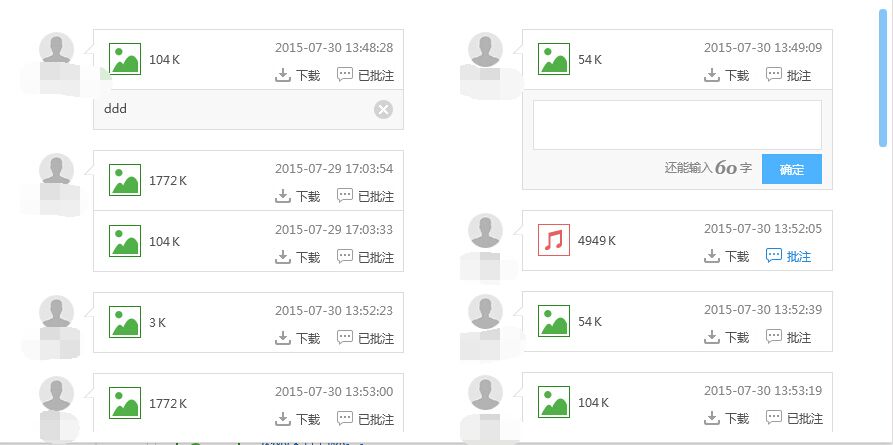
业务有这样的需求,类似瀑布流。内容两列不等高展示。
只需要继承panel,重写MeasureOverride和ArrangeOverride方法就行了。
很简单,内容都在代码里。
using System;

using System.Collections.Generic;

using System.Linq;

using System.Text;

using System.Threading.Tasks;

using System.Windows;

using System.Windows.Controls;

namespace XXXXXX

{

    public class TwoColumnPanel : Panel

    {

        /// <summary>

        /// 先测量需要多大尺寸,做个申报准备

        /// </summary>

        /// <param name="constraint">限定的尺寸,比如,规定了width和height</param>

        /// <returns></returns>

        protected override Size MeasureOverride(Size constraint)

        {

            //定义预期的宽度和高度

            double height = 0, height1 = 0, height2 = 0, width = 0;

            UIElement element;

            if (Children.Count > 0)

            {

                element = Children[0];

                width = element.DesiredSize.Width*2;

            }

            //遍历每个元素,计算所需的总尺寸

            for (int i = 0; i < Children.Count; i++)

            {

                element = Children[i];

                //按照限定的尺寸测量一下自己,拿镜子找着自己

                element.Measure(constraint);

                if (i % 2 == 0)

                {

                    height1 += element.DesiredSize.Height;

                }

                else

                {

                    height2 += element.DesiredSize.Height;

                }

            }

            height = height1 > height2 ? height1 : height2;

            //申报,我需要这个尺寸

            return new Size(width, height);

        }

        /// <summary>

        /// 排列每个元素

        /// </summary>

        /// <param name="arrangeBounds">测量的尺寸</param>

        /// <returns></returns>

        protected override Size ArrangeOverride(Size arrangeBounds)

        {

            double currentX2 = 0,currentY1 = 0,currentY2 = 0;

            UIElement element;

            if (Children.Count > 0)

            {

                element = Children[0];

                currentX2 = element.DesiredSize.Width;

            }

            for (int i = 0; i < Children.Count; i++)

            {

                element = Children[i];

                //排列每个元素

                if (i % 2 == 0)

                {

                    Children[i].Arrange(new Rect(0, currentY1, element.DesiredSize.Width, element.DesiredSize.Height));

                    currentY1 += element.DesiredSize.Height;

                }

                else

                {

                    Children[i].Arrange(new Rect(currentX2, currentY2, element.DesiredSize.Width, element.DesiredSize.Height));

                    currentY2 += element.DesiredSize.Height;

                }

            }

            return arrangeBounds;

        }

    }

}
wpf ListBox,item两列不等高。的更多相关文章
- 多种方法实现div两列等高(收集整理)
HTML骨架 <div id="header">头部</div> <div id ="container"> <div ...
- JQuery 实现两列等高并自适应高度
想要使用 JQuery 实现两列等高并自适应高度,其实也很简单,原理就是取得左右两边的高度,然后判断这个值,把大的值赋给小的就行了.看代码: $(document).ready(function() ...
- 两列等高布局 padding+margin的负值 CSS布局奇淫技巧之-多列等高
代码: 效果图: watermark/2/text/aHR0cDovL2Jsb2cuY3Nkbi5uZXQv/font/5a6L5L2T/fontsize/400/fill/I0JBQkFCMA==/ ...
- 纯css实现两列等高
<!doctype html> <html> <head> <meta /> <title>Title</title> < ...
- css两列等高布局
布局方案 等高布局有几种不同的方法,但目前为止我认为浏览器兼容最好最简便的应该是padding补偿法.首先把列的padding-bottom设为一个足够大的值,再把列的margin-bottom设一个 ...
- 利用jQuery进行三行两列等高布局
<!DOCTYPE html PUBLIC "-//W3C//DTD XHTML 1.0 Transitional//EN" "http://www.w3.org/ ...
- 布局两列div等高方法
一.左右布局,左侧div绝对定位,外div相对定位 <!DOCTYPE html> <html lang="en"> <head> <me ...
- 两列布局,读《css那些事儿》
两列布局: 1.两列定宽: 要点:float.width固定. :after清除浮动. 前提:两列的盒模型宽度相加不能大于父元素的宽度,否则会出现错位现象. <!DOCTYPE html> ...
- flex 垂直居中、两列对齐、自适应宽
flex 垂直居中 <div id="parent"> <div id="child"> </div> </div&g ...
随机推荐
- 20145213《Java程序设计》第五周学习总结
20145213<Java程序设计>第五周学习总结 教材学习内容总结 "素衣莫起风尘叹,犹及清明可到家."每每念此,不得不心疼自己.古人清明长假都进城耍了,还担心自己清 ...
- 【XLL API 函数】xlCoerce
将 XLOPER/XLOPER12 转换为另一种类型,或是查询表格中的单元格值. 函数原型 Excel12(xlCoerce, LPXLOPER12 pxRes, 2, LPXLOPER12 pxSo ...
- 使用 ODBC .NET 提供程序和 Visual C# .NET 执行 SQL 参数化存储过程
http://support2.microsoft.com/kb/310130/zh-cn 此分步指导文章描述如何使用 ODBC .NET 托管提供程序和 Visual C# .Net 调用参数化 S ...
- balabalabala
[微分享]:种子不落在肥土而落在瓦砾中,有生命力的种子决不会悲观和叹气,因为有了阻力才有磨炼.
- css3属性flex弹性布局设置三列(四列)分布样式
参考:阮一峰的网络日志 <!doctype html> <html lang="en"> <head> <meta charset=&qu ...
- 瓦片地图与geoserver发布
本文主要包括以下内容 TileMill生成Tile影像金字塔(.mbtiles压缩文件) Mbutil(https://github.com/mapbox/mbutil)解压缩 Apache HTTP ...
- MyEclipse生成WAR包并在Tomcat下部署发布(转发)
从来没有想过web项目还能打包的,但是有要求,就不得不去实现,在网上找了一下,发现挺简单的. 首先是使用MyEclipse将web项目打包,如下图所示. 右键选中项目,选择export. 然后选择J2 ...
- APP消息推送:通知和透传
目前市场上的消息推送方式有两种:通知和透传.什么是透传?透传即是透明传送,即传送网络无论传输业务如何,只负责将需要传送的业务传送到目的节点,同时保证传输的质量即可,而不对传输的业务进行处理.透传消息, ...
- JavaWeb学习之JSP常用标签、EL表达式的运算符、JSTL标签库(6)
1.JSP常用标签 * 只要支持JSP文件,常用标签有可以直接使用 * 格式: jsp:xxxx * jsp:forward ,完成jsp页面的转发 * page属性:转发的地址 <% requ ...
- [LeetCode] Isomorphic Strings
Isomorphic Strings Total Accepted: 30898 Total Submissions: 120944 Difficulty: Easy Given two string ...