
Rabbitmq -Publish_Subscribe模式- python编码实现
Let's quickly go over what we covered in the previous tutorials:
- A producer is a user application that sends messages.
- A queue is a buffer that stores messages.
- A consumer is a user application that receives messages.
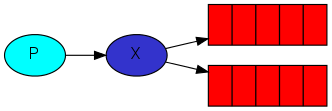
channel.exchange_declare(exchange='logs',type='fanout')
Listing exchanges
To list the exchanges on the server you can run the ever useful rabbitmqctl:
$ sudo rabbitmqctl list_exchanges

Listing exchanges ...

logs      fanout

amq.direct      direct

amq.topic       topic

amq.fanout      fanout

amq.headers     headers

...done.
In this list there are some amq.* exchanges and the default (unnamed) exchange. These are created by default, but it is unlikely you'll need to use them at the moment.
Nameless exchange
In previous parts of the tutorial we knew nothing about exchanges, but still were able to send messages to queues. That was possible because we were using a default exchange, which we identify by the empty string ("").
#简单的翻译下: 在前面的教程中我们没有指定exchange也能够发送消息到队列里面,那很有可能我们使用了默认的exchange
Recall how we published a message before:
channel.basic_publish(exchange='',routing_key='hello',body=message)
The exchange parameter(参数) is the the name of the exchange. The empty string denotes the default or nameless exchange: messages are routed to the queue with the name specified byrouting_key, if it exists.
# 这个exchange的参数是exchange的名字,这里没写为空的话代表着使用默认的exchange或者不可能命名的exchange。消息能够被路由到队列是因为使用 routing_key这个特殊的字段。
此时我们修改下代码
Now, we can publish to our named exchange instead:
channel.basic_publish(exchange='logs',routing_key='',body=message)
Temporary queues
As you may remember previously we were using queues which had a specified name (rememberhello and task_queue?). Being able to name a queue was crucial for us -- we needed to point the workers to the same queue. Giving a queue a name is important when you want to share the queue between producers and consumers.
# 简单的翻译下:你可能还记得我们前面在使用队列的时候指定了特殊的管道名字,这样命名是为了对我们有用,我们需要把那些运行的程序去指向同一个队列,命名一个队列非常重要当我们在生产者和消费者共享队列的时候
But that's not the case for our logger. We want to hear about all log messages, not just a subset of them. We're also interested only in currently flowing messages not in the old ones. To solve that we need two things.
Firstly, whenever we connect to Rabbit we need a fresh, empty queue. To do it we could create a queue with a random name, or, even better - let the server choose a random queue name for us. We can do this by not supplying the queue parameter to queue_declare:
result=channel.queue_declare()
Secondly, once we disconnect the consumer the queue should be deleted. There's an exclusive flag for that:
result=channel.queue_declare(exclusive=True)
Bindings

We've already created a fanout exchange and a queue. Now we need to tell the exchange to send messages to our queue. That relationship between exchange and a queue is called a binding
# translate:我们已经创建了扇出的交换器和一个队列,现在我们需要告诉这个交换器发送消息到我们队列,这时,交换器和队列他们之间两者的关系成为捆版
channel.queue_bind(exchange='logs',queue=result.method.queue)
From now on the logs exchange will append messages to our queue.
Listing bindings
You can list existing bindings using, you guessed it, rabbitmqctl list_bindings.
Putting it all together
The producer program, which emits log messages, doesn't look much different from the previous tutorial. The most important change is that we now want to publish messages to our logs exchange instead of the nameless one. We need to supply a routing_key when sending, but its value is ignored for fanout exchanges. Here goes the code for emit_log.py script:
# translate: 这个生产这程序,能够发送日志消息,看起来不不同于前面的教程,这个最重要的改变是我们现在想发送广播信息到我们的日志交换器而不是未命名的交换器,我们需要提供一个routeing_key当我们发送的时候,但是它的值是可以忽略的对于扇出交换器,这里能够得到这个代码:
github地址:https://github.com/rabbitmq/rabbitmq-tutorials/blob/master/python/emit_log.py
#!/usr/bin/env pythonimport pika

import sys

connection=pika.BlockingConnection(pika.ConnectionParameters(

        host='localhost'))

channel=connection.channel()

channel.exchange_declare(exchange='logs',

                         type='fanout')

message=' '.join(sys.argv[1:]) or"info: Hello World!"channel.basic_publish(exchange='logs',

                      routing_key='',

                      body=message)

print(" [x] Sent %r"%message)

connection.close()
As you see, after establishing the connection we declared the exchange. This step is neccesary as publishing to a non-existing exchange is forbidden.
The messages will be lost if no queue is bound to the exchange yet, but that's okay for us; if no consumer is listening yet we can safely discard the message.The code for receive_logs.py:
# translate: 正如你所看到的,在建立连接后我们可以声明这个交换器,这一步的话广播到不存在的交换器是会被拒绝的,
这个信息会被丢失如果没有队列去限制这个交换器,但是这对我们来说是OK,如果没有消费者去监听的话,我们就可以安全的丢弃这个消息,这个代码如下:
The code for receive_logs.py:
#!/usr/bin/env pythonimport pika

connection=pika.BlockingConnection(pika.ConnectionParameters(

        host='localhost'))

channel=connection.channel()

channel.exchange_declare(exchange='logs',

                         type='fanout')

result=channel.queue_declare(exclusive=True)

queue_name=result.method.queuechannel.queue_bind(exchange='logs',

                   queue=queue_name)

print(' [*] Waiting for logs. To exit press CTRL+C')

defcallback(ch, method, properties, body):

    print(" [x] %r"%body)

channel.basic_consume(callback,

                      queue=queue_name,

                      no_ack=True)

channel.start_consuming()
代码地址:https://github.com/rabbitmq/rabbitmq-tutorials/blob/master/python/receive_logs.py
We're done. If you want to save logs to a file, just open a console and type:
$ python receive_logs.py > logs_from_rabbit.log
If you wish to see the logs on your screen, spawn a new terminal and run:
$ python receive_logs.py
And of course, to emit logs type:
$ python emit_log.py
Using rabbitmqctl list_bindings you can verify that the code actually creates bindings and queues as we want. With two receive_logs.py programs running you should see something like:
$ sudo rabbitmqctl list_bindings

Listing bindings ...

logs    exchange        amq.gen-JzTY20BRgKO-HjmUJj0wLg  queue           []

logs    exchange        amq.gen-vso0PVvyiRIL2WoV3i48Yg  queue           []

...done.
The interpretation of the result is straightforward: data from exchange logs goes to two queues with server-assigned names. And that's exactly what we intended.
To find out how to listen for a subset of messages, let's move on to tutorial 4
/YouDaoYunBiJi/qqEB3E1B35E56F6DBA5AE1D5AEEA1E4488/4d9107bcdece41e3a3150325be78ffac/exchanges.png)
Rabbitmq -Publish_Subscribe模式- python编码实现的更多相关文章
- Rabbitmq -Routeing模式- python编码实现
(using the pika 0.10.0 Python client) In the previous tutorial we built a simple logging system. We ...
- 转--python 编码规范
编程规范 1.1. 命名规范 1.1.1. [强制] 命名不能以下划线或美元符号开始和结尾 反例: name / __name / $Object / name / name$ / Object$ 1 ...
- Python编码(encode)和解码(Decode)常见的两个错误
项目地址:https://git.io/pytips 0x07 和 0x08 分别介绍了 Python 中的字符串类型(str)和字节类型(byte),以及 Python 编码中最常见也是最顽固的两个 ...
- 使用rabbitmq rpc 模式
服务器端 安装 ubuntu 16.04 server 安装 rabbitmq-server 设置 apt 源 curl -s https://packagecloud ...
- VS2013+PTVS,python编码问题
1.调试,input('中文'),乱码2.调试,print('中文'),正常3.不调试,input('中文'),正常4.不调试,print('中文'),正常 页面编码方式已经加了"# -- ...
- (转载) 浅谈python编码处理
最近业务中需要用 Python 写一些脚本.尽管脚本的交互只是命令行 + 日志输出,但是为了让界面友好些,我还是决定用中文输出日志信息. 很快,我就遇到了异常: UnicodeEncodeError: ...
- Python 编码简单说
先说说什么是编码. 编码(encoding)就是把一个字符映射到计算机底层使用的二进制码.编码方案(encoding scheme)规定了字符串是如何编码的. python编码,其实就是对python ...
- Python之路3【知识点】白话Python编码和文件操作
Python文件头部模板 先说个小知识点:如何在创建文件的时候自动添加文件的头部信息! 通过:file--settings 每次都通过file--setings打开设置页面太麻烦了!可以通过:View ...
- python编码规范
python编码规范 文件及目录规范 文件保存为 utf-8 格式. 程序首行必须为编码声明:# -*- coding:utf-8 -*- 文件名全部小写. 代码风格 空格 设置用空格符替换TAB符. ...
随机推荐
- PHP 实现页面静态化
PHP文件执行阶段:语法分析->编译->运行 静态html文件执行顺序:运行 动态程序: 连接数据库服务器或者缓存服务器->获取数据->填充到模板->呈现给用户 关于优化 ...
- C语言文件的读写
对文件的读和写是最常用的文件操作.在C语言中提供了多种文件读写的函数: 字符读写函数 :fgetc和fputc 字符串读写函数:fgets和fputs 数据块读写函数:freed和fwrite 格式 ...
- android之Activity回传数据
约定:当Activity发生跳转时将原来的Activity成为父Activity,将新出现的Activity成为子Activity. 情景设置 下面是个发短信的Activity 当我们点击图中的+按钮 ...
- SqlServer中——查找杀死阻塞进程
查找阻塞进程: SELECT blocking_session_id '阻塞进程的ID', wait_duration_ms '等待时间(毫秒)', session_id '(会话ID)' FROM ...
- MVC架构设计——EF-Code First
详情参考:http://www.cnblogs.com/guomingfeng/archive/2013/05/28/mvc-ef-repository.html
- 【JavaEE企业应用实战学习记录】optiontransferselect实现两个列表选择框
<%@ page contentType="text/html; charset=GBK" language="java"%> <%@tagl ...
- Linux IO Scheduler(Linux IO 调度器)
每个块设备或者块设备的分区,都对应有自身的请求队列(request_queue),而每个请求队列都可以选择一个I/O调度器来协调所递交的request.I/O调度器的基本目的是将请求按照它们对应在块设 ...
- struts2 spring3.2 hibernate4.1 框架搭建 整合
ssh是企业开发中常遇到的框架组合,现将框架的搭建过程记录下来,以便以后查看.我的搭建过程是,首先struts,然后spring,最后hibernate.struts2的最新版本为2.3.8,我下载的 ...
- jenkins 把包传到远程服务器上
首先我们在 一台服务器上部署svn,maven,jdk,tomcat,nexus,还有Jenkins. 这里我主要记录Jenkins. 首先我们从网上下载Jenkins的包 wget http://m ...
- 9.29判断变量x是奇数还是偶数
方法一: package qqq; public class Jiou { public static void main(String[] args) { // TODO Auto-generate ...