
Python开发【第十二篇】:DOM
文档对象模型(Document Object Model,DOM)是一种用于HTML和XML文档的编程接口。它给文档提供了一种结构化的表示方法,可以改变文档的内容和呈现方式。我们最为关心的是,DOM把网页和脚本以及其他的编程语言联系了起来。DOM属于浏览器,而不是JavaScript语言规范里的规定的核心内容。
一、查找元素
1、直接查找
|
1
2
3
4
|
document.getElementById 根据ID获取一个标签document.getElementsByName 根据name属性获取标签集合document.getElementsByClassName 根据class属性获取标签集合document.getElementsByTagName 根据标签名获取标签集合 |
2、间接查找
|
1
2
3
4
5
6
7
8
9
10
11
12
13
|
parentNode // 父节点childNodes // 所有子节点firstChild // 第一个子节点lastChild // 最后一个子节点nextSibling // 下一个兄弟节点previousSibling // 上一个兄弟节点parentElement // 父节点标签元素children // 所有子标签firstElementChild // 第一个子标签元素lastElementChild // 最后一个子标签元素nextElementtSibling // 下一个兄弟标签元素previousElementSibling // 上一个兄弟标签元素 |
二、操作
1、内容
|
1
2
3
4
5
|
innerText 文本outerTextinnerHTML HTML内容innerHTML value 值 |
2、属性
|
1
2
3
4
5
6
7
8
9
|
attributes // 获取所有标签属性setAttribute(key,value) // 设置标签属性getAttribute(key) // 获取指定标签属性/*var atr = document.createAttribute("class");atr.nodeValue="democlass";document.getElementById('n1').setAttributeNode(atr);*/ |
<!DOCTYPE html>

<html>

<head lang="en">

    <meta charset="UTF-8">

    <title></title>

</head>

<body>

    <input type="button" value="全选"  onclick="CheckAll();"/>

    <input type="button" value="取消" onclick="CancelAll();"/>

    <input type="button" value="反选" onclick="ReverseCheck();"/>

    <table border="1" >

        <thead>

        </thead>

        <tbody id="tb">

            <tr>

                <td><input type="checkbox" /></td>

                <td>111</td>

                <td>222</td>

            </tr>

            <tr>

                <td><input type="checkbox" /></td>

                <td>111</td>

                <td>222</td>

            </tr>

            <tr>

                <td><input type="checkbox" /></td>

                <td>111</td>

                <td>222</td>

            </tr>

            <tr>

                <td><input type="checkbox" /></td>

                <td>111</td>

                <td>222</td>

            </tr>

        </tbody>

    </table>

    <script>

        function CheckAll(ths){

            var tb = document.getElementById('tb');

            var trs = tb.childNodes;

            for(var i =0; i<trs.length; i++){

                var current_tr = trs[i];

                if(current_tr.nodeType==1){

                    var inp = current_tr.firstElementChild.getElementsByTagName('input')[0];

                    inp.checked = true;

                }

            }

        }

        function CancelAll(ths){

            var tb = document.getElementById('tb');

            var trs = tb.childNodes;

            for(var i =0; i<trs.length; i++){

                var current_tr = trs[i];

                if(current_tr.nodeType==1){

                    var inp = current_tr.firstElementChild.getElementsByTagName('input')[0];

                    inp.checked = false;

                }

            }

        }

        function ReverseCheck(ths){

            var tb = document.getElementById('tb');

            var trs = tb.childNodes;

            for(var i =0; i<trs.length; i++){

                var current_tr = trs[i];

                if(current_tr.nodeType==1){

                    var inp = current_tr.firstElementChild.getElementsByTagName('input')[0];

                    if(inp.checked){

                        inp.checked = false;

                    }else{

                        inp.checked = true;

                    }

                }

            }

        }

    </script>

</body>

</html>
Demo
3、class操作
|
1
2
3
|
className // 获取所有类名classList.remove(cls) // 删除指定类classList.add(cls) // 添加类 |
4、标签操作
a.创建标签
|
1
2
3
4
5
6
7
8
|
// 方式一var tag = document.createElement('a')tag.innerText = "wupeiqi"tag.className = "c1"tag.href = "http://www.cnblogs.com/wupeiqi"// 方式二 |
b.操作标签
|
1
2
3
4
5
6
7
8
9
10
11
|
// 方式一var obj = "<input type='text' />";xxx.insertAdjacentHTML("beforeEnd",obj);xxx.insertAdjacentElement('afterBegin',document.createElement('p'))//注意:第一个参数只能是'beforeBegin'、 'afterBegin'、 'beforeEnd'、 'afterEnd'// 方式二var tag = document.createElement('a')xxx.appendChild(tag)xxx.insertBefore(tag,xxx[1]) |
5、样式操作
|
1
2
3
4
|
var obj = document.getElementById('i1')obj.style.fontSize = "32px";obj.style.backgroundColor = "red"; |
    <input onfocus="Focus(this);" onblur="Blur(this);" id="search" value="请输入关键字" style="color: gray;" />

    <script>

        function Focus(ths){

            ths.style.color = "black";

            if(ths.value == '请输入关键字' || ths.value.trim() == ""){

                ths.value = "";

            }

        }

        function Blur(ths){

            if(ths.value.trim() == ""){

                ths.value = '请输入关键字';

                ths.style.color = 'gray';

            }else{

                ths.style.color = "black";

            }

        }

    </script>
Demo
6、位置操作
|
1
2
3
4
5
6
7
8
9
10
11
12
13
14
15
16
17
18
19
20
21
22
23
24
25
26
27
28
|
总文档高度document.documentElement.offsetHeight 当前文档占屏幕高度document.documentElement.clientHeight 自身高度tag.offsetHeight 距离上级定位高度tag.offsetTop 父定位标签tag.offsetParent 滚动高度tag.scrollTop/* clientHeight -> 可见区域:height + padding clientTop -> border高度 offsetHeight -> 可见区域:height + padding + border offsetTop -> 上级定位标签的高度 scrollHeight -> 全文高:height + padding scrollTop -> 滚动高度 特别的: document.documentElement代指文档根节点*/ |
<!DOCTYPE html>

<html>

<head lang="en">

    <meta charset="UTF-8">

    <title></title>

</head>

<body style="margin: 0;">

    <div style="height: 900px;">

    </div>

    <div style="padding: 10px;">

        <div id="i1" style="height:190px;padding: 2px;border: 1px solid red;margin: 8px;">

                <p>asdf</p>

                <p>asdf</p>

                <p>asdf</p>

                <p>asdf</p>

                <p>asdf</p>

        </div>

    </div>

    <script>

        var i1 = document.getElementById('i1');

        console.log(i1.clientHeight); // 可见区域:height + padding

        console.log(i1.clientTop);    // border高度

        console.log('=====');

        console.log(i1.offsetHeight); // 可见区域:height + padding + border

        console.log(i1.offsetTop);    // 上级定位标签的高度

        console.log('=====');

        console.log(i1.scrollHeight);   //全文高:height + padding

        console.log(i1.scrollTop);      // 滚动高度

        console.log('=====');

    </script>

</body>

</html>
test
<!DOCTYPE html>

<html>

<head lang="en">

    <meta charset="UTF-8">

    <title></title>

</head>

<style>

    body{

        margin: 0px;

    }

    img {

        border: 0;

    }

    ul{

        padding: 0;

        margin: 0;

        list-style: none;

    }

    .clearfix:after {

        content: ".";

        display: block;

        height: 0;

        clear: both;

        visibility: hidden;

    }

    .wrap{

        width: 980px;

        margin: 0 auto;

    }

    .pg-header{

        background-color: #303a40;

        -webkit-box-shadow: 0 2px 5px rgba(0,0,0,.2);

        -moz-box-shadow: 0 2px 5px rgba(0,0,0,.2);

        box-shadow: 0 2px 5px rgba(0,0,0,.2);

    }

    .pg-header .logo{

        float: left;

        padding:5px 10px 5px 0px;

    }

    .pg-header .logo img{

        vertical-align: middle;

        width: 110px;

        height: 40px;

    }

    .pg-header .nav{

        line-height: 50px;

    }

    .pg-header .nav ul li{

        float: left;

    }

    .pg-header .nav ul li a{

        display: block;

        color: #ccc;

        padding: 0 20px;

        text-decoration: none;

        font-size: 14px;

    }

    .pg-header .nav ul li a:hover{

        color: #fff;

        background-color: #425a66;

    }

    .pg-body{

    }

    .pg-body .catalog{

        position: absolute;

        top:60px;

        width: 200px;

        background-color: #fafafa;

        bottom: 0px;

    }

    .pg-body .catalog.fixed{

        position: fixed;

        top:10px;

    }

    .pg-body .catalog .catalog-item.active{

        color: #fff;

        background-color: #425a66;

    }

    .pg-body .content{

        position: absolute;

        top:60px;

        width: 700px;

        margin-left: 210px;

        background-color: #fafafa;

        overflow: auto;

    }

    .pg-body .content .section{

        height: 500px;

    }

</style>

<body onscroll="ScrollEvent();">

<div class="pg-header">

    <div class="wrap clearfix">

        <div class="logo">

            <a href="#">

                <img src="http://core.pc.lietou-static.com/revs/images/common/logo_7012c4a4.pn">

            </a>

        </div>

        <div class="nav">

            <ul>

                <li>

                    <a  href="#">首页</a>

                </li>

                <li>

                    <a  href="#">功能一</a>

                </li>

                <li>

                    <a  href="#">功能二</a>

                </li>

            </ul>

        </div>

    </div>

</div>

<div class="pg-body">

    <div class="wrap">

        <div class="catalog">

            <div class="catalog-item" auto-to="function1"><a>第1张</a></div>

            <div class="catalog-item" auto-to="function2"><a>第2张</a></div>

            <div class="catalog-item" auto-to="function3"><a>第3张</a></div>

        </div>

        <div class="content">

            <div menu="function1" class="section">

                <h1>第一章</h1>

            </div>

            <div menu="function2" class="section">

                <h1>第二章</h1>

            </div>

            <div menu="function3" class="section">

                <h1>第三章</h1>

            </div>

        </div>

    </div>

</div>

    <script>

        function ScrollEvent(){

            var bodyScrollTop = document.body.scrollTop;

            if(bodyScrollTop>50){

                document.getElementsByClassName('catalog')[0].classList.add('fixed');

            }else{

                document.getElementsByClassName('catalog')[0].classList.remove('fixed');

            }

        }

    </script>

</body>

</html>
Demo-滚动固定
<!DOCTYPE html>

<html>

<head lang="en">

    <meta charset="UTF-8">

    <title></title>

</head>

<style>

    body{

        margin: 0px;

    }

    img {

        border: 0;

    }

    ul{

        padding: 0;

        margin: 0;

        list-style: none;

    }

    h1{

        padding: 0;

        margin: 0;

    }

    .clearfix:after {

        content: ".";

        display: block;

        height: 0;

        clear: both;

        visibility: hidden;

    }

    .wrap{

        width: 980px;

        margin: 0 auto;

    }

    .pg-header{

        background-color: #303a40;

        -webkit-box-shadow: 0 2px 5px rgba(0,0,0,.2);

        -moz-box-shadow: 0 2px 5px rgba(0,0,0,.2);

        box-shadow: 0 2px 5px rgba(0,0,0,.2);

    }

    .pg-header .logo{

        float: left;

        padding:5px 10px 5px 0px;

    }

    .pg-header .logo img{

        vertical-align: middle;

        width: 110px;

        height: 40px;

    }

    .pg-header .nav{

        line-height: 50px;

    }

    .pg-header .nav ul li{

        float: left;

    }

    .pg-header .nav ul li a{

        display: block;

        color: #ccc;

        padding: 0 20px;

        text-decoration: none;

        font-size: 14px;

    }

    .pg-header .nav ul li a:hover{

        color: #fff;

        background-color: #425a66;

    }

    .pg-body{

    }

    .pg-body .catalog{

        position: absolute;

        top:60px;

        width: 200px;

        background-color: #fafafa;

        bottom: 0px;

    }

    .pg-body .catalog.fixed{

        position: fixed;

        top:10px;

    }

    .pg-body .catalog .catalog-item.active{

        color: #fff;

        background-color: #425a66;

    }

    .pg-body .content{

        position: absolute;

        top:60px;

        width: 700px;

        margin-left: 210px;

        background-color: #fafafa;

        overflow: auto;

    }

    .pg-body .content .section{

        height: 500px;

        border: 1px solid red;

    }

</style>

<body onscroll="ScrollEvent();">

<div class="pg-header">

    <div class="wrap clearfix">

        <div class="logo">

            <a href="#">

                <img src="http://core.pc.lietou-static.com/revs/images/common/logo_7012c4a4.pn">

            </a>

        </div>

        <div class="nav">

            <ul>

                <li>

                    <a  href="#">首页</a>

                </li>

                <li>

                    <a  href="#">功能一</a>

                </li>

                <li>

                    <a  href="#">功能二</a>

                </li>

            </ul>

        </div>

    </div>

</div>

<div class="pg-body">

    <div class="wrap">

        <div class="catalog" id="catalog">

            <div class="catalog-item" auto-to="function1"><a>第1张</a></div>

            <div class="catalog-item" auto-to="function2"><a>第2张</a></div>

            <div class="catalog-item" auto-to="function3"><a>第3张</a></div>

        </div>

        <div class="content" id="content">

            <div menu="function1" class="section">

                <h1>第一章</h1>

            </div>

            <div menu="function2" class="section">

                <h1>第二章</h1>

            </div>

            <div menu="function3" class="section">

                <h1>第三章</h1>

            </div>

        </div>

    </div>

</div>

    <script>

        function ScrollEvent(){

            var bodyScrollTop = document.body.scrollTop;

            if(bodyScrollTop>50){

                document.getElementsByClassName('catalog')[0].classList.add('fixed');

            }else{

                document.getElementsByClassName('catalog')[0].classList.remove('fixed');

            }

            var content = document.getElementById('content');

            var sections = content.children;

            for(var i=0;i<sections.length;i++){

                var current_section = sections[i];

                // 当前标签距离顶部绝对高度

                var scOffTop = current_section.offsetTop + 60;

                // 当前标签距离顶部,相对高度

                var offTop = scOffTop - bodyScrollTop;

                // 当前标签高度

                var height = current_section.scrollHeight;

                if(offTop<0 && -offTop < height){

                    // 当前标签添加active

                    // 其他移除 active

                    var menus = document.getElementById('catalog').children;

                    var current_menu = menus[i];

                    current_menu.classList.add('active');

                    for(var j=0;j<menus.length;j++){

                        if(menus[j] == current_menu){

                        }else{

                            menus[j].classList.remove('active');

                        }

                    }

                    break;

                }

            }

        }

    </script>

</body>

</html>
Demo-滚动菜单
<!DOCTYPE html>

<html>

<head lang="en">

    <meta charset="UTF-8">

    <title></title>

</head>

<style>

    body{

        margin: 0px;

    }

    img {

        border: 0;

    }

    ul{

        padding: 0;

        margin: 0;

        list-style: none;

    }

    h1{

        padding: 0;

        margin: 0;

    }

    .clearfix:after {

        content: ".";

        display: block;

        height: 0;

        clear: both;

        visibility: hidden;

    }

    .wrap{

        width: 980px;

        margin: 0 auto;

    }

    .pg-header{

        background-color: #303a40;

        -webkit-box-shadow: 0 2px 5px rgba(0,0,0,.2);

        -moz-box-shadow: 0 2px 5px rgba(0,0,0,.2);

        box-shadow: 0 2px 5px rgba(0,0,0,.2);

    }

    .pg-header .logo{

        float: left;

        padding:5px 10px 5px 0px;

    }

    .pg-header .logo img{

        vertical-align: middle;

        width: 110px;

        height: 40px;

    }

    .pg-header .nav{

        line-height: 50px;

    }

    .pg-header .nav ul li{

        float: left;

    }

    .pg-header .nav ul li a{

        display: block;

        color: #ccc;

        padding: 0 20px;

        text-decoration: none;

        font-size: 14px;

    }

    .pg-header .nav ul li a:hover{

        color: #fff;

        background-color: #425a66;

    }

    .pg-body{

    }

    .pg-body .catalog{

        position: absolute;

        top:60px;

        width: 200px;

        background-color: #fafafa;

        bottom: 0px;

    }

    .pg-body .catalog.fixed{

        position: fixed;

        top:10px;

    }

    .pg-body .catalog .catalog-item.active{

        color: #fff;

        background-color: #425a66;

    }

    .pg-body .content{

        position: absolute;

        top:60px;

        width: 700px;

        margin-left: 210px;

        background-color: #fafafa;

        overflow: auto;

    }

    .pg-body .content .section{

        height: 500px;

        border: 1px solid red;

    }

</style>

<body onscroll="ScrollEvent();">

<div class="pg-header">

    <div class="wrap clearfix">

        <div class="logo">

            <a href="#">

                <img src="http://core.pc.lietou-static.com/revs/images/common/logo_7012c4a4.pn">

            </a>

        </div>

        <div class="nav">

            <ul>

                <li>

                    <a  href="#">首页</a>

                </li>

                <li>

                    <a  href="#">功能一</a>

                </li>

                <li>

                    <a  href="#">功能二</a>

                </li>

            </ul>

        </div>

    </div>

</div>

<div class="pg-body">

    <div class="wrap">

        <div class="catalog" id="catalog">

            <div class="catalog-item" auto-to="function1"><a>第1张</a></div>

            <div class="catalog-item" auto-to="function2"><a>第2张</a></div>

            <div class="catalog-item" auto-to="function3"><a>第3张</a></div>

        </div>

        <div class="content" id="content">

            <div menu="function1" class="section">

                <h1>第一章</h1>

            </div>

            <div menu="function2" class="section">

                <h1>第二章</h1>

            </div>

            <div menu="function3" class="section" style="height: 200px;">

                <h1>第三章</h1>

            </div>

        </div>

    </div>

</div>

    <script>

        function ScrollEvent(){

            var bodyScrollTop = document.body.scrollTop;

            if(bodyScrollTop>50){

                document.getElementsByClassName('catalog')[0].classList.add('fixed');

            }else{

                document.getElementsByClassName('catalog')[0].classList.remove('fixed');

            }

            var content = document.getElementById('content');

            var sections = content.children;

            for(var i=0;i<sections.length;i++){

                var current_section = sections[i];

                // 当前标签距离顶部绝对高度

                var scOffTop = current_section.offsetTop + 60;

                // 当前标签距离顶部,相对高度

                var offTop = scOffTop - bodyScrollTop;

                // 当前标签高度

                var height = current_section.scrollHeight;

                if(offTop<0 && -offTop < height){

                    // 当前标签添加active

                    // 其他移除 active

                    // 如果已经到底部,现实第三个菜单

                    // 文档高度 = 滚动高度 + 视口高度

                    var a = document.getElementsByClassName('content')[0].offsetHeight + 60;

                    var b = bodyScrollTop + document.documentElement.clientHeight;

                    console.log(a+60,b);

                    if(a == b){

                        var menus = document.getElementById('catalog').children;

                        var current_menu = document.getElementById('catalog').lastElementChild;

                        current_menu.classList.add('active');

                        for(var j=0;j<menus.length;j++){

                            if(menus[j] == current_menu){

                            }else{

                                menus[j].classList.remove('active');

                            }

                        }

                    }else{

                        var menus = document.getElementById('catalog').children;

                        var current_menu = menus[i];

                        current_menu.classList.add('active');

                        for(var j=0;j<menus.length;j++){

                            if(menus[j] == current_menu){

                            }else{

                                menus[j].classList.remove('active');

                            }

                        }

                    }

                    break;

                }

            }

        }

    </script>

</body>

</html>
Demo-滚动高度
7、提交表单
|
1
|
document.geElementById('form').submit() |
8、其他操作
|
1
2
3
4
5
6
7
8
9
10
11
12
13
14
|
console.log 输出框alert 弹出框confirm 确认框 // URL和刷新location.href 获取URLlocation.href = "url" 重定向location.reload() 重新加载 // 定时器setInterval 多次定时器clearInterval 清除多次定时器setTimeout 单次定时器clearTimeout 清除单次定时器 |
三、事件
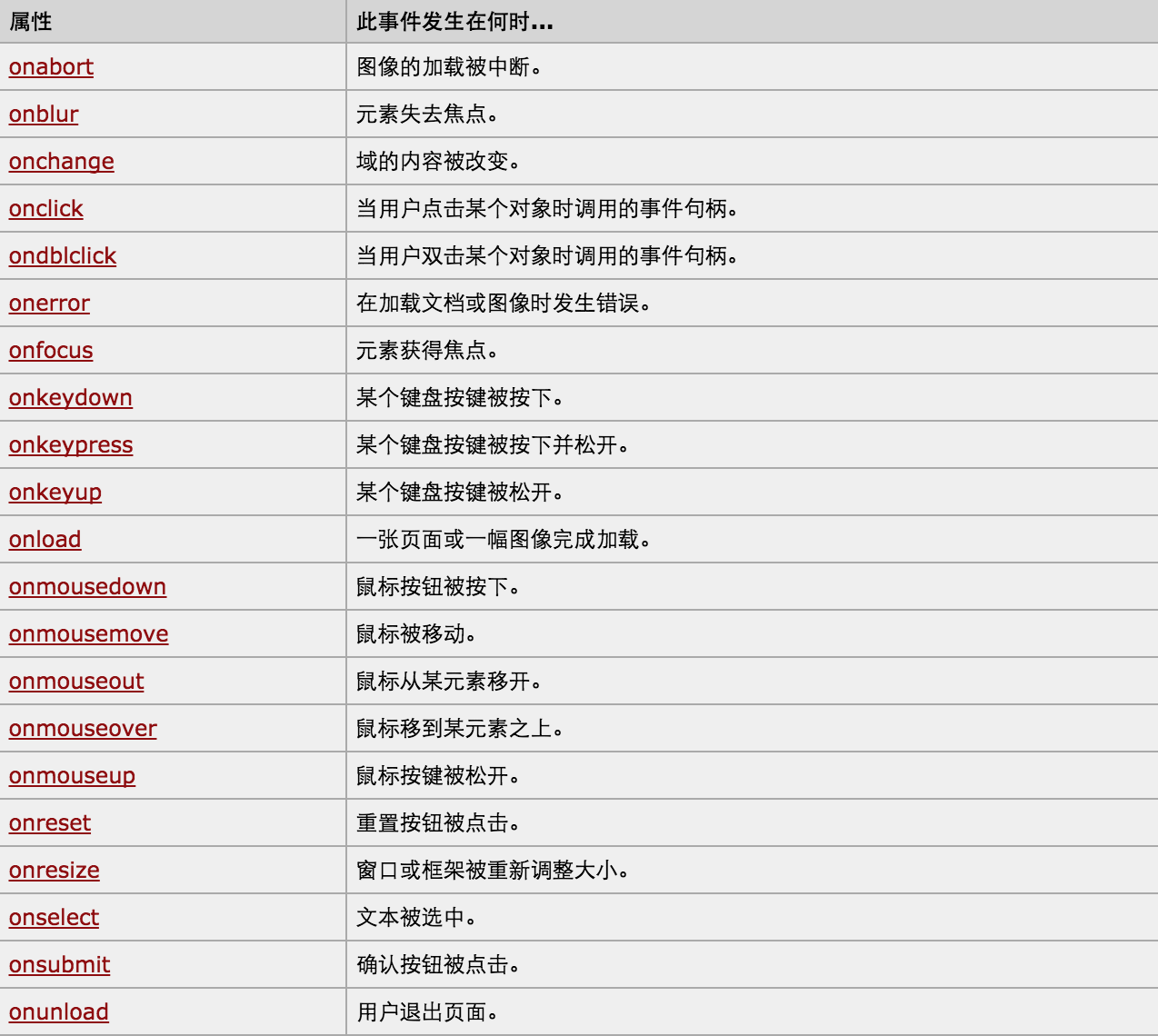
对于事件需要注意的要点:
- this
- event
- 事件链以及跳出
this标签当前正在操作的标签,event封装了当前事件的内容。
实例:
<!DOCTYPE html>

<html>

    <head>

        <meta charset='utf-8' />

        <title></title>

        <style>

            .gray{

                color:gray;

            }

            .black{

                color:black;

            }

        </style>

        <script type="text/javascript">

            function Enter(){

               var id= document.getElementById("tip")

               id.className = 'black';

               if(id.value=='请输入关键字'||id.value.trim()==''){

                    id.value = ''

               }

            }

            function Leave(){

                var id= document.getElementById("tip")

                var val = id.value;

                if(val.length==0||id.value.trim()==''){

                    id.value = '请输入关键字'

                    id.className = 'gray';

                }else{

                    id.className = 'black';

                }

            }

        </script>

    </head>

    <body>

        <input type='text' class='gray' id='tip' value='请输入关键字' onfocus='Enter();'  onblur='Leave();'/>

    </body>

</html>
搜索框
<!DOCTYPE html>
<html>
<head>
<meta charset='utf-8' >
<title>欢迎blue shit莅临指导 </title>
<script type='text/javascript'>
function Go(){
var content = document.title;
var firstChar = content.charAt(0)
var sub = content.substring(1,content.length)
document.title = sub + firstChar;
}
setInterval('Go()',1000);
</script>
</head>
<body>
</body>
</html>
跑马灯
Python开发【第十二篇】:DOM的更多相关文章
- 图解Python 【第十二篇】:Django 基础
本节内容一览表: Django基础:http://www.ziqiangxuetang.com/django/django-tutorial.html 一.Django简介 Django文件介绍:ht ...
- Python开发【十二章】:ORM sqlalchemy
一.对象映射关系(ORM) orm英文全称object relational mapping,就是对象映射关系程序,简单来说我们类似python这种面向对象的程序来说一切皆对象,但是我们使用的数据库却 ...
- Swift开发第十二篇——protocol组合&static和class
本篇分为两部分: 一.Swift 中 protocol 组合的使用 二.Swfit 中 static和class 的使用 一.Swift 中 protocol 组合的使用 在 Swift 中我们可以使 ...
- python【第十二篇下】操作MySQL数据库以及ORM之 sqlalchemy
内容一览: 1.Python操作MySQL数据库 2.ORM sqlalchemy学习 1.Python操作MySQL数据库 2. ORM sqlachemy 2.1 ORM简介 对象关系映射(英语: ...
- python【第十二篇】Mysql基础
内容: 1.数据库介绍及MySQL简介 2.MySQL基本操作 1 数据库介绍 1.1什么是数据库? 数据库(Database)是按照数据结构来组织.存储和管理数据的仓库,每个数据库都有一个或多个不同 ...
- Python 学习 第十二篇:pandas
pandas是基于NumPy构建的模块,含有使数据分析更快更简单的操作工具和数据结构,最常用的数据结构是:序列Series和数据框DataFrame,Series类似于numpy中的一维数组,类似于关 ...
- PowerBI开发 第十二篇:钻取
钻取是指沿着层次结构(维度的层次)查看数据,钻取可以变换分析数据的粒度.钻取分为下钻(Drill-down)和上钻(Drill-up),上钻是沿着数据的维度结构向上聚合数据,在更大的粒度上查看数据的统 ...
- Python学习第十二篇——切片的使用
Python中使用函数切片可以创建副本,保留原本.现在给出如下代码 magicians_list = ['mole','jack','lucy'] new_lists = [] def make_gr ...
- python基础-第十二篇-12.1jQuery基础与实例
一.查找元素 1.选择器 基本选择器 $("*") $("#id") $(".class") $("element") ...
- Python开发【第二十二篇】:Web框架之Django【进阶】
Python开发[第二十二篇]:Web框架之Django[进阶] 猛击这里:http://www.cnblogs.com/wupeiqi/articles/5246483.html 博客园 首页 ...
随机推荐
- wow.js使用方法
近日,在做项目中,需要做到滚动条滑到某个位置时,才能显示动画,网上查询到有个wow.js可以达到要求,现在把使用方法做如下总结: wow.js演示地址 wow.js的github地址 使用方法真是超简 ...
- The following signatures couldn't be verified because the public key is not available: NO_PUBKEY 51716619E084DAB9
sudo su gpg --keyserver keyserver.ubuntu.com --recv-keys 51716619E084DAB9 gpg -a --export 51716619E0 ...
- 【BZOJ-2521】最小生成树 最小割
2521: [Shoi2010]最小生成树 Time Limit: 10 Sec Memory Limit: 128 MBSubmit: 415 Solved: 242[Submit][Statu ...
- UOJ262 【NOIP2016】换教室
本文版权归ljh2000和博客园共有,欢迎转载,但须保留此声明,并给出原文链接,谢谢合作. 本文作者:ljh2000作者博客:http://www.cnblogs.com/ljh2000-jump/转 ...
- Jenkins使用jenkins-cli.jar进行远程调用时出现“ERROR: No such job 'test'”的问题解决(Windows)
网上最提倡的解决办法是用SSH的key进行登录,但是我发觉Linux上非常容易实现,但是Windows压根不知道在哪里设置. 原文:https://issues.jenkins-ci.org/brow ...
- Lamp源码搭建
Lamp Centos6.5 + Apache/2.2.29 + PHP 5.3.29 + Mysql5.6.20 Apache(/usr/local/apache) PHP(/usr/local/b ...
- Swift 用Delegate和Block实现回调的Demo
一.有关回调 我们知道,执行函数的时候,一般都有return作为返回参数了,那有return了为什么还要回调呢? 回调是为了实现异步的返回,在某些特殊的情况下,比如你执行的函数是一个长时间运行的函数, ...
- 整合Servlet到Spring容器
有时在Spring(3.2.5)项目中,如果使用到Servlet,可能希望Servlet实例作为bean受Spring容器管理,这样也能自动注入其他需要的bean,查了下,发现只针对过滤器提供了代理类 ...
- linux下memcache的运用,和php结合小案例。
由于是采用脚本安装的memache,所以软件的依赖关系我就不操心了,脚本已经帮我装好了和php的关联关系,实在是很省心.后续如果有需要,我会针对windows和linux各写一个安装和配置的说明,一来 ...
- IPsec 学习笔记
工作中需要,参考网上的资料对IPSecVPN进行学习,并通过博客记录下一些知识点作为学习记录和后续复习的材料. Transport Layer (TLS) 其中主要参考了以下文档: http://ww ...