
Python开发【第十二篇】:DOM
文档对象模型(Document Object Model,DOM)是一种用于HTML和XML文档的编程接口。它给文档提供了一种结构化的表示方法,可以改变文档的内容和呈现方式。我们最为关心的是,DOM把网页和脚本以及其他的编程语言联系了起来。DOM属于浏览器,而不是JavaScript语言规范里的规定的核心内容。
一、查找元素
1、直接查找
|
1
2
3
4
|
document.getElementById 根据ID获取一个标签document.getElementsByName 根据name属性获取标签集合document.getElementsByClassName 根据class属性获取标签集合document.getElementsByTagName 根据标签名获取标签集合 |
2、间接查找
|
1
2
3
4
5
6
7
8
9
10
11
12
13
|
parentNode // 父节点childNodes // 所有子节点firstChild // 第一个子节点lastChild // 最后一个子节点nextSibling // 下一个兄弟节点previousSibling // 上一个兄弟节点parentElement // 父节点标签元素children // 所有子标签firstElementChild // 第一个子标签元素lastElementChild // 最后一个子标签元素nextElementtSibling // 下一个兄弟标签元素previousElementSibling // 上一个兄弟标签元素 |
二、操作
1、内容
|
1
2
3
4
5
|
innerText 文本outerTextinnerHTML HTML内容innerHTML value 值 |
2、属性
|
1
2
3
4
5
6
7
8
9
|
attributes // 获取所有标签属性setAttribute(key,value) // 设置标签属性getAttribute(key) // 获取指定标签属性/*var atr = document.createAttribute("class");atr.nodeValue="democlass";document.getElementById('n1').setAttributeNode(atr);*/ |
<!DOCTYPE html>

<html>

<head lang="en">

    <meta charset="UTF-8">

    <title></title>

</head>

<body>

    <input type="button" value="全选"  onclick="CheckAll();"/>

    <input type="button" value="取消" onclick="CancelAll();"/>

    <input type="button" value="反选" onclick="ReverseCheck();"/>

    <table border="1" >

        <thead>

        </thead>

        <tbody id="tb">

            <tr>

                <td><input type="checkbox" /></td>

                <td>111</td>

                <td>222</td>

            </tr>

            <tr>

                <td><input type="checkbox" /></td>

                <td>111</td>

                <td>222</td>

            </tr>

            <tr>

                <td><input type="checkbox" /></td>

                <td>111</td>

                <td>222</td>

            </tr>

            <tr>

                <td><input type="checkbox" /></td>

                <td>111</td>

                <td>222</td>

            </tr>

        </tbody>

    </table>

    <script>

        function CheckAll(ths){

            var tb = document.getElementById('tb');

            var trs = tb.childNodes;

            for(var i =0; i<trs.length; i++){

                var current_tr = trs[i];

                if(current_tr.nodeType==1){

                    var inp = current_tr.firstElementChild.getElementsByTagName('input')[0];

                    inp.checked = true;

                }

            }

        }

        function CancelAll(ths){

            var tb = document.getElementById('tb');

            var trs = tb.childNodes;

            for(var i =0; i<trs.length; i++){

                var current_tr = trs[i];

                if(current_tr.nodeType==1){

                    var inp = current_tr.firstElementChild.getElementsByTagName('input')[0];

                    inp.checked = false;

                }

            }

        }

        function ReverseCheck(ths){

            var tb = document.getElementById('tb');

            var trs = tb.childNodes;

            for(var i =0; i<trs.length; i++){

                var current_tr = trs[i];

                if(current_tr.nodeType==1){

                    var inp = current_tr.firstElementChild.getElementsByTagName('input')[0];

                    if(inp.checked){

                        inp.checked = false;

                    }else{

                        inp.checked = true;

                    }

                }

            }

        }

    </script>

</body>

</html>
Demo
3、class操作
|
1
2
3
|
className // 获取所有类名classList.remove(cls) // 删除指定类classList.add(cls) // 添加类 |
4、标签操作
a.创建标签
|
1
2
3
4
5
6
7
8
|
// 方式一var tag = document.createElement('a')tag.innerText = "wupeiqi"tag.className = "c1"tag.href = "http://www.cnblogs.com/wupeiqi"// 方式二 |
b.操作标签
|
1
2
3
4
5
6
7
8
9
10
11
|
// 方式一var obj = "<input type='text' />";xxx.insertAdjacentHTML("beforeEnd",obj);xxx.insertAdjacentElement('afterBegin',document.createElement('p'))//注意:第一个参数只能是'beforeBegin'、 'afterBegin'、 'beforeEnd'、 'afterEnd'// 方式二var tag = document.createElement('a')xxx.appendChild(tag)xxx.insertBefore(tag,xxx[1]) |
5、样式操作
|
1
2
3
4
|
var obj = document.getElementById('i1')obj.style.fontSize = "32px";obj.style.backgroundColor = "red"; |
    <input onfocus="Focus(this);" onblur="Blur(this);" id="search" value="请输入关键字" style="color: gray;" />

    <script>

        function Focus(ths){

            ths.style.color = "black";

            if(ths.value == '请输入关键字' || ths.value.trim() == ""){

                ths.value = "";

            }

        }

        function Blur(ths){

            if(ths.value.trim() == ""){

                ths.value = '请输入关键字';

                ths.style.color = 'gray';

            }else{

                ths.style.color = "black";

            }

        }

    </script>
Demo
6、位置操作
|
1
2
3
4
5
6
7
8
9
10
11
12
13
14
15
16
17
18
19
20
21
22
23
24
25
26
27
28
|
总文档高度document.documentElement.offsetHeight 当前文档占屏幕高度document.documentElement.clientHeight 自身高度tag.offsetHeight 距离上级定位高度tag.offsetTop 父定位标签tag.offsetParent 滚动高度tag.scrollTop/* clientHeight -> 可见区域:height + padding clientTop -> border高度 offsetHeight -> 可见区域:height + padding + border offsetTop -> 上级定位标签的高度 scrollHeight -> 全文高:height + padding scrollTop -> 滚动高度 特别的: document.documentElement代指文档根节点*/ |
<!DOCTYPE html>

<html>

<head lang="en">

    <meta charset="UTF-8">

    <title></title>

</head>

<body style="margin: 0;">

    <div style="height: 900px;">

    </div>

    <div style="padding: 10px;">

        <div id="i1" style="height:190px;padding: 2px;border: 1px solid red;margin: 8px;">

                <p>asdf</p>

                <p>asdf</p>

                <p>asdf</p>

                <p>asdf</p>

                <p>asdf</p>

        </div>

    </div>

    <script>

        var i1 = document.getElementById('i1');

        console.log(i1.clientHeight); // 可见区域:height + padding

        console.log(i1.clientTop);    // border高度

        console.log('=====');

        console.log(i1.offsetHeight); // 可见区域:height + padding + border

        console.log(i1.offsetTop);    // 上级定位标签的高度

        console.log('=====');

        console.log(i1.scrollHeight);   //全文高:height + padding

        console.log(i1.scrollTop);      // 滚动高度

        console.log('=====');

    </script>

</body>

</html>
test
<!DOCTYPE html>

<html>

<head lang="en">

    <meta charset="UTF-8">

    <title></title>

</head>

<style>

    body{

        margin: 0px;

    }

    img {

        border: 0;

    }

    ul{

        padding: 0;

        margin: 0;

        list-style: none;

    }

    .clearfix:after {

        content: ".";

        display: block;

        height: 0;

        clear: both;

        visibility: hidden;

    }

    .wrap{

        width: 980px;

        margin: 0 auto;

    }

    .pg-header{

        background-color: #303a40;

        -webkit-box-shadow: 0 2px 5px rgba(0,0,0,.2);

        -moz-box-shadow: 0 2px 5px rgba(0,0,0,.2);

        box-shadow: 0 2px 5px rgba(0,0,0,.2);

    }

    .pg-header .logo{

        float: left;

        padding:5px 10px 5px 0px;

    }

    .pg-header .logo img{

        vertical-align: middle;

        width: 110px;

        height: 40px;

    }

    .pg-header .nav{

        line-height: 50px;

    }

    .pg-header .nav ul li{

        float: left;

    }

    .pg-header .nav ul li a{

        display: block;

        color: #ccc;

        padding: 0 20px;

        text-decoration: none;

        font-size: 14px;

    }

    .pg-header .nav ul li a:hover{

        color: #fff;

        background-color: #425a66;

    }

    .pg-body{

    }

    .pg-body .catalog{

        position: absolute;

        top:60px;

        width: 200px;

        background-color: #fafafa;

        bottom: 0px;

    }

    .pg-body .catalog.fixed{

        position: fixed;

        top:10px;

    }

    .pg-body .catalog .catalog-item.active{

        color: #fff;

        background-color: #425a66;

    }

    .pg-body .content{

        position: absolute;

        top:60px;

        width: 700px;

        margin-left: 210px;

        background-color: #fafafa;

        overflow: auto;

    }

    .pg-body .content .section{

        height: 500px;

    }

</style>

<body onscroll="ScrollEvent();">

<div class="pg-header">

    <div class="wrap clearfix">

        <div class="logo">

            <a href="#">

                <img src="http://core.pc.lietou-static.com/revs/images/common/logo_7012c4a4.pn">

            </a>

        </div>

        <div class="nav">

            <ul>

                <li>

                    <a  href="#">首页</a>

                </li>

                <li>

                    <a  href="#">功能一</a>

                </li>

                <li>

                    <a  href="#">功能二</a>

                </li>

            </ul>

        </div>

    </div>

</div>

<div class="pg-body">

    <div class="wrap">

        <div class="catalog">

            <div class="catalog-item" auto-to="function1"><a>第1张</a></div>

            <div class="catalog-item" auto-to="function2"><a>第2张</a></div>

            <div class="catalog-item" auto-to="function3"><a>第3张</a></div>

        </div>

        <div class="content">

            <div menu="function1" class="section">

                <h1>第一章</h1>

            </div>

            <div menu="function2" class="section">

                <h1>第二章</h1>

            </div>

            <div menu="function3" class="section">

                <h1>第三章</h1>

            </div>

        </div>

    </div>

</div>

    <script>

        function ScrollEvent(){

            var bodyScrollTop = document.body.scrollTop;

            if(bodyScrollTop>50){

                document.getElementsByClassName('catalog')[0].classList.add('fixed');

            }else{

                document.getElementsByClassName('catalog')[0].classList.remove('fixed');

            }

        }

    </script>

</body>

</html>
Demo-滚动固定
<!DOCTYPE html>

<html>

<head lang="en">

    <meta charset="UTF-8">

    <title></title>

</head>

<style>

    body{

        margin: 0px;

    }

    img {

        border: 0;

    }

    ul{

        padding: 0;

        margin: 0;

        list-style: none;

    }

    h1{

        padding: 0;

        margin: 0;

    }

    .clearfix:after {

        content: ".";

        display: block;

        height: 0;

        clear: both;

        visibility: hidden;

    }

    .wrap{

        width: 980px;

        margin: 0 auto;

    }

    .pg-header{

        background-color: #303a40;

        -webkit-box-shadow: 0 2px 5px rgba(0,0,0,.2);

        -moz-box-shadow: 0 2px 5px rgba(0,0,0,.2);

        box-shadow: 0 2px 5px rgba(0,0,0,.2);

    }

    .pg-header .logo{

        float: left;

        padding:5px 10px 5px 0px;

    }

    .pg-header .logo img{

        vertical-align: middle;

        width: 110px;

        height: 40px;

    }

    .pg-header .nav{

        line-height: 50px;

    }

    .pg-header .nav ul li{

        float: left;

    }

    .pg-header .nav ul li a{

        display: block;

        color: #ccc;

        padding: 0 20px;

        text-decoration: none;

        font-size: 14px;

    }

    .pg-header .nav ul li a:hover{

        color: #fff;

        background-color: #425a66;

    }

    .pg-body{

    }

    .pg-body .catalog{

        position: absolute;

        top:60px;

        width: 200px;

        background-color: #fafafa;

        bottom: 0px;

    }

    .pg-body .catalog.fixed{

        position: fixed;

        top:10px;

    }

    .pg-body .catalog .catalog-item.active{

        color: #fff;

        background-color: #425a66;

    }

    .pg-body .content{

        position: absolute;

        top:60px;

        width: 700px;

        margin-left: 210px;

        background-color: #fafafa;

        overflow: auto;

    }

    .pg-body .content .section{

        height: 500px;

        border: 1px solid red;

    }

</style>

<body onscroll="ScrollEvent();">

<div class="pg-header">

    <div class="wrap clearfix">

        <div class="logo">

            <a href="#">

                <img src="http://core.pc.lietou-static.com/revs/images/common/logo_7012c4a4.pn">

            </a>

        </div>

        <div class="nav">

            <ul>

                <li>

                    <a  href="#">首页</a>

                </li>

                <li>

                    <a  href="#">功能一</a>

                </li>

                <li>

                    <a  href="#">功能二</a>

                </li>

            </ul>

        </div>

    </div>

</div>

<div class="pg-body">

    <div class="wrap">

        <div class="catalog" id="catalog">

            <div class="catalog-item" auto-to="function1"><a>第1张</a></div>

            <div class="catalog-item" auto-to="function2"><a>第2张</a></div>

            <div class="catalog-item" auto-to="function3"><a>第3张</a></div>

        </div>

        <div class="content" id="content">

            <div menu="function1" class="section">

                <h1>第一章</h1>

            </div>

            <div menu="function2" class="section">

                <h1>第二章</h1>

            </div>

            <div menu="function3" class="section">

                <h1>第三章</h1>

            </div>

        </div>

    </div>

</div>

    <script>

        function ScrollEvent(){

            var bodyScrollTop = document.body.scrollTop;

            if(bodyScrollTop>50){

                document.getElementsByClassName('catalog')[0].classList.add('fixed');

            }else{

                document.getElementsByClassName('catalog')[0].classList.remove('fixed');

            }

            var content = document.getElementById('content');

            var sections = content.children;

            for(var i=0;i<sections.length;i++){

                var current_section = sections[i];

                // 当前标签距离顶部绝对高度

                var scOffTop = current_section.offsetTop + 60;

                // 当前标签距离顶部,相对高度

                var offTop = scOffTop - bodyScrollTop;

                // 当前标签高度

                var height = current_section.scrollHeight;

                if(offTop<0 && -offTop < height){

                    // 当前标签添加active

                    // 其他移除 active

                    var menus = document.getElementById('catalog').children;

                    var current_menu = menus[i];

                    current_menu.classList.add('active');

                    for(var j=0;j<menus.length;j++){

                        if(menus[j] == current_menu){

                        }else{

                            menus[j].classList.remove('active');

                        }

                    }

                    break;

                }

            }

        }

    </script>

</body>

</html>
Demo-滚动菜单
<!DOCTYPE html>

<html>

<head lang="en">

    <meta charset="UTF-8">

    <title></title>

</head>

<style>

    body{

        margin: 0px;

    }

    img {

        border: 0;

    }

    ul{

        padding: 0;

        margin: 0;

        list-style: none;

    }

    h1{

        padding: 0;

        margin: 0;

    }

    .clearfix:after {

        content: ".";

        display: block;

        height: 0;

        clear: both;

        visibility: hidden;

    }

    .wrap{

        width: 980px;

        margin: 0 auto;

    }

    .pg-header{

        background-color: #303a40;

        -webkit-box-shadow: 0 2px 5px rgba(0,0,0,.2);

        -moz-box-shadow: 0 2px 5px rgba(0,0,0,.2);

        box-shadow: 0 2px 5px rgba(0,0,0,.2);

    }

    .pg-header .logo{

        float: left;

        padding:5px 10px 5px 0px;

    }

    .pg-header .logo img{

        vertical-align: middle;

        width: 110px;

        height: 40px;

    }

    .pg-header .nav{

        line-height: 50px;

    }

    .pg-header .nav ul li{

        float: left;

    }

    .pg-header .nav ul li a{

        display: block;

        color: #ccc;

        padding: 0 20px;

        text-decoration: none;

        font-size: 14px;

    }

    .pg-header .nav ul li a:hover{

        color: #fff;

        background-color: #425a66;

    }

    .pg-body{

    }

    .pg-body .catalog{

        position: absolute;

        top:60px;

        width: 200px;

        background-color: #fafafa;

        bottom: 0px;

    }

    .pg-body .catalog.fixed{

        position: fixed;

        top:10px;

    }

    .pg-body .catalog .catalog-item.active{

        color: #fff;

        background-color: #425a66;

    }

    .pg-body .content{

        position: absolute;

        top:60px;

        width: 700px;

        margin-left: 210px;

        background-color: #fafafa;

        overflow: auto;

    }

    .pg-body .content .section{

        height: 500px;

        border: 1px solid red;

    }

</style>

<body onscroll="ScrollEvent();">

<div class="pg-header">

    <div class="wrap clearfix">

        <div class="logo">

            <a href="#">

                <img src="http://core.pc.lietou-static.com/revs/images/common/logo_7012c4a4.pn">

            </a>

        </div>

        <div class="nav">

            <ul>

                <li>

                    <a  href="#">首页</a>

                </li>

                <li>

                    <a  href="#">功能一</a>

                </li>

                <li>

                    <a  href="#">功能二</a>

                </li>

            </ul>

        </div>

    </div>

</div>

<div class="pg-body">

    <div class="wrap">

        <div class="catalog" id="catalog">

            <div class="catalog-item" auto-to="function1"><a>第1张</a></div>

            <div class="catalog-item" auto-to="function2"><a>第2张</a></div>

            <div class="catalog-item" auto-to="function3"><a>第3张</a></div>

        </div>

        <div class="content" id="content">

            <div menu="function1" class="section">

                <h1>第一章</h1>

            </div>

            <div menu="function2" class="section">

                <h1>第二章</h1>

            </div>

            <div menu="function3" class="section" style="height: 200px;">

                <h1>第三章</h1>

            </div>

        </div>

    </div>

</div>

    <script>

        function ScrollEvent(){

            var bodyScrollTop = document.body.scrollTop;

            if(bodyScrollTop>50){

                document.getElementsByClassName('catalog')[0].classList.add('fixed');

            }else{

                document.getElementsByClassName('catalog')[0].classList.remove('fixed');

            }

            var content = document.getElementById('content');

            var sections = content.children;

            for(var i=0;i<sections.length;i++){

                var current_section = sections[i];

                // 当前标签距离顶部绝对高度

                var scOffTop = current_section.offsetTop + 60;

                // 当前标签距离顶部,相对高度

                var offTop = scOffTop - bodyScrollTop;

                // 当前标签高度

                var height = current_section.scrollHeight;

                if(offTop<0 && -offTop < height){

                    // 当前标签添加active

                    // 其他移除 active

                    // 如果已经到底部,现实第三个菜单

                    // 文档高度 = 滚动高度 + 视口高度

                    var a = document.getElementsByClassName('content')[0].offsetHeight + 60;

                    var b = bodyScrollTop + document.documentElement.clientHeight;

                    console.log(a+60,b);

                    if(a == b){

                        var menus = document.getElementById('catalog').children;

                        var current_menu = document.getElementById('catalog').lastElementChild;

                        current_menu.classList.add('active');

                        for(var j=0;j<menus.length;j++){

                            if(menus[j] == current_menu){

                            }else{

                                menus[j].classList.remove('active');

                            }

                        }

                    }else{

                        var menus = document.getElementById('catalog').children;

                        var current_menu = menus[i];

                        current_menu.classList.add('active');

                        for(var j=0;j<menus.length;j++){

                            if(menus[j] == current_menu){

                            }else{

                                menus[j].classList.remove('active');

                            }

                        }

                    }

                    break;

                }

            }

        }

    </script>

</body>

</html>
Demo-滚动高度
7、提交表单
|
1
|
document.geElementById('form').submit() |
8、其他操作
|
1
2
3
4
5
6
7
8
9
10
11
12
13
14
|
console.log 输出框alert 弹出框confirm 确认框 // URL和刷新location.href 获取URLlocation.href = "url" 重定向location.reload() 重新加载 // 定时器setInterval 多次定时器clearInterval 清除多次定时器setTimeout 单次定时器clearTimeout 清除单次定时器 |
三、事件
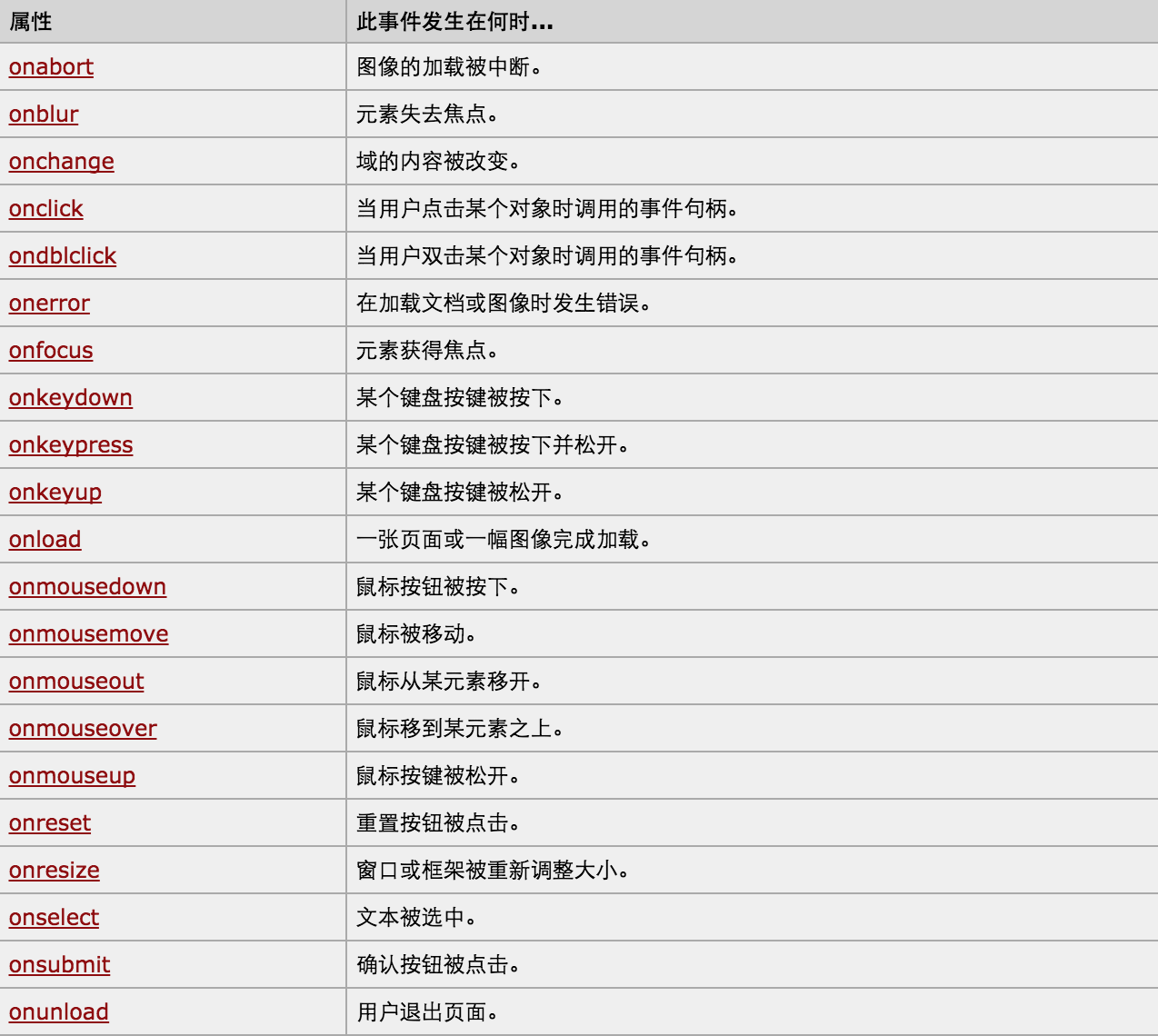
对于事件需要注意的要点:
- this
- event
- 事件链以及跳出
this标签当前正在操作的标签,event封装了当前事件的内容。
实例:
<!DOCTYPE html>

<html>

    <head>

        <meta charset='utf-8' />

        <title></title>

        <style>

            .gray{

                color:gray;

            }

            .black{

                color:black;

            }

        </style>

        <script type="text/javascript">

            function Enter(){

               var id= document.getElementById("tip")

               id.className = 'black';

               if(id.value=='请输入关键字'||id.value.trim()==''){

                    id.value = ''

               }

            }

            function Leave(){

                var id= document.getElementById("tip")

                var val = id.value;

                if(val.length==0||id.value.trim()==''){

                    id.value = '请输入关键字'

                    id.className = 'gray';

                }else{

                    id.className = 'black';

                }

            }

        </script>

    </head>

    <body>

        <input type='text' class='gray' id='tip' value='请输入关键字' onfocus='Enter();'  onblur='Leave();'/>

    </body>

</html>
搜索框
<!DOCTYPE html>
<html>
<head>
<meta charset='utf-8' >
<title>欢迎blue shit莅临指导 </title>
<script type='text/javascript'>
function Go(){
var content = document.title;
var firstChar = content.charAt(0)
var sub = content.substring(1,content.length)
document.title = sub + firstChar;
}
setInterval('Go()',1000);
</script>
</head>
<body>
</body>
</html>
跑马灯
Python开发【第十二篇】:DOM的更多相关文章
- 图解Python 【第十二篇】:Django 基础
本节内容一览表: Django基础:http://www.ziqiangxuetang.com/django/django-tutorial.html 一.Django简介 Django文件介绍:ht ...
- Python开发【十二章】:ORM sqlalchemy
一.对象映射关系(ORM) orm英文全称object relational mapping,就是对象映射关系程序,简单来说我们类似python这种面向对象的程序来说一切皆对象,但是我们使用的数据库却 ...
- Swift开发第十二篇——protocol组合&static和class
本篇分为两部分: 一.Swift 中 protocol 组合的使用 二.Swfit 中 static和class 的使用 一.Swift 中 protocol 组合的使用 在 Swift 中我们可以使 ...
- python【第十二篇下】操作MySQL数据库以及ORM之 sqlalchemy
内容一览: 1.Python操作MySQL数据库 2.ORM sqlalchemy学习 1.Python操作MySQL数据库 2. ORM sqlachemy 2.1 ORM简介 对象关系映射(英语: ...
- python【第十二篇】Mysql基础
内容: 1.数据库介绍及MySQL简介 2.MySQL基本操作 1 数据库介绍 1.1什么是数据库? 数据库(Database)是按照数据结构来组织.存储和管理数据的仓库,每个数据库都有一个或多个不同 ...
- Python 学习 第十二篇:pandas
pandas是基于NumPy构建的模块,含有使数据分析更快更简单的操作工具和数据结构,最常用的数据结构是:序列Series和数据框DataFrame,Series类似于numpy中的一维数组,类似于关 ...
- PowerBI开发 第十二篇:钻取
钻取是指沿着层次结构(维度的层次)查看数据,钻取可以变换分析数据的粒度.钻取分为下钻(Drill-down)和上钻(Drill-up),上钻是沿着数据的维度结构向上聚合数据,在更大的粒度上查看数据的统 ...
- Python学习第十二篇——切片的使用
Python中使用函数切片可以创建副本,保留原本.现在给出如下代码 magicians_list = ['mole','jack','lucy'] new_lists = [] def make_gr ...
- python基础-第十二篇-12.1jQuery基础与实例
一.查找元素 1.选择器 基本选择器 $("*") $("#id") $(".class") $("element") ...
- Python开发【第二十二篇】:Web框架之Django【进阶】
Python开发[第二十二篇]:Web框架之Django[进阶] 猛击这里:http://www.cnblogs.com/wupeiqi/articles/5246483.html 博客园 首页 ...
随机推荐
- 给<tr>标签添加边框
今天做网站时发现给<tr>添加border无效.起初还以为tr不支持这个属性,百度,原来只要给<table>添加一句代码就可以了,代码如下: table{border-coll ...
- 【bzoj1597】 土地购买
http://www.lydsy.com/JudgeOnline/problem.php?id=1597 (题目链接) 题意 购买n个矩形,每块土地的价格是它的面积,但可以同时购买多快土地. 这些土地 ...
- uva11426 gcd、欧拉函数
题意:给出N,求所有满足i<j<=N的gcd(i,j)之和 这题去年做过一次... 设f(n)=gcd(1,n)+gcd(2,n)+......+gcd(n-1,n),那么answer=S ...
- SQLite Learning、SQL Query Optimization In Multiple Rule
catalog . SQLite简介 . Sqlite安装 . SQLite Programing . SQLite statements 1. SQLite简介 SQLite是一款轻型的数据库,是遵 ...
- androidstudio 之 svn配置 汇总
http://www.cnblogs.com/shaocm/p/4182380.html https://www.zhihu.com/question/32298079 http://www.it16 ...
- Unity3d5.0 新UI之2048
因为汽车系统没写出来所以,纠结之中,弄了弄新版本的UI. 做了个2048. 新版本的unity的UI必须以Canvas为基底来呈现,如果没有加画布的话可是显示不出来东西的哦. 而且作为UI上的所有组件 ...
- 第一章、欢迎进入C#编程世界
1.GUI:图形用户界面. 2.在C#中,所有可执行代码都必须在方法中定义,而方法必须从属于类或结构. 3.程序集中可能包含多个命名空间的类,而一个命名空间可能跨越多个程序集. 4.解决方案文件使用. ...
- (译)你应该知道的jQuery小技巧
帮助提高你jQuery应用的简单小技巧 回到顶部按钮 图片预加载 判断图片是否加载完 自动修补破损图像 Hover切换class类 禁用输入 停止正在加载的链接 toggle fade/slide 简 ...
- linux下安装zookeeper(单机版)
Zookeeper 分布式服务框架是用来解决分布式应用中经常遇到的一些数据管理问题,如:统一命名服务.状态同步服务.集群管理.分布式应用配置项的管理等.本文主要从使用者角度来介绍一下Zookeeper ...
- #第一用Markdown编辑器#
Markdown初次使用 This is a simple Markdown editor based on 'Markdown' it's * italic * style. it's also _ ...