
Python自动化 【第五篇】:Python基础-常用模块
目录
- 模块介绍
- time和datetime模块
- random
- os
- sys
- shutil
- json和pickle
- shelve
- xml处理
- yaml处理
- configparser
- hashlib
- re正则表达式
1. 模块介绍
1.1 定义
能够实现某个功能的代码集合(本质是py文件) test.p的模块名是test包的定义:用来从逻辑上组织模块,本质就是一个目录(必须带有一个__init__.py文件)
1.2 导入方法
a) Import module
b) Import module1,module2
c) From module import *
d) From module import m1,m2,m3
e) From module import logger as module_logger
1.3 Import 本质
导入模块的本质就是把python文件解释一遍
导入包的本质就是在执行该包下的__init__.py文件
1.4 导入优化
From module import test as module_test
1.5 模块的分类
a) 标准库
b) 开源模块(第三方模块)
c) 自定义模块
2. time & datetime 模块
time的三种表现方式:
1)时间戳(用秒来表示)
2)格式化的时间字符串
3)元组(struct_time)共九个元素。
2.1 时间戳
 1 import time

 2 # print(time.clock()) #返回处理器时间,3.3开始已废弃 , 改成了time.process_time()测量处理器运算时间,不包括sleep时间,不稳定,mac上测不出来

 3 # print(time.altzone)  #返回与utc时间的时间差,以秒计算\

 4 # print(time.asctime()) #返回时间格式"Fri Aug 19 11:14:16 2016",

 5 # print(time.localtime()) #返回本地时间 的struct time对象格式

 6 # print(time.gmtime(time.time()-800000)) #返回utc时间的struc时间对象格式

 7

 8 # print(time.asctime(time.localtime())) #返回时间格式"Fri Aug 19 11:14:16 2016",

 9 #print(time.ctime()) #返回Fri Aug 19 12:38:29 2016 格式, 同上

 10

 11 # 日期字符串 转成  时间戳

 12 # string_2_struct = time.strptime("2016/05/22","%Y/%m/%d") #将 日期字符串 转成 struct时间对象格式

 13 # print(string_2_struct)

 14 # struct_2_stamp = time.mktime(string_2_struct) #将struct时间对象转成时间戳

 15 # print(struct_2_stamp)

 16 #将时间戳转为字符串格式

 17 # print(time.gmtime(time.time()-86640)) #将utc时间戳转换成struct_time格式

 18 # print(time.strftime("%Y-%m-%d %H:%M:%S",time.gmtime()) ) #将utc struct_time格式转成指定的字符串格式

 19 #时间加减

 20 import datetime

 21 # print(datetime.datetime.now()) #返回 2016-08-19 12:47:03.941925

 22 #print(datetime.date.fromtimestamp(time.time()) )  # 时间戳直接转成日期格式 2016-08-19

 23 # print(datetime.datetime.now() )

 24 # print(datetime.datetime.now() + datetime.timedelta(3)) #当前时间+3天

 25 # print(datetime.datetime.now() + datetime.timedelta(-3)) #当前时间-3天

 26 # print(datetime.datetime.now() + datetime.timedelta(hours=3)) #当前时间+3小时

 27 # print(datetime.datetime.now() + datetime.timedelta(minutes=30)) #当前时间+30分

 28 # c_time  = datetime.datetime.now()

 29 # print(c_time.replace(minute=3,hour=2)) #时间替换
2.2 格式化的时间字符串
格式参照:
%a 本地(locale)简化星期名称
%A 本地完整星期名称
%b 本地简化月份名称
%B 本地完整月份名称
%c 本地相应的日期和时间表示
%d 一个月中的第几天(01 - 31)
%H 一天中的第几个小时(24小时制,00 - 23)
%I 第几个小时(12小时制,01 - 12)
%j 一年中的第几天(001 - 366)
%m 月份(01 - 12)
%M 分钟数(00 - 59)
%p 本地am或者pm的相应符 一
%S 秒(01 - 61) 二
%U 一年中的星期数。(00 - 53星期天是一个星期的开始。)第一个星期天之前的所有天数都放在第0周。 三
%w 一个星期中的第几天(0 - 6,0是星期天) 三
%W 和%U基本相同,不同的是%W以星期一为一个星期的开始。
%x 本地相应日期
%X 本地相应时间
%y 去掉世纪的年份(00 - 99)
%Y 完整的年份
%Z 时区的名字(如果不存在为空字符)
%% ‘%’字符
2.3 时间关系转换
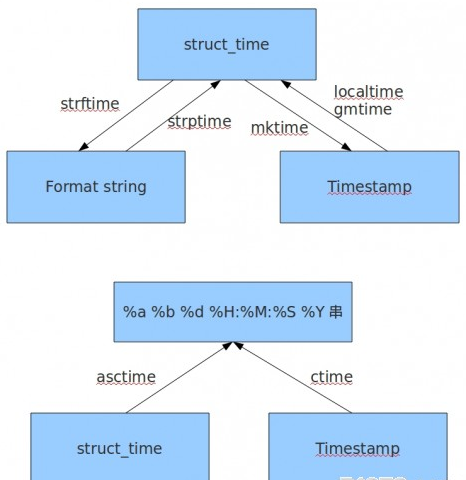
3. random模块
3.1 随机数
import random

print (random.random())  #0.6445010863311293

#random.random()用于生成一个0到1的随机符点数: 0 <= n < 1.0

#random.randint()的函数原型为:random.randint(a, b),用于生成一个指定范围内的整数。

# 其中参数a是下限,参数b是上限,生成的随机数n: a <= n <= b

#random.randrange的函数原型为:random.randrange([start], stop[, step]),

# 从指定范围内,按指定基数递增的集合中 获取一个随机数。如:random.randrange(10, 100, 2),

# 结果相当于从[10, 12, 14, 16, ... 96, 98]序列中获取一个随机数。

# random.randrange(10, 100, 2)在结果上与 random.choice(range(10, 100, 2) 等效。

print(random.choice('liukuni')) #i

#random.choice从序列中获取一个随机元素。

# 其函数原型为:random.choice(sequence)。参数sequence表示一个有序类型。

# 这里要说明一下:sequence在python不是一种特定的类型,而是泛指一系列的类型。

# list, tuple, 字符串都属于sequence。有关sequence可以查看python手册数据模型这一章。

# 下面是使用choice的一些例子:

print(random.choice("学习Python"))#学

print(random.choice(["JGood","is","a","handsome","boy"]))  #List

print(random.choice(("Tuple","List","Dict")))   #List

print(random.sample([1,2,3,4,5],3))    #[1, 2, 5]

#random.sample的函数原型为:random.sample(sequence, k),从指定序列中随机获取指定长度的片断。sample函数不会修改原有序列。
3.2 实际应用
#!/usr/bin/env python

# encoding: utf-8

import random

import string

# 随机整数:

# 随机选取0到100间的偶数:

# 随机浮点数:

print(random.random())  # 0.2746445568079129

print(random.uniform(1, 10))  # 9.887001463194844

# 随机字符:

print(random.choice('abcdefg&#%^*f'))  # f

# 多个字符中选取特定数量的字符:

print(random.sample('abcdefghij', 3))  # ['f', 'h', 'd']

# 随机选取字符串:

print(random.choice(['apple', 'pear', 'peach', 'orange', 'lemon']))  # apple

# 洗牌#

items = [1, 2, 3, 4, 5, 6, 7]

print(items)  # [1, 2, 3, 4, 5, 6, 7]

random.shuffle(items)

print(items)  # [1, 4, 7, 2, 5, 3, 6]
3.3 生成随机验证码
import random
checkcode = ''
for i in range(4):
    current = random.randrange(0,4)
    if current != i:
        temp = chr(random.randint(65,90))
    else:
        temp = random.randint(0,9)
    checkcode += str(temp)
print checkcode
4. os模块
os.getcwd() 获取当前工作目录,即当前python脚本工作的目录路径
os.chdir("dirname") 改变当前脚本工作目录;相当于shell下cd
os.curdir 返回当前目录: ('.')
os.pardir 获取当前目录的父目录字符串名:('..')
os.makedirs('dirname1/dirname2') 可生成多层递归目录
os.removedirs('dirname1') 若目录为空,则删除,并递归到上一级目录,如若也为空,则删除,依此类推
os.mkdir('dirname') 生成单级目录;相当于shell中mkdir dirname
os.rmdir('dirname') 删除单级空目录,若目录不为空则无法删除,报错;相当于shell中rmdir dirname
os.listdir('dirname') 列出指定目录下的所有文件和子目录,包括隐藏文件,并以列表方式打印
os.remove() 删除一个文件
os.rename("oldname","newname") 重命名文件/目录
os.stat('path/filename') 获取文件/目录信息
os.sep 输出操作系统特定的路径分隔符,win下为"\\",Linux下为"/"
os.linesep 输出当前平台使用的行终止符,win下为"\r\n",Linux下为"\n"
os.pathsep 输出用于分割文件路径的字符串
os.name 输出字符串指示当前使用平台。win->'nt';
Linux->'posix'
os.system("bash
command") 运行shell命令,直接显示
os.environ 获取系统环境变量
os.path.abspath(path) 返回path规范化的绝对路径
os.path.split(path) 将path分割成目录和文件名二元组返回
os.path.dirname(path) 返回path的目录。其实就是os.path.split(path)的第一个元素
os.path.basename(path) 返回path最后的文件名。如何path以/或\结尾,那么就会返回空值。即os.path.split(path)的第二个元素
os.path.exists(path) 如果path存在,返回True;如果path不存在,返回False
os.path.isabs(path) 如果path是绝对路径,返回True
os.path.isfile(path) 如果path是一个存在的文件,返回True。否则返回False
os.path.isdir(path) 如果path是一个存在的目录,则返回True。否则返回False
os.path.join(path1[, path2[, ...]]) 将多个路径组合后返回,第一个绝对路径之前的参数将被忽略
os.path.getatime(path) 返回path所指向的文件或者目录的最后存取时间
os.path.getmtime(path) 返回path所指向的文件或者目录的最后修改时间
5. sys模块
sys.argv 命令行参数List,第一个元素是程序本身路径
sys.exit(n) 退出程序,正常退出时exit(0)
sys.version 获取Python解释程序的版本信息
sys.maxint 最大的Int值
sys.path 返回模块的搜索路径,初始化时使用PYTHONPATH环境变量的值
sys.platform 返回操作系统平台名称
sys.stdout.write('please:')
val = sys.stdin.readline()[:-1]
6. shutil模块
import shutil
f1 = open("file.txt", encoding="utf-8")
f2 = open("file2.txt", "w",encoding="utf-8")
shutil.copyfileobj(f1,f2)
shutil.copyfile() 输入源文件就copy:
shutil.copyfile("file1", "file2")
shutil.copymode() 仅拷贝权限,内容、组、用户均不变(待实验)
shutil.copystat() 拷贝权限,没有创建新文件
shutil.copy() 拷贝文件
shutil.copy2() 所有都拷贝(文件和状态信息)
shutil.copytree() 递归拷贝文件(将文件和所在目录都拷贝)
shutil.copytree("test1", "test2")
shutil.rmtree() 递归删除文件 比调用shell命令高效
shutil.rmtree("test3")
shutil.move() 递归的移动文件
shutil.make_archive(base_name, format, file)
import shutil

shutil.make_archive("shutil_archive_test", "zip", "E:\Pycharm\day5")
zipfile
import zipfile
z = zipfile.ZipFile("file1.zip", "w")  # 指定压缩后的文件名是file1.txt
z.write("test1.py")  # 先把test1.py压缩至file1.zip
print("----------")  # 可以干些其他事
z.write("test2.py")  # 然后把test2.py压缩至file1.zip
z.close()
7. json和pickle模块
解决了不同语言不同平台的之间的数据交换
参考:http://www.cnblogs.com/ZhPythonAuto/p/5786091.html
8. shelve模块
shelve模块是一个简单的k,v将内存数据通过文件持久化的模块,可以持久化任何pickle可支持的python数据格式。
import shelve
import datetime
d = shelve.open('shelve_test')  # 打开一个文件

# info = {"age":22,"job":"it"}
#
# name = ["alex", "rain", "test"]
# d["name"] = name  # 持久化列表
# d["info"] = info  # 持久化类
# d["date"] =datetime.datetime.now()
# d.close()
print(d.get("name"))
print(d.get("info"))
print(d.get("date"))
9. xml处理模块
xml的格式如下,就是通过<>节点来区别数据结构的:
<?xml version="1.0"?>

<data>

    <country name="Liechtenstein">

        <rank updated="yes">2</rank>

        <year>2008</year>

        <gdppc>141100</gdppc>

        <neighbor name="Austria" direction="E"/>

        <neighbor name="Switzerland" direction="W"/>

    </country>

    <country name="Singapore">

        <rank updated="yes">5</rank>

        <year>2011</year>

        <gdppc>59900</gdppc>

        <neighbor name="Malaysia" direction="N"/>

    </country>

    <country name="Panama">

        <rank updated="yes">69</rank>

        <year>2011</year>

        <gdppc>13600</gdppc>

        <neighbor name="Costa Rica" direction="W"/>

        <neighbor name="Colombia" direction="E"/>

    </country>

</data>
xml协议在各个语言里的都是支持的,在python中可以用以下模块操作xml
import xml.etree.ElementTree as ET

tree = ET.parse("xmltest.xml")

root = tree.getroot()

print(root.tag)

# 遍历xml文档

for child in root:

    print(child.tag, child.attrib)

    for i in child:

        print(i.tag, i.text, i.attrib)

# 只遍历year 节点

for node in root.iter('year'):

    print(node.tag, node.text)
修改和删除xml文档内import xml.etree.ElementTree as ET

tree = ET.parse("xmltest.xml")

root = tree.getroot()

# 修改

for node in root.iter('year'):

    new_year = int(node.text) + 1

    node.text = str(new_year)

    node.set("updated", "yes")

tree.write("xmltest.xml")

# 删除node

for country in root.findall('country'):

    rank = int(country.find('rank').text)

    if rank > 50:

        root.remove(country)

tree.write('output.xml')
自己创建xml文档
import xml.etree.ElementTree as ET

new_xml = ET.Element("namelist")
name = ET.SubElement(new_xml, "name", attrib={"enrolled": "yes"})
age = ET.SubElement(name, "age", attrib={"checked": "no"})
sex = ET.SubElement(name, "sex")
age.text = '
name2 = ET.SubElement(new_xml, "name", attrib={"enrolled": "no"})
age = ET.SubElement(name2, "age")
age.text = '

et = ET.ElementTree(new_xml)  # 生成文档对象
et.write("test.xml", encoding="utf-8", xml_declaration=True)

ET.dump(new_xml)  # 打印生成的格式
10. PyYAML模块
yaml语法(用作配置文件)
数据结构可以用类似大纲的缩排方式呈现,结构通过缩进来表示,连续的项目通过减号“-”来表示,map结构里面的key/value对用冒号“:”来分隔。样例如下:
house:
  family:
    name: Doe
    parents:
      - John
      - Jane
    children:
      - Paul
      - Mark
      - Simone
  address:
    number: 34
    street: Main Street
    city: Nowheretown
    zipcode: 12345
11. ComfigParser模块
用于生成和修改常见配置文档,当前模块的名称在 python 3.x 版本中变更为 configparser。
格式如下:
[DEFAULT]

ServerAliveInterval = 45

Compression = yes

CompressionLevel = 9

ForwardX11 = yes

[bitbucket.org]

User = hg

[topsecret.server.com]

Port = 50022

ForwardX11 = no
用python生成一个这样的文档
import configparser

config = configparser.ConfigParser()

config[',

                     'Compression': 'yes',

                     '}

config['bitbucket.org'] = {}

config['bitbucket.org']['User'] = 'hg'

config['topsecret.server.com'] = {}

topsecret = config['topsecret.server.com']

topsecret['  # mutates the parser

topsecret['ForwardX11'] = 'no'  # same here

config['DEFAULT']['ForwardX11'] = 'yes'

with open('example.ini', 'w') as configfile:

    config.write(configfile)
写完后还可以读出来:
>>> import configparser

>>> config = configparser.ConfigParser()

>>> config.sections()

[]

>>> config.read('example.ini')

['example.ini']

>>> config.sections()

['bitbucket.org', 'topsecret.server.com']

>>> 'bitbucket.org' in config

True

>>> 'bytebong.com' in config

False

>>> config['bitbucket.org']['User']

'hg'

>>> config['DEFAULT']['Compression']

'yes'

>>> topsecret = config['topsecret.server.com']

>>> topsecret['ForwardX11']

'no'

>>> topsecret['Port']

'

>>> for key in config['bitbucket.org']: print(key)

...

user

compressionlevel

serveraliveinterval

compression

forwardx11

>>> config['bitbucket.org']['ForwardX11']

'yes'
configparser增删改查语法
[section1]
k1 = v1
k2:v2

[section2]
k1 = v1

import ConfigParser

config = ConfigParser.ConfigParser()
config.read('i.cfg')

# ########## 读 ##########
# secs = config.sections()
# print secs
# options = config.options('group2')
# print options

# item_list = config.items('group2')
# print item_list

# val = config.get('group1','key')
# val = config.getint('group1','key')

# ########## 改写 ##########
# sec = config.remove_section('group1')
# config.write(open('i.cfg', "w"))

# sec = config.has_section('wupeiqi')
# sec = config.add_section('wupeiqi')
# config.write(open('i.cfg', "w"))

# config.set('group2','k1',11111)
# config.write(open('i.cfg', "w"))

# config.remove_option('group2','age')
# config.write(open('i.cfg', "w"))
12. hashlib模块
用于加密相关的操作,3.x里代替了md5模块和sha模块,主要提供 SHA1, SHA224, SHA256, SHA384, SHA512 ,MD5 算法
import hashlib

m = hashlib.md5()

m.update(b"Hello")

m.update(b"It's me")

print(m.digest())

m.update(b"It's been a long time since last time we ...")

print(m.digest())  # 2进制格式hash

print(len(m.hexdigest()))  # 16进制格式hash

'''

def digest(self, *args, **kwargs): # real signature unknown

    """ Return the digest value as a string of binary data. """

    pass

def hexdigest(self, *args, **kwargs): # real signature unknown

    """ Return the digest value as a string of hexadecimal digits. """

    pass

'''

import hashlib

# ######## md5 ########

hash = hashlib.md5()

hash.update('admin')

print(hash.hexdigest())

# ######## sha1 ########

hash = hashlib.sha1()

hash.update('admin')

print(hash.hexdigest())

# ######## sha256 ########

hash = hashlib.sha256()

hash.update('admin')

print(hash.hexdigest())

# ######## sha384 ########

hash = hashlib.sha384()

hash.update('admin')

print(hash.hexdigest())

# ######## sha512 ########

hash = hashlib.sha512()

hash.update('admin')

print(hash.hexdigest())
python 还有一个 hmac 模块,它内部对我们创建 key 和 内容 再进行处理然后再加密
import hmac
h = hmac.new('wueiqi')
h.update('hellowo')
print h.hexdigest()
13. re模块
常用正则表达式符号:
'.' 默认匹配除\n之外的任意一个字符,若指定flag DOTALL,则匹配任意字符,包括换行
'^' 匹配字符开头,若指定flags MULTILINE,这种也可以匹配上(r"^a","\nabc\neee",flags=re.MULTILINE)
'$' 匹配字符结尾,或e.search("foo$","bfoo\nsdfsf",flags=re.MULTILINE).group()也可以
'*' 匹配*号前的字符0次或多次,re.findall("ab*","cabb3abcbbac") 结果为['abb', 'ab', 'a']
'+' 匹配前一个字符1次或多次,re.findall("ab+","ab+cd+abb+bba") 结果['ab', 'abb']
'?' 匹配前一个字符1次或0次
'{m}' 匹配前一个字符m次
'{n,m}' 匹配前一个字符n到m次,re.findall("ab{1,3}","abb abc abbcbbb") 结果'abb', 'ab', 'abb']
'|' 匹配|左或|右的字符,re.search("abc|ABC","ABCBabcCD").group() 结果'ABC'
'(...)' 分组匹配,re.search("(abc){2}a(123|456)c", "abcabca456c").group() 结果 abcabca456c
'\A' 只从字符开头匹配,re.search("\Aabc","alexabc") 是匹配不到的
'\Z' 匹配字符结尾,同$
'\d' 匹配数字0-9
'\D' 匹配非数字
'\w' 匹配[A-Za-z0-9]
'\W' 匹配非[A-Za-z0-9]
's' 匹配空白字符,\t、\n、\r , re.search("\s+","ab\tc1\n3").group(),结果 '\t'
'(?P<name>...)' 分组匹配,re.search("(?P<province>[0-9]{4})(?P<city>[0-9]{2})(?P<birthday>[0-9]{4})","371481199306143242").groupdict("city"),结果{'province': '3714', 'city': '81', 'birthday': '1993'}
最常用的匹配语法
re.match 从头开始匹配
re.search 匹配包含
re.findall 把所有匹配到的字符放到以列表中的元素返回
re.splitall 以匹配到的字符当做列表分隔符
re.sub 匹配字符并替换
几个匹配模式
re.I(re.IGNORECASE): 忽略大小写(括号内是完整写法,下同)
M(MULTILINE): 多行模式,改变'^'和'$'的行为
S(DOTALL): 点任意匹配模式,改变'.'的行为
Python自动化 【第五篇】:Python基础-常用模块的更多相关文章
- 【python自动化第五篇:python入门进阶】
今天内容: 模块的定义 导入方法 import的本质 导入优化 模块分类 模块介绍 一.模块定义: 用来在逻辑上组织python代码(变量,函数,逻辑,类):本质就是为了实现一个功能(就是以.py结尾 ...
- 第五篇.python进阶
目录 第五篇.python进阶 1. 异常处理 2. 数字类型内置方法 2.定义: 3.常用操作+内置方法: 4.存一个值or多个值: 5.有序or无序: 6.可变和不可变 1.用途: 2.定义: 3 ...
- 进击的Python【第五章】:Python的高级应用(二)常用模块
Python的高级应用(二)常用模块学习 本章学习要点: Python模块的定义 time &datetime模块 random模块 os模块 sys模块 shutil模块 ConfigPar ...
- 【python自动化第十一篇】
[python自动化第十一篇:] 课程简介 gevent协程 select/poll/epoll/异步IO/事件驱动 RabbitMQ队列 上节课回顾 进程: 进程的诞生时为了处理多任务,资源的隔离, ...
- 第五篇python进阶之深浅拷贝
目录 第五篇python进阶之深浅拷贝 一.引言 1.1可变 和不可变 二.拷贝(只针对可变数据类型) 三.浅拷贝 四.深拷贝 第五篇python进阶之深浅拷贝 一.引言 1.1可变 和不可变 id不 ...
- 孤荷凌寒自学python第十五天python循环控制语句
孤荷凌寒自学python第十五天python循环控制语句 (完整学习过程屏幕记录视频地址在文末,手写笔记在文末) python中只有两种循环控制语句 一.while循环 while 条件判断式 1: ...
- 图解Python 【第五篇】:面向对象-类-初级基础篇
由于类的内容比较多,分为类-初级基础篇和类-进阶篇 类的内容总览图: 本节主要讲基础和面向对象的特性 本节内容一览图: 前言总结介绍: 面向对象是一种编程方式,此编程方式的实现是基于对 类 和 对象 ...
- python【第五篇】常用模块学习
一.主要内容 模块介绍 time &datetime模块 random os sys shutil json & pickle shelve xml处理 yaml处理 configpa ...
- Python【第五篇】模块、包、常用模块
一.模块(Module) 在计算机程序的开发过程中,随着程序代码越写越多,在一个文件里代码就会越来越长,越来越不容易维护. 为了编写可维护的代码,我们把很多函数分组,分别放到不同的文件里,这样,每个文 ...
- 【python自动化第七篇:面向对象进阶】
知识点概览: 静态方法,类方法,属性方法 类的特殊方法 反射 异常处理 socket开发基础 一.静态方法:@staticmethod 只是名义上归类管理,实际上在静态方法里访问不了类或者实例中的任何 ...
随机推荐
- 关于谷歌浏览器 表单元素获取焦点后自动增加外边线的问题解决CSS代码
input,textarea:focus { outline: none;} /*去除表单元素默认边框*/
- 标准IO的简单应用,动静态库,读取系统时间并打印,模拟ls -l功能
2015.2.27星期五,小雨 标准IO实现的复制功能: #include <stdio.h>#include <errno.h> #define N 64 int main( ...
- M3: 发送邮件附件(2)
本小节介绍如何通过邮件将生成的贺卡发送给朋友.使用到了EmailMessageAPI, 需要引入的命名空间为Windows.ApplicationModel.Email. 请确保完成了以前的章节. 在 ...
- raw_input 和input的区别
input它会根据用户输入变换相应的类型, raw_input则是不管用户输入什么类型的都会转变成字符型.
- windows dir改成ls
习惯了linux下的ls命令,windows的dir用的很不习惯,又不想装cygwin, bash,就想把dir重命名为ls,发现dos下有个命令doskey可以完成该功能.在命令提示符下敲: > ...
- unix exec族函数 关于参数的疑惑
问题不出在这几个函数,而在于看后文解释器的时候发现一个很奇妙的问题. #include <unistd.h> int execl(const char *pathname, const c ...
- 使用JavaScript设置、获取父子页面中的值
一:获取父页面中的值 有二种方法windows.open()和windows.showModalDialog() 1.windos.open(URL,name,reatures,replace) 再父 ...
- 【 D3.js 入门系列 --- 5 】 如何添加坐标轴
第3节中做了一个图标,但没有为它添加一个相应的坐标轴,这样不知道每一个柱形到底有多长.这一节做一个坐标轴. D3中的坐标轴都是以 svg 图的形式出现的,这也是为什么在第3节中要使用 svg 的方法做 ...
- applicationContext.xml和web.xml的一些配置
applicationContext.xml <!-- test环境 --> <beans profile="test"> <context:prop ...
- linux crontab -r 导致no crontab for root的原因及解决方案
使用方式 : crontab file [-u user]-用指定的文件替代目前的crontab. crontab-[-u user]-用标准输入替代目前的crontab. crontab-1[use ...