
android服务之启动方式
服务有两种启动方式
- 通过startService方法来启动
- 通过bindService来开启服务
布局文件
在布局文件中我们定义了四个按键来测试这两种方式来开启服务的不同
<?xml version="1.0" encoding="utf-8"?>

<LinearLayout xmlns:android="http://schemas.android.com/apk/res/android"

    android:orientation="vertical" android:layout_width="match_parent"

    android:layout_height="match_parent">

    <Button

        android:layout_width="wrap_content"

        android:layout_height="wrap_content"

        android:textSize="18sp"

        android:text="开始服务"

        android:onClick="start"/>

    <Button

        android:id="@+id/stop"

        android:layout_width="wrap_content"

        android:layout_height="wrap_content"

        android:textSize="18sp"

        android:text="停止服务"

        android:onClick="stop"/>

    <Button

        android:layout_width="wrap_content"

        android:layout_height="wrap_content"

        android:textSize="18sp"

        android:text="绑定服务"

        android:onClick="bind"/>

    <Button

        android:layout_width="wrap_content"

        android:layout_height="wrap_content"

        android:textSize="18sp"

        android:text="解绑"

        android:onClick="unbind"/>

</LinearLayout>
Activity
在Activity中我们使用了这两种方式来开启服务
package xidian.dy.com.chujia;

import android.content.ComponentName;

import android.content.Intent;

import android.content.ServiceConnection;

import android.os.Bundle;

import android.os.IBinder;

import android.support.v7.app.AppCompatActivity;

import android.view.View;

import android.widget.Toast;

public class MainActivity extends AppCompatActivity {

    Intent service;

    MyConnection mc;

    @Override

    public void onCreate(Bundle savedInstanceState) {

        super.onCreate(savedInstanceState);

        setContentView(R.layout.main);

        service = new Intent(this, MyService.class);

        mc = new MyConnection();

    }

    public void start(View v){

        Toast.makeText(this,"开启服务",Toast.LENGTH_SHORT).show();

        startService(service);

    }

    public void stop(View v){

        Toast.makeText(this,"关闭服务",Toast.LENGTH_SHORT).show();

        stopService(service);

    }

    public void bind(View v){

        bindService(service,mc,BIND_AUTO_CREATE);

    }

    public void unbind(View v){

        unbindService(mc);

    }

    class MyConnection implements ServiceConnection{

        @Override

        public void onServiceConnected(ComponentName name, IBinder service) {

        }

        @Override

        public void onServiceDisconnected(ComponentName name) {

        }

    }

}
注意在绑定服务的时候需要传入回调函数(第二个参数),当绑定成功会调用onServiceConnected方法,当解除绑定会调用onServiceDisconnected方法。
Service
在服务代码中我们将各个方法复写了一边,其实代码中各个方法也表示了服务的生命周期。
package xidian.dy.com.chujia;

import android.app.Service;

import android.content.Intent;

import android.os.IBinder;

import android.support.annotation.Nullable;

import android.util.Log;

/**

 * Created by dy on 2016/7/12.

 */

public class MyService extends Service {

    @Override

    public void onCreate() {

        super.onCreate();

        Log.i(this.getClass().getName(), "****start方法****");

    }

    @Override

    public int onStartCommand(Intent intent, int flags, int startId) {

        Log.i(this.getClass().getName(), "*****startCommand方法*****");

        return super.onStartCommand(intent, flags, startId);

    }

    @Override

    public void onDestroy() {

        Log.i(this.getClass().getName(), "***Destroy方法***");

        super.onDestroy();

    }

    @Nullable

    @Override

    public IBinder onBind(Intent intent) {

        Log.i(this.getClass().getName(), "****Bind方法被调用****");

        return null;

    }

    @Override

    public boolean onUnbind(Intent intent) {

        Log.i(this.getClass().getName(),"****unBind方法被调用****");

        return super.onUnbind(intent);

    }

}
两者区别
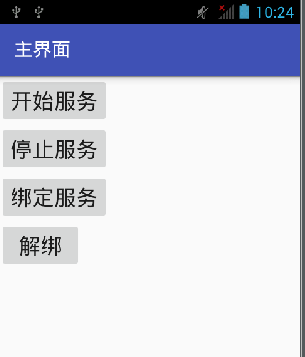
启动服务
- 点击开始服务

- 点击返回按键销毁Activity,我们发现服务仍在运行
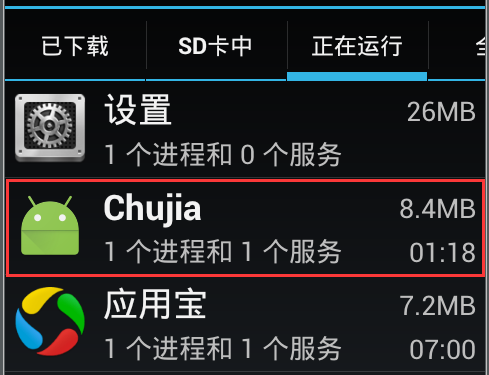
- 点击停止服务

绑定服务
- 点击绑定服务

- 点击返回按键销毁Activity,则会抛出异常并且有两方法被调用


通过对比我们发现startService开启的服务是独立运行的,而通过bindService开启的服务则依赖于Activity,但Activity被销毁时绑定的服务也被销毁了
android服务之启动方式的更多相关文章
- android activity的启动方式
1.Standard正常启动,默认的启动方式,没什么说头 2.SingleTop 意思就是在栈顶只能存在一个相同的activity 不能叠加,如果再A上继续启动A的话,只会调用A的onNewInten ...
- android service两种启动方式
android service的启动方式有以下两种: 1.Context.startService()方式启动,生命周期如下所示,启动时,startService->onCreate()-> ...
- Android service介绍和启动方式
1.Android service的作用: service通常是用来处理一些耗时操作,或后台执行不提供用户交互界面的操作,例如:下载.播放音乐. 2.Android service的生命周期: ser ...
- Android服务之PackageManagerService启动源码分析
了解了Android系统的启动过程的读者应该知道,Android的所有Java服务都是通过SystemServer进程启动的,并且驻留在SystemServer进程中.SystemServer进程在启 ...
- Android界面组件的四种启动方式
Android界面组件启动有四种方式 standard,singleTop,singleTask,singleInstance. standard:每次调用都会都会产生新的组件. singletop: ...
- Android Init进程命令的执行和服务的启动
这里开始分析init进程中配置文件的解析,在配置文件中的命令的执行和服务的启动. 首先init是一个可执行文件,它的对应的Makfile是init/Android.mk. Android.mk定义了i ...
- Android系统Surface机制的SurfaceFlinger服务的启动过程分析
文章转载至CSDN社区罗升阳的安卓之旅,原文地址:http://blog.csdn.net/luoshengyang/article/details/8022957 在前面一篇文章中,我们简要介绍了A ...
- Android Activity 的四种启动模式 lunchMode 和 Intent.setFlags();singleTask的两种启动方式。
原文:Android Activity 的四种启动模式 lunchMode 和 Intent.setFlags();singleTask的两种启动方式. Android Activity 的四种启动模 ...
- Hive 学习笔记(启动方式,内置服务)
一.Hive介绍 Hive是基于Hadoop的一个数据仓库,Hive能够将SQL语句转化为MapReduce任务进行运行. Hive架构图分为以下四部分. 1.用户接口 Hive有三个用户接口: 命令 ...
随机推荐
- /usr/include/sys/types.h:62: error: conflicting types for ‘dev_t’
/usr/include/sys/types.h:62: error: conflicting types for ‘dev_t’/usr/include/linux/types.h:13: erro ...
- JQuery入门——进度条
越来越觉得常规javascript已经跟不上节奏了,打算学点进阶的,从JQuery学起. JQuery是一个Javascript库,可以从JQuery.com下载,放到本地,用 <script ...
- linux 下 mysql 安装(不用编译的方式)
环境是centos6.x.相信其他的也大同小异.相对来说这种方式我用的比较多. 一些环境依赖表库: yum install perl yum install libaio 1)下载:在mysql的网站 ...
- 退役了退役了-AJAX
hi 昨晚打球悲剧的把脚崴了. 要知道,上一次崴脚是四年前:那一次伤的是左脚,也是我这么多年打篮球的生涯中,这么多次崴脚中,最严重的一次受伤.休息了整整一个月,受寝室兄弟们的无微不至的照顾,最后也买了 ...
- MMORPG大型游戏设计与开发(客户端架构 part15 of vegine)
一个接口需要统一的派生接口,这样做的好处在于能够统一的进行管理.我所知的脚本语言中,接口有多重接口,也还有所谓的虚基类,这些都是方便类的管理.在vengine(微引擎)中,统一的的接口管理为kerne ...
- NOIP2002pj产生数[floyd 高精度]
背景 给出一个整数 n(n<10^30) 和 k 个变换规则(k<=15). 规则:一位数可变换成另一个一位数:规则的右部不能为零. 例如:n=234.有规则(k=2):2-> 53 ...
- 怎么修改windows命令行字体大小
打开命令行窗口: 在标题栏处右键单击-->属性,然后更改即可
- LESS速查
注释 缓存式注释/*注释内容*/ 非缓存式注释//注释内容 变量 @nice-blue: #5B83AD; @light-blue: @nice-blue + #111; #header { col ...
- 在Ubuntu14.04下安装vsftp服务器
猜想在Ubuntu下搭建ftp服务器来实现windows和ubuntu下文件互传是一件很简单的事儿,但是在网上找了好几篇文章都不行,故自己在这里总结一下方法. 首先安装vsftp服务器 sudo ap ...
- JavaScript 各种页面跳转方法
第一种: window.location.href="login.jsp?backurl=\"+window.location.href; 第二种: alert("返回& ...