
springMVC之配置
1、项目结构

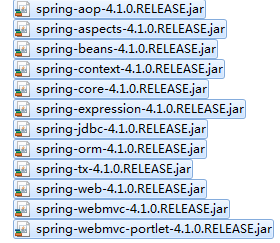
2、所需jar包
3、web.xml文件
<?xml version="1.0" encoding="UTF-8"?>

<web-app xmlns:xsi="http://www.w3.org/2001/XMLSchema-instance" xmlns="http://java.sun.com/xml/ns/javaee" xmlns:web="http://java.sun.com/xml/ns/javaee/web-app_2_5.xsd" xsi:schemaLocation="http://java.sun.com/xml/ns/javaee http://java.sun.com/xml/ns/javaee/web-app_3_0.xsd" id="WebApp_ID" version="3.0">

  <display-name>spring</display-name>

      <servlet>

        <servlet-name>springMVC</servlet-name>

        <servlet-class>org.springframework.web.servlet.DispatcherServlet</servlet-class>

        <init-param>

            <param-name>contextConfigLocation</param-name>

            <param-value>/WEB-INF/spring-config.xml</param-value>

        </init-param>

        <load-on-startup>1</load-on-startup>

    </servlet>

    <servlet-mapping>

        <servlet-name>springMVC</servlet-name>

        <url-pattern>/</url-pattern>

    </servlet-mapping>

  <welcome-file-list>

    <welcome-file>index.html</welcome-file>

    <welcome-file>index.htm</welcome-file>

    <welcome-file>index.jsp</welcome-file>

    <welcome-file>default.html</welcome-file>

    <welcome-file>default.htm</welcome-file>

    <welcome-file>default.jsp</welcome-file>

  </welcome-file-list>

</web-app>
load-on-startup:表示启动容器时初始化该Servlet;
url-pattern:表示哪些请求交给Spring Web MVC处理, “/” 是用来定义默认servlet映射的。也可以如“*.html”表示拦截所有以html为扩展名的请求。
自此请求已交给Spring Web MVC框架处理,因此我们需要配置Spring的配置文件,默认DispatcherServlet会加载WEB-INF/配置文件名.xml配置文件
4、spring配置文件
<?xml version="1.0" encoding="UTF-8"?>

<beans xmlns="http://www.springframework.org/schema/beans"

    xmlns:xsi="http://www.w3.org/2001/XMLSchema-instance" xmlns:oxm="http://www.springframework.org/schema/oxm"

    xmlns:context="http://www.springframework.org/schema/context"

    xmlns:aop="http://www.springframework.org/schema/aop" xmlns:tx="http://www.springframework.org/schema/tx"

    xsi:schemaLocation="http://www.springframework.org/schema/beans

       http://www.springframework.org/schema/beans/spring-beans-3.0.xsd

       http://www.springframework.org/schema/oxm

       http://www.springframework.org/schema/oxm/spring-oxm-3.0.xsd

       http://www.springframework.org/schema/context

       http://www.springframework.org/schema/context/spring-context-3.0.xsd

       http://www.springframework.org/schema/tx

        http://www.springframework.org/schema/tx/spring-tx-3.0.xsd

         http://www.springframework.org/schema/aop

         http://www.springframework.org/schema/aop/spring-aop-3.0.xsd">

    <!--  通知spring容器通过注解的方式装配bean -->

      <context:annotation-config />

    <!--  通知spring容器采用自动扫描机制查找注解的bean -->

      <context:component-scan base-package="com.*" />

    <bean id="viewResolver" class="org.springframework.web.servlet.view.UrlBasedViewResolver">

        <property name="viewClass"

            value="org.springframework.web.servlet.view.JstlView" />

        <property name="prefix" value="" />

        <property name="suffix" value=".jsp" />

    </bean>

</beans>
InternalResourceViewResolver:用于支持Servlet、JSP视图解析。
viewClass:JstlView表示JSP模板页面需要使用JSTL标签库,classpath中必须包含jstl的相关jar包。
prefix和suffix:查找视图页面的前缀和后缀(前缀[逻辑视图名]后缀),比如传进来的逻辑视图名为hello,则该该jsp视图页面应该存放在“WebRoot/*.jsp”。
5、Java代码
package com.controller;

import org.springframework.stereotype.Controller;

import org.springframework.ui.Model;

import org.springframework.web.bind.annotation.RequestMapping;

@Controller

public class ProductsController {

    @RequestMapping("/testSpringMVC")

    public String testSpringMVC(String name, Model model){

        System.out.println("name = "+name);

        model.addAttribute("name", name);

        return "success";

    }

}
6、视图页面
index.jsp
<%@ page language="java" import="java.util.*" pageEncoding="UTF-8"%>

<%

String path = request.getContextPath();

String basePath = request.getScheme()+"://"+request.getServerName()+":"+request.getServerPort()+path+"/";

%>

<!DOCTYPE HTML PUBLIC "-//W3C//DTD HTML 4.01 Transitional//EN">

<html>

  <head>

    <base href="<%=basePath%>">

  </head>

  <body>

    <form action="testSpringMVC" method="post">

          <input type="text" name="name">

        <input type="submit" value="确定">

    </form>  </body>

</html>
success.jsp
<%@ page language="java" import="java.util.*" pageEncoding="ISO-8859-1"%>

<%

String path = request.getContextPath();

String basePath = request.getScheme()+"://"+request.getServerName()+":"+request.getServerPort()+path+"/";

%>

<!DOCTYPE HTML PUBLIC "-//W3C//DTD HTML 4.01 Transitional//EN">

<html>

  <head>

    <base href="<%=basePath%>">

    <title>success</title>

  </head>

  <body>

    ${name},success. <br>

  </body>

</html>
7、报错
Caused by: java.lang.NoClassDefFoundError: javax/servlet/jsp/jstl/core/Config
at org.springframework.web.servlet.support.JstlUtils.exposeLocalizationContext(JstlUtils.java:101)
at org.springframework.web.servlet.view.JstlView.exposeHelpers(JstlView.java:135)
at org.springframework.web.servlet.view.InternalResourceView.renderMergedOutputModel(InternalResourceView.java:146)
at org.springframework.web.servlet.view.AbstractView.render(AbstractView.java:303)
at org.springframework.web.servlet.DispatcherServlet.render(DispatcherServlet.java:1228)
at org.springframework.web.servlet.DispatcherServlet.processDispatchResult(DispatcherServlet.java:1011)
at org.springframework.web.servlet.DispatcherServlet.doDispatch(DispatcherServlet.java:955)
解决方案1:选中工程,右键 --> Build Path --> Configure Build Path --> Libraries --> Add Libraries --> MyEclipse Libraries --> 选择一个jstl包引入
解决方案2:引入jstl.jar standard.jar两个包
springMVC之配置的更多相关文章
- SpringMVC、SpringMVC XML配置(纯XML方式)
1.引入SrpingMVC所使用的Java包: cglib-nodep-2.1_3.jar.commons-logging.jar.spring-aspects-4.1.7.RELEASE.jar.s ...
- Springmvc中配置Quartz使用,实现任务实时调度。
菜鸡的自我修炼,第一次接触quartz,做个记录.-------jstarseven 最近在项目中,第一次在springmvc中配置实用quartz,深刻的感受到quartz带来的方便,顺手做个记录. ...
- springMVC+Hibernate配置
本文描述下 sypro 项目中使用 springMVC+Hibernate配置,初学SpringMVC做下简单整理解. 1.web项目首先我们要使用 web.xml文件将 spring配置引入进来 & ...
- SpringMVC简单配置
SpringMVC简单配置 一.eclipse安装Spring插件 打开help下的Install New Software 点击add,location中输入http://dist.springso ...
- Idea简单SpringMVC框架配置
前边已经介绍过了Struts在Idea上的配置,相对于Struts来说,我觉得SpringMVC有更多的优势,首先Struts是需要对action进行配置,页面发送不同的请求,就需要配置不同的acti ...
- SpringMVC常用配置(二),最简洁的配置实现文件上传
Spring.SpringMVC持续介绍中,基础配置前面已经介绍了很多,如果小伙伴们还不熟悉可以参考这几篇文章: 1.Spring基础配置 2.Spring常用配置 3.Spring常用配置(二) 4 ...
- SpringMVC常用配置
关于Spring.SpringMVC我们前面几篇博客都介绍了很多,但是还不够,这些框架中涉及到的注解.配置非常多,那么我们今天再来介绍一个SpringMVC的基本配置,灵活的使用这些配置,可以让我们在 ...
- SpringMVC基础配置(通过注解配置,非xml配置)
SpringMVC是什么,有多火,我这里就不再啰嗦了,SpringMVC比Struts2好用太多,我在学校的时候私下里两种都接触过,对比之后果断选择了SpringMVC,后来在做Android应用开发 ...
- maven+springmvc的配置
1. 首先创建1个mavenweb项目 如果没有的话最好是去官网下载一个最新版本的eclipse 里面什么都有 maven/gradle 啥的 2. 选择路径 没啥影响 就是一个路径 默认就行 ...
- SpringMVC的配置和使用
SpringMVC的配置和使用 什么是SpringMVC? SpringMVC是Spring家族的一员,Spring是将现在开发中流行的组件进行组合而成的一个框架!它用在基于MVC的表现层开发,类似于 ...
随机推荐
- 为你解惑之WPF经典9问详解
本文解答了关于WPF的9个最常见的问题.从某种意义上讲,这两种技术是相互关联的:它们都是关于界面表现的技术,更进一步的,Silverlight是基于WPF的,是它的一个子集.不仅从理论上介绍了这两种技 ...
- NOIp 0910 爆零记
这套题是神犇chty出的. 刚拿到题的时候有点懵逼,因为按照一般的套路第一题都是一眼题,但是看到第一题后想了很多个算法和数据结构好像都不能很好的解决.然后就随手敲了个暴力去看T2. 嗯...文件名是b ...
- Centos7下搭建KVM虚拟机
PRE-INSTALL ============================================================= kvm相关安装包及其作用 qemu-kvm 主要的K ...
- spark操作elasticsearch数据的限制
对于复杂的数据类型,比如IP和GeoPoint,只是在elasticsearch中有效,用spark读取时会转换成常用的String类型. Geo types. It is worth mention ...
- Java数据结构——解析算术表达式
- C# Language Specification
https://msdn.microsoft.com/en-us/library/aa645596(v=vs.71).aspx
- 收缩菜单 css变样
// 收缩菜单 $("#leftMenu li h3").click(function(){ $v = $(this).next('.ajax').css('display'); ...
- yourphp的sql语句
1.插入单条数据 $data[0]['cardid'] = $_POST['cardid']; $data[0]['name'] = $_POST['name']; $data[0]['mobile' ...
- Google 谷歌网页搜索, 学术搜索
Google 谷歌网页搜索, 学术搜索 1. 网页搜索引擎-Google * https://letsgg.tk/ * https://google.kfd.me/ 谷歌搜索镜像: http://d ...
- UnExpected Error, Quitting
UnExpected Error, Quitting VB在win7 环境安装后,启动vb6.0弹出以上英文提示,目前解决方法: 下载动态库,放置于C:\ProgramFiles\Common Fil ...