
C4 文件和目录:APUE 笔记
C4: 文件和目录
本章主要讨论stat函数及其返回信息,通过修改stat结构字段,了解文件属性。
struct stat结构定义如下:
 struct stat

   {

     __dev_t st_dev;        /* Device.  */

 #ifndef __x86_64__

     unsigned short int __pad1;

 #endif

 #if defined __x86_64__ || !defined __USE_FILE_OFFSET64

     __ino_t st_ino;        /* File serial number.    */

 #else

     __ino_t __st_ino;            /* 32bit file serial number.    */

 #endif

 #ifndef __x86_64__

     __mode_t st_mode;            /* File mode.  */

     __nlink_t st_nlink;            /* Link count.  */

 #else

     __nlink_t st_nlink;        /* Link count.  */

     __mode_t st_mode;        /* File mode.  */

 #endif

     __uid_t st_uid;        /* User ID of the file's owner.    */

     __gid_t st_gid;        /* Group ID of the file's group.*/

 #ifdef __x86_64__

     int __pad0;

 #endif

     __dev_t st_rdev;        /* Device number, if device.  */

 #ifndef __x86_64__

     unsigned short int __pad2;

 #endif

 #if defined __x86_64__ || !defined __USE_FILE_OFFSET64

     __off_t st_size;            /* Size of file, in bytes.  */

 #else

     __off64_t st_size;            /* Size of file, in bytes.  */

 #endif

     __blksize_t st_blksize;    /* Optimal block size for I/O.  */

 #if defined __x86_64__  || !defined __USE_FILE_OFFSET64

     __blkcnt_t st_blocks;        /* Number 512-byte blocks allocated. */

 #else

     __blkcnt64_t st_blocks;        /* Number 512-byte blocks allocated. */

 #endif

 #ifdef __USE_XOPEN2K8

     /* Nanosecond resolution timestamps are stored in a format

        equivalent to 'struct timespec'.  This is the type used

        whenever possible but the Unix namespace rules do not allow the

        identifier 'timespec' to appear in the <sys/stat.h> header.

        Therefore we have to handle the use of this header in strictly

        standard-compliant sources special.  */

     struct timespec st_atim;        /* Time of last access.  */

     struct timespec st_mtim;        /* Time of last modification.  */

     struct timespec st_ctim;        /* Time of last status change.  */

 # define st_atime st_atim.tv_sec    /* Backward compatibility.  */

 # define st_mtime st_mtim.tv_sec

 # define st_ctime st_ctim.tv_sec

 #else

     __time_t st_atime;            /* Time of last access.  */

     __syscall_ulong_t st_atimensec;    /* Nscecs of last access.  */

     __time_t st_mtime;            /* Time of last modification.  */

     __syscall_ulong_t st_mtimensec;    /* Nsecs of last modification.  */

     __time_t st_ctime;            /* Time of last status change.  */

     __syscall_ulong_t st_ctimensec;    /* Nsecs of last status change.  */

 #endif

 #ifdef __x86_64__

     __syscall_slong_t __glibc_reserved[];

 #else

 # ifndef __USE_FILE_OFFSET64

     unsigned long int __glibc_reserved4;

     unsigned long int __glibc_reserved5;

 # else

     __ino64_t st_ino;            /* File serial number.    */

 # endif

 #endif

   };
1 函数stat、fstat、fstatat、lstat
获取文件属性,头文件 sys/stat.h。成功返回0,失败返回-1。
 /* Get file attributes for FILE and put them in BUF.  */

 extern int stat (const char *__restrict __file,

          struct stat *__restrict __buf) __THROW __nonnull ((, ));

 /* Get file attributes for the file, device, pipe, or socket

    that file descriptor FD is open on and put them in BUF.  */

 extern int fstat (int __fd, struct stat *__buf) __THROW __nonnull (());

 /* Get file attributes about FILE and put them in BUF.

    If FILE is a symbolic link, do not follow it.  */

 extern int lstat (const char *__restrict __file,

           struct stat *__restrict __buf) __THROW __nonnull ((, ));

 /* Similar to stat, get the attributes for FILE and put them in BUF.

    Relative path names are interpreted relative to FD unless FD is

    AT_FDCWD.  */

 # ifndef __USE_FILE_OFFSET64

 extern int fstatat (int __fd, const char *__restrict __file,

             struct stat *__restrict __buf, int __flag)

      __THROW __nonnull ((, ));
以上4个函数区别:
- stat返回文件名相关的文件属性
- fstat返回文件描述符相关的文件属性
- lastat与符号链接有关,如果输入参数文件名是一个文件链接,则返回符号链接的信息,而非文件信息
- fstatat为相对一个打开目录,flag参数控制是否跟随一个符号链接
2 文件类型
对应stat结构的字段 __mode_t st_mode; /* File mode. */
UNIX的文件类型有以下几种:
| 类型 | 类型识别宏 | 释义 |
| 普通文件 | S_ISREG() | 文本或者二进制文件 |
| 目录文件 | S_ISDIR() | 目录 |
| 块特殊文件 | S_ISBLK() | 此类型文件提供对设备带缓冲的访问 |
| 字符特殊文件 | S_ISCHR() | 此类型文件提供对设备不带缓冲的访问 |
| FIFO | S_ISFIFO() | 进程间通信,也称管道 |
| 套接字 | S_ISSOCK() | 网络通信 |
| 符号链接 | S_ISLINK() | 此类型文件指向另一个文件 |
用法为S_ISREG(stat.st_mode)
3 设置用户ID和组ID
注意,此为进程属性。
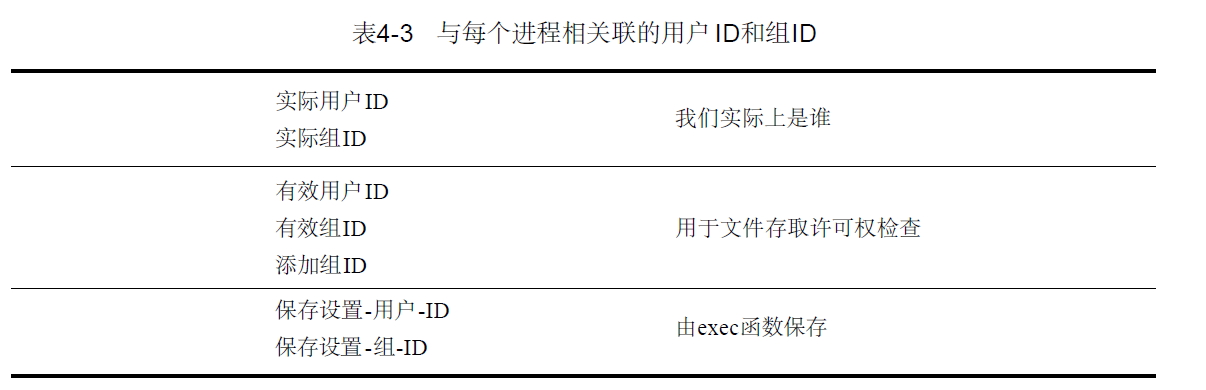
通常,进程的有效用户ID就是实际用户ID,有效组ID就是实际组ID。stat中的两个ID是文件拥有者ID和组ID
19 __uid_t st_uid; /* User ID of the file's owner. */
20 __gid_t st_gid; /* Group ID of the file's group.*/
4 文件访问权限
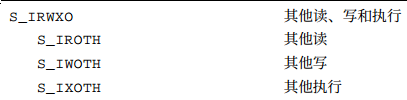
stat结构的st_mode也包含了文件的访问权限。文件都有9个访问权限位,stat.h中定义为9个宏,如下图:
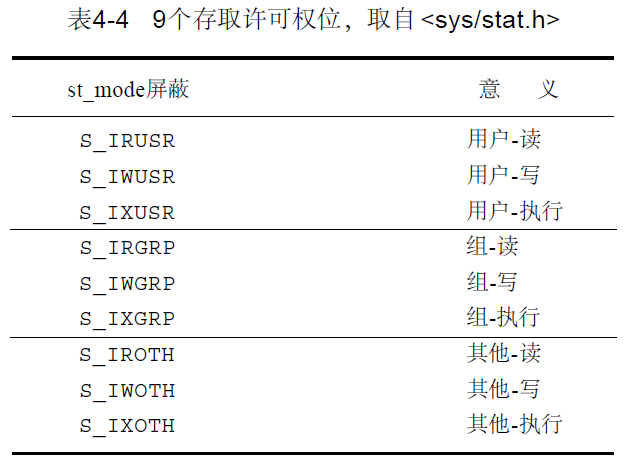
上图前3行,用户指文件所有者。用u表示用户,g表示组,o表示其他,与chmod命令保持一致。
文件权限规则:
- 执行权限:名字路径中的任一目录,包括它可能隐含的当前工作目录都应有执行权限。其中,目录读权限指的是访问目录内容(读目录文件列表),目录执行权限指的是搜索(通过该目录)
- 读权限:是否能够打开文件进行读操作
- 写权限:是否能够打开文件进行写操作。如果open中对一个文件制定O_TRUNK,则必须对该文件具有写权限
- 如需创建一个新文件,则必须对文件所在目录具有写权限和执行权限
- 如需删除一个文件,则必须对文件所在目录具有写权限和执行权限,对文件本身不需要有读写权限
文件有拥有者ID st_uid和拥有者组ID st_gid,此为文件属性。
进程有有效ID和组ID。
访问文件时,两组ID进行判断,觉得进程是否拥有文件使用权。规则为:
- 若进程的有效用户ID是0(超级用户),则允许访问
- 若进程的有效ID等于文件所有者ID,则允许访问
- 若进程的组ID等于文件所有者组ID,则允许访问
- 其他用户的访问权限位被设置,则允许访问,否则拒绝
创建新文件时
- 新文件的用户ID设置为进程有效用户ID
- 新文件的组ID可以设置为进程的有效组ID,或者是所在目录的组ID,依赖系统
5 函数access和faccessat
按照进程实际用户ID和实际组ID进行访问权限测试文件权限,头文件 unistd.h。成功返回0,失败返回-1
 /* Test for access to NAME using the real UID and real GID.  */

 extern int access (const char *__name, int __type) __THROW __nonnull (());

 /* Test for access to FILE relative to the directory FD is open on.

    If AT_EACCESS is set in FLAG, then use effective IDs like `eaccess',

    otherwise use real IDs like `access'.  */

 extern int faccessat (int __fd, const char *__file, int __type, int __flag)
操作类型为:
| 操作类型 | 说明 |
| F_OK | 测试文件是否存在 |
| R_OK | 测试读权限 |
| W_OK | 测试写权限 |
| X_OK | 测试执行权限 |
faccessat函数,如果flag设置为AT_EACCESS,访问检查用的是调用有效用户ID和有效组ID,而不是实际用户ID和实际组ID。
6 函数umask
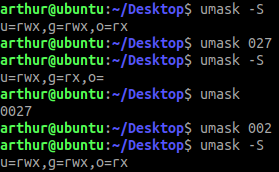
为进程设置文件模式创建屏蔽字,并返回之前的值。头文件sys/stat.h,返回之前的文件屏蔽字
 /* Set the file creation mask of the current process to MASK,

    and return the old creation mask.  */

 extern __mode_t umask (__mode_t __mask) __THROW;
参数mask为表4-4按位或运算得来。
7 函数chmod、fchmod、fchmodat
更改现有文件的访问权限,头文件sys/stat.h。成功返回0,失败返回-1。
 /* Set file access permissions for FILE to MODE.

    If FILE is a symbolic link, this affects its target instead.  */

 extern int chmod (const char *__file, __mode_t __mode)

      __THROW __nonnull (());

 /* Set file access permissions of the file FD is open on to MODE.  */

 #if defined __USE_POSIX199309 || defined __USE_XOPEN_EXTENDED

 extern int fchmod (int __fd, __mode_t __mode) __THROW;

 #endif

 /* Set file access permissions of FILE relative to

    the directory FD is open on.  */

 extern int fchmodat (int __fd, const char *__file, __mode_t __mode,

              int __flag)

      __THROW __nonnull (()) __wur;
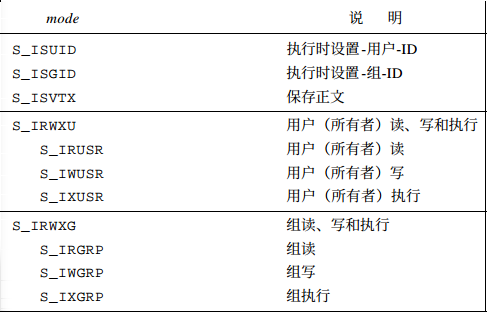
参数mode是下图所示常量的按位或。
8 函数chown、fchown、fchownat、lchown
用于改变文件的用户ID和组ID,头文件 unistd.h。成功返回0,失败返回-1。
 /* Change the owner and group of FILE.  */

 extern int chown (const char *__file, __uid_t __owner, __gid_t __group)

      __THROW __nonnull (()) __wur;

 /* Change the owner and group of the file that FD is open on.  */

 extern int fchown (int __fd, __uid_t __owner, __gid_t __group) __THROW __wur;

 /* Change the owner and group of FILE relative to the directory FD is open

    on.  */

 extern int fchownat (int __fd, const char *__file, __uid_t __owner,

              __gid_t __group, int __flag)

      __THROW __nonnull (()) __wur;

 /* Change owner and group of FILE, if it is a symbolic

    link the ownership of the symbolic link is changed.  */

 extern int lchown (const char *__file, __uid_t __owner, __gid_t __group)

      __THROW __nonnull (()) __wur;
如果两个参数中任意一个是-1,则对于ID不变。
9 文件长度
stat结构成员st_size表示以字节为单位的文件长度,此字段对普通文件、目录文件、符号链接有效。
10 函数truncate文件截断
可以改变文件长度,头文件unistd.h。成功返回0,失败返回-1。
 /* Truncate FILE to LENGTH bytes.  */

 # ifndef __USE_FILE_OFFSET64

 extern int truncate (const char *__file, __off_t __length)

      __THROW __nonnull (()) __wur;
11 函数link、linkat、unlink、unlinkat、remove
创建一个指向现有文件i节点的链接,头文件unistd.h。成功返回0,失败返回-1。
这种链接方式,直接指向文件i节点,使得文件i节点上的链接计数__nlink_t st_nlink; /* Link count. */增加。
 /* Make a link to FROM named TO.  */

 extern int link (const char *__from, const char *__to) __THROW __nonnull ((, )) __wur;

 /* Like link but relative paths in TO and FROM are interpreted relative

    to FROMFD and TOFD respectively.  */

 extern int linkat (int __fromfd, const char *__from, int __tofd, const char *__to, int __flags)

      __THROW __nonnull ((, )) __wu
unlink可以删除一个现有目录项,将所引文件的链接计数减1。成功返回0,失败返回-1。
 /* Remove the link NAME.  */

 extern int unlink (const char *__name) __THROW __nonnull (());

 /* Remove the link NAME relative to FD.  */

 extern int unlinkat (int __fd, const char *__name, int __flag)

      __THROW __nonnull (());
只有文件的链接计数达到0,文件的内容才可以被删除。
如果unlinkat的参数flag被设置为AT_REMOVEDIR时,unlinkat函数可以类似rmdir一样删除目录。
remove函数解除对一个文件或者目录的链接,头文件stdio.h。成功返回0,失败返回-1。
对于文件,remove的功能与unlink类似。对于目录,remove的功能与rmdir类似。
 /* Remove file FILENAME.  */

 extern int remove (const char *__filename) __THROW;
open\creat创建新临时文件后,立即调用unlink,可以保证临时文件在程序奔溃时也可以被删除。
12 函数rename、renameat
rename、renameat可用于对文件或者目录重命名,头文件stdio.h。成功返回0,失败返回-1。
 /* Rename file OLD to NEW.  */

 extern int rename (const char *__old, const char *__new) __THROW;

 /* Rename file OLD relative to OLDFD to NEW relative to NEWFD.  */

 extern int renameat (int __oldfd, const char *__old, int __newfd,   const char *__new) __THROW;
13 符号链接
符号链接比i节点的链接更加灵活,有以下两个原因:
- i节点链接通常要求链接和文件在同一文件系统
- 通常只有超级用户才能创建i节点的链接
可以用symlink或symlinkat函数创建一个符号链接,头文件unistd.h。成功返回0,失败返回-1。
 /* Make a symbolic link to FROM named TO.  */

 extern int symlink (const char *__from, const char *__to)

      __THROW __nonnull ((, )) __wur;

 /* Like symlink but a relative path in TO is interpreted relative to TOFD.  */

 extern int symlinkat (const char *__from, int __tofd,

               const char *__to) __THROW __nonnull ((, )) __wur;
函数创建一个指向from文件路径的新目录项to。
由于open方法访问符号链接时,将访问到符号链接引用的文件。为了访问符号链接本身,需要使用readlink和readlinkat函数,头文件unistd.h。成功返回读取的字节数,失败返回-1。
 /* Read the contents of the symbolic link PATH into no more than

    LEN bytes of BUF.  The contents are not null-terminated.

    Returns the number of characters read, or -1 for errors.  */

 extern ssize_t readlink (const char *__restrict __path,

              char *__restrict __buf, size_t __len)

      __THROW __nonnull ((, )) __wur;

 /* Like readlink but a relative PATH is interpreted relative to FD.  */

 extern ssize_t readlinkat (int __fd, const char *__restrict __path,

                char *__restrict __buf, size_t __len)

      __THROW __nonnull ((, )) __wur;
14 文件时间
stat结构有3个时间:
- struct timespec st_atim; /* Time of last access. */ 文件访问时间
- struct timespec st_mtim; /* Time of last modification. */ 文件修改时间,指的是文件内容被修改
- struct timespec st_ctim; /* Time of last status change. */ i节点状态变更时间,节点最后修改时间,如访问权限、用户ID、链接数等
文件访问时间和修改时间可以用futimens和utimensat函数更改,头文件sys/stat.h。成功返回0,失败返回-1。
 /* Set file access and modification times of the file associated with FD.  */

 extern int futimens (int __fd, const struct timespec __times[]) __THROW;

 /* Set file access and modification times relative to directory file

    descriptor.  */

 extern int utimensat (int __fd, const char *__path, const struct timespec __times[], int __flags) __THROW __nonnull (());
timespec结构定义为:
 struct timespec

 {

   __time_t tv_sec;        /* Seconds.  */

   __syscall_slong_t tv_nsec;    /* Nanoseconds.  */

 };
函数futimens数组参数的第一个元素包含访问时间,第二个参数包含修改时间。
- 如果times是空指针,则设置访问时间和修改时间为当前时间
- 如果times数组的任一元素tv_nsec为UTIME_NOW,则忽略tv_sec字段,时间戳设置为当前时间
- 如果times数组的任一元素tv_nsec为UTIME_OMIT,则忽略tv_sec字段,时间戳保持不变
- 如果times数组的任一元素tv_nsec不是UTIME_OMIT和TIME_NOW,则设置时间戳为tv_sec和tv_nsec
15 目录操作:创建、删除、读取、切换
使用函数mkdir、mkdirat、rmdir可以创建或者删除目录,头文件sys/stat.h。成功返回0,失败返回-1。
 /* Create a new directory named PATH, with permission bits MODE.  */

 extern int mkdir (const char *__path, __mode_t __mode)

      __THROW __nonnull (());

 /* Like mkdir, create a new directory with permission bits MODE.  But

    interpret relative PATH names relative to the directory associated

    with FD.  */

 extern int mkdirat (int __fd, const char *__path, __mode_t __mode)

      __THROW __nonnull (());

 /* Remove the directory PATH.  */

 extern int rmdir (const char *__path) __THROW __nonnull (());
注意:
- 创建目录至少应该指定一个执行权限位
- rmdir只能删除空目录
对某一目录具有访问权限的任一用户都可以读目录,但是只有内核才可以写目录。目录操作头文件dirent.h。
 /* Open a directory stream on NAME.

    Return a DIR stream on the directory, or NULL if it could not be opened.

    This function is a possible cancellation point and therefore not

    marked with __THROW.  */

 extern DIR *opendir (const char *__name) __nonnull (());

 /* Same as opendir, but open the stream on the file descriptor FD.

    This function is a possible cancellation point and therefore not

    marked with __THROW.  */

 extern DIR *fdopendir (int __fd);

 /* Read a directory entry from DIRP.  Return a pointer to a `struct

    dirent' describing the entry, or NULL for EOF or error.  The

    storage returned may be overwritten by a later readdir call on the

    same DIR stream.

    If the Large File Support API is selected we have to use the

    appropriate interface.

    This function is a possible cancellation point and therefore not

    marked with __THROW.  */

 extern struct dirent *readdir (DIR *__dirp) __nonnull (());

 /* Rewind DIRP to the beginning of the directory.  */

 extern void rewinddir (DIR *__dirp) __THROW __nonnull (());

 /* Close the directory stream DIRP.

    Return 0 if successful, -1 if not.

    This function is a possible cancellation point and therefore not

    marked with __THROW.  */

 extern int closedir (DIR *__dirp) __nonnull (());

 /* Return the current position of DIRP.  */

 extern long int telldir (DIR *__dirp) __THROW __nonnull (());

 /* Seek to position POS on DIRP.  */

 extern void seekdir (DIR *__dirp, long int __pos) __THROW __nonnull (());
每个进程都有一个初始工作目录。起始目录是登录名的属性,而当前工作目录是进程的属性。
使用chdir可以切换当前工作目录,头文件unistd.h。成功返回0,失败返回-1。
 /* Change the process's working directory to PATH.  */

 extern int chdir (const char *__path) __THROW __nonnull (()) __wur;

 /* Change the process's working directory to the one FD is open on.  */

 extern int fchdir (int __fd) __THROW __wur;
使用getcwd可以获取当前工作目录,头文件unistd.h。成功返回0,失败返回-1。
 /* Get the pathname of the current working directory,

    and put it in SIZE bytes of BUF.  Returns NULL if the

    directory couldn't be determined or SIZE was too small.

    If successful, returns BUF.  In GNU, if BUF is NULL,

    an array is allocated with `malloc'; the array is SIZE

    bytes long, unless SIZE == 0, in which case it is as

    big as necessary.  */

 extern char *getcwd (char *__buf, size_t __size) __THROW __wur;
C4 文件和目录:APUE 笔记的更多相关文章
- linux文件权限目录配置笔记
###linux 文件权限目录配置笔记 ---------- 多人多任务环境 linux 一般将文件可存取的身份分为三个类别:owner group others Permission deny ls ...
- linux文件与目录管理笔记
### Linux文件与目录管理 ---------- 绝对路径: / 相对路径:不以/开头的 当前目录 . 上一个工作目录 - 用户主目录 ~ root账户的主目录是/root 其他用户是/home ...
- C3 文件IO:APUE 笔记
C3:文件IO 1 引言 本章描述的函数被成为不带缓冲的IO,涉及5个函数:open.read.write.lseek.close. 文件控制:dup.sync.fsync.fdatasync.fcn ...
- apue学习笔记(第四章 文件和目录)
本章将描述文件系统的其他特性和文件的性质. 函数stat.fstat.fstatat和lstat #include <sys/stat.h> int stat(const char *re ...
- APUE 学习笔记(三) 文件和目录
1. 文件类型 文件类型信息包含在 struct stat 里的 st_mode 成员 (1)普通文件,unix内核并不区分文本文件和二进制文件 (2)目录文件,这种文件包含了其他文件的名字以及指向这 ...
- APUE学习笔记3——文件和目录
1 简介 之前学习了执行I/O操作的基本函数,主要是围绕普通文件I/O的打开.读或写.下面继续学习Unix文件系统的其他特征和文件的基本性质.我们将从stat函数开始,了解stat结构所代表的文件属性 ...
- 《UNIX环境高级编程》(APUE) 笔记第四章 - 文件和目录
4 - 文件和目录 1. 函数 stat.fstat.fstatat 和 lstat #inlcude <sys/stat.h> int stat(const char *restrict ...
- emacs 新手笔记(四) —— 使用 dired 完成一些简单的文件和目录操作
ilocker:关注 Android 安全(新入行,0基础) QQ: 2597294287 据说熟悉了 dired,就可以在 emacs 下轻松管理文件和目录了,甚至不再需要 shell 和桌面操作. ...
- (三) 一起学 Unix 环境高级编程 (APUE) 之 文件和目录
. . . . . 目录 (一) 一起学 Unix 环境高级编程 (APUE) 之 标准IO (二) 一起学 Unix 环境高级编程 (APUE) 之 文件 IO (三) 一起学 Unix 环境高级编 ...
随机推荐
- java_基础——用代码编译.java文件+加载class文件
[本文介绍] 本文不是深入理解和使用java编译器,只是在代码里编译.java文件的helloWorld.这种技术还是蛮有意思的,说不定在将来的某些只能化项目会运用到!^_^ [简单编译的流程] [j ...
- TQ2440系统介绍入门 、linux系统目录结构
TQ2440开发板系统安装步骤: 1.先用JTAG线安装BIOS到开发板.下载BIOS,NOR/NAND开关选在NOR位置. 2.linux安装步骤: (1).格式化分区 (2).安装BIOS---& ...
- git零散知识
集中式与分布式的差别: 集中式的服务器挂了所有人都挂了,因为完整仓库只存在服务器上,分布式如果github挂了你可以重新建一个服务器,然后把任何一个人的仓库clone过去 一句话总结:分布式版本控制的 ...
- PAT 1089 Insert or Merge[难]
1089 Insert or Merge (25 分) According to Wikipedia: Insertion sort iterates, consuming one input ele ...
- MongoDB的固定集合
一.MongoDB固定集合概念 固定集合指的是事先创建,并且大小固定的集合.即假设一个集合设置了固定大小为100,再添加一条文档的时候,会把最前面的文档剔除,永远只保留100条数据. 固定集合特性:固 ...
- kettle配置命名参数
bat 调度文件如下 cd D:/Program Files/kettle700/data-integrationKitchen.bat /rep repository /dir /TEST /job ...
- C++学习笔记-隐式成员函数
通过一个例子来复习C++操作符重载及隐式成员函数.MyString类模仿标准string类,简单的实现了构造一个字符串.字符串比较.取单个字符等功能.如下: #ifndef MYSTRING_H_ # ...
- (转)VC串口小程序(用SerialPort类)
××××××××××××××××××××××××××××××××××××××××××××××××××××× 在MFC里面实现串口通讯有很多方式: 方案一:使用微软公司提供的 串口类,SerialPor ...
- Java 为什么要使用反射(通俗易懂的举例)
Java反射最大的好处就是能在运行期间,获得某个类的结构.成员变量,用来实例化. 下列是具体使用场景:假如我们有两个程序员,一个程序员在写程序的时候,需要使用第二个程序员所写的类,但第二个程序员并没完 ...
- Eclipse 导入Maven 项目报错
新建Maven项目时出错:org.apache.maven.archiver.MavenArchiver.getManifest 新建Maven项目时出错:org.apache.maven.arc ...