
Validated 注解完成 Spring Boot 参数校验
1. @Valid 和 @Validated
- 声明式校验
- 分组检验
- 嵌套校验
2. 常用注解
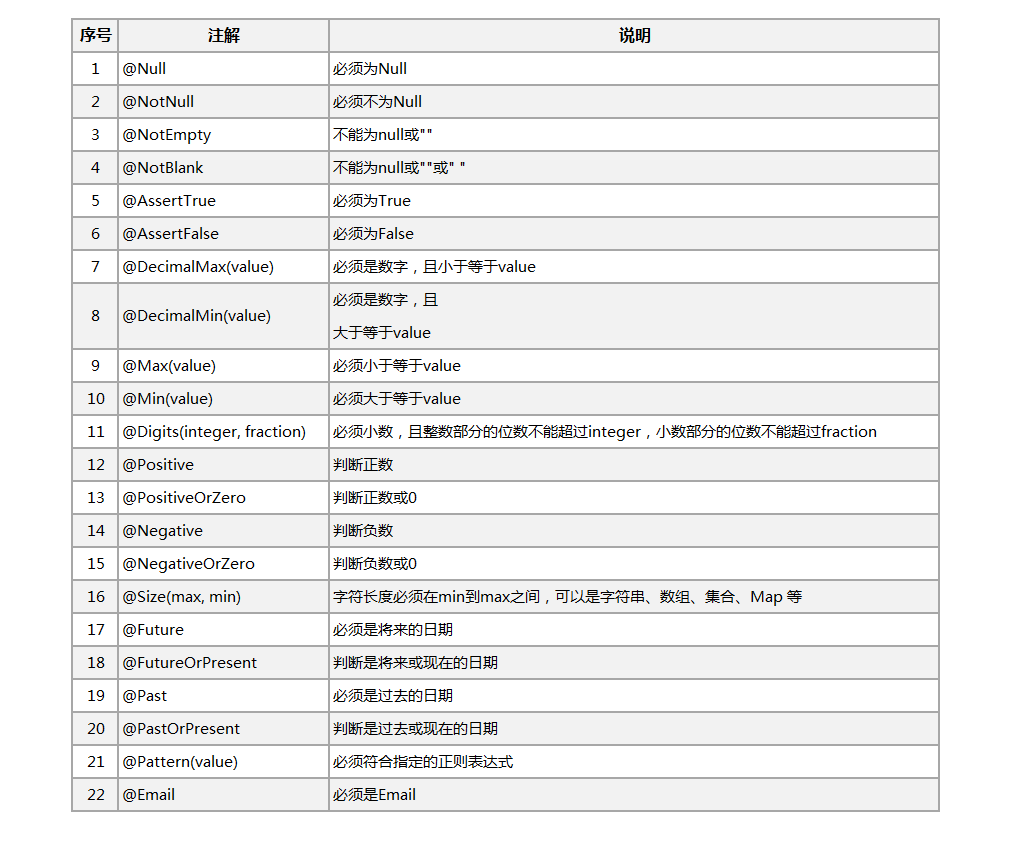
3. 快速入门
- 创建Maven项目
- 修改pom.xml
 1 <project xmlns="http://maven.apache.org/POM/4.0.0"

 2     xmlns:xsi="http://www.w3.org/2001/XMLSchema-instance"

 3     xsi:schemaLocation="http://maven.apache.org/POM/4.0.0 http://maven.apache.org/xsd/maven-4.0.0.xsd">

 4     <modelVersion>4.0.0</modelVersion>

 5     <groupId>com.c3stones</groupId>

 6     <artifactId>spring-boot-validated-demo</artifactId>

 7     <version>0.0.1-SNAPSHOT</version>

 8     <name>spring-boot-validated-demo</name>

 9     <description>Spring Boot Validated Demo</description>

10

11     <parent>

12         <groupId>org.springframework.boot</groupId>

13         <artifactId>spring-boot-starter-parent</artifactId>

14         <version>2.1.4.RELEASE</version>

15     </parent>

16

17     <properties>

18         <java.version>1.8</java.version>

19     </properties>

20

21     <dependencies>

22            <dependency>

23             <groupId>org.projectlombok</groupId>

24             <artifactId>lombok</artifactId>

25         </dependency>

26         <dependency>

27             <groupId>org.springframework.boot</groupId>

28             <artifactId>spring-boot-starter-web</artifactId>

29         </dependency>

30         <dependency>

31             <groupId>org.springframework.boot</groupId>

32             <artifactId>spring-boot-starter-test</artifactId>

33             <scope>test</scope>

34         </dependency>

35     </dependencies>

36

37 </project>
- 创建启动类
import org.springframework.boot.SpringApplication;

import org.springframework.boot.autoconfigure.SpringBootApplication;

@SpringBootApplication

public class Application {

    public static void main(String[] args) {

        SpringApplication.run(Application.class, args);

    }

}
- 创建DTO
 1 import javax.validation.constraints.NotEmpty;

 2 import javax.validation.constraints.Pattern;

 3

 4 import org.hibernate.validator.constraints.Length;

 5

 6 import lombok.Data;

 7

 8 /**

 9  * 用户保存DTO

10  *

11  */

12 @Data

13 public class UserSaveDto {

14

15     /**

16      * 用户名称

17      */

18     @NotEmpty(message = "用户名称不能为空")

19     @Length(min = 6, max = 12, message = "账号长度为 6-12 位")

20     @Pattern(regexp = "^[A-Za-z0-9]+$", message = "用户名称格式为数字或字母")

21     private String username;

22

23     /**

24      * 密码

25      */

26     @NotEmpty(message = "密码不能为空")

27     @Length(min = 6, max = 18, message = "密码长度为 6-18 位")

28     private String password;

29 }
- 创建Controller
 1 import javax.validation.Valid;

 2 import javax.validation.constraints.Min;

 3

 4 import org.slf4j.Logger;

 5 import org.slf4j.LoggerFactory;

 6 import org.springframework.validation.annotation.Validated;

 7 import org.springframework.web.bind.annotation.GetMapping;

 8 import org.springframework.web.bind.annotation.PostMapping;

 9 import org.springframework.web.bind.annotation.RequestMapping;

10 import org.springframework.web.bind.annotation.RequestParam;

11 import org.springframework.web.bind.annotation.RestController;

12

13 import com.c3stones.dto.UserSaveDto;

14

15 @RestController

16 @RequestMapping("/user")

17 @Validated

18 public class UserController {

19

20     private Logger logger = LoggerFactory.getLogger(getClass());

21

22     @GetMapping("/get")

23     public String get(@RequestParam("id") @Min(value = 1L, message = "id必须大于0") Integer id) {

24         logger.info("获取用户信息,id:" + id);

25         return "get success";

26     }

27

28     @PostMapping("/save")

29     public String save(@Valid UserSaveDto saveDto) {

30         logger.info("保存用户信息:", saveDto.toString());

31         return "save success";

32     }

33

34 }
- 启动项目
- 测试get方法
 1 curl -X GET "http://localhost:8080/user/get?id=0"

 2 #返回:

 3 {

 4     "timestamp": "2020-05-20T03:27:23.667+0000",

 5     "status": 500,

 6     "error": "Internal Server Error",

 7     "message": "get.id: id必须大于0",

 8     "path": "/user/get"

 9 }

10

11 curl -X GET "http://localhost:8080/user/get?id=1"

12 #返回:

13 get success
- 测试save方法
 1 curl -X POST "http://localhost:8080/user/save?username=test&password=123"

 2 #返回:

 3 {

 4     "timestamp": "2020-05-20T03:29:46.684+0000",

 5     "status": 400,

 6     "error": "Bad Request",

 7     "errors": [

 8         {

 9             "codes": [

10                 "Length.userSaveDto.username",

11                 "Length.username",

12                 "Length.java.lang.String",

13                 "Length"

14             ],

15             "arguments": [

16                 {

17                     "codes": [

18                         "userSaveDto.username",

19                         "username"

20                     ],

21                     "arguments": null,

22                     "defaultMessage": "username",

23                     "code": "username"

24                 },

25                 12,

26                 6

27             ],

28             "defaultMessage": "账号长度为 6-12 位",

29             "objectName": "userSaveDto",

30             "field": "username",

31             "rejectedValue": "test",

32             "bindingFailure": false,

33             "code": "Length"

34         },

35         {

36             "codes": [

37                 "Length.userSaveDto.password",

38                 "Length.password",

39                 "Length.java.lang.String",

40                 "Length"

41             ],

42             "arguments": [

43                 {

44                     "codes": [

45                         "userSaveDto.password",

46                         "password"

47                     ],

48                     "arguments": null,

49                     "defaultMessage": "password",

50                     "code": "password"

51                 },

52                 18,

53                 6

54             ],

55             "defaultMessage": "密码长度为 6-18 位",

56             "objectName": "userSaveDto",

57             "field": "password",

58             "rejectedValue": "123",

59             "bindingFailure": false,

60             "code": "Length"

61         }

62     ],

63     "message": "Validation failed for object='userSaveDto'. Error count: 2",

64     "path": "/user/save"

65 }

66

67 curl -X POST "http://localhost:8080/user/save?username=test001&password=123456"

68 #返回:

69 save success
4. 分组校验
- 编写实体类
 1 import javax.validation.constraints.NotEmpty;

 2 import javax.validation.constraints.NotNull;

 3

 4 import lombok.AllArgsConstructor;

 5 import lombok.Data;

 6 import lombok.NoArgsConstructor;

 7

 8 /**

 9  * 用户

10  *

11  */

12 @Data

13 @NoArgsConstructor

14 @AllArgsConstructor

15 public class User {

16

17     /**

18      * 用户保存分组

19      *

20      */

21     public interface UserSaveGroup {

22     }

23

24     /**

25      * 用户更新分组

26      *

27      */

28     public interface UserUpdateGroup {

29     }

30

31     /**

32      * ID

33      */

34     @NotNull(message = "ID不能为空", groups = { UserUpdateGroup.class })

35     private Integer id;

36

37     /**

38      * 用户名称

39      */

40     @NotEmpty(message = "用户名称不能为空", groups = { UserSaveGroup.class, UserUpdateGroup.class })

41     private String username;

42

43     /**

44      * 密码

45      */

46     @NotEmpty(message = "密码不能为空", groups = { UserSaveGroup.class, UserUpdateGroup.class })

47     private String password;

48 }
- Controller添加方法
 1 @PostMapping("/saveUser")

 2 public String saveUser(@Validated({ UserSaveGroup.class }) User user) {

 3     logger.info("保存用户信息:", user.toString());

 4     return "saveUser success";

 5 }

 6

 7 @PutMapping("/updateUser")

 8 public String updateUser(@Validated({ UserUpdateGroup.class }) User user) {

 9     logger.info("更新用户信息:", user.toString());

10     return "updateUser success";

11 }
- 测试UserSaveGroup分组
 1 curl -X POST "http://localhost:8080/user/saveUser"

 2 #返回:

 3 {

 4     "timestamp": "2020-05-20T03:45:15.357+0000",

 5     "status": 400,

 6     "error": "Bad Request",

 7     "errors": [

 8         {

 9             "codes": [

10                 "NotEmpty.user.password",

11                 "NotEmpty.password",

12                 "NotEmpty.java.lang.String",

13                 "NotEmpty"

14             ],

15             "arguments": [

16                 {

17                     "codes": [

18                         "user.password",

19                         "password"

20                     ],

21                     "arguments": null,

22                     "defaultMessage": "password",

23                     "code": "password"

24                 }

25             ],

26             "defaultMessage": "密码不能为空",

27             "objectName": "user",

28             "field": "password",

29             "rejectedValue": null,

30             "bindingFailure": false,

31             "code": "NotEmpty"

32         },

33         {

34             "codes": [

35                 "NotEmpty.user.username",

36                 "NotEmpty.username",

37                 "NotEmpty.java.lang.String",

38                 "NotEmpty"

39             ],

40             "arguments": [

41                 {

42                     "codes": [

43                         "user.username",

44                         "username"

45                     ],

46                     "arguments": null,

47                     "defaultMessage": "username",

48                     "code": "username"

49                 }

50             ],

51             "defaultMessage": "用户名称不能为空",

52             "objectName": "user",

53             "field": "username",

54             "rejectedValue": null,

55             "bindingFailure": false,

56             "code": "NotEmpty"

57         }

58     ],

59     "message": "Validation failed for object='user'. Error count: 2",

60     "path": "/user/saveUser"

61 }

62

63 curl -X POST "http://localhost:8080/user/saveUser?username=zhangsan&password=123456"

64 #返回:

65 saveUser success
- 测试UserUpdateGroup分组
 1 curl -X PUT "http://localhost:8080/user/updateUser"

 2 #返回:

 3 {

 4     "timestamp": "2020-05-20T03:52:01.350+0000",

 5     "status": 400,

 6     "error": "Bad Request",

 7     "errors": [

 8         {

 9             "codes": [

10                 "NotEmpty.user.username",

11                 "NotEmpty.username",

12                 "NotEmpty.java.lang.String",

13                 "NotEmpty"

14             ],

15             "arguments": [

16                 {

17                     "codes": [

18                         "user.username",

19                         "username"

20                     ],

21                     "arguments": null,

22                     "defaultMessage": "username",

23                     "code": "username"

24                 }

25             ],

26             "defaultMessage": "用户名称不能为空",

27             "objectName": "user",

28             "field": "username",

29             "rejectedValue": null,

30             "bindingFailure": false,

31             "code": "NotEmpty"

32         },

33         {

34             "codes": [

35                 "NotNull.user.id",

36                 "NotNull.id",

37                 "NotNull.java.lang.Integer",

38                 "NotNull"

39             ],

40             "arguments": [

41                 {

42                     "codes": [

43                         "user.id",

44                         "id"

45                     ],

46                     "arguments": null,

47                     "defaultMessage": "id",

48                     "code": "id"

49                 }

50             ],

51             "defaultMessage": "ID不能为空",

52             "objectName": "user",

53             "field": "id",

54             "rejectedValue": null,

55             "bindingFailure": false,

56             "code": "NotNull"

57         },

58         {

59             "codes": [

60                 "NotEmpty.user.password",

61                 "NotEmpty.password",

62                 "NotEmpty.java.lang.String",

63                 "NotEmpty"

64             ],

65             "arguments": [

66                 {

67                     "codes": [

68                         "user.password",

69                         "password"

70                     ],

71                     "arguments": null,

72                     "defaultMessage": "password",

73                     "code": "password"

74                 }

75             ],

76             "defaultMessage": "密码不能为空",

77             "objectName": "user",

78             "field": "password",

79             "rejectedValue": null,

80             "bindingFailure": false,

81             "code": "NotEmpty"

82         }

83     ],

84     "message": "Validation failed for object='user'. Error count: 3",

85     "path": "/user/updateUser"

86 }

87

88 curl -X PUT "http://localhost:8080/user/updateUser?id=1001&username=zhangsan&password=123123"

89 #返回:

90 updateUser success
5. 国际化配置
- 配置文件中添加
1 spring:

2 # i18 message 配置,对应 MessageSourceProperties 配置类

3    messages:

4       basename: i18n/messages # 文件路径基础名

5       encoding: UTF-8 # 使用 UTF-8 编码
- 在项目resource目录下创建i18n文件夹
- 在i18n中添加国际化配置文件
messages.properties
1 Goods.id.NotNull=商品ID不能为空
messages_en.properties
1 Goods.id.NotNull=Goods id cannot be empty
messages_ja.properties
1 Goods.id.NotNull=商品IDは空にできません
- 创建实体
 1 import javax.validation.constraints.NotNull;

 2

 3 import lombok.AllArgsConstructor;

 4 import lombok.Data;

 5 import lombok.NoArgsConstructor;

 6

 7 /**

 8  * 商品

 9  *

10  */

11 @Data

12 @NoArgsConstructor

13 @AllArgsConstructor

14 public class Goods {

15

16     /**

17      * 商品ID

18      */

19     @NotNull(message = "{Goods.id.NotNull}")

20     private Integer id;

21

22     /**

23      * 商品名称

24      */

25     private String name;

26 }
- 创建Controller
 1 import javax.validation.Valid;

 2

 3 import org.slf4j.Logger;

 4 import org.slf4j.LoggerFactory;

 5 import org.springframework.validation.annotation.Validated;

 6 import org.springframework.web.bind.annotation.PostMapping;

 7 import org.springframework.web.bind.annotation.RequestMapping;

 8 import org.springframework.web.bind.annotation.RestController;

 9

10 import com.c3stones.entity.Goods;
11

12 @RestController

13 @RequestMapping("/goods")

14 @Validated

15 public class GoodsController {

16

17     private Logger logger = LoggerFactory.getLogger(getClass());

18

19     @PostMapping("/save")

20     public String save(@Valid Goods goods) {

21         logger.info("保存商品信息:", goods.toString());

22         return "save success";

23     }

24

25 }
- 测试(通过头部指定 Accept-Language 参数)
  1 #测试默认中文

  2 curl -X POST "http://localhost:8080/goods/save"

  3 #返回:

  4 {

  5     "timestamp": "2020-05-20T04:15:59.417+0000",

  6     "status": 400,

  7     "error": "Bad Request",

  8     "errors": [

  9         {

 10             "codes": [

 11                 "NotNull.goods.id",

 12                 "NotNull.id",

 13                 "NotNull.java.lang.Integer",

 14                 "NotNull"

 15             ],

 16             "arguments": [

 17                 {

 18                     "codes": [

 19                         "goods.id",

 20                         "id"

 21                     ],

 22                     "arguments": null,

 23                     "defaultMessage": "id",

 24                     "code": "id"

 25                 }

 26             ],

 27             "defaultMessage": "商品ID不能为空",

 28             "objectName": "goods",

 29             "field": "id",

 30             "rejectedValue": null,

 31             "bindingFailure": false,

 32             "code": "NotNull"

 33         }

 34     ],

 35     "message": "Validation failed for object='goods'. Error count: 1",

 36     "path": "/goods/save"

 37 }

 38

 39 #测试英文

 40 curl -X POST -H "Accept-Language:en" "http://localhost:8080/goods/save"

 41 #返回:

 42 {

 43     "timestamp": "2020-05-20T04:16:15.078+0000",

 44     "status": 400,

 45     "error": "Bad Request",

 46     "errors": [

 47         {

 48             "codes": [

 49                 "NotNull.goods.id",

 50                 "NotNull.id",

 51                 "NotNull.java.lang.Integer",

 52                 "NotNull"

 53             ],

 54             "arguments": [

 55                 {

 56                     "codes": [

 57                         "goods.id",

 58                         "id"

 59                     ],

 60                     "arguments": null,

 61                     "defaultMessage": "id",

 62                     "code": "id"

 63                 }

 64             ],

 65             "defaultMessage": "Goods id cannot be empty",

 66             "objectName": "goods",

 67             "field": "id",

 68             "rejectedValue": null,

 69             "bindingFailure": false,

 70             "code": "NotNull"

 71         }

 72     ],

 73     "message": "Validation failed for object='goods'. Error count: 1",

 74     "path": "/goods/save"

 75 }

 76

 77 #测试日文

 78 curl -X POST -H "Accept-Language:ja" "http://localhost:8080/goods/save"

 79 #返回:

 80 {

 81     "timestamp": "2020-05-20T04:16:35.011+0000",

 82     "status": 400,

 83     "error": "Bad Request",

 84     "errors": [

 85         {

 86             "codes": [

 87                 "NotNull.goods.id",

 88                 "NotNull.id",

 89                 "NotNull.java.lang.Integer",

 90                 "NotNull"

 91             ],

 92             "arguments": [

 93                 {

 94                     "codes": [

 95                         "goods.id",

 96                         "id"

 97                     ],

 98                     "arguments": null,

 99                     "defaultMessage": "id",

100                     "code": "id"

101                 }

102             ],

103             "defaultMessage": "商品IDは空にできません",

104             "objectName": "goods",

105             "field": "id",

106             "rejectedValue": null,

107             "bindingFailure": false,

108             "code": "NotNull"

109         }

110     ],

111     "message": "Validation failed for object='goods'. Error count: 1",

112     "path": "/goods/save"

113 }
6. 项目地址
Validated 注解完成 Spring Boot 参数校验的更多相关文章
- Spring Boot 参数校验
1.背景介绍 开发过程中,后台的参数校验是必不可少的,所以经常会看到类似下面这样的代码 这样写并没有什么错,还挺工整的,只是看起来不是很优雅而已. 接下来,用Validation来改写这段 2.Spr ...
- Spring Boot参数校验
1. 概述 作为接口服务提供方,非常有必要在项目中加入参数校验,比如字段非空,字段长度限制,邮箱格式验证等等,数据校验常用到概念:JSR303/JSR-349: JSR303是一项标准,只提供规范不提 ...
- spring boot输入数据校验(validation)
Spring Boot 集成教程 Spring Boot 介绍 Spring Boot 开发环境搭建(Eclipse) Spring Boot Hello World (restful接口)例子 sp ...
- spring mvc注解和spring boot注解
1 spring mvc和spring boot之间的关系 spring boot包含spring mvc.所以,spring mvc的注解在spring boot总都是可以用的吗? spring b ...
- spring boot 参数传递(spring boot 参数传数 arg0 每一个参数 arg0#{arg0},arg1 #{arg1})
spring boot 参数传数 arg0 每一个参数 arg0#{arg0},arg1 #{arg1} @Select("select * from sys_user where nam ...
- 使用AOP+自定义注解完成spring boot的接口权限校验
记使用AOP+自定义注解完成接口的权限校验,代码如下: pom文件添加所需依赖: 1 <dependency> 2 <groupId>org.aspectj</group ...
- Spring boot validation校验
使用 Hibernate validator 的步骤:1. 在 Pojo 类的字段上, 加上 Hibernate validator 注解2. 在Controller 函数的形参前加上 @Valid ...
- spring boot参数验证
必须要知道 简述 JSR303/JSR-349,hibernate validation,spring validation 之间的关系 JSR303 是一项标准,JSR-349 是其的升级版本,添加 ...
- Spring Boot (一) 校验表单重复提交
一.前言 在某些情况下,由于网速慢,用户操作有误(连续点击两下提交按钮),页面卡顿等原因,可能会出现表单数据重复提交造成数据库保存多条重复数据. 存在如上问题可以交给前端解决,判断多长时间内不能再次点 ...
随机推荐
- 使用XSL解析XML输出HTML(XSL学习笔记一)
最近项目用到 XSL + XML,XML大家应该很熟悉,XSL暂且不解释,先看效果,如果想学习XSL的内容,可以先访问: https://www.w3school.com.cn/xsl/xsl_lan ...
- Gulp自动化构建的基本使用
Study Notes 本博主会持续更新各种前端的技术,如果各位道友喜欢,可以关注.收藏.点赞下本博主的文章. Gulp 用自动化构建工具增强你的工作流程! gulp 将开发流程中让人痛苦或耗时的任务 ...
- 凭借着这份Spring面试题,我拿到了阿里,字节跳动美团的offer!
一般问题 1.1. 不同版本的 Spring Framework 有哪些主要功能? 1.2. 什么是 Spring Framework? Spring 是一个开源应用框架,旨在降低应用程序开发 ...
- 标准库之collections
collections 模块----Python标准库,是数据结构常用模块 常用类型有: 计数器(Counter) dict的子类,计算可hash的对象: 双端队列(deque) 类似于list ...
- 详解FL Studio压缩器——Fruity Limiter(下)
Hello!小伙伴们又见面啦-接上一篇,本篇咱们继续讲解音乐编曲软件FL Studio20压缩器内容. 包络"ENVELOPE"中包含三个旋钮,它们都有什么作用呢?一起来揭晓吧! ...
- 合并2个数组为1个无重复元素的有序数组--Go对比Python
Go实现: 1 package main 2 3 import ( 4 "fmt" 5 "sort" 6 ) 7 8 func main() { 9 var a ...
- java工作两年了,连myBatis中的插件机制都玩不懂,那你工作危险了!
插件的配置与使用 在mybatis-config.xml配置文件中配置plugin结点,比如配置一个自定义的日志插件LogInterceptor和一个开源的分页插件PageInterceptor: & ...
- 自定义JSTL Tag
<?xml version="1.0" encoding="UTF-8" ?> <taglib xmlns="http://java ...
- Visual Studio使用Git忽略不想上传到远程仓库的文件
前言: 作为一个.NET开发者而已,有着宇宙最强IDE:Visual Studio加持,让我们的开发效率得到了更好的提升.我们不需要担心环境变量的配置和其他代码管理工具,因为VS有丰富的拓展工具.废话 ...
- Java基础教程——抽象类
抽象类 抽象类是介于普通类(class)和接口(interface)之间的一种特殊类. 接口的方法都不实现,类的方法都必须实现,抽象类里的方法可以实现,可以不实现. Java 8之后接口中可以实现方法 ...