
Springboot(二)springboot之jsp支持
参考恒宇少年的博客:https://www.jianshu.com/p/90a84c814d0c
springboot内部对jsp的支持并不是特别理想,而springboot推荐的视图是Thymeleaf(在以后章节进行讲解),但是开发人员对jsp的应用得掌握,还是必不可少的。
本文目标:
整合springboot web项目支持jsp作为视图输出
一、使用IntelliJ IDEA 工具来构建项目(建项目时候要选中war包)
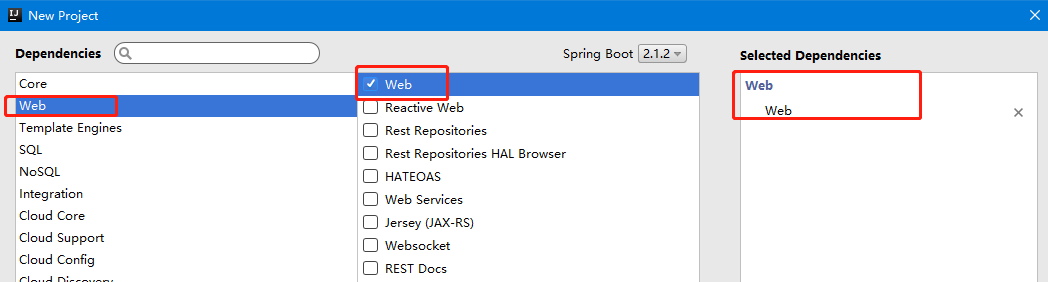
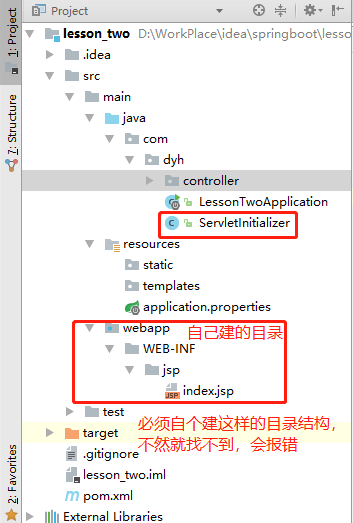
二、自动生成的ServletInitializer类介绍
实现SpringBootServletInitializer的子类需要重写一个configure方法,方法内自动根据LessontwoApplication.class的类型创建一个SpringApplicationBuilder交付给springboot框架来完成初始化运行配置。
三、配置springboot支持jsp
<?xml version="1.0" encoding="UTF-8"?>

<project xmlns="http://maven.apache.org/POM/4.0.0" xmlns:xsi="http://www.w3.org/2001/XMLSchema-instance"

    xsi:schemaLocation="http://maven.apache.org/POM/4.0.0 http://maven.apache.org/xsd/maven-4.0.0.xsd">

    <modelVersion>4.0.0</modelVersion>

    <parent>

        <groupId>org.springframework.boot</groupId>

        <artifactId>spring-boot-starter-parent</artifactId>

        <version>2.1.2.RELEASE</version>

        <relativePath/> <!-- lookup parent from repository -->

    </parent>

    <groupId>com.dyh</groupId>

    <artifactId>lesson_two</artifactId>

    <version>0.0.1-SNAPSHOT</version>

    <packaging>war</packaging>

    <name>lesson_two</name>

    <description>Demo project for Spring Boot</description>

    <properties>

        <java.version>1.8</java.version>

    </properties>

    <dependencies>

        <dependency>

            <groupId>org.springframework.boot</groupId>

            <artifactId>spring-boot-starter-web</artifactId>

        </dependency>

        <dependency>

            <groupId>org.springframework.boot</groupId>

            <artifactId>spring-boot-starter-tomcat</artifactId>

            <scope>provided</scope>

        </dependency>

        <dependency>

            <groupId>org.springframework.boot</groupId>

            <artifactId>spring-boot-starter-test</artifactId>

            <scope>test</scope>

        </dependency>

        <!--添加springboot对jsp支持-->

        <dependency>

            <groupId>org.apache.tomcat.embed</groupId>

            <artifactId>tomcat-embed-jasper</artifactId>

        </dependency>

        <!--servlet支持开启-->

        <dependency>

            <groupId>javax.servlet</groupId>

            <artifactId>javax.servlet-api</artifactId>

        </dependency>

        <!--使用jstl标签-->

        <dependency>

            <groupId>javax.servlet</groupId>

            <artifactId>jstl</artifactId>

        </dependency>

    </dependencies>

    <build>

        <plugins>

            <plugin>

                <groupId>org.springframework.boot</groupId>

                <artifactId>spring-boot-maven-plugin</artifactId>

            </plugin>

        </plugins>

    </build>

</project>
四、配置视图
我们必须按照jsp文件之前的文件目录风格,在/webapp/WEB-INF/jsp目录下。
1. 在main目录下创建webapp文件夹
2. 在webapp下创建jsp文件夹
3. 修改application.properties文件让springmvc支持视图的跳转目录指向为/main/webapp/jsp

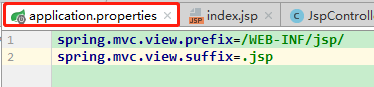
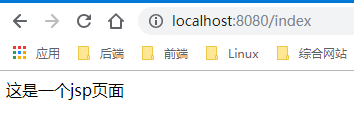
五、controller层代码书写,请求127.0.0.1:8080/index,返回到index.jsp页面
@Controller

public class JspController {

    @RequestMapping(value = "/index",method = RequestMethod.GET)

    public String getJsp(){

        return "index";

    }

}
六、创建Jsp页面,并测试
<%@ page contentType="text/html;charset=UTF-8" language="java" %>

<html>

<head>

    <title>Title</title>

</head>

<body>

    这是一个jsp页面

</body>

</html>
Springboot(二)springboot之jsp支持的更多相关文章
- SpringBoot学习:添加JSP支持
项目下载地址:http://download.csdn.NET/detail/aqsunkai/9805821 (一)pom中添加依赖: <!-- https://mvnrepository.c ...
- springboot(二).springboot整合logback用于日志输出
springboot整合logback用于日志输出 我们项目的基本框架已经完成,http请求已经可以访问,现在给我们的框架添加日志记录的功能并能将每天的记录记录到文件中去 在这里,我们使用logbac ...
- SpringBoot(二) -- SpringBoot配置
一.配置文件 SpringBoot可以使用两种类型的配置文件(文件名固定): application.properties application.yml 配置文件的作用就是来修改SpringBoot ...
- SpringBoot(二) SpringBoot核心配置文件application.yml/properties
我们都知道在Spring中有着application.xml文件对Spring进行相关配置,通过web.xml中的contextConfigLocation指定application.xml文件所在位 ...
- SpringBoot(二): SpringBoot属性配置文件 SpringBoot多环境配置文件 SpringBoot自定义配置文件
1.属性配置文件 一共分为两种,一种是键值对的properties属性配置文件,一种是yaml格式的配置文件 properties配置: 2.多环境配置文件 当我们的项目中有多套配置文件 比如开发的配 ...
- 搭建SpringBoot、Jsp支持学习笔记
Spring Boot 添加JSP支持 大体步骤: (1) 创建Maven web project: (2) 在pom.xml文件添加依赖: (3) ...
- springboot 2.0 整合 同时支持jsp+html跳转
springboot项目创建教程 https://blog.csdn.net/q18771811872/article/details/88126835 springboot2.0 跳转html教程 ...
- spring-boot(二)
学习文章来自:http://www.ityouknow.com/spring-boot.html web开发 spring boot web开发非常的简单,其中包括常用的json输出.filters. ...
- springboot(二):web综合开发
上篇文章介绍了spring boot初级教程:spring boot(一):入门篇,方便大家快速入门.了解实践Spring boot特性:本篇文章接着上篇内容继续为大家介绍spring boot的其它 ...
随机推荐
- MyEclipse 选中属性或方法后 相同的不变色
myeclipse-->windows-->java-->Editor-->content Assist-->Mark Occurrencmyeclipse-->w ...
- JSTL版本问题
JSTL的版本有很多,和Servlet,jsp,tomcat都有版本兼容的问题,以下是收藏的相关帖子 JSTL不同版本和EL表达式的关联 https://www.cnblogs.com/yangzh ...
- JVM类加载机制小结
这篇文章我们关注一个问题:Java程序是怎么进入JVM并执行的?经常写Java程序的小伙伴应该都听说过类加载机制,在<深入理解Java虚拟机>里周老师已经讲的很清楚了,这篇随笔把之前的笔记 ...
- 前端开发,页面加载速度性能优化,如何提高web页面加载速度
一个网页访问速度的快慢, 不仅看它服务器的配置,这里除去你空间主机配置很烂的情况以外,我们从网站开发方面来探讨,前端技术需要从哪些方面提高访问的速度,需要用到哪些技术手段. 文件的加载 图标的加载: ...
- BZOJ3573 米特运输 题解
题目 米特是D星球上一种非常神秘的物质,蕴含着巨大的能量.在以米特为主要能源的D星上,这种米特能源的运输和储存一直是一个大问题.D星上有N个城市,我们将其顺序编号为1到N,1号城市为首都.这N个城市由 ...
- JavaScript图片预览
预览选中的图片文件 jQuery $("#selectImage").change(function(){ $("#image").attr("src ...
- day82 序列化器-Serializer
目录 一.序列化器的基本功能 二.定义序列化器 三.创建Serializers对象 四.序列化器的使用 1 序列化 2 反序列化 2.1 数据验证(类比forms组件) 2.2 数据保存 一.序列化器 ...
- day75 bbs项目☞后台管理+修改头像
目录 一.后台管理之添加文章 二.修改用户头像 bbs项目总结 一.后台管理之添加文章 添加文章有两个需要注意的问题: 文章的简介切取,应该想办法获取到当前文章的文本内容后再截取字符 XSS攻击,由于 ...
- Scala 面向对象(二):package 包 (一) 入门
1 Scala包的基本介绍 和Java一样,Scala中管理项目可以使用包,但Scala中的包的功能更加强大,使用也相对复杂些,下面我们学习Scala包的使用和注意事项. 2 Scala包快速入门 使 ...
- 数据分析02 /pandas基础
数据分析02 /pandas基础 目录 数据分析02 /pandas基础 1. pandas简介 2. Series 3. DataFrame 4. 总结: 1. pandas简介 numpy能够帮助 ...