
nginx错误分析 `104: Connection reset by peer`
故障描述
应用从虚拟机环境迁移到kubernetes环境中,有些应用不定时出现请求失败的情况,且应用没有记录任何日志,而在NGINX中记录502错误。我们查看了之前虚拟机中的访问情况,没有发现该问题。
基础信息
# 请求流程
client --> nginx(nginx-ingress-controller) --> tomcat(容器)
# nginx版本
$ nginx -V

nginx version: nginx/1.15.5

built by gcc 8.2.0 (Debian 8.2.0-7)

built with OpenSSL 1.1.0h  27 Mar 2018

TLS SNI support enabled

configure arguments: --prefix=/usr/share/nginx --conf-path=/etc/nginx/nginx.conf --modules-path=/etc/nginx/modules --http-log-path=/var/log/nginx/access.log --error-log-path=/var/log/nginx/error.log --lock-path=/var/lock/nginx.lock --pid-path=/run/nginx.pid --http-client-body-temp-path=/var/lib/nginx/body --http-fastcgi-temp-path=/var/lib/nginx/fastcgi --http-proxy-temp-path=/var/lib/nginx/proxy--http-scgi-temp-path=/var/lib/nginx/scgi --http-uwsgi-temp-path=/var/lib/nginx/uwsgi --with-debug --with-compat --with-pcre-jit --with-http_ssl_module --with-http_stub_status_module --with-http_realip_module --with-http_auth_request_module --with-http_addition_module --with-http_dav_module --with-http_geoip_module --with-http_gzip_static_module --with-http_sub_module --with-http_v2_module --with-stream --with-stream_ssl_module --with-stream_ssl_preread_module --with-threads --with-http_secure_link_module --with-http_gunzip_module --with-file-aio --without-mail_pop3_module --without-mail_smtp_module --without-mail_imap_module --without-http_uwsgi_module --without-http_scgi_module --with-cc-opt='-g -Og -fPIE -fstack-protector-strong -Wformat -Werror=format-security -Wno-deprecated-declarations -fno-strict-aliasing -D_FORTIFY_SOURCE=2 --param=ssp-buffer-size=4 -DTCP_FASTOPEN=23 -fPIC -I/root/.hunter/_Base/2c5c6fc/a134798/92161a9/Install/include -Wno-cast-function-type -m64 -mtune=native' --with-ld-opt='-fPIE -fPIC -pie -Wl,-z,relro -Wl,-z,now -L/root/.hunter/_Base/2c5c6fc/a134798/92161a9/Install/lib' --user=www-data --group=www-data --add-module=/tmp/build/ngx_devel_kit-0.3.1rc1 --add-module=/tmp/build/set-misc-nginx-module-0.32 --add-module=/tmp/build/headers-more-nginx-module-0.33 --add-module=/tmp/build/nginx-goodies-nginx-sticky-module-ng-08a395c66e42 --add-module=/tmp/build/nginx-http-auth-digest-274490cec649e7300fea97fed13d84e596bbc0ce --add-module=/tmp/build/ngx_http_substitutions_filter_module-bc58cb11844bc42735bbaef7085ea86ace46d05b --add-module=/tmp/build/lua-nginx-module-e94f2e5d64daa45ff396e262d8dab8e56f5f10e0 --add-module=/tmp/build/lua-upstream-nginx-module-0.07 --add-module=/tmp/build/nginx_cookie_flag_module-1.1.0 --add-module=/tmp/build/nginx-influxdb-module-f20cfb2458c338f162132f5a21eb021e2cbe6383 --add-dynamic-module=/tmp/build/nginx-opentracing-0.6.0/opentracing --add-dynamic-module=/tmp/build/ModSecurity-nginx-37b76e88df4bce8a9846345c27271d7e6ce1acfb --add-dynamic-module=/tmp/build/ngx_http_geoip2_module-3.0 --add-module=/tmp/build/nginx_ajp_module-bf6cd93f2098b59260de8d494f0f4b1f11a84627 --add-module=/tmp/build/ngx_brotli
# nginx-ingress-controller版本
0.20.0
# tomcat版本
tomcat 7.0.72
# kubernetes版本
[10:16:48 openshift@st2-control-111a27 ~]$ oc version

oc v3.11.0+62803d0-1

kubernetes v1.11.0+d4cacc0

features: Basic-Auth GSSAPI Kerberos SPNEGO

Server https://paas-sh-01.99bill.com:443

openshift v3.11.0+0323629-61

kubernetes v1.11.0+d4cacc0

[10:16:56 openshift@st2-control-111a27 ~]$ kubectl version

Client Version: version.Info{Major:"1", Minor:"11+", GitVersion:"v1.11.0+d4cacc0", GitCommit:"d4cacc0", GitTreeState:"clean", BuildDate:"2018-10-15T09:45:30Z", GoVersion:"go1.10.2", Compiler:"gc", Platform:"linux/amd64"}

Server Version: version.Info{Major:"1", Minor:"11+", GitVersion:"v1.11.0+d4cacc0", GitCommit:"d4cacc0", GitTreeState:"clean", BuildDate:"2018-11-20T19:51:55Z", GoVersion:"go1.10.3", Compiler:"gc", Platform:"linux/amd64"}
排查
1. 查看日志 有2种错误日志情况
# nginx error.log
2019/11/08 07:59:43 [error] 189#189: *1707448 recv() failed (104: Connection reset by peer) while reading response header from upstream, client: 192.168.55.200, server: _, request: "GET /dbpool-server/ HTTP/1.1", upstream: "http://10.128.8.193:8080/dbpool-server/", host: "192.168.111.24:8090"

2019/11/08 07:00:00 [error] 188#188: *1691956 upstream prematurely closed connection while reading response header from upstream, client: 192.168.55.200, server: _, request: "GET /dbpool-server/ HTTP/1.1", upstream: "http://10.128.8.193:8080/dbpool-server/", host: "192.168.111.24:8090"
# nginx upstream.log
- 2019-11-08T07:59:43+08:00 GET /dbpool-server/ HTTP/1.1 502 0.021 10.128.8.193:8080 502 0.021 - 192.168.111.24

- 2019-11-08T07:00:00+08:00 GET /dbpool-server/ HTTP/1.1 502 0.006 10.128.8.193:8080 502 0.006 - 192.168.111.24
# tomcat当时的访问日志
192.168.55.200 - - [08/Nov/2019:06:59:00 +0800] GET /dbpool-server/ HTTP/1.1 200 222 0

192.168.55.200 - - [08/Nov/2019:06:59:20 +0800] GET /dbpool-server/ HTTP/1.1 200 222 0

192.168.55.200 - - [08/Nov/2019:06:59:40 +0800] GET /dbpool-server/ HTTP/1.1 200 222 0

192.168.55.200 - - [08/Nov/2019:07:00:20 +0800] GET /dbpool-server/ HTTP/1.1 200 222 0

192.168.55.200 - - [08/Nov/2019:07:00:40 +0800] GET /dbpool-server/ HTTP/1.1 200 222 1

...

192.168.55.200 - - [08/Nov/2019:07:59:03 +0800] GET /dbpool-server/ HTTP/1.1 200 222 1

192.168.55.200 - - [08/Nov/2019:07:59:23 +0800] GET /dbpool-server/ HTTP/1.1 200 222 0

192.168.55.200 - - [08/Nov/2019:08:00:03 +0800] GET /dbpool-server/ HTTP/1.1 200 222 1

192.168.55.200 - - [08/Nov/2019:08:00:23 +0800] GET /dbpool-server/ HTTP/1.1 200 222 0

192.168.55.200 - - [08/Nov/2019:08:00:43 +0800] GET /dbpool-server/ HTTP/1.1 200 222 0
分析
根据故障现象,从网络上搜索了一些结果,但是感觉信息不多。而且由于nginx这一类的代理出现Connection reset的场景复杂,原因多样,也不好判断是什么原因引起的。
之前使用虚拟机的时候没有出现这样的情况,于是对比了这两方面的配置,发现虚机环境nginx与tomcat之间使用的是HTTP 1.0,而在kubernetes环境中使用的是HTTP 1.1,这中间最大的区别在于HTTP 1.1默认开启了keepalive功能。所以想到可能是由于tomcat和nginx设置的keepalive timeout时间不一致导致了问题的发生。
# tomcat keepalive配置server.conf文件中
...
  <Connector acceptCount="800"

            port="${http.port}"

            protocol="HTTP/1.1"

            executor="tomcatThreadPool"

            enableLookups="false"

            connectionTimeout="20000"

                maxThreads="1024"

                disableUploadTimeout="true"

            URIEncoding="UTF-8"

            useBodyEncodingForURI="true"/>
...
根据tomcat官方文档说明,keepAliveTimeout默认等于connectionTimeout,我们这里配置的是20s。
| 参数 | 解释 |
| keepAliveTimeout | The number of milliseconds this Connector will wait for another HTTP request before closing the connection. The default value is to use the value that has been set for the connectionTimeout attribute. Use a value of -1 to indicate no (i.e. infinite) timeout. |
| maxKeepAliveRequests | The maximum number of HTTP requests which can be pipelined until the connection is closed by the server. Setting this attribute to 1 will disable HTTP/1.0 keep-alive, as well as HTTP/1.1 keep-alive and pipelining. Setting this to -1 will allow an unlimited amount of pipelined or keep-alive HTTP requests. If not specified, this attribute is set to 100. |
| connectionTimeout | The number of milliseconds this Connector will wait, after accepting a connection, for the request URI line to be presented. Use a value of -1 to indicate no (i.e. infinite) timeout. The default value is 60000 (i.e. 60 seconds) but note that the standard server.xml that ships with Tomcat sets this to 20000 (i.e. 20 seconds). Unless disableUploadTimeout is set to false, this timeout will also be used when reading the request body (if any). |
tomcat官方文档 https://tomcat.apache.org/tomcat-7.0-doc/config/http.html
# nginx(nginx-ingress-controller)中的配置
由于没有显示的配置,所以使用的是nginx的默认参数配置,默认是60s。
http://nginx.org/en/docs/http/ngx_http_upstream_module.html#keepalive_timeout

Syntax:    keepalive_timeout timeout;

Default:

keepalive_timeout 60s;

Context:    upstream

This directive appeared in version 1.15.3.

Sets a timeout during which an idle keepalive connection to an upstream server will stay open.
解决
竟然有了大概的分析猜测,可以尝试调整nginx的keepalive timeout为15s(需要小于tomcat的超时时间),测试了之后,故障就这样得到了解决。
由于我们使用的nginx-ingress-controller版本是0.20.0,还不支持通过参数配置这个参数,所以我们可以修改配置模板,如下:
...
        {{ if $all.DynamicConfigurationEnabled }}

        upstream upstream_balancer {

            server 0.0.0.1; # placeholder

            balancer_by_lua_block {

              balancer.balance()

            }

            {{ if (gt $cfg.UpstreamKeepaliveConnections 0) }}

            keepalive {{ $cfg.UpstreamKeepaliveConnections }};

            {{ end }}

            # ADD -- START

            keepalive_timeout 15s;

            # ADD -- END

        }

        {{ end }}
...
不过,从0.21.0版本开始,已经可以通过配置参数 |[upstream-keepalive-timeout](#upstream-keepalive-timeout)|int|60| 对这个值修改。
小想法: 一般情况下,都是nginx主动对tomcat发起连接请求,所以如果是nginx主动关闭连接,也是合理的解释,这样会避免一些因为协议配置或漏洞引起的问题。
故障重现
# 准备一个测试应用并启动一个测试实例
# pod实例

[10:18:49 openshift@st2-control-111a27 ~]$ kubectl get pods dbpool-server-f5d64996d-5vxqc

NAME                            READY     STATUS    RESTARTS   AGE

dbpool-server-f5d64996d-5vxqc   1/1       Running   0          1d
# nginx环境
# ingress-nginx-controller信息

[10:21:24 openshift@st2-control-111a27 ~]$ kubectl get pods -owide nginx-ingress-inside-controller-98b95b554-6hxbw

NAME                                              READY     STATUS    RESTARTS   AGE       IP               NODE   NOMINATED NODE

nginx-ingress-inside-controller-98b95b554-6hxbw   1/1       Running   0          3d        192.168.111.24   paas-ing010001.99bill.com   <none>

# ingress信息

[10:19:58 openshift@st2-control-111a27 ~]$ kubectl get ingress dbpool-server-inside -oyaml

apiVersion: extensions/v1beta1

kind: Ingress

metadata:

  annotations:

    kubernetes.io/ingress.class: pletest-inside

    nginx.ingress.kubernetes.io/ssl-redirect: "false"

    nginx.ingress.kubernetes.io/upstream-vhost: aaaaaaaaaaaaaaaaaaaaa

  generation: 1

  name: dbpool-server-inside

  namespace: pletest

spec:

  rules:

  - http:

      paths:

      - backend:

          serviceName: dbpool-server

          servicePort: http

        path: /dbpool-server/
# 测试访问脚本
一直去访问应用,毕竟不知道什么时候会出问题,不能手动去访问。
#!/bin/sh

n=1

while true

do

        curl http://192.168.111.24:8090/dbpool-server/

        sleep 20 # 这个20和tomcat的keepalive超时时间是一致的,尝试过1,但是没有复现成功

        n=$((n+1))

        echo $n

done
# 抓包分析
在nginx端抓包
tcpdump -i vxlan_sys_4789 host 10.128.8.193 -w /tmp/20191106-2.pcap
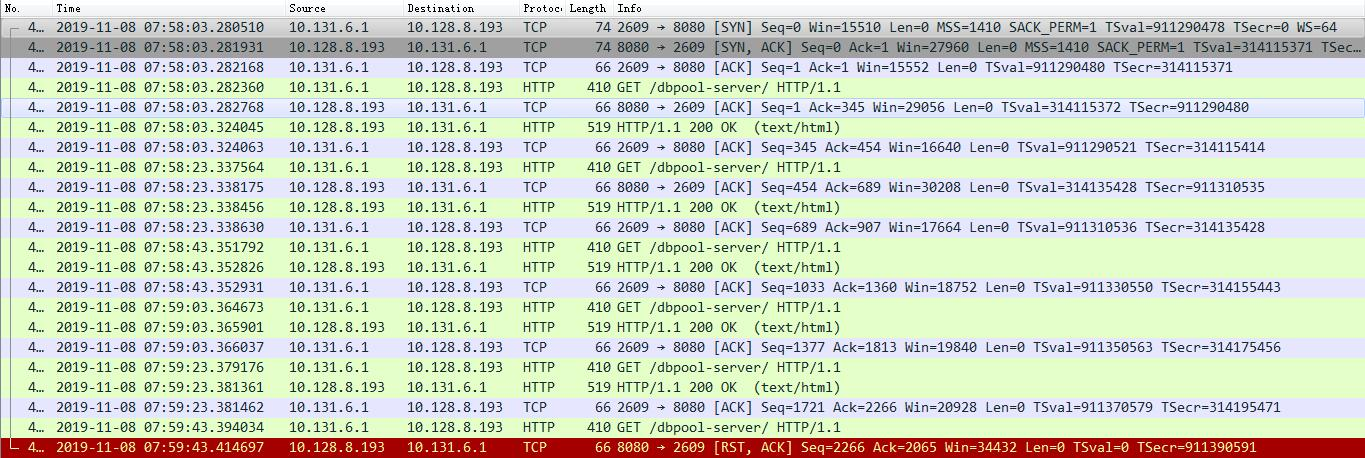
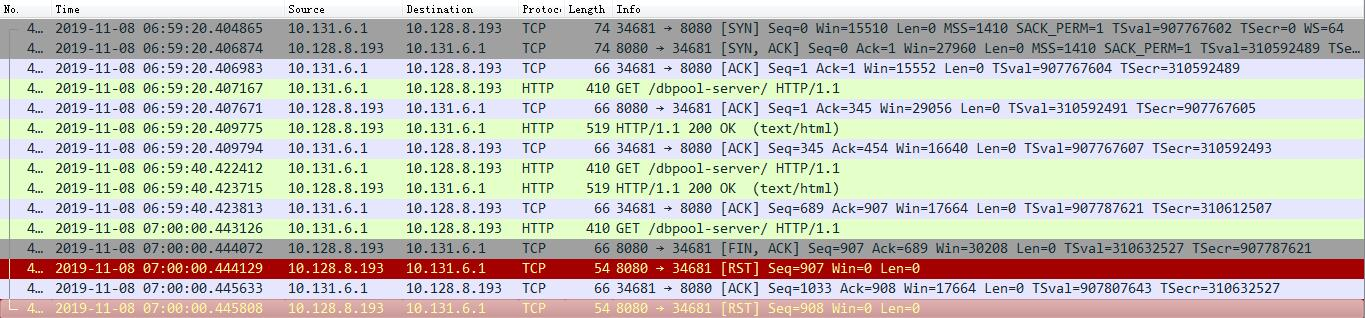
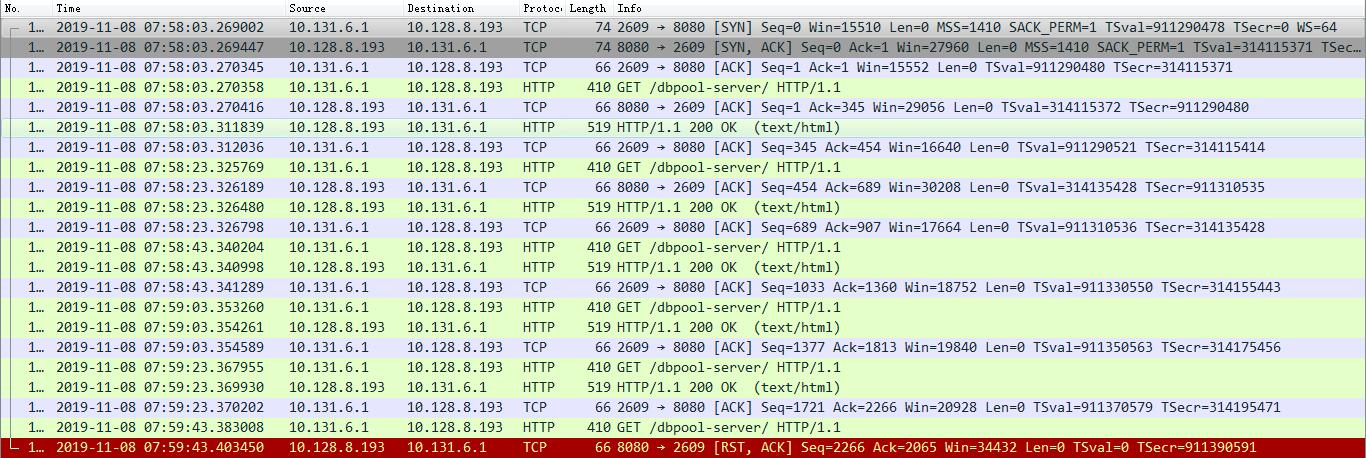
通过下面的数据包可以看到,TCP连接在空闲了20s之后,有tomcat发起了断开,但是这是nginx正好发送了一个请求过去,tomcat没有回应这个请求,而是通过RST异常结束了这个连接。这样就解释了tomcat为什么没有日志的情况。
(出现 104: Connection reset by peer 错误情况的nginx端数据包)
(出现 upstream prematurely closed connection 错误的nginx端数据包)
(出现 104: Connection reset by peer 错误情况的tomcat端数据包)
(出现 upstream prematurely closed connection 错误情况的tomcat端数据包)

社区对于该问题的Issues
在nginx-ingress社区对这个问题也有人提出来,可以看以下几个连接:
https://github.com/kubernetes/ingress-nginx/issues/3099
https://github.com/kubernetes/ingress-nginx/pull/3222
nginx错误分析 `104: Connection reset by peer`的更多相关文章
- nginx recv() failed (104: Connection reset by peer) while reading response header from upstream解决方法
首先说下 先看 按照ab 每秒请求的结果 看看 都有每秒能请求几个 如果并发量超出你请求的个数 会这样 所以一般图片和代码服务器最好分开 还有看看io瓶ding 和有没有延迟的PHP代码执行 0 先修 ...
- recv() failed (104: Connection reset by peer) while reading response header from upstream
2017年12月1日10:18:34 情景描述: 浏览器执行了一会儿, 报500错误 运行环境: nginx + php-fpm nginx日志: recv() failed (104: Conn ...
- OGG-01232 Receive TCP params error: TCP/IP error 104 (Connection reset by peer), endpoint:
源端: 2015-02-05 17:45:49 INFO OGG-01815 Virtual Memory Facilities for: COM anon alloc: mmap(MAP_ANON) ...
- urllib2.URLError: <urlopen error [Errno 104] Connection reset by peer>
http://www.dianping.com/shop/8010173 File "综合商场1.py", line 152, in <module> httpC ...
- celery使用rabbitmq报错[Errno 104] Connection reset by peer.
写好celery任务文件,使用celery -A app worker --loglevel=info启动时,报告如下错误: [2019-01-29 01:19:26,680: ERROR/MainP ...
- Python 频繁请求问题: [Errno 104] Connection reset by peer
Table of Contents 1. 记遇到的一个问题:[Errno 104] Connection reset by peer 记遇到的一个问题:[Errno 104] Connection r ...
- fwrite(): send of 8192 bytes failed with errno=104 Connection reset by peer
问题:fwrite(): send of 8192 bytes failed with errno=104 Connection reset by peer 问题描述 通过mysql + sphinx ...
- python requests [Errno 104] Connection reset by peer
有个需求,数据库有个表有将近 几千条 url 记录,每条记录都是一个图片,我需要请求他们拿到每个图片存到本地.一开始我是这么写的(伪代码): import requests for url in ur ...
- 转:get value from agent failed: ZBX_TCP_READ() failed;[104] connection reset by peer
get value from agent failed: ZBX_TCP_READ() failed;[104] connection reset by peer zabbix都搭建好了,进行一下测试 ...
随机推荐
- HTTP的传输编码(Transfer-Encoding:chunked) / net::ERR_INVALID_CHUNKED_ENCODING
https://blog.csdn.net/m0_37668842/article/details/89138733 https://www.cnblogs.com/jamesvoid/p/11297 ...
- Navicat 使用 SSH 通道
使用 Navicat for MySQL 通过跳板机登录 Mysql 时(使用 SSH 通道) 报错如下: SSH : Expected key exchange group packet from ...
- history-back
;!function(pkg, undefined){ //此声明函数在xback.js文件里有,在app.js里必须再声明一次,不然监听返回事件失败 var STATE = 'x-back'; va ...
- select用法&原理详解(源码剖析)(转)
今天遇到了在select()前后fd_set的变化问题,查了好久终于找到一个有用的帖子了,很赞,很详细!!原文链接如下: select用法&原理详解(源码剖析) 我的问题是: 如下图示:在se ...
- codeforces - 978D【思维】
D. Almost Arithmetic Progression time limit per test 1 second memory limit per test 256 megabytes in ...
- Ubuntu 18.04 + pip3 install virtualenvwrapper 找不到virtualenvwrapper.sh
Reference Ubuntu 18.04 只自带python3.6.5, 因此不想装python2了, 但通过apt install 装virtualenvwrapper时发现必须得装python ...
- React Hooks: useRef All In One
React Hooks: useRef All In One useRef https://reactjs.org/docs/hooks-reference.html#useref refs xgqf ...
- Bearer Token & OAuth 2.0
Bearer Token & OAuth 2.0 access token & refresh token http://localhost:8080/#/login HTTP Aut ...
- free useful skills videos courses & tutorials
free useful skills videos courses & tutorials website video courses https://realpython.com/ http ...
- 如何重置电信悦 me 智能网关
如何重置电信悦 me 智能网关 重置电信网关密码 电信悦 me 智能网关密码忘记了怎么办? 首先,得要知道默认终端配置地址和默认终端配置密码. 可以从无线路由器背面标签得知. 如果不知道密码了,可以通 ...