
spring-cloud-netflix-hystrix-dashboard
Hystrix-dashboard是一款针对Hystrix进行实时监控的工具,通过Hystrix Dashboard我们可以在直观地看到各Hystrix Command的请求响应时间, 请求成功率等数据。
Hystrix Dashboard
我们使用上期spring-cloud-consumer-hystrix工程进行修改,添加hystrix Dashboard功能
添加所需要的依赖:
<?xml version="1.0" encoding="UTF-8"?>

<project xmlns="http://maven.apache.org/POM/4.0.0" xmlns:xsi="http://www.w3.org/2001/XMLSchema-instance"

         xsi:schemaLocation="http://maven.apache.org/POM/4.0.0 https://maven.apache.org/xsd/maven-4.0.0.xsd">

    <modelVersion>4.0.0</modelVersion>

    <parent>

        <groupId>lf.liyouyou</groupId>

        <artifactId>spring-cloud-netflix-demo</artifactId>

        <version>1.0-SNAPSHOT</version>

    </parent>

    <groupId>lf.liyouyou</groupId>

    <artifactId>spring-cloud-consumer-hystrix</artifactId>

    <version>0.0.1-SNAPSHOT</version>

    <name>spring-cloud-consumer-hystrix</name>

    <description>Demo project for Spring Boot</description>

    <dependencies>

        <dependency>

            <groupId>org.springframework.boot</groupId>

            <artifactId>spring-boot-starter-web</artifactId>

        </dependency>

        <dependency>

            <groupId>org.springframework.cloud</groupId>

            <artifactId>spring-cloud-starter-netflix-eureka-client</artifactId>

        </dependency>

        <dependency>

            <groupId>org.springframework.cloud</groupId>

            <artifactId>spring-cloud-starter-netflix-hystrix</artifactId>

        </dependency>

        <dependency>

            <groupId>org.springframework.cloud</groupId>

            <artifactId>spring-cloud-starter-netflix-hystrix-dashboard</artifactId>

        </dependency>

        <dependency>

            <groupId>org.springframework.cloud</groupId>

            <artifactId>spring-cloud-starter-openfeign</artifactId>

        </dependency>

        <dependency>

            <groupId>org.springframework.boot</groupId>

            <artifactId>spring-boot-starter-actuator</artifactId>

        </dependency>

        <dependency>

            <groupId>org.springframework.boot</groupId>

            <artifactId>spring-boot-starter-test</artifactId>

            <scope>test</scope>

            <exclusions>

                <exclusion>

                    <groupId>org.junit.vintage</groupId>

                    <artifactId>junit-vintage-engine</artifactId>

                </exclusion>

            </exclusions>

        </dependency>

    </dependencies>

</project>
二、启动类添加注解
package lf.liyouyou;

import com.netflix.hystrix.contrib.metrics.eventstream.HystrixMetricsStreamServlet;

import org.springframework.boot.SpringApplication;

import org.springframework.boot.autoconfigure.SpringBootApplication;

import org.springframework.boot.web.servlet.ServletRegistrationBean;

import org.springframework.cloud.client.circuitbreaker.EnableCircuitBreaker;

import org.springframework.cloud.client.discovery.EnableDiscoveryClient;

import org.springframework.cloud.netflix.hystrix.EnableHystrix;

import org.springframework.cloud.netflix.hystrix.dashboard.EnableHystrixDashboard;

import org.springframework.cloud.openfeign.EnableFeignClients;

import org.springframework.context.annotation.Bean;

@SpringBootApplication

@EnableDiscoveryClient

@EnableFeignClients

@EnableHystrixDashboard

@EnableCircuitBreaker

public class SpringCloudConsumerHystrixApplication {

    public static void main(String[] args) {

        SpringApplication.run(SpringCloudConsumerHystrixApplication.class, args);

    }

}
三、修改配置:
spring.application.name=spring-cloud-netflix-consumer-hystrix

server.port=9091

eureka.client.service-url.defaultZone=http://localhost:8000/eureka/

feign.hystrix.enabled=true

#默认只开启了health和info,设置为*,则包含所有的web入口端点

management.endpoints.web.exposure.include=*

hystrix.dashboard.proxy-stream-allow-list=*
启动项目,
输入:http://localhost:9091/hystrix 进入如下页面:

注意自己的应用是在本地还是外部,本地用http,不同版本路径不同,2.0版本路径为../actuator/hystrix.stream
输入之后点击 monitor,进入页面
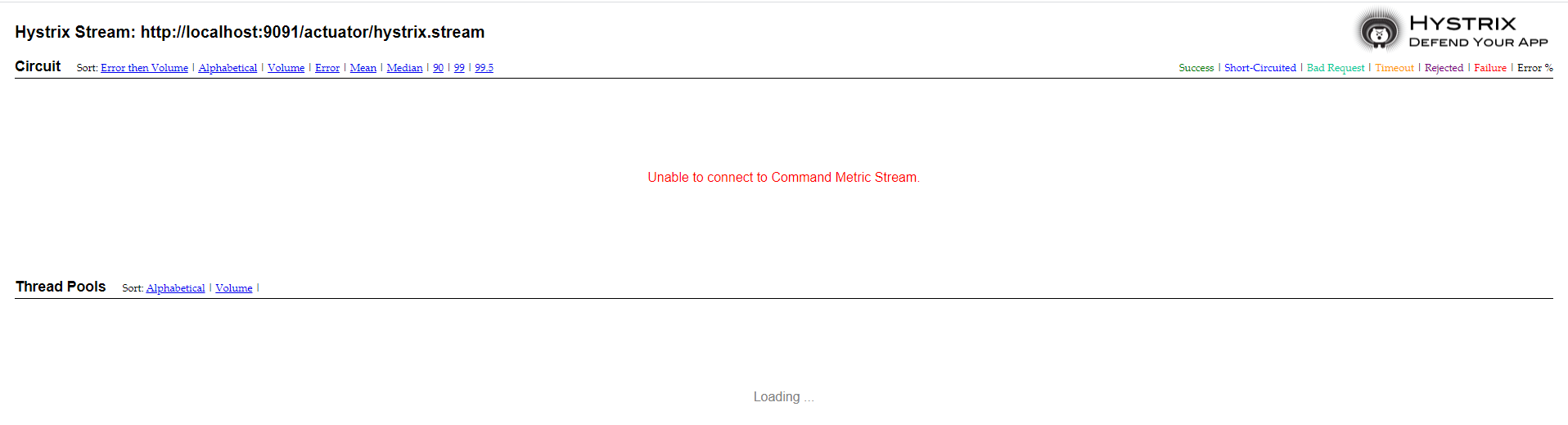
出现 Unable to connect to Command Metric Stream.显示未连接
(1)访问自己的应用服务,http://localhost:9091/actuator/hystrix.stream,显示ping,调用熔断接口http://localhost:9091/hello/lf,返回data
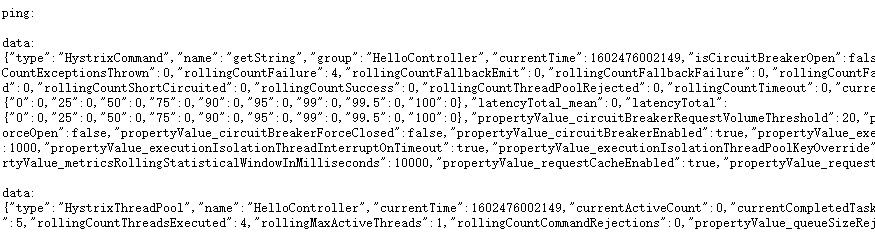
排除的代码、注解、包的问题
(2)查看debug日志,若出现
Proxy opening connection to: http://localhost:9091/actuator/hystrix.stream
WARN 6980 --- [nio-9091-exec-8] ashboardConfiguration$ProxyStreamServlet : Failed opening connection to http://localhost:9091/actuator/hystrix.stream : 404 : HTTP/1.1 404
则需要在application.properties配置中,打开actuator访问
management.endpoints.web.exposure.include=*
(3)查看debug日志,若出现
WARN 9888 --- [nio-9091-exec-3] ashboardConfiguration$ProxyStreamServlet : Origin parameter: http://localhost:9091/actuator/hystrix.stream is not in the allowed list of proxy host names.
If it should be allowed add it to hystrix.dashboard.proxyStreamAllowList.
则需要在application.properties配置中,打开代理访问
hystrix.dashboard.proxy-stream-allow-list=*
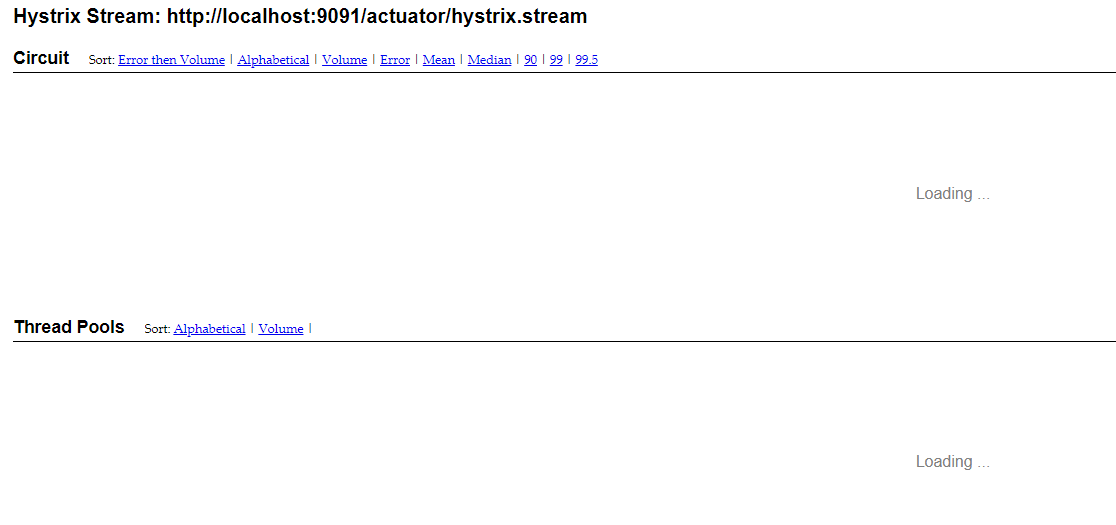
重新启动项目,重新访问,进入hystrix面板
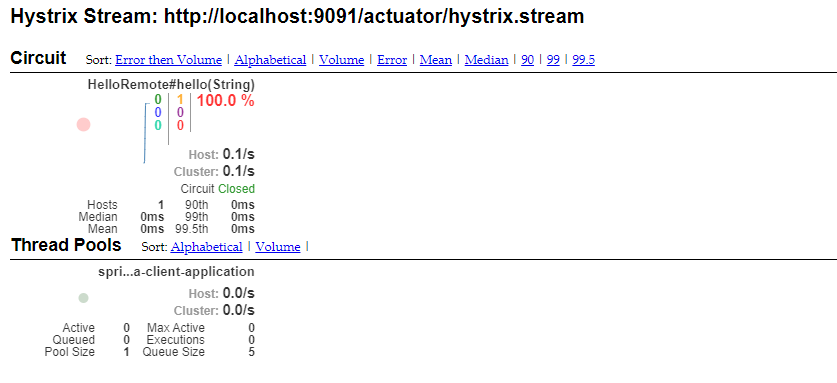
访问熔断接口,面板如下
If it should be allowed add it to hystrix.dashboard.proxyStreamAllowList.
则需要在application.properties配置中,打开代理访问
spring-cloud-netflix-consumer-hystrix
spring-cloud-netflix-hystrix-dashboard的更多相关文章
- springcloud学习04- 断路器Spring Cloud Netflix Hystrix
依赖上个博客:https://www.cnblogs.com/wang-liang-blogs/p/12072423.html 1.断路器存在的原因 引用博客 https://blog.csdn.ne ...
- Spring Cloud Netflix Hystrix介绍和使用
前面我们搭建了具有服务降级功能的Hystrix客户端,现在我们来详细了解下Hystrix的一些功能. Hystrix的意思是豪猪,大家都知道,就是长满刺的猪...实际上,它表明了该框架的主要功能:自我 ...
- Spring Cloud Netflix项目进入维护模式
任何项目都有其生命周期,Spring Could Netflix也不例外,官宣已进入维护模式,如果在新项目开始考虑技术选型时要考虑到这点风险,并考虑绕道的可能性. 原创: itmuch IT牧场 这 ...
- spring cloud连载第三篇之Spring Cloud Netflix
1. Service Discovery: Eureka Server(服务发现:eureka服务器) 1.1 依赖 <dependency> <groupId>org.spr ...
- Spring Cloud Netflix概览和架构设计
Spring Cloud简介 Spring Cloud是基于Spring Boot的一整套实现微服务的框架.他提供了微服务开发所需的配置管理.服务发现.断路器.智能路由.微代理.控制总线.全局锁.决策 ...
- 基于Spring Cloud Netflix的TCC柔性事务和EDA事件驱动示例
Solar Spring Cloud为开发者提供了快速构建分布式系统中的一些常见工具,如分布式配置中心,服务发现与注册中心,智能路由,服务熔断及降级,消息总线,分布式追踪的解决方案等. 本次实战以模拟 ...
- Spring Cloud 学习--Hystrix应用
上一篇介绍了Hystrix基本功能和单独使用的方式,今天继续学习如何将Hystrix融入SpringCloud组件中去. 在Ribbon上使用熔断器 在 pom.xml 文件中引入 hystrix 的 ...
- Spring Cloud netflix 概览和架构设计
pring Cloud是基于Spring Boot的一整套实现微服务的框架.他提供了微服务开发所需的配置管理.服务发现.断路器.智能路由.微代理.控制总线.全局锁.决策竞选.分布式会话和集群状态管理等 ...
- spring cloud图形化dashboard是如何实现指标的收集展示的
spring cloud图形化dashboard是如何实现指标的收集展示的 1.dashboard图形化界面入口 http://localhost:10000/hystrix.stream 说明:端口 ...
- 分布式微服务技术之 Spring Cloud Netflix
1 背景 Netflix 是全球十大视频网站中唯一收费站点,是美国互联网流媒体播放商,由于访问量巨大,转型为云计算公司. 由Netflix公司主持开发了一套代码框架和库Netflix OSS即open ...
随机推荐
- Java入门者:如何写出美观的Java代码?
前言 在帮助各位同学远程解决代码问题的时候,发现很多同学的代码都有一个共同问题:代码书写格式不规范.虽然代码书写规范对程序性能及运行并不影响,但影响着别人对你编程习惯或能力的第一印象,同时也会给阅读者 ...
- Docker 建站小记
一,前言 Docker 建站小记,我使用了四个镜像来搭建:nginx,certbot,mysql,gradle.欢迎访问:https://www.zzk0.top 这个网页是从 github 上找的个 ...
- pytest fixtures装饰器的使用
一.pytest中可以使用@pytest.fixture 装饰器来装饰一个方法,被装饰方法的方法名可以作为一个参数传入到测试方法中.可以使用这种方式来完成测试之前的初始化,也可以返回数据给测试函数. ...
- 在QML 中用javascritpt 将中文转换拼音,可以在音标
项目需要, 今天整理了一下.在QML调用javascrit将中文汉字转换成拼音. 感觉执行效率低.下面是主要代码. 具体代码请参考QMLPinyin 代码 ```import "./piny ...
- "INVALID" is not a valid start token
Search · is not a valid start token https://github.com/prometheus/prometheus/search?q=is+not+a+valid ...
- 二进制GCD
目录 写在前面 具体实现: Code 写在前面 全程抄书 想要进一步提高求 \(\gcd\) 的效率,可以通过不断去除因子 \(2\) 来降低常数,这就是"二进制 \(\gcd\) &quo ...
- fastHttp服务端处理请求的过程
Github 地址 https://github.com/valyala/fasthttp fastHttp 服务端的处理请求的过程 工作过程 主要代码 设置监听地址 server.go func ( ...
- Excel 如何实现以万为单位 保留两位小数 且不四舍五入
数据科学交流群,群号:189158789,欢迎各位对数据科学感兴趣的小伙伴的加入! =TEXT(INT(I18/100)*1000,"0!.00,万") 将I18替换成你要转化的单 ...
- Linux CGroup入门
Linux cgroup Linux CGroup全称Linux Control Group, 是Linux内核的一个功能,用来限制,控制与分离一个进程组群的资源(如CPU.内存.磁盘输入输出等).L ...
- Nginx基本功能及其原理,配置原理
Nginx基本功能及其原理,配置原理 一.正向代理.反向代理 二.Nginx配置文件的整体结构 三.Nginx配置SSL及HTTP跳转到HTTPS 四.nginx 配置管理 [nginx.conf 基 ...