
【转】ANDROID LOLLIPOP SCREEN CAPTURE AND SHARING
https://datatheorem.github.io/android/2014/12/26/android-screencapture/
https://www.youtube.com/watch?v=tT1XSoykjtA
ANDROID LOLLIPOP SCREEN CAPTURE AND SHARING
Android Lollipop has a new feature that allows screen capturing and screen sharing from third party applications. The feature allows third party apps to capture videos from the device and deliver it over the network.
Screen capturing does not require any pre-defined permissions; however, it does require user consent, as shown in the image below. If the user agrees to the consent, which does not necessarily explain the permanence of the feature nor its broad range, the application is able to capture everything that is displayed on the device’s screen, including sensitive activity from all other apps, such as password keystrokes, credit card screens, home addresses, etc. The capturing ability remains on even if the user terminates/closes the app, but not after a reboot. Additionally, when an application is performing screen capturing a small screen casting icon is displayed in the notification bar. This does not give the user enough information to make an informed decision on whether to disable casting.
Please click here to view the full step-by-step demo. Thanks Alexey Reznik for creating an informative video.
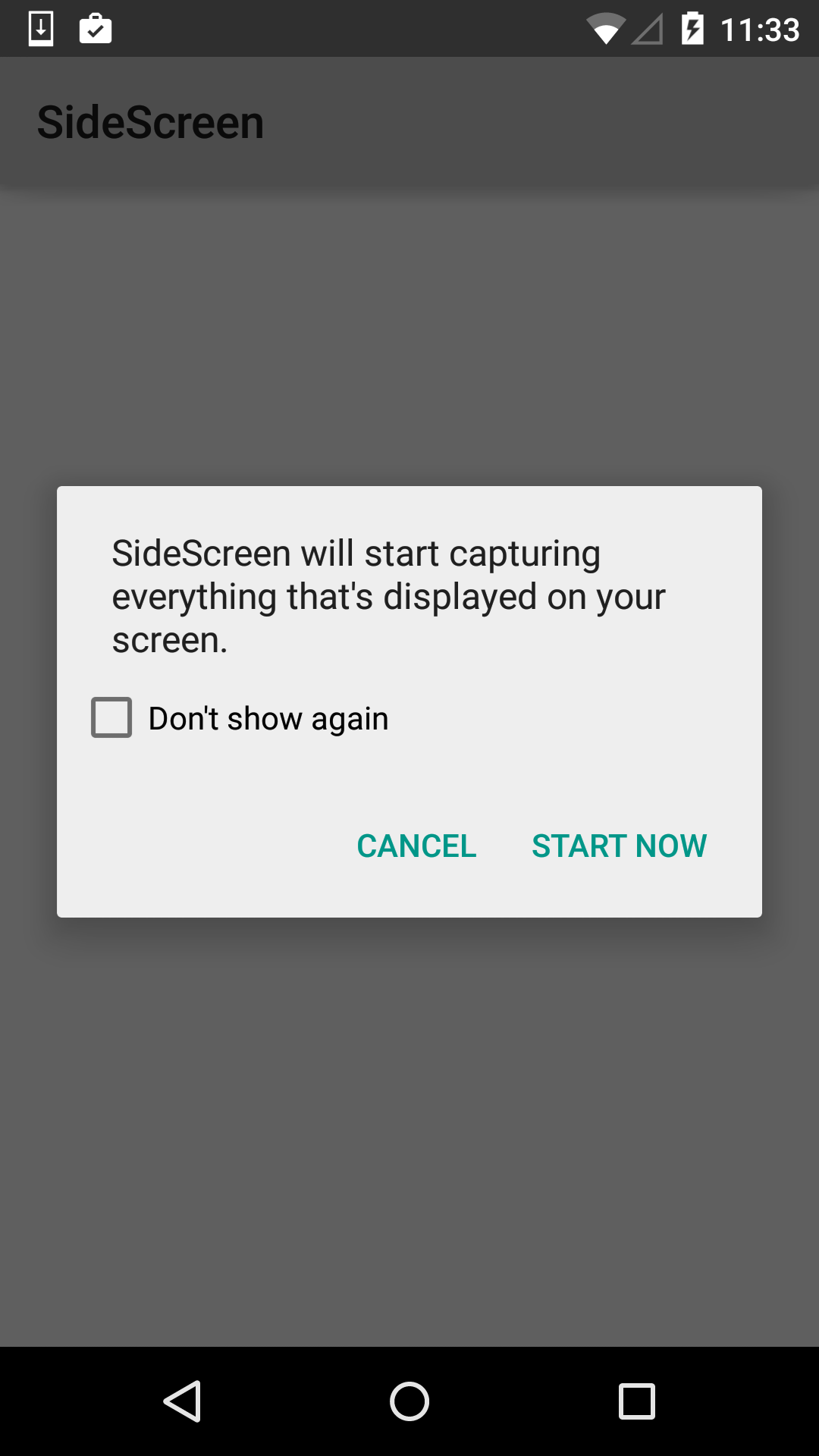
Fig:SideScreen is a 3rd Party Application on Google Play
Since a user may not understand the impact of its consent, mobile apps should proactive protect their sensitive screens from third party screen capturing and sharing. This is possible using the FLAG_SECURE option on any given screen. The following code shows an example:
protected void onCreate(Bundle savedInstanceState) {

super.onCreate(savedInstanceState);

        setContentView(R.layout.activity_main);

         getWindow().setFlags(LayoutParams.FLAG_SECURE,

                 LayoutParams.FLAG_SECURE)

…

…

}
However, if the developers want to protect all the screens of their applications from third party screen capturing and sharing, they need to use this flag in each of the Activities separately. There is no global means to set this flag for all the screens at once. But, one can design their applications in such a way that the FLAG_SECURE needs to be used only once. Below is the code snippet:
- Define a BaseActivity and set the FLAG_SECURE in that Activity :
public class BaseActivity extends Activity {

    @Override

    protected void onCreate(Bundle savedInstanceState) {

        super.onCreate(savedInstanceState);

        /**

         * approach 1: create a base activity and set the FLAG_SECURE in it,

         * Extend all other activities, Fragments from this activity

         */

        getWindow().setFlags(LayoutParams.FLAG_SECURE,

                LayoutParams.FLAG_SECURE);

    }
- Take this BaseActivity as superclass for all the other Activities.
public class LoginActivity extends BaseActivity

public class MainActivity extends BaseActivity
By doing so, when the onCreate() method of the super class is overrriden, the FLAG_SECURE automatically gets set for all the child activities.
- There might be cases where one wants to unset the FLAG_SECURE for some screens. In such cases, in child activity can use the below code:
@Override

    protected void onCreate(Bundle savedInstanceState) {

        super.onCreate(savedInstanceState);

        setContentView(R.layout.activity_main);

        /*

        clear flags: It can be used when user need to enable screen capturing in some applications

         */

        getWindow().clearFlags(WindowManager.LayoutParams.FLAG_SECURE);

    }
More information on FLAG_SECURE API can be found here: FLAG_SECURE
【转】ANDROID LOLLIPOP SCREEN CAPTURE AND SHARING的更多相关文章
- SPX Instant Screen Capture
Today I will recommend a NICE screen capture tool, which name is SPA Instant Screen Capture. http:// ...
- Android(Lollipop/5.0) Material Design(六) 使用图像
Material Design列 Android(Lollipop/5.0)Material Design(一) 简单介绍 Android(Lollipop/5.0)Material Design(二 ...
- ffmpeg 录屏 screen capture recorder
ffmpeg在Linux下用X11grab进行屏幕录像,在Windows下用DirectShow滤镜 首先需要安装一个软件,screen capture recorder 编译好的下载地址是: htt ...
- Android(Lollipop/5.0) Material Design(二) 入门指南
Material Design系列 Android(Lollipop/5.0)Material Design(一) 简介 Android(Lollipop/5.0)Material Design(二) ...
- Android(Lollipop/5.0) Material Design(一) 简单介绍
Material Design系列 Android(Lollipop/5.0)Material Design(一) 简单介绍 Android(Lollipop/5.0)Material Design( ...
- Android(Lollipop/5.0) Material Design(四) 创建列表和卡片
Material Design系列 Android(Lollipop/5.0)Material Design(一) 简单介绍 Android(Lollipop/5.0)Material Design( ...
- full page screen capture in js
full page screen capture in js html2canvas https://html2canvas.hertzen.com/ https://github.com/nikla ...
- Android Lollipop 5.0 经典新特性回顾
*Tamic 专注移动开发! 更多文章请关注 http://blog.csdn.net/sk719887916 虽然Android已到了7.0 ,但是我们还是不能忘怀视觉革命性改变的5.0,今天回顾下 ...
- Android(Lollipop/5.0) Material Design(一) 简介
官网地址:https://developer.android.com/intl/zh-tw/design/material/index.html 使用Material Design 需要api21,即 ...
随机推荐
- Linux 下使用 killall 命令终止进程的 8 大用法
Linux 的命令行提供很多命令来杀死进程.比如,你可以向 kill 命传递一个PID来杀死进程:pkill 命令使用一个正则表达式作为输入,所以和该模式匹配的进程都被杀死. 但是还有一个命令叫 ki ...
- “随手记”开发记录day03
今天完成了进入页面 还有记账页面 出现的问题,在登录页面中由于布局采用的错误 后边的view把前面的view遮住,看不出来,我们查找方法,找到了设置权重的办法解决 明天打算完成加号里面的内容
- 为何选择spark!
随着大数据处理的应用场景越来越多,人们对Hadoop的要求也越来越高,开发出的对应的系统也越来越多,人们迫切的需要一个综合的计算框架,Spark应运而生,我们可以看看Spark可以干些什么. 那么为什 ...
- 2020-07-20:你觉得redis有什么缺点,给你改进的话你会怎么改进?
福哥答案2020-07-20: 1.由于 Redis 是内存数据库,短时间内大量增加数据,可能导致内存不够用.2.redis是单线程的,单台服务器无法充分利用多核服务器的CPU.3.遇到大量查询时容易 ...
- (转载)sqlserver2008”备份集中的数据库备份与现有的XX数据库不同”解决办法
原文链接:https://www.cnblogs.com/huangfr/archive/2012/08/09/2629687.html 因为是在另一台电脑对同名数据库做的备份,用常规方法还原,提示不 ...
- SpringBoot--- 使用SpringSecurity进行授权认证
SpringBoot--- 使用SpringSecurity进行授权认证 前言 在未接触 SpringSecurity .Shiro 等安全认证框架之前,如果有页面权限需求需要满足,通常可以用拦截器, ...
- 推断(inference)和预测(prediction)
上二年级的大儿子一直在喝无乳糖牛奶,最近让他尝试喝正常牛奶,看看反应如何.三天过后,儿子说,好像没反应,我可不可以说我不对乳糖敏感了. 我说,呃,这个问题不简单啊.你知道吗,这在统计学上叫推断. 儿子 ...
- client-go workqueue demo
链接地址:https://github.com/kubernetes/client-go [root@wangjq examples]# tree . ├── create-update-delete ...
- nova卸载volume源码分析
基于llvm +iscsi协议进行分析 1.客戶端接受请求并路由到 VolumeAttachmentController 其对应的restfull请求格式如下:delete /servers/{ser ...
- 团队作业3:需求改进&系统设计(歪瑞古德小队)
目录 一.需求&原型改进 1.1 用户需求调查 1.2 选题需求改进 1.3 功能分析的四个象限 1.4 完善需求规格说明书 1.5 任务分解WBS调整 1.6 项目进度计划调整 二.后端架构 ...