
windows系统下的第一个console程序
窗口+r 键,输入cmd,打开一个命令行窗口
切换到你的目标目录
输入 dotnet new
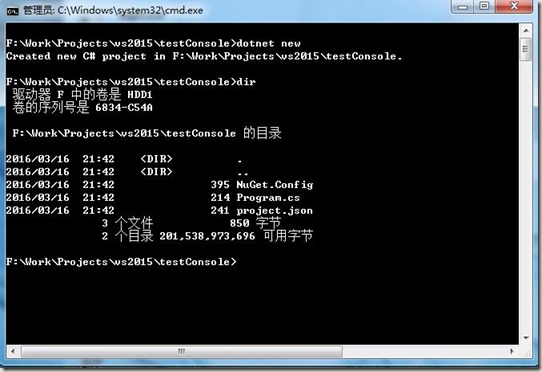
dotnet会自动帮你创建3个文件。
NuGet.Config文件主要定义了NuGet获取nupkg包时的服务器地址,具体内容如下
<?xml version="1.0" encoding="utf-8"?>

<configuration>

  <packageSources>

    <!--To inherit the global NuGet package sources remove the <clear/> line below -->

    <clear />

    <add key="dotnet-core" value="https://dotnet.myget.org/F/dotnet-core/api/v3/index.json" />

    <add key="api.nuget.org" value="https://api.nuget.org/v3/index.json" />

  </packageSources>

</configuration>
Program.cs包含了应用的入口点,只简单的输出了经典的“Hello world!”具体内容如下
using System;

namespace ConsoleApplication

{

    public class Program

    {

        public static void Main(string[] args)

        {

            Console.WriteLine("Hello World!");

        }

    }

}
project.json是项目的配置文件,配置了依赖的包、运行环境等信息。
关键的依赖关系dependencies需要注意,跟dnx时有了很大区别
具体内容如下
{

    "version": "1.0.0-*",

    "compilationOptions": {

        "emitEntryPoint": true

    },

    "dependencies": {

        "NETStandard.Library": "1.0.0-rc2-23811"

    },

    "frameworks": {

        "dnxcore50": { }

    }

}
然后使用命令 dotnet restore来还原依赖的包
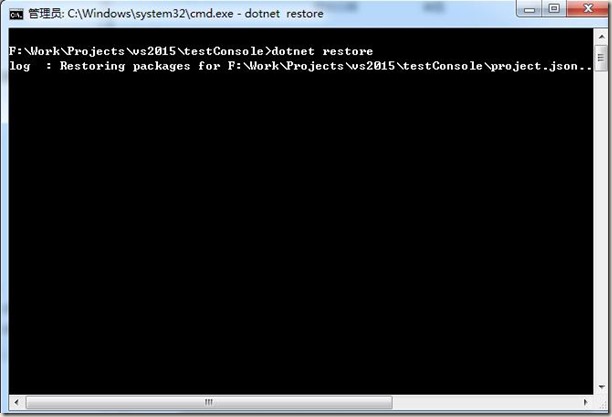
结果出错:
error: The HTTP request to 'GET https://api.nuget.org/v3-flatcontainer/system.reflection/index.json' has timed out after
100000ms.
error: Failed to retrieve information from remote source 'https://dotnetmyget.blob.core.windows.net/artifacts/dotnet-cor
e/nuget/v3/flatcontainer/system.reflection/index.json'.
error: The HTTP request to 'GET https://dotnetmyget.blob.core.windows.net/artifacts/dotnet-core/nuget/v3/flatcontainer/s
ystem.reflection/index.json' has timed out after 100000ms.
error: Failed to retrieve information from remote source 'https://dotnetmyget.blob.core.windows.net/artifacts/dotnet-cor
e/nuget/v3/flatcontainer/system.reflection/index.json'.
error: The HTTP request to 'GET https://dotnetmyget.blob.core.windows.net/artifacts/dotnet-core/nuget/v3/flatcontainer
/system.reflection/index.json' has timed out after 100000ms.
搞不懂咋搞的,竟然linux下很正常,自家的windows搞不定。
windows系统下的第一个console程序的更多相关文章
- Ubuntu系统下的第一个console程序
进入自己喜欢的目录,前面步骤和windows基本一致,只简单描述下 执行 dotnet new 然后执行 dotnet restore 然后执行 dotnet run 第一次未编译,会自动编译,然后可 ...
- 在Windows系统下用命令把应用程序添加到系统服务
在Windows系统下用命令把应用程序添加到系统服务,使用SC命令. 加入服务格式如下:sc create ServiceName binPath= 程序路径 start= auto(等号后面的空格是 ...
- Windows系统下部署安装一个/多个Tomcat8
首先从http://tomcat.apache.org/上下载Tomcat8.0压缩版的,解压到指定路径后即可. 第一:在Windows系统中安装部署单个Tomcat 对于这种情况, ...
- 踩坑:windows系统下,nodejs版本管理器无法使用n来管理
错误 :在windows系统下,需要npm 一个n来管理nodejs的版本,但是使用npm install -g n命令之后报错 原因 : n 不支持 windows系统 只支持mac系统.
- windows系统下c语言暂停程序
原文:windows系统下c语言暂停程序 windows系统下,很多C语言初学者的调试时,往往没看到结果程序就退出了,据我所知的方法主要有以下几种 方法一: #include int main() { ...
- Windows系统下将目录挂载为一个磁盘并分配盘符
Windows系统下subst可以临时将目录分配一个盘符. 将路径与驱动器号关联. SUBST [drive1: [drive2:]path]SUBST drive1: /D drive1: 指定要分 ...
- 在windows系统下打包linux平台运行的go程序
在windows系统下打包linux平台运行的go程序 1.先在main.go下打包成.exe可执行程序测试代码是否正确 //cd到main.go目录 go build //打包命令 如果打包成功则表 ...
- windows系统下简单nodejs安装及环境配置
相信对于很多关注javascript发展的同学来说,nodejs已经不是一个陌生的词眼,这里不想谈太多的nodejs的相关信息.只说一下,windows系统下简单nodejs环境配置 相信 ...
- 【并行计算】Windows系统下搭建MPI环境
Windows系统下搭建MPI环境 MPI的全称是Message Passing Interface即标准消息传递界面,可以用于并行计算.MPI的具体实现一般采用MPICH.下面介绍如何在Window ...
随机推荐
- 使用angularJS遇见的一些问题的解决方案
1. angularJS的$http.post请求,SpringMVC后台接收不到参数值的解决方案 问题一般为:400 Required String parameter 'rPassword' is ...
- Regular Expression Matching leetcode
递归方法运行时间过长.考虑使用动态规划的方法. 代码如下: bool isMatch(string s, string p) { int i,j; int m=s.size(); int n=p.si ...
- ppt 制作海报 导出高分辨率图片
用ppt做海报,导出图片的时候,发现导出的图片的分辨率只有96ppi,清晰度不太好. 怎么能这样呢! 网上搜了一下,发现微软提供了一个修改注册表的方法,点击这里访问.不过那里讲的最新只有2010,我的 ...
- php生成网页桌面快捷方式
本文将介绍使用PHP生成网页桌面快捷方式的代码,并添加图标及解决不同浏览器保存出现的乱码问题. 我们访问网站时,如果网站的内容很有吸引,一般我们都会使用浏览器的收藏夹功能,收藏此网站. 在浏览器收藏的 ...
- seaJS 简单例子,理解seaJS
学习心得: 记得第一次学underscore的时候,去的官网(不管什么都是官网好),呼啦一长列语法,我就一个个看,看完也不知道underscore是做什么的.就是现在underscore我也用不上,学 ...
- IIS报错 试图加载格式不正确 的程序集解决办法
一般都是由于系统位数不一致导致的 方法:64位启用32应用程序兼容(推荐) 思路就是把程序池设置为对应的应用程序(即到底要不要启用32位应用程序)
- java 获取本地电脑的分辨率代码
1.代码: java.awt.Toolkit tk=java.awt.Toolkit.getDefaultToolkit(); java.awt.Dimension screenSize= ...
- java基本数据类型取值范围
在JAVA中一共有八种基本数据类型,他们分别是 byte.short.int.long.float.double.char.boolean 整型 其中byte.short.int.long都是表示整数 ...
- JavaScript-BOM-history:保存当前窗口打开后成功访问过的url历史记录栈
history:保存当前窗口打开后成功访问过的url历史记录栈history.go(n):前进n步前进一步:history.go(1);后退一步:history.go(-1);刷新:history.g ...
- babel 配置探究及错误解析
前面的文章说到了react 15的一些特性,众所周知react搭配es6或者叫es2015的开发模式更加的方便快捷.不过提到es2015这个毕竟没有被浏览器广泛支持的规范,要想能够快快乐乐的应用起来, ...