
windows系统下的第一个console程序
窗口+r 键,输入cmd,打开一个命令行窗口
切换到你的目标目录
输入 dotnet new
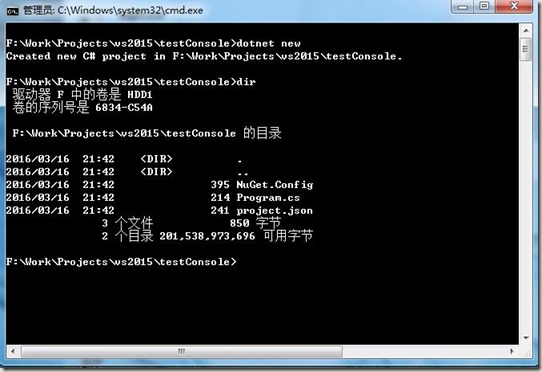
dotnet会自动帮你创建3个文件。
NuGet.Config文件主要定义了NuGet获取nupkg包时的服务器地址,具体内容如下
<?xml version="1.0" encoding="utf-8"?>

<configuration>

  <packageSources>

    <!--To inherit the global NuGet package sources remove the <clear/> line below -->

    <clear />

    <add key="dotnet-core" value="https://dotnet.myget.org/F/dotnet-core/api/v3/index.json" />

    <add key="api.nuget.org" value="https://api.nuget.org/v3/index.json" />

  </packageSources>

</configuration>
Program.cs包含了应用的入口点,只简单的输出了经典的“Hello world!”具体内容如下
using System;

namespace ConsoleApplication

{

    public class Program

    {

        public static void Main(string[] args)

        {

            Console.WriteLine("Hello World!");

        }

    }

}
project.json是项目的配置文件,配置了依赖的包、运行环境等信息。
关键的依赖关系dependencies需要注意,跟dnx时有了很大区别
具体内容如下
{

    "version": "1.0.0-*",

    "compilationOptions": {

        "emitEntryPoint": true

    },

    "dependencies": {

        "NETStandard.Library": "1.0.0-rc2-23811"

    },

    "frameworks": {

        "dnxcore50": { }

    }

}
然后使用命令 dotnet restore来还原依赖的包
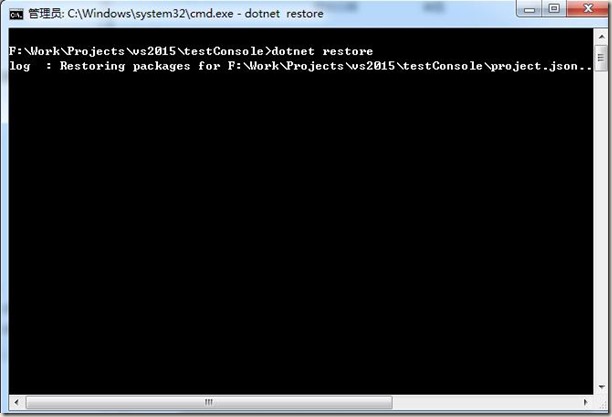
结果出错:
error: The HTTP request to 'GET https://api.nuget.org/v3-flatcontainer/system.reflection/index.json' has timed out after
100000ms.
error: Failed to retrieve information from remote source 'https://dotnetmyget.blob.core.windows.net/artifacts/dotnet-cor
e/nuget/v3/flatcontainer/system.reflection/index.json'.
error: The HTTP request to 'GET https://dotnetmyget.blob.core.windows.net/artifacts/dotnet-core/nuget/v3/flatcontainer/s
ystem.reflection/index.json' has timed out after 100000ms.
error: Failed to retrieve information from remote source 'https://dotnetmyget.blob.core.windows.net/artifacts/dotnet-cor
e/nuget/v3/flatcontainer/system.reflection/index.json'.
error: The HTTP request to 'GET https://dotnetmyget.blob.core.windows.net/artifacts/dotnet-core/nuget/v3/flatcontainer
/system.reflection/index.json' has timed out after 100000ms.
搞不懂咋搞的,竟然linux下很正常,自家的windows搞不定。
windows系统下的第一个console程序的更多相关文章
- Ubuntu系统下的第一个console程序
进入自己喜欢的目录,前面步骤和windows基本一致,只简单描述下 执行 dotnet new 然后执行 dotnet restore 然后执行 dotnet run 第一次未编译,会自动编译,然后可 ...
- 在Windows系统下用命令把应用程序添加到系统服务
在Windows系统下用命令把应用程序添加到系统服务,使用SC命令. 加入服务格式如下:sc create ServiceName binPath= 程序路径 start= auto(等号后面的空格是 ...
- Windows系统下部署安装一个/多个Tomcat8
首先从http://tomcat.apache.org/上下载Tomcat8.0压缩版的,解压到指定路径后即可. 第一:在Windows系统中安装部署单个Tomcat 对于这种情况, ...
- 踩坑:windows系统下,nodejs版本管理器无法使用n来管理
错误 :在windows系统下,需要npm 一个n来管理nodejs的版本,但是使用npm install -g n命令之后报错 原因 : n 不支持 windows系统 只支持mac系统.
- windows系统下c语言暂停程序
原文:windows系统下c语言暂停程序 windows系统下,很多C语言初学者的调试时,往往没看到结果程序就退出了,据我所知的方法主要有以下几种 方法一: #include int main() { ...
- Windows系统下将目录挂载为一个磁盘并分配盘符
Windows系统下subst可以临时将目录分配一个盘符. 将路径与驱动器号关联. SUBST [drive1: [drive2:]path]SUBST drive1: /D drive1: 指定要分 ...
- 在windows系统下打包linux平台运行的go程序
在windows系统下打包linux平台运行的go程序 1.先在main.go下打包成.exe可执行程序测试代码是否正确 //cd到main.go目录 go build //打包命令 如果打包成功则表 ...
- windows系统下简单nodejs安装及环境配置
相信对于很多关注javascript发展的同学来说,nodejs已经不是一个陌生的词眼,这里不想谈太多的nodejs的相关信息.只说一下,windows系统下简单nodejs环境配置 相信 ...
- 【并行计算】Windows系统下搭建MPI环境
Windows系统下搭建MPI环境 MPI的全称是Message Passing Interface即标准消息传递界面,可以用于并行计算.MPI的具体实现一般采用MPICH.下面介绍如何在Window ...
随机推荐
- soapUI 时间格式
用soapUI测试webservice,接收DateTime格式,总是包 not a valid AllXsd value 老外说,必须用ISO8601格式,如: 2009-03-13T22:16:0 ...
- SQL Server2005索引碎片分析和解决方法
SQL Server2005索引碎片分析和解决方法 本文作者(郑贤娴),请您在阅读本文时尊重作者版权. 摘要: SQL Server,为了反应数据的更新,需要维护表上的索引,因而这些索引会形成碎片.根 ...
- javascript学习第四课函数
函数也是一种数据类型:function类型 所以函数也可当作一个数据作参数传递 三种函数的声明示例: 一般来讲,声明方式一和声明方式二比较常用,方式三比较少. 常用函数方式示例: 注意:虽然函数支持嵌 ...
- PHP获取当前服务器信息的基本语句
下面是PHP获取当前服务器信息的基本语句. PHP程式版本: <?PHP echo PHP_VERSION; ?> ZEND版本: <?PHP echo zend_version() ...
- php中的抽象类(abstract class)和接口(interface)
一. 抽象类abstract class 1 .抽象类是指在 class 前加了 abstract 关键字且存在抽象方法(在类方法 function 关键字前加了 abstract 关键字)的类. 2 ...
- IIS出现 分析器错误消息: 在应用程序级别之外使用注册为 allowDefinition='MachineToApplication' 的节是错误的
这是因为发布的时候按了“生成部署包”
- pip 8 安装
1.首先安装setuptools 2.再安装pip http://blog.csdn.net/u013372487/article/details/51726002
- Parameter Passing / Request Parameters in JSF 2.0 (转)
This Blog is a compilation of various methods of passing Request Parameters in JSF (2.0 +) (1) f:vi ...
- bdb log file 预设长度的性能优化
看代码随手记:log_put.c, __log_write() /* * If we're writing the first block in a log file on a filesystem ...
- P1906联合权值
描述 无向连通图 G 有 n 个点,n-1 条边.点从 1 到 n 依次编号,编号为 i 的点的权值为 WiWi, 每条边的长度均为 1.图上两点(u, v)的距离定义为 u 点到 v 点的最短距离. ...